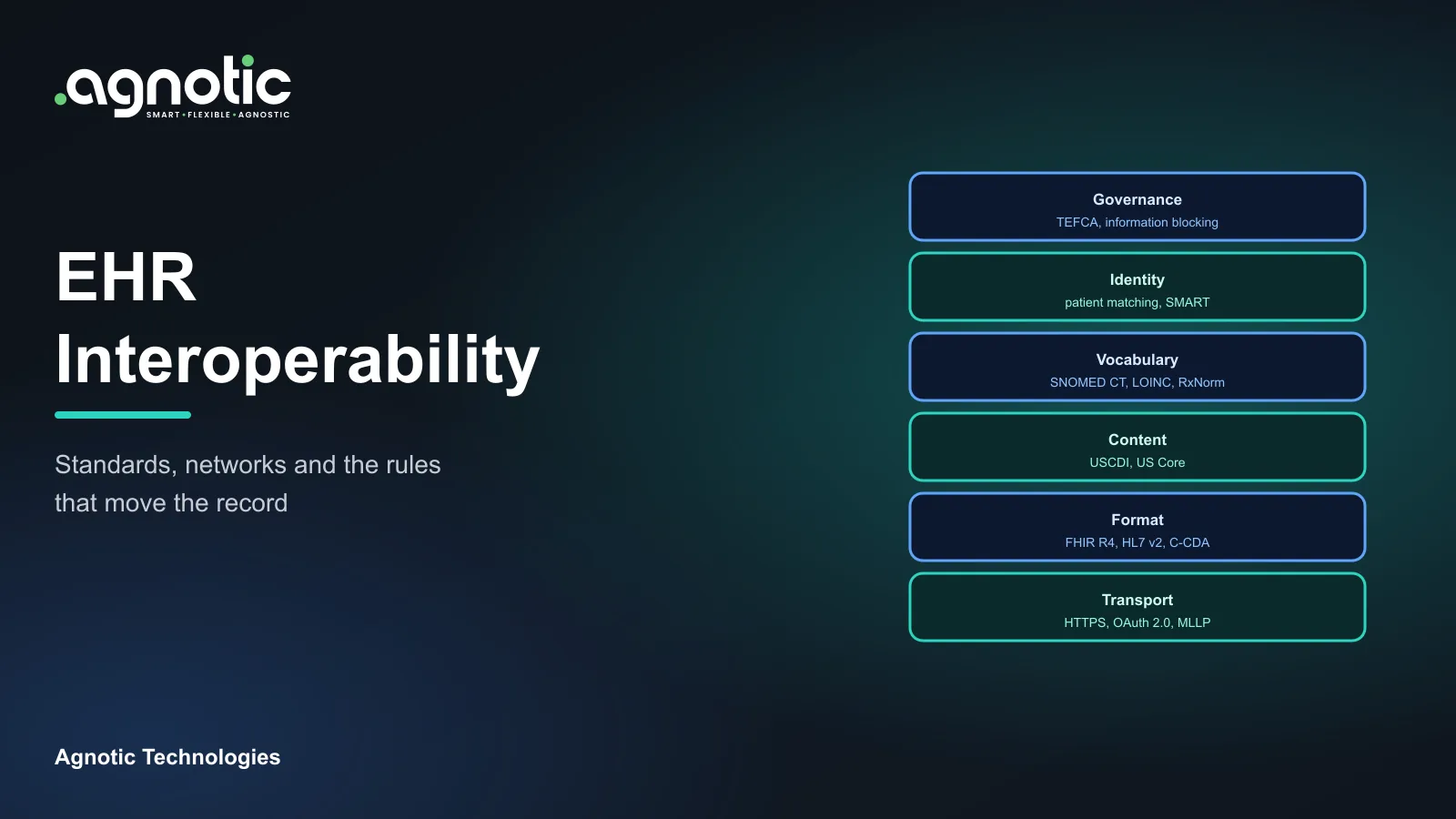
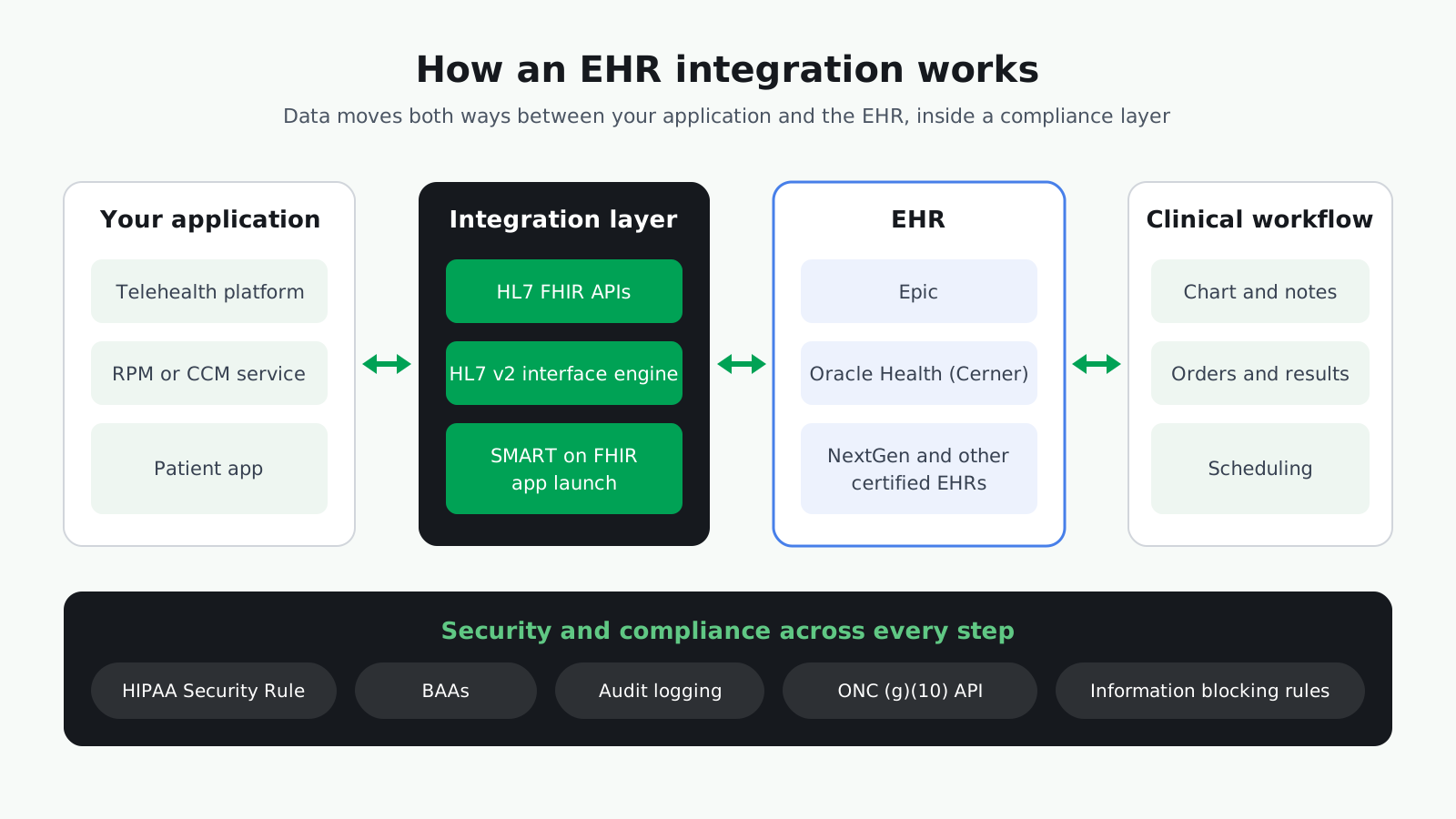
EHR integrations connect an outside application, such as a telehealth platform, remote monitoring service or patient app, to an electronic health record so data moves between them without manual re-entry. Integrations typically use HL7 v2 messages, HL7 FHIR APIs, or both, and every one that touches patient data must meet HIPAA requirements.
This EHR integration guide explains how integration with EHR systems works, why the timing matters, how it differs by vendor and use case, and how to plan the build.
What are EHR integrations?
Integrating a telehealth product with an EHR?
Our telehealth EHR integration team connects virtual care platforms to EHRs so visits, notes and orders land in the clinical record.
An EHR integration is any connection that lets another system read from or write to the electronic health record. The data can include demographics, appointments, problems, medications, lab results, notes and documents. The direction matters: some integrations only read data, others also write data back so clinicians see it inside their normal workflow.
The main integration methods
HL7 International publishes both of the core standards, HL7 v2 and FHIR. Many EHR API integration projects combine them with other methods:
- 1. HL7 v2 messages: Event-based messages such as ADT for admissions and registrations, and ORM and ORU for orders and results, usually exchanged through an interface engine.
- 2. HL7 FHIR APIs: RESTful APIs that return structured resources such as Patient, Observation and Encounter. Certified EHRs must offer a standardized FHIR API.
- 3. SMART on FHIR app launch: A way to launch a third-party app from inside the EHR with the right patient and user context and OAuth-based authorization.
- 4. Files and batch feeds: Scheduled exports, often CSV or flat files, still common for reporting and some billing workflows.
- 5. Vendor-specific APIs: Proprietary endpoints that cover functions the standard APIs do not.
Why do EHR integrations matter now?
Several federal rules have made standardized access to EHR data the expected norm, which changes what buyers can ask for and what builders must support.
- Standardized APIs in certified EHRs: The ASTP/ONC Health IT Certification Program requires certified health IT to offer a standardized API for patient and population services (45 CFR 170.315(g)(10)), built on HL7 FHIR, the US Core implementation guide and SMART App Launch. From January 1, 2026, certified products must support USCDI version 3 as the baseline data set.
- Information blocking rules: The 21st Century Cures Act created information blocking rules, set out in 45 CFR Part 171, that apply to health care providers, developers of certified health IT, and health information networks and exchanges. HHS has also finalized disincentives for health care providers found to have committed information blocking.
- Remote monitoring billing: The CY 2026 Medicare Physician Fee Schedule final rule (CMS-1832-F) added remote physiologic monitoring codes 99445 and 99470 for shorter monitoring periods and the first 10 minutes of management, alongside existing codes such as 99453, 99454, 99457 and 99458. Billing depends on documented device days and time, which is easier when monitoring data reaches the EHR.
How do EHR integrations differ by vendor and use case?
The standards are shared, but each EHR vendor and each clinical use case has its own access process, data needs and edge cases. Plan for those differences early.
Epic
For an Epic EHR integration, start with Epic's own developer resources. Epic publishes API and interface specifications, data-sharing playbooks and a developer guide at open.epic.com, and lists products that work with Epic in its Showroom. Expect to work with the health system's Epic team on which APIs are enabled, how your app is registered, and how data is written back.
Oracle Health (Cerner)
A Cerner EHR integration follows the same principles. Oracle Health EHRs that are certified under the ONC program must offer the same standardized FHIR API as other certified EHRs. In practice, teams also confirm which resources and write operations each client site has enabled, because configuration varies by organization.
NextGen
For a NextGen EHR integration in an ambulatory practice, as with other certified EHRs, the starting point is the standardized FHIR API, with HL7 v2 interfaces where the practice relies on them for scheduling or results.
Remote patient monitoring (RPM)
An RPM EHR integration moves device readings, alerts and time logs into the EHR so care teams can act on them and billing staff can support the monitoring codes. The key design question is what reaches the chart: every reading, daily summaries, or only out-of-range alerts.
Chronic care management (CCM)
A CCM EHR integration brings care plans, outreach notes and time tracking into the EHR so the whole care team works from the same record. Write-back of care plan updates is usually the hardest part.
Non-emergency medical transportation (NEMT)
Medicaid agencies must ensure necessary transportation for beneficiaries to and from providers (42 CFR 431.53). A NEMT EHR integration typically needs appointment data from the EHR to schedule rides, and trip status back to reduce missed appointments.
How do you keep an EHR integration secure?
Every EHR integration that handles protected health information falls under HIPAA. The HIPAA Security Rule requires administrative, physical and technical safeguards for electronic protected health information (45 CFR Part 164, Subpart C). In practice that means least-privilege access for each integration account, encryption in transit and at rest, audit logs of every read and write, and a documented process for revoking access. For SMART on FHIR apps, request only the scopes the workflow needs, and treat tokens and logs as sensitive data.
For healthtech teams, EHR integration in healthtech products also raises vendor questions: which subprocessors see the data, where it is stored, and how long it is kept. Answer these before the first security review, because health systems will ask.
How do teams approach an EHR integration step by step?
- 1. Define the workflow and the data: Write down who uses the data, at which step, and which fields are required. This becomes the integration specification.
- 2. Confirm access with the EHR owner: Identify the vendor, version and the APIs or interfaces the health system will enable, and who approves production access.
- 3. Choose the method per data flow: FHIR for structured reads and writes where supported, HL7 v2 where the site already runs interfaces, SMART on FHIR for in-EHR apps.
- 4. Agree on security and contracts: Sign a Business Associate Agreement where protected health information is involved, and agree on authentication, encryption and audit logging.
- 5. Map and normalize data: EHR data integration depends on mapping codes, units and identifiers between systems, and on matching patients reliably.
- 6. Test in a sandbox, then with real site configuration: Vendor sandboxes rarely match a live site, so plan a test phase against the customer's own environment.
- 7. Monitor in production: Track failed messages, API errors and data drift, and keep a reprocessing path for failures.
What drives EHR integration cost?
There is no single price for an EHR integration. Cost depends on scope and on decisions made early. The main drivers are:
- Number of EHRs and sites: Each vendor, and often each site, adds configuration and testing.
- Read only or read and write: Writing data back into the chart needs more validation, testing and clinical sign-off.
- Method: Using FHIR APIs that the EHR already exposes is usually simpler than building new HL7 v2 interfaces through an interface engine.
- Data mapping effort: Custom codes, free text and inconsistent identifiers take time to map and test.
- Security and compliance work: Audit logging, access control, BAAs and security reviews.
- Vendor and site fees: Some EHR vendors or health systems charge for interface or API access. Confirm these early.
- Ongoing support: Monitoring, upgrades and changes when the EHR or your product releases new versions.
What are the common mistakes with EHR integrations?
- Starting the build before access is confirmed: Without the EHR owner's approval and a test environment, development stalls.
- Assuming the sandbox matches production: Real sites have custom fields, local codes and different enabled APIs.
- Writing everything back to the chart: Too much data creates noise for clinicians. Send what supports a decision.
- Weak patient matching: Mismatched identifiers put data in the wrong record, which is a safety risk.
- No monitoring: Interfaces fail quietly. Without alerts, missing data is discovered by clinicians first.
- Treating integration as a one-time project: EHR upgrades and new versions of standards require ongoing maintenance.
What do EHR integrations mean for your build plan?
Treat the integration as part of the product, not an add-on. Use this list as a starting checklist:
- Data flows: List each flow with its direction, frequency and owner.
- Standards: Default to FHIR where the EHR supports it and keep HL7 v2 capability for sites that rely on interfaces.
- Access: Track the approval steps and contacts for each EHR and site.
- Compliance: Confirm BAAs, HIPAA safeguards and audit logging before any real patient data flows.
- Testing: Budget time for site-specific testing, not just vendor sandboxes.
- Operations: Plan monitoring, alerting and reprocessing from day one.
How Agnotic can help
Agnotic Technologies is a software development services company. We design and build EHR integrations for your product: defining the data flows, working with HL7 v2 and FHIR, putting HIPAA safeguards in place, and setting up monitoring so the integration keeps working after launch. You own the product; we build it with you.
Build your EHR integration with Agnotic
Explore our telehealth EHR integration service or browse more articles in our EHR integration hub.
Sources
- 45 CFR 170.315(g)(10) Standardized API for patient and population services (ASTP/ONC)
- ASTP/ONC Standards Version Advancement Process: approved standards (USCDI v3, US Core)
- ASTP/ONC Information Blocking
- CMS CY 2026 Physician Fee Schedule Final Rule (CMS-1832-F) fact sheet
- Epic developer resources (open.epic.com)
- 42 CFR 431.53: Assurance of transportation
- 45 CFR 164.502: Uses and disclosures of protected health information
- 45 CFR Part 164, Subpart C: HIPAA Security Rule