EHR mobile app development is building a mobile app for patients or clinicians that reads from, and sometimes writes to, an electronic health record. A working app needs secure sign-in, usually a backend that brokers EHR access through FHIR APIs and SMART on FHIR, HIPAA safeguards on the device and server, and an accessible interface.
This EHR mobile app development guide explains the types of apps, why EHR data is now reachable from a phone, a step by step guide to the build, the mistakes we see most, and what drives cost.
What is EHR mobile app development?
Building a mobile app on top of an EHR?
We connect mobile apps to Epic, Oracle Health and other EHRs through FHIR and SMART on FHIR.
Mobile EHR app development covers several kinds of apps. Patient apps show records, results and medications, book visits, request refills and send messages. Clinician apps support rounding, results review, documentation and inbox work. Hospital mobile app development adds check-in, wayfinding, bill payment and visitor information. What they share is a dependency on EHR data and the rules that protect it.
Custom app or the EHR vendor's app?
Most large EHR vendors offer their own patient and clinician apps. A custom app makes sense when it does something those apps do not: a specialty workflow, a program that spans several health systems, data from devices or other sources, or a branded experience tied to your service. If the vendor's app already covers the need, configuring it is usually faster.
Common features in patient and clinician apps
- Patient records: Results, medications, allergies, immunizations and visit summaries from the EHR.
- Scheduling: Booking, rescheduling and reminders tied to the EHR's scheduling system.
- Messaging: Secure messages with the care team, routed to the right inbox.
- Refills and forms: Medication refill requests and intake forms that file to the record.
- Clinician tools: Patient lists, results review, documentation and task lists for rounding.
- Device data: Readings from connected devices or phone health platforms, shown next to clinical data.
Hospital mobile app development
Hospital apps combine EHR data with services that live outside the EHR: wayfinding, parking, check-in, bill payment, visitor information and price estimates. That means more integrations, such as scheduling, billing and payment systems, and often several facilities with different settings. Plan the app as one front door to these systems, with each integration behind the backend rather than inside the app.
Why does EHR mobile app development matter now?
- Patient access: HIPAA, enforced by HHS, gives individuals a right to access their health information (45 CFR 164.524), and health IT certified under the ASTP/ONC Health IT Certification Program must offer standardized FHIR APIs, built on HL7 International's FHIR standard, that let patients direct that data to a third-party app of their choice.
- Current API standards: From January 1, 2026, certified FHIR APIs under 45 CFR 170.315(g)(10) must support USCDI v3, US Core 6.1.0 and SMART App Launch 2.0.
- Payer data: CMS interoperability rules require many health plans, such as Medicare Advantage organizations and Medicaid programs, to offer a FHIR Patient Access API, so a patient app can also show claims and coverage data.
- Phone platforms: Apple's Health Records feature lets users of participating health systems download parts of their records to iPhone using FHIR, and Health Connect is the Android platform for sharing health data under user controlled permissions.
- Apps outside HIPAA: The FTC's amended Health Breach Notification Rule, effective July 29, 2024, makes clear that health apps not covered by HIPAA must notify consumers, the FTC and in some cases the media after a breach of health data.
- Accessibility: WCAG 2.2 is the W3C guideline commonly used as the benchmark for accessible web and mobile apps.
How do teams approach EHR mobile app development step by step?
This step by step guide to mobile app development focuses on the parts that change when an EHR is involved:
- 1. Define users, tasks and data: Write down who uses the app, the tasks they complete, and the EHR data each task reads or writes.
- 2. Choose the EHR access route: Use a SMART on FHIR standalone launch for patients, an EHR launch for clinician tools, backend services for server jobs, or vendor APIs where FHIR does not cover the need.
- 3. Pick the technology: Native Swift and Kotlin give full access to device features. Cross-platform frameworks such as Flutter and React Native share code across iOS and Android. Choose based on your team, offline needs and device features.
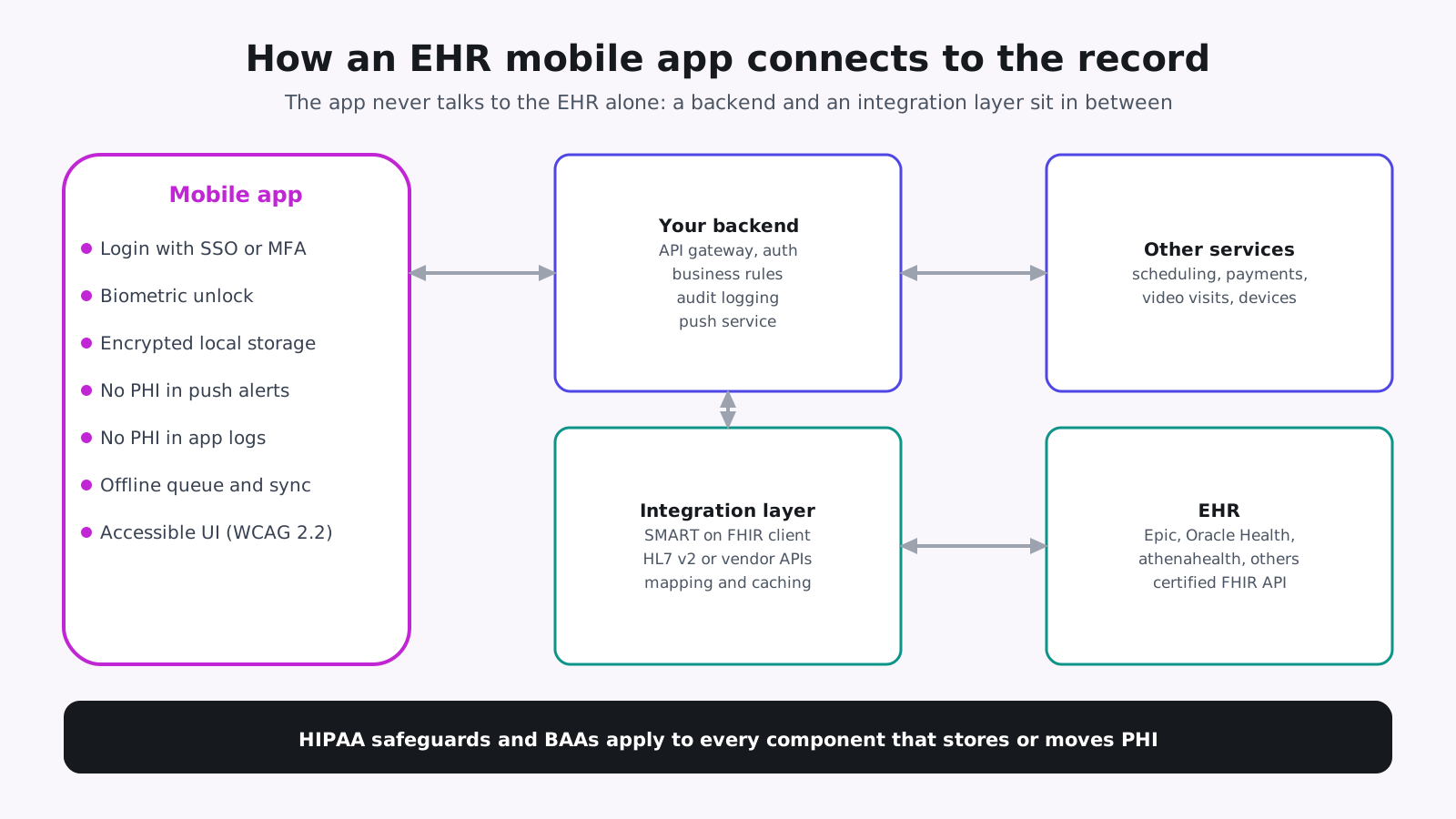
- 4. Design the backend: Put an API layer between the app and the EHR for authorization, token handling, business rules, audit logging and push notifications.
- 5. Secure the device: Store tokens and cached data in the platform keystore or encrypted storage, support biometric sign-in, and keep PHI out of push notifications and logs.
- 6. Design for every user: Follow WCAG 2.2, support screen readers and large text, and test with real patients and clinicians.
- 7. Test in layers: Use the EHR sandbox, real devices, security testing and accessibility testing before a pilot with real data.
- 8. Release and support: Pass app store review, complete each health system's app approval, and monitor crashes, API errors and usage after launch.
Sign-in and identity
Patients usually sign in with their provider's portal account through a SMART on FHIR standalone launch, and the app receives tokens to call the API. Clinician apps usually sign in through the health system's identity provider with single sign-on. In both cases, keep refresh tokens in secure storage, time out idle sessions, and let users sign out of all devices.
Offline use and sync
Decide early what must work without a connection. Reading recent data offline is simple if the cache is encrypted and expires. Creating data offline is harder: the app must queue changes, sync them when the connection returns, and handle conflicts when the same record changed on the server.
Push notifications without PHI
Push notifications pass through Apple and Google services and can appear on a locked screen. Send a short prompt, such as "You have a new message", and show the details only after the user opens the app and signs in.
What healthcare mobile app development adds to a normal build
A complete developers guide to mobile app development covers design, coding, testing and release. Healthcare mobile app development adds Business Associate Agreements with every vendor that handles PHI, the HIPAA Security Rule's administrative, physical and technical safeguards, EHR integration and approval at each health system, and closer review of analytics and crash reporting tools that might send patient data to third parties.
What are the common mistakes with EHR mobile app development?
- Tokens in plain storage: Access and refresh tokens must sit in secure storage, not in plain app preferences.
- PHI in notifications: Lock screen notifications can expose PHI. Send a prompt to open the app instead.
- Third-party SDKs that leak data: Analytics and advertising SDKs can send health data to vendors without a BAA.
- Assuming one EHR: An app that works with one EHR may need changes for the next, even when both support FHIR.
- Ignoring offline use: Clinicians lose signal in hospitals. Decide what works offline and how changes sync.
- Accessibility as polish: Fixing accessibility after launch costs more than designing for it from the start.
- Underestimating approvals: App store review and health system approval both take time. Put them in the plan.
- Testing only in simulators: Simulators miss battery, network and accessibility problems. Test on the older phones your users actually carry.
What are EHR mobile app development best practices?
- Keep the app thin: Put EHR access and business rules in the backend, where they are easier to secure and update.
- Request narrow scopes: Ask only for the EHR data each feature needs.
- Design for slow networks: Cache carefully, retry safely and show clear status to users.
- Log without PHI: Record events and errors in a way that does not copy patient data.
- Plan for many sites: Keep health system settings in configuration so new sites do not need new releases.
- Measure real use: Track feature use and drop-off without collecting PHI, so you know which features to improve next.
What does EHR mobile app development mean for your build plan?
Understanding mobile app development cost starts with these drivers:
- Platforms: iOS, Android or both, and native or cross-platform.
- Users: A patient app, a clinician app, or both.
- EHR integrations: The number of EHRs and whether the app writes data back.
- Features: Messaging, scheduling, payments, video visits and device data each add scope.
- Offline needs: Offline access and sync add design and testing work.
- Compliance: BAAs, HIPAA safeguards, security testing and accessibility work.
- Support: App store updates, operating system changes and EHR API upgrades.
A sensible first release targets one user group, one EHR and the few features those users need most, with security and accessibility built in from the start. Add platforms, EHRs and features in later releases, reusing the same backend and integration layer.
How Agnotic can help
Agnotic Technologies is a software development services company. We build EHR mobile apps for digital health companies and hospital teams: patient and clinician apps, the backend and integration layer, SMART on FHIR connections to Epic, Oracle Health and other EHRs, and HIPAA safeguards on the device and server. You own the code; we build it around your users.
Build your EHR mobile app with Agnotic
Explore our EHR integration services or browse more articles in our EHR integration hub.
Related reading on Agnotic
Go deeper on the apps, integrations and data covered in this guide.
Sources
- 45 CFR 164.524: Access of individuals to protected health information
- ASTP/ONC: Standardized API for patient and population services, 170.315(g)(10)
- HL7 SMART App Launch implementation guide
- 45 CFR Part 164, Subpart C: HIPAA Security Rule
- FTC: Health Breach Notification Rule
- Apple Developer: Accessing health records
- Android Developers: Health Connect
- CMS Interoperability and Prior Authorization Final Rule (CMS-0057-F)