EHR data migration is moving patient records from one electronic health record system to another, or into an archive, without losing accuracy or meaning. It covers deciding what to move, mapping fields and codes, extracting, transforming and loading the data, validating it with clinicians, and keeping legacy records available for as long as the law requires.
This EHR data migration guide explains what moves and what gets archived, how to size a legacy migration, where FHIR and data portability help, a step by step approach, best practices and the mistakes that cause trouble at go-live.
What is EHR data migration?
Moving to a new EHR?
We plan and build EHR data migrations, from data mapping and conversion to validation and archives.
What is EHR data migration in practice? It happens when a practice or hospital changes EHR vendors, merges with another organization, consolidates systems, or retires an old product. The new EHR needs enough history for safe care from the first day, and everything else must stay retrievable for patients, clinicians, auditors and legal requests.
Three destinations for legacy data
- Discrete data: Coded data loaded into the new EHR so it works in the chart, alerts and reports.
- Documents: Notes, reports, scanned records and summaries loaded as documents attached to the right patient.
- Archive: Older or inactive history kept in a read-only archive, searchable when needed, instead of loading it into the new EHR.
What usually moves as discrete data
- Demographics and identifiers: Needed to match every other record to the right patient.
- Clinical lists: Problems, medications, allergies and immunizations.
- Recent results: Lab results and vital signs that clinicians need for trends.
- Upcoming activity: Future appointments, open orders and referrals.
- Billing: Many organizations finish working open accounts receivable in the old system instead of moving balances.
Why does EHR data migration matter now?
- Full data export: ONC Health IT Certification Program criterion 170.315(b)(10), administered by ASTP/ONC, requires certified health IT that stores electronic health information to support single patient and whole population export in a computable, documented format. The compliance deadline was December 31, 2023.
- Standard documents: C-CDA is an HL7 International standard for structured clinical documents, and certified EHRs must create and receive these documents for transitions of care under 170.315(b)(1).
- Standard data sets: USCDI is the standardized set of health data classes and elements maintained by ASTP/ONC. Since January 1, 2026, USCDI v3 is the version certified health IT must support, and the most recent published version is v7 (July 2026).
- Information blocking: The HHS information blocking rules (45 CFR Part 171) limit practices that interfere with access, exchange or use of electronic health information, which matters when you request data from an outgoing vendor.
- Retention: Medical record retention periods are mainly set by state law. CMS's Medicare Conditions of Participation require hospitals to keep medical records for at least 5 years (42 CFR 482.24(b)(1)), and HIPAA's six year rule (45 CFR 164.316(b)(2)) applies to compliance documentation such as policies, not to the medical record itself.
- Patient access: Records in the designated record set, such as medical and billing records used to make decisions about individuals (45 CFR 164.501), stay subject to patients' right of access, so archived data must remain retrievable.
How do you size a legacy EHR data migration?
Legacy EHR data migration sizing starts with a data profile, not a guess. Measure these before you commit to scope or dates:
- Patients and years: How many patients and how many years of history exist, and how many are active.
- Data types: Which clinical areas hold data, and how much of it is coded versus free text.
- Documents: The number and total size of notes, reports and scanned files.
- Data quality: Duplicate patients, missing codes, retired codes and inconsistent units.
- Sources: The number of systems involved, including old interfaces and specialty systems.
- Customization: Custom fields, templates and local code lists that need their own mapping.
- Downtime tolerance: How long the organization can run with the old system frozen.
How does FHIR help with EHR migration and data portability?
FHIR improves EHR migration and data portability, but it does not do the whole job. Certified EHRs expose HL7 FHIR APIs built to US Core, and the FHIR Bulk Data Access standard can export data for groups of patients. That gives a standard way to read the USCDI data classes. Data outside USCDI, such as custom templates, billing detail and some document types, usually comes from the 170.315(b)(10) export or vendor database extracts. On the receiving side, many EHRs load converted data through their own import tools rather than through FHIR writes, so plan the load method with the new vendor early.
How do teams approach EHR data migration step by step?
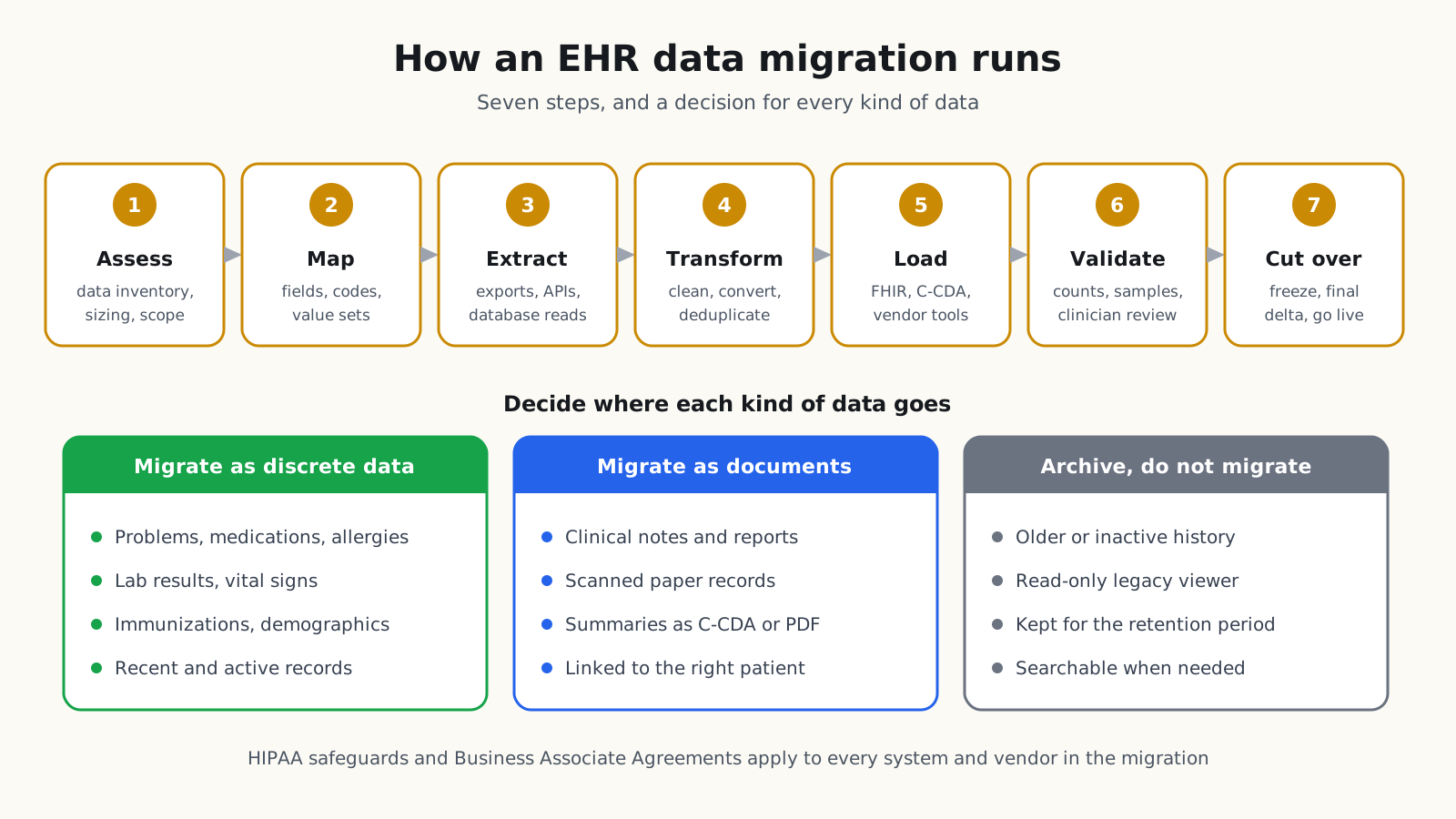
- 1. Assess: Inventory the source systems, profile the data, and agree on scope with clinical, billing and compliance leaders.
- 2. Map: Map each field and code to the new EHR, using standard code systems such as ICD-10-CM, SNOMED CT, LOINC and RxNorm, and list values that need manual review.
- 3. Extract: Pull data through exports, APIs or database reads, and keep an untouched copy of each extract.
- 4. Transform: Clean, convert and deduplicate the data, and match every record to the right patient.
- 5. Load: Run test loads into a non-production environment first, then repeat until results are stable.
- 6. Validate: Compare counts, review samples of charts with clinicians, and fix mapping errors before go-live.
- 7. Cut over: Freeze the old system, load the final changes, and support users through the first weeks.
- 8. Archive and retire: Move remaining history into a read-only archive, confirm access works, then decommission the old system.
Validation that clinicians trust
Counts prove that records arrived; they do not prove the records are right. Ask clinicians to compare a sample of charts side by side in the old and new systems, with extra attention to medications, allergies and recent results. Record every difference, fix the cause in the mapping, and rerun the sample until the differences are explained.
Patient matching
Every migrated item depends on landing in the right chart. Match patients on several identifiers, such as name, date of birth, sex, address and existing medical record numbers, and send uncertain matches to a person for review. Merge duplicates in the source before the final load, because merging charts after go-live is slower and riskier.
Who should be on the migration team
- Clinical lead: Decides what history clinicians need and leads chart validation.
- Data engineer: Profiles, extracts and transforms the data, and builds the validation reports.
- Interface or vendor specialist: Knows the load tools and limits of the new EHR.
- Health information management: Owns record retention, release of information and the archive.
- Privacy and security lead: Confirms BAAs, access control and audit logging.
What are EHR data migration best practices?
- Decide by data type: Agree what moves as discrete data, what moves as documents and what stays in the archive.
- Involve clinicians early: They know which history matters for safe care.
- Rehearse: Run full test migrations before the real one, and time them.
- Keep an audit trail: Record what was moved, changed or excluded, and why.
- Protect the data: Apply HIPAA safeguards and sign Business Associate Agreements with every vendor that handles the data.
- Plan the archive: Make sure archived records can be searched, viewed and released on request.
- Accessible archive: Make the archive viewer usable by every staff member, following WCAG 2.2.
What are the common mistakes with EHR data migration?
- Moving everything: Loading all history clutters the new chart and slows the project.
- Starting too late: Mapping and validation take longer than the load itself.
- Ignoring duplicates: Duplicate patients in the old system become duplicate charts in the new one.
- Losing meaning in codes: Mapping local codes to the nearest standard code without review can change clinical meaning.
- No archive plan: Retiring the old system before archived data is accessible creates legal and patient access problems.
- Weak go-live support: Clinicians need help finding history in the first weeks.
What does EHR data migration mean for your build plan?
- Volume and history: Patients, years and documents in scope.
- Source complexity: Number of systems, custom fields and data quality.
- Load method: Vendor import tools, FHIR, document loads or a mix.
- Validation effort: Clinician time for chart review and rework.
- Archive: A read-only archive for the history you do not migrate.
- Cutover: Downtime planning, final loads and go-live support.
Treat the migration as its own project with its own plan, owner and rehearsals, linked to the new EHR rollout but not hidden inside it.
How Agnotic can help
Agnotic Technologies is a software development services company. We plan and build EHR data migrations: data profiling and sizing, mapping to standard code systems, extraction and conversion pipelines, validation tools, and read-only archives, with HIPAA safeguards throughout. You own the code and the data.
Plan your EHR data migration with Agnotic
Explore our EHR integration services or browse more articles in our EHR integration hub.
Related reading on Agnotic
Go deeper on the integrations, standards and data work covered in this guide.
Sources
- ASTP/ONC: Electronic health information export, 170.315(b)(10)
- ASTP/ONC: Transitions of care, 170.315(b)(1)
- ASTP/ONC: United States Core Data for Interoperability (USCDI)
- 45 CFR Part 171: Information blocking
- 42 CFR 482.24: Condition of participation, medical record services
- 45 CFR 164.316: Policies, procedures and documentation requirements
- 45 CFR 164.501: Definitions, including designated record set
- 45 CFR Part 164, Subpart C: HIPAA Security Rule