Epic Beacon is Epic's oncology application: the part of the Epic EHR where cancer care teams build and manage treatment plans, order and track chemotherapy and other regimens cycle by cycle, and document the course of treatment. For software teams, Beacon matters because oncology data is some of the most structured and most sensitive in the record, and because the ways to connect to it are specific.
This Epic Beacon guide explains what Beacon does, why it matters to builders now, how its data appears through Epic's FHIR APIs, how an integration works, best practices, common mistakes and your build plan.
What is Epic Beacon?
Connecting an oncology product to Epic?
Agnotic builds Epic integrations, including Epic mobile apps integration and oncology data flows, through Epic on FHIR, SMART on FHIR and HL7 v2 interfaces.
Epic Beacon is the oncology module of the Epic electronic health record. Clinicians use it to create protocol-based treatment plans, schedule and order chemotherapy, immunotherapy and supportive medications by cycle and day, record staging and treatment response, and coordinate with pharmacy, infusion, laboratory and radiology. Epic Beacon explained in one line: it is where the cancer treatment plan lives and where every dose against it is recorded.
What Beacon holds
- Treatment plans: Protocol templates turned into patient-specific plans with cycles, days and doses.
- Orders: Chemotherapy and supportive medication orders, with the lab and vital sign checks that gate each dose.
- Staging and diagnosis: Cancer diagnosis, stage and relevant markers documented in a structured way.
- Treatment course: Administered doses, dose modifications, delays and reasons.
- Coordination: Links to pharmacy preparation and verification, infusion scheduling, lab results and imaging.
- Summaries: Treatment summaries and survivorship documents for patients and referring clinicians.
Why does Epic Beacon matter for software teams now?
- Epic opened its APIs: Epic on FHIR describes itself as a free resource for developers who create apps for use by patients and healthcare organizations, with resources available across FHIR DSTU2, STU3 and R4, OAuth 2.0 for apps and backend clients, and a FHIR Bulk Data Access tutorial.
- The catalog is large: open.epic states that over 750 no-cost APIs and interfaces are available, and that USCDI v3 support is available to app developers for free.
- Customers find apps through Showroom: Epic's Showroom lets Epic customers discover products that work with Epic, and Vendor Services is the developer-facing program behind it.
- Certification sets the floor: Under ONC certification criterion 170.315(g)(10) and the HTI-1 rule, certified EHRs expose a FHIR API supporting USCDI v3, US Core 6.1.0, SMART App Launch 2.0 and Bulk Data Access from January 1, 2026.
- Oncology data is standardized: HL7's minimal Common Oncology Data Elements (mCODE) implementation guide defines FHIR profiles for cancer diagnosis, staging, treatment and outcomes, which is the target model for oncology data leaving the EHR.
- Business associates apply: Under 45 CFR 164.502(e), any vendor that creates, receives, maintains or transmits PHI for a covered entity needs a Business Associate Agreement before Beacon data flows to it.
How does Beacon data appear through Epic's APIs?
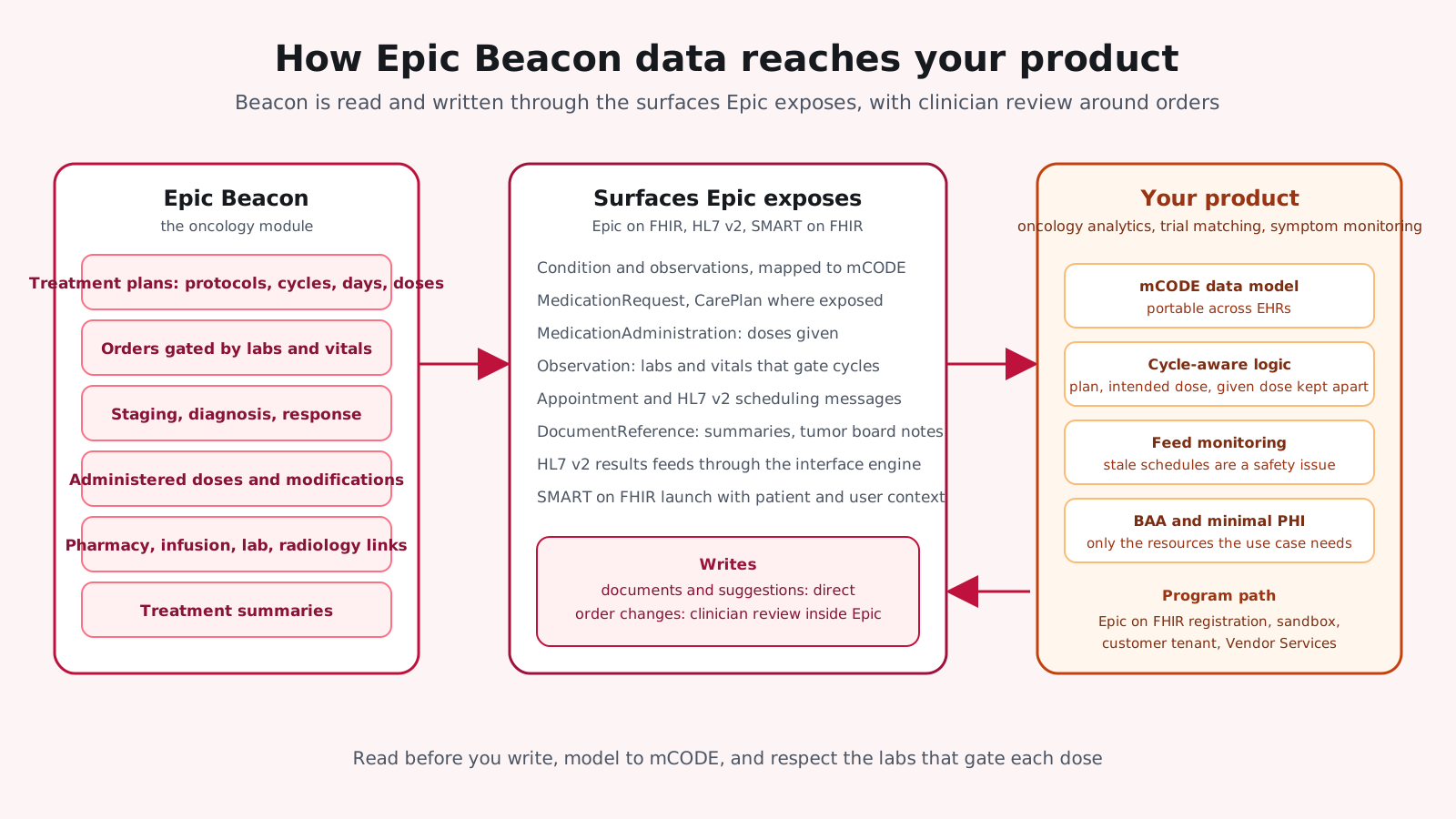
An Epic Beacon integration rarely touches Beacon directly. It reads and writes the FHIR resources and HL7 v2 messages that Beacon's data is exposed through, and it respects the review that Epic places around orders. The diagram shows the usual flows.
- Diagnosis and staging: Condition resources and related observations, mapped to mCODE profiles for oncology products.
- Treatment plans and orders: MedicationRequest and related resources for regimen medications, with CarePlan where the organization exposes it. Write access to orders is limited and reviewed.
- Administrations: MedicationAdministration records for doses given, with timing and dose changes.
- Labs and vitals: Observation resources and HL7 v2 results feeds that gate each cycle.
- Scheduling: Appointment resources and HL7 v2 scheduling messages for infusion visits.
- Documents: DocumentReference for treatment summaries and tumor board notes.
- Launch: SMART on FHIR apps launched from the oncology workflow with patient and user context.
Why oncology data is different
A cancer treatment plan is a schedule, not a snapshot. Doses are tied to cycles and days, held or reduced on the basis of the latest labs, and changed when a patient's condition changes. An integration that reads today's medication list misses the plan, and one that ignores dose modifications reports treatment that never happened. Model the plan, the intended doses and the administered doses as separate things.
mCODE as the shared language
HL7's mCODE implementation guide profiles FHIR resources for cancer diagnosis, staging, treatment and outcomes. Mapping Epic's oncology data to mCODE at the boundary of your product means the same analytics, trial matching or symptom monitoring logic works for customers on other EHRs, and it gives the clinical team a vocabulary to check your mappings against.
What Beacon integrations are built for
The common products that connect to Beacon are symptom monitoring between cycles, clinical trial matching against diagnosis and treatment history, pharmacy and infusion coordination tools, oncology analytics and registries, and patient education tied to the regimen. Each reads a different slice of the plan and the course of treatment, and only a few need to write anything back, which is why read-first design works.
How does an Epic Beacon integration work step by step?
- 1. Define the oncology use case: Symptom monitoring, trial matching, dose tracking, pharmacy coordination or analytics, in plain scenarios.
- 2. Map to resources: Which FHIR resources and HL7 v2 messages carry the data, and which are read, written or event-driven.
- 3. Register on Epic on FHIR: Create the app, request the resources and scopes, and test against the sandbox.
- 4. Get a customer tenant: Work with the health system's Epic team on a test environment with their Beacon configuration.
- 5. Build with mCODE in mind: Map Epic's data to oncology profiles so your product works across customers.
- 6. Handle write-back carefully: Suggestions and documents first. Order changes go through clinician review inside Epic.
- 7. Test cycle logic: Delays, dose modifications and cancelled days are where integrations break.
- 8. Go through the program: Vendor Services review, listing where appropriate, and the customer's own validation.
What are Epic Beacon integration best practices?
- Read before you write: Most oncology products deliver value from reading plans, administrations and results.
- Model to mCODE: It keeps your product portable across Epic customers and other EHRs.
- Respect the gating logic: Labs and vitals that gate a dose in Beacon should gate your workflows too.
- Design for site differences: Protocol libraries and Beacon configuration differ by organization.
- Keep PHI minimal: Request only the resources the use case needs, under a BAA.
- Monitor the feeds: Oncology schedules change daily, and a stale feed is a safety issue.
- Involve pharmacy and nursing: The people who prepare and give the doses will catch what oncologists miss.
The practices above reflect how oncology teams, pharmacies and infusion centers use Beacon day to day. The mistakes below come from treating it like any other data source.
What are the common mistakes with Epic Beacon integration?
- Assuming direct access: Expecting to read Beacon tables rather than the FHIR and HL7 v2 surfaces Epic exposes.
- Writing orders from outside: Attempting to change regimens without the review Epic requires.
- Ignoring cycle changes: Treating a treatment plan as fixed when delays and modifications are routine.
- One customer's configuration as the standard: Building to a single site's protocol library.
- Sandbox confidence: A working sandbox integration that fails on the customer's tenant.
- Skipping the program: Discovering Vendor Services requirements after the build.
What does Epic Beacon mean for your build plan?
- Use case and resources: What you read, what you write and which events you need.
- Epic program steps: App registration, sandbox, customer tenant and Vendor Services review.
- Data modeling: mCODE mapping and handling of site-specific configuration.
- Write-back design: Documents and suggestions versus reviewed order changes.
- Compliance: BAAs, PHI minimization and audit logging.
- Operations: Feed monitoring, Epic upgrade tracking and per-customer validation.
For the broader Epic picture, our Epic EHR guide covers the platform and its programs, and our EHR integrations guide covers methods and costs across vendors.
How Agnotic can help
Agnotic Technologies is a software development services company. We build Epic integrations for oncology and other specialty products: Epic on FHIR app registration and development, SMART on FHIR launches, HL7 v2 feeds, mCODE data mapping, reviewed write-back and the monitoring that keeps feeds current, with HIPAA safeguards designed in. Your product gets Beacon's data the way Epic intends it to flow.
Build your Epic Beacon integration with Agnotic
Explore our Epic integration services or browse more articles in our EHR integration hub.
Related reading on Agnotic
Go deeper on the Epic, oncology and integration topics covered in this guide.
Sources
- Epic: Epic on FHIR developer resources
- Epic: open.epic
- Epic: Vendor Services and Showroom
- HL7: minimal Common Oncology Data Elements (mCODE) implementation guide
- HL7: SMART App Launch
- ASTP/ONC: Standardized API for patient and population services, 170.315(g)(10)
- 45 CFR 164.502: Uses and disclosures of PHI, including business associates
- HL7 FHIR R4: MedicationRequest resource