Epic EHR is the electronic health record platform made by Epic, the employee-owned company founded in 1979 that now holds a current record for more than 325 million patients. For builders, Epic is both the system users live in and the platform products must connect to.
This Epic EHR guide explains what the platform includes, why it matters to builders now, how Epic's developer programs work, how an Epic EHR integration proceeds step by step, how training and change management fit, best practices, common mistakes and what it means for your build plan.
What is Epic EHR?
Integrating your product with Epic?
Agnotic builds Epic integrations: Epic on FHIR apps, SMART on FHIR launches, HL7 v2 interfaces and the data pipelines behind them.
Epic EHR is an integrated electronic health record platform that covers inpatient, ambulatory, emergency, surgical and specialty care along with scheduling, billing and patient engagement, sold mainly to health systems and large medical groups. Epic EHR explained for builders: one database per organization, modules for each care setting and specialty, a patient portal, exchange networks between Epic sites, and a developer program for connecting outside software.
What the platform includes
- Clinical modules: Ambulatory and inpatient charting, orders, medications and specialty applications such as Beacon for oncology.
- Operational modules: Scheduling, registration, revenue cycle and reporting.
- Patient engagement: The MyChart patient portal and app for access, messaging, scheduling and telehealth.
- Exchange: Record sharing between organizations through Epic's networks and standards-based exchange.
- Data: Reporting tools and Cosmos, Epic's de-identified research dataset.
- Developer surfaces: FHIR APIs, SMART on FHIR app launch, HL7 v2 interfaces and bulk data.
Why does Epic EHR matter for builders now?
- Scale: Epic states on its About page that more than 325 million patients have a current electronic record in Epic, and that the company is employee-owned and developer-led, founded in a basement in 1979.
- Free developer access: Epic on FHIR describes itself as a free resource for developers who create apps for use by patients and healthcare organizations, with a testing sandbox, client registration and documentation of resources across FHIR DSTU2, STU3 and R4.
- A large API catalog: open.epic states that over 750 no-cost APIs and interfaces are available, and that USCDI v3 support is available to app developers for free.
- A discovery channel: Epic's Showroom lets Epic customers discover products that work with Epic, with Vendor Services as the developer-facing program.
- Certification requirements: Like every certified EHR, Epic must meet ONC criterion 170.315(g)(10), which under HTI-1 means USCDI v3, US Core 6.1.0, SMART App Launch 2.0 and Bulk Data Access from January 1, 2026.
- Information blocking rules: 45 CFR Part 171 restricts practices that interfere with access, exchange or use of electronic health information, which shapes what customers can ask Epic and its developers to share.
How do Epic's developer programs work?
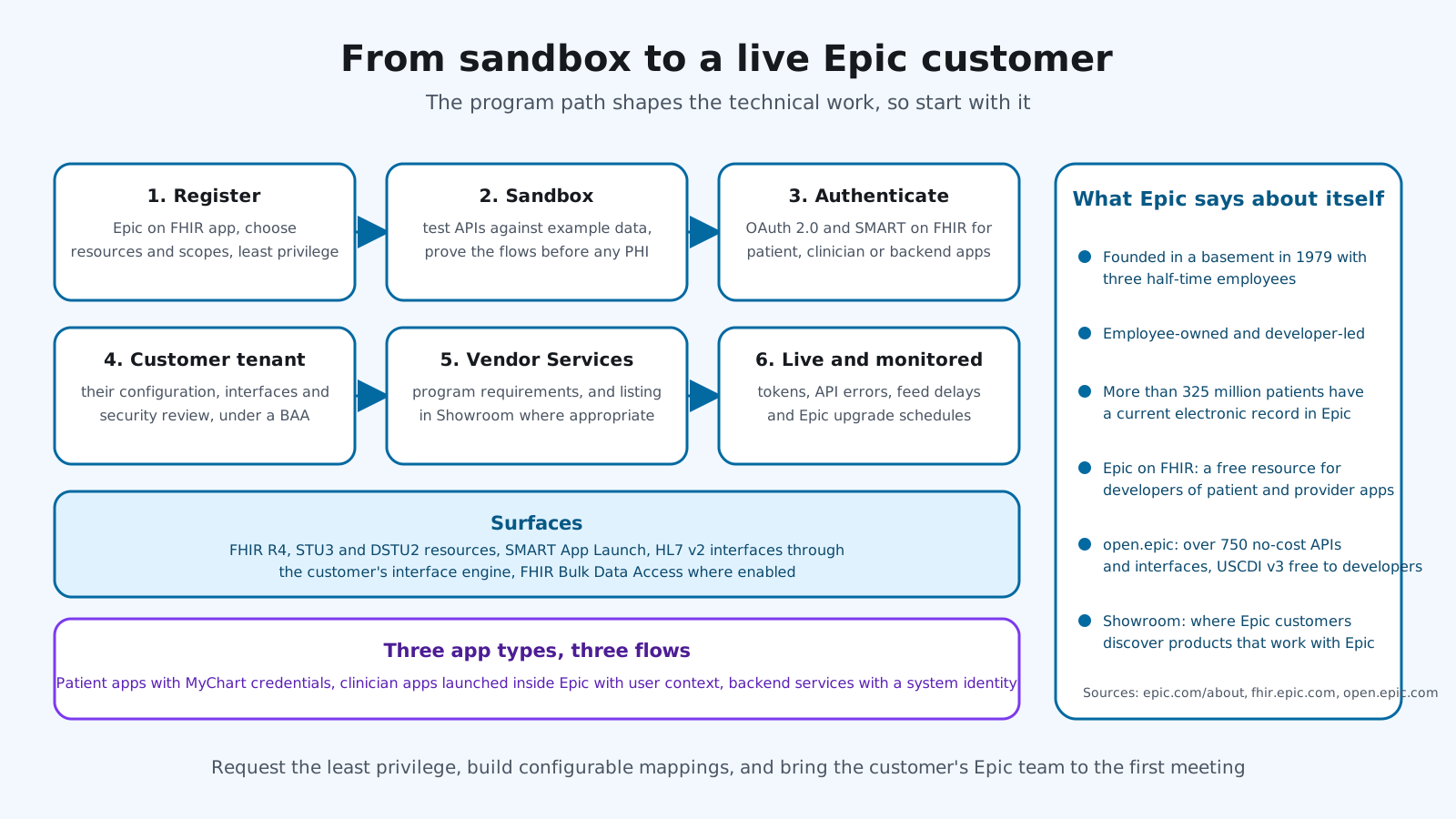
An Epic EHR integration guide starts with the program path, because the technical work is shaped by it. The diagram shows the route from sandbox to a live customer, and the surfaces available at each step.
- Epic on FHIR: Register an app, choose the FHIR resources and scopes it needs, and test against the public sandbox with example data.
- OAuth 2.0 and SMART on FHIR: Patient-facing, clinician-facing and backend apps authenticate differently. Epic documents patient and provider app flows and backend OAuth 2.0 clients.
- Customer tenant: Real integrations are validated in a health system's test environment with its own configuration, interfaces and security review.
- Vendor Services and Showroom: The developer program and the catalog where Epic customers discover products that work with Epic.
- HL7 v2 interfaces: Admissions, orders, results and scheduling feeds through the customer's interface engine for event-driven and legacy use cases.
- Bulk data: FHIR Bulk Data Access for population-level exports, where the customer enables it.
Patient, clinician and backend apps
Epic distinguishes apps that patients use with their own MyChart credentials, apps that clinicians launch inside Epic with user context, and backend services that run with a system identity and no user present. Each has its own OAuth 2.0 flow, scope rules and review expectations. Decide which you are building before you register, because changing later means re-registering and re-testing.
Working with the customer's Epic team
Every Epic customer has analysts who own the build, an interface team that owns HL7 v2 feeds and a security team that reviews new connections. They decide what is enabled in the tenant, when changes can land and which upgrade window applies. Treat them as the integration partner they are. The fastest Epic projects we have seen are the ones where that team was in the first meeting.
How does an Epic EHR integration proceed step by step?
- 1. Define the use case and users: Patient app, clinician app inside Epic, or a backend service, and what it reads and writes.
- 2. Map to resources and events: FHIR resources, SMART launch type, HL7 v2 messages and bulk data needs.
- 3. Register and prototype: Epic on FHIR app registration, sandbox testing and scope minimization.
- 4. Engage the customer: Their Epic team, security review and test tenant, with a Business Associate Agreement in place.
- 5. Build for configuration differences: Each organization's Epic build is different. Make mappings configurable.
- 6. Validate in the tenant: Patient matching, launch context, write-back and interface feeds against real configuration.
- 7. Complete the program steps: Vendor Services requirements and any listing.
- 8. Go live and monitor: Token health, API errors, feed delays and Epic upgrade schedules.
How do Epic EHR training and change management fit?
A guide to Epic EHR training matters to builders because clinicians learn Epic in structured programs, and anything you add must fit the way they were taught. Health systems run role-based training, credentialed trainers and super users, and they schedule changes around upgrade cycles.
- Fit the taught workflow: Launch your app from where the user already works, and return them there.
- Train with the customer's trainers: Tip sheets and short sessions through the health system's training team.
- Respect upgrade windows: Changes land with the organization's Epic release schedule, not around it.
- Measure adoption inside Epic: Launches, completions and support tickets by role.
What are Epic EHR integration best practices?
- Standards first: FHIR and SMART on FHIR before custom interfaces, because they survive upgrades.
- Least privilege: Request only the resources and scopes the use case needs, and expect vendor review to check.
- Configurable mappings: No hard-coded assumptions about one customer's build.
- Patient matching discipline: Use Epic's identifiers and handle merges and duplicates.
- Write-back with review: Documents and suggestions first. Orders and clinical data changes go through the customer's governance.
- Monitor tokens and feeds: Expired credentials and silent interface failures are the most common outages.
- Track Epic releases: APIs and workflows change on a schedule you can plan for.
The practices above are the ones Epic customers' teams tend to ask about first. The mistakes below are the ones they have seen before.
What are the common mistakes with Epic EHR integration?
- Sandbox as proof: A working sandbox app that fails on the first customer tenant.
- Over-requesting scopes: Asking for everything and stalling in review.
- Skipping the customer's Epic team: The health system's analysts control the configuration you depend on.
- Hard-coded builds: Mappings and workflows tied to one organization.
- No BAA before data: PHI flowing before the agreement is signed.
- Ignoring training: A technically correct app that nobody launches because it is not in the taught workflow.
What does Epic EHR mean for your build plan?
- Use case and app type: Patient, clinician or backend, and what it reads and writes.
- Program steps: Registration, sandbox, customer tenant, Vendor Services and listing.
- Configurability: Mappings, launch contexts and interfaces per customer.
- Compliance: BAAs, scope minimization and audit logging.
- Training and adoption: Materials and sessions through the customer's training team.
- Operations: Token and feed monitoring, release tracking and per-customer support.
For oncology specifically, our Epic Beacon guide covers the treatment plan data, and our EHR integrations guide covers methods and costs across EHR vendors.
How Agnotic can help
Agnotic Technologies is a software development services company. We build Epic integrations for digital health companies and hospital teams: Epic on FHIR app development, SMART on FHIR launches, backend services, HL7 v2 interfaces, bulk data pipelines and the configurable mappings that make one product work across many Epic customers, with HIPAA safeguards designed in. We work with your customers' Epic teams, not around them.
Build your Epic integration with Agnotic
Explore our EHR integration services or browse more articles in our EHR integration hub.
Related reading on Agnotic
Go deeper on the Epic, FHIR and integration topics covered in this guide.