Cloud computing in healthcare means running clinical, administrative and analytics systems on infrastructure and managed services rented from a cloud provider instead of in a hospital data center. The provider runs the hardware and part of the platform. The organization and its software partner stay responsible for how patient data is configured, accessed and protected.
This cloud computing in healthcare guide covers the service and deployment models, why the move is happening now, the applications, a reference architecture, the pros and cons, shared responsibility, a step by step migration, best practices and common mistakes.
What is cloud computing in healthcare?
Planning the move, or the operations after it?
Agnotic designs, migrates and runs cloud platforms for healthcare teams as healthcare cloud managed services. Start with our cloud and DevOps services.
Cloud computing in healthcare is the use of on-demand computing, storage, networking and managed services from providers such as AWS, Microsoft Azure and Google Cloud to run health systems' software and data. It covers hosting EHRs and portals, FHIR data platforms, analytics, imaging archives, telehealth and backup, under a Business Associate Agreement and HIPAA safeguards.
Service models
- Infrastructure as a service: Virtual machines, storage and networks you configure yourself. Most control, most responsibility.
- Platform as a service: Managed databases, containers, queues and functions. The provider patches the platform.
- Managed health data services: FHIR stores and health APIs, such as AWS HealthLake, Azure Health Data Services and the Google Cloud Healthcare API, that speak FHIR, HL7 v2 and DICOM out of the box.
- Software as a service: Vendor-run applications, such as a cloud EHR, where you configure and the vendor operates.
Deployment models
Public cloud, with logical isolation on shared provider infrastructure, is the common choice for new systems. Private cloud suits workloads that cannot share hardware. Hybrid, where on-premises systems connect to cloud services, is normal during a migration and for imaging or device gateways. Multi-cloud usually arrives through acquisitions and vendor choices rather than by design.
Why does cloud computing in healthcare matter now?
- The provider is a business associate: Under 45 CFR 164.502(e) and 164.308(b), a covered entity may let a vendor handle ePHI only with a Business Associate Agreement. HHS OCR's cloud computing guidance says a cloud provider that stores ePHI is a business associate even when the data is encrypted and the provider holds no key.
- Contingency planning is required: The HIPAA Security Rule's contingency plan standard at 45 CFR 164.308(a)(7) requires a data backup plan, a disaster recovery plan and an emergency mode operation plan. Cloud regions and managed backups make all three easier to meet.
- Stronger rules are proposed: HHS published a proposed update to the HIPAA Security Rule on January 6, 2025 that would make encryption and multi-factor authentication mandatory with limited exceptions. It had not been finalized as of October 2026.
- Sector goals exist: HHS published Healthcare and Public Health Cybersecurity Performance Goals in January 2024: ten essential and ten enhanced goals, mapped to the 405(d) Health Industry Cybersecurity Practices.
- FHIR is native in the cloud: AWS documents HealthLake as a HIPAA eligible service that stores and shares health data using FHIR R4, and Microsoft and Google publish the lists of services covered by their BAAs.
- Population data must move: Certified EHRs must support the FHIR Bulk Data Access standard under ONC criterion 170.315(g)(10), and cloud data platforms are where those exports usually land.
What are the applications of cloud computing in healthcare?
The applications of cloud computing in healthcare run from hosting the systems you already have to building data platforms that were not practical on premises. Most organizations start with one of the first three below.
- Hosting clinical systems: EHRs, portals, practice management and telehealth platforms on managed infrastructure.
- FHIR data platforms: A managed FHIR store as the system of exchange for apps, analytics and partners.
- Analytics and population health: Data lakes and warehouses fed by bulk FHIR exports, HL7 v2 feeds and claims.
- Imaging: Cloud archives and viewers for DICOM studies, with AI triage pipelines beside them.
- Remote monitoring and devices: Ingestion of readings from wearables and home devices at scale.
- AI and machine learning: Training and serving models next to the data, under the same BAA.
- Backup and disaster recovery: Copies in a second region, tested restores and failover.
- Integration: Interface engines and API gateways running as managed containers.
What does a healthcare cloud architecture look like?
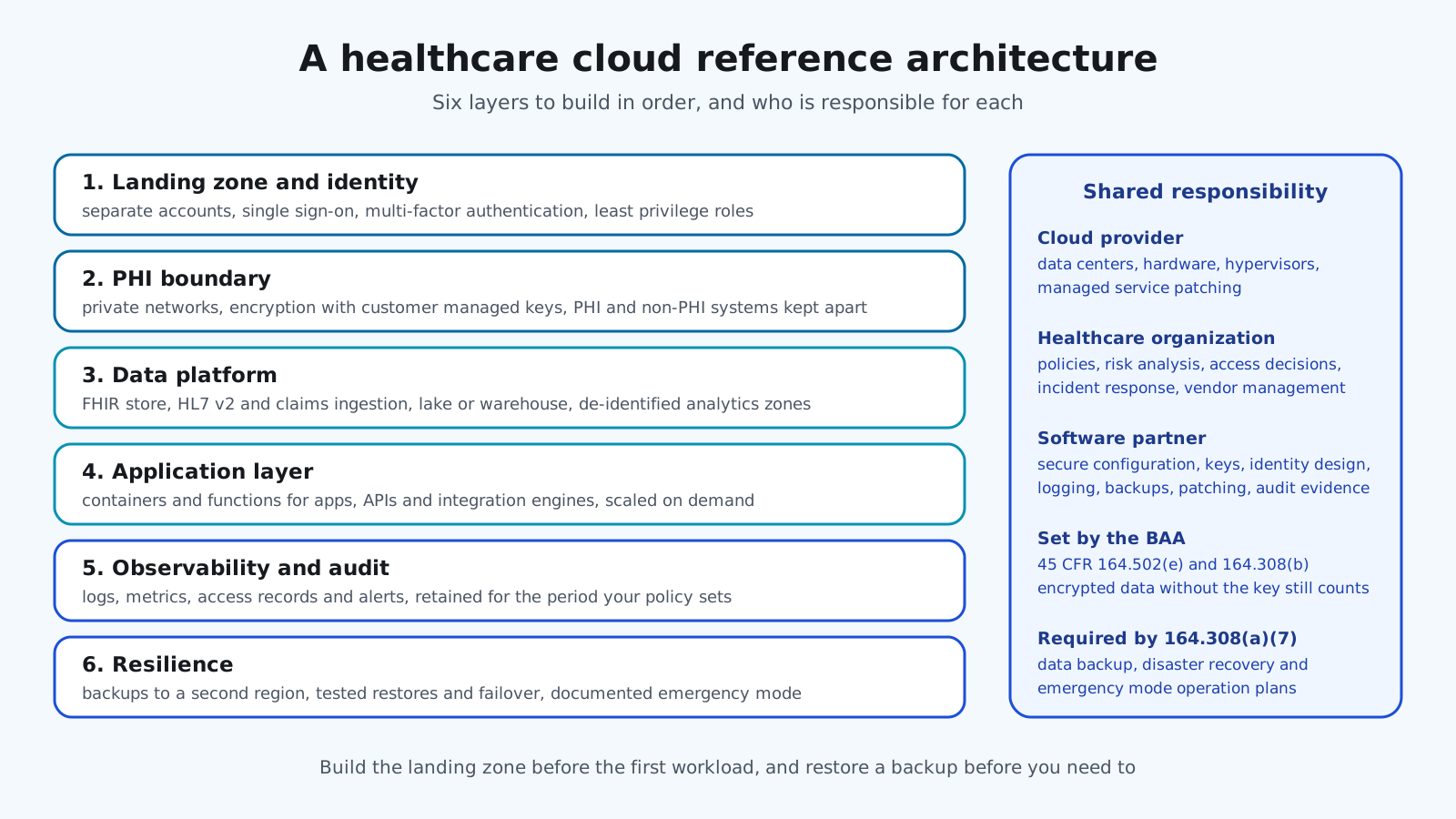
- Landing zone: Separate accounts or subscriptions for production, test and shared services, with guardrails applied centrally.
- Identity: Single sign-on, multi-factor authentication, least privilege roles and no shared credentials.
- PHI boundary: Private networks, encryption with managed keys, and a clear line between systems that hold PHI and those that do not.
- Data platform: FHIR store, HL7 v2 and claims ingestion, a lake or warehouse, and de-identified zones for analytics.
- Application layer: Containers or functions for apps, APIs and integration engines, scaled on demand.
- Observability and audit: Logs, metrics, access records and alerts retained for the period your policy sets.
- Resilience: Backups to a second region, tested recovery and a documented emergency mode.
What are the pros and cons of cloud computing in healthcare?
The pros and cons of cloud computing in healthcare depend on what you compare against. Against a well run data center the cost case is mixed. Against an aging one, the resilience and security case is strong.
Advantages
- Resilience: Multiple regions, managed backups and failover that few hospitals can match on premises.
- Elasticity: Capacity for peaks, such as open enrollment or flu season, without buying hardware.
- Managed services: Patched databases, FHIR stores and queues that remove undifferentiated work.
- Security tooling: Encryption, key management, logging and threat detection available by configuration.
- Speed: New environments in hours, which shortens projects and testing.
Risks
- Cost drift: Pay as you go becomes pay for what you forgot to turn off, and egress charges surprise.
- Shared responsibility gaps: Misconfigured storage and over-broad roles cause many cloud incidents.
- Vendor dependence: Proprietary services make moving hard. Standards such as FHIR reduce it.
- Network dependence: Clinical sites need resilient connectivity and a plan for outages.
- Data location: Residency and GDPR questions for patients and partners outside the United States.
Who is responsible for security in the healthcare cloud?
Cloud providers describe a shared responsibility model. They secure the physical infrastructure and the managed service itself, and the customer secures what runs on it: identities, configuration, data and applications. In healthcare the customer side is shared again between the organization and its software partner, and the BAA sets the terms.
In practice the provider owns data centers, hardware and managed service patching. The organization owns policies, risk analysis, access decisions and incident response. The software partner owns secure configuration, encryption and keys, identity design, logging, backups and the evidence auditors ask for. Everyone needs to know where PHI is and what happens when something fails.
How do teams move to the cloud step by step?
Teams move to the cloud by building the secure foundation first and then migrating one system at a time, each with a tested way back. Eight steps cover most programs.
- 1. Inventory and classify: Every system, its data, its PHI status, dependencies and recovery needs.
- 2. Sign the BAA and read it: Confirm which services are covered and what the provider does and does not do.
- 3. Build the landing zone: Accounts, identity, networking, encryption, logging and guardrails before any workload.
- 4. Pick the first workload: Something valuable and low risk, such as a data platform or a portal, not the EHR.
- 5. Choose the pattern per system: Rehost, replatform onto managed services, or rebuild on FHIR and APIs.
- 6. Migrate with a rollback: Parallel run, data validation and a tested way back.
- 7. Operate: Monitoring, cost reviews, patching, backup tests and access reviews on a calendar.
- 8. Repeat and retire: Move the next system and decommission the old hardware, including secure disposal.
What are cloud computing in healthcare best practices?
Cloud computing in healthcare best practices are mostly about discipline in configuration, because the provider has already done the hard part on the infrastructure side.
- Encrypt everything and manage the keys: Customer managed keys, rotation and separation from the data they protect.
- Least privilege by default: Roles per job, time-limited elevated access and quarterly reviews.
- No public PHI storage: Block public buckets and open databases by policy, not by hoping.
- Infrastructure as code: Every environment reproducible and reviewed like application code.
- Tag and budget: Cost allocation per system and alerts when spend moves.
- Test recovery: Restore from backup and fail over to the second region on a schedule.
- Keep standards at the edges: FHIR, HL7 v2 and DICOM interfaces so systems can move later.
What are the common mistakes with cloud computing in healthcare?
- Lift and shift forever: Servers moved as they were, with the same fragility and a higher bill.
- A BAA for the provider only: Monitoring, support and analytics vendors added later without agreements.
- One account for everything: Production, test and personal experiments sharing credentials and networks.
- Logs nobody reads: Audit trails collected but never alerted on or reviewed.
- Untested recovery: Backups configured, restores never attempted.
- PHI in test: Production data copied into development environments.
- No exit plan: Proprietary formats everywhere, so the next migration is as hard as the first.
What does cloud computing in healthcare mean for your build plan?
- Scope: Which systems move, in what order, and which stay on premises for now.
- Landing zone and security: Identity, networking, encryption and logging are the first investment.
- Migration patterns: Rehosting is fastest. Replatforming and rebuilding cost more and return more.
- Data platform: FHIR store, pipelines and analytics zones if population health or AI is the goal.
- Compliance work: Risk analysis, BAAs, policies and audit evidence.
- Operations: Managed services, monitoring, cost management and recovery testing as an ongoing cost.
If analytics is the reason for the move, our EHR data analytics guide covers the pipelines that feed it, and our EHR data migration guide covers moving the records themselves.
How Agnotic can help
Agnotic Technologies is a software development services company. We design, migrate and run healthcare cloud platforms: landing zones with HIPAA safeguards, FHIR data platforms, integration engines, analytics pipelines, backup and recovery, and the DevOps automation that keeps them patched and observable. Your organization keeps the BAA and the decisions. We build and operate the platform with you.
Build your healthcare cloud platform with Agnotic
Explore our healthcare cloud and DevOps services or browse more articles in our Healthcare Data Engineering hub.
Related reading on Agnotic
Go deeper on the migrations, FHIR stores and data work covered in this guide.
Sources
- 45 CFR 164.502: Uses and disclosures of PHI, including business associates
- 45 CFR 164.308: Administrative safeguards, including the contingency plan
- HHS OCR: Guidance on HIPAA and cloud computing
- HHS OCR: HIPAA Security Rule notice of proposed rulemaking
- HHS: Healthcare and Public Health Cybersecurity Performance Goals
- AWS: What is AWS HealthLake
- AWS: Shared responsibility model
- ASTP/ONC: Standardized API for patient and population services, 170.315(g)(10)