Epic ambulatory integration is connecting outside software to the outpatient side of Epic: clinic schedules, visits, orders, results, notes and the patient portal that EpicCare Ambulatory users work in every day. It is the most common Epic integration, because most products touch the clinic visit.
This Epic ambulatory complete guide covers what the outpatient workflow contains, why it matters now, which surfaces Epic exposes for it, how an integration proceeds step by step, how Epic mobile apps integration fits, best practices, common mistakes and what it means for your build plan.
What is Epic ambulatory integration?
Connecting a clinic workflow or patient app to Epic?
Agnotic builds Epic ambulatory integrations and Epic mobile apps integration: SMART on FHIR launches in the clinic, patient apps on MyChart credentials and HL7 v2 feeds.
Epic ambulatory integration is the connection of third-party software to Epic's outpatient workflows: reading and writing schedules, encounters, orders, results, medications, documents and care plans, launching apps inside the clinician's workspace, and connecting patient apps through the portal's credentials. It uses the FHIR APIs, SMART on FHIR and HL7 v2 interfaces that Epic exposes, under the customer's configuration and review.
What the ambulatory workflow contains
- Scheduling: Templates, slots, appointments, check-in and no-show handling.
- The visit: Rooming, vitals, intake questionnaires, documentation and diagnoses.
- Orders and results: Labs, imaging and referrals placed in the visit, results returned and acknowledged.
- Medications: Prescriptions, refills and reconciliation.
- Care management: Health maintenance, care gaps and chronic condition registries.
- Patient side: Portal messages, pre-visit questionnaires, results release and telehealth links.
- Billing handoff: Charges, codes and claim data for the revenue cycle.
Why does Epic ambulatory integration matter now?
- Developer access is open: Epic on FHIR describes itself as a free resource for developers who create apps for use by patients and healthcare organizations, with FHIR DSTU2, STU3 and R4 resources, OAuth 2.0 and a testing sandbox.
- The catalog is large: open.epic states that over 750 no-cost APIs and interfaces are available, and that USCDI v3 support is available to app developers for free.
- Certification requires it: Under ONC criterion 170.315(g)(10) and the HTI-1 rule, certified EHRs expose a FHIR API supporting USCDI v3, US Core 6.1.0, SMART App Launch 2.0 and Bulk Data Access from January 1, 2026.
- Patients can connect apps: The same criterion lets patient-chosen apps read a patient's record with the patient's permission, which is how consumer and remote monitoring apps reach Epic data.
- Data must flow: The information blocking rules at 45 CFR Part 171 restrict practices that interfere with access, exchange or use of electronic health information.
- Vendors are business associates: Under 45 CFR 164.502(e), a vendor that creates, receives, maintains or transmits PHI for a covered entity needs a Business Associate Agreement before clinic data flows.
Which surfaces does Epic expose for ambulatory workflows?
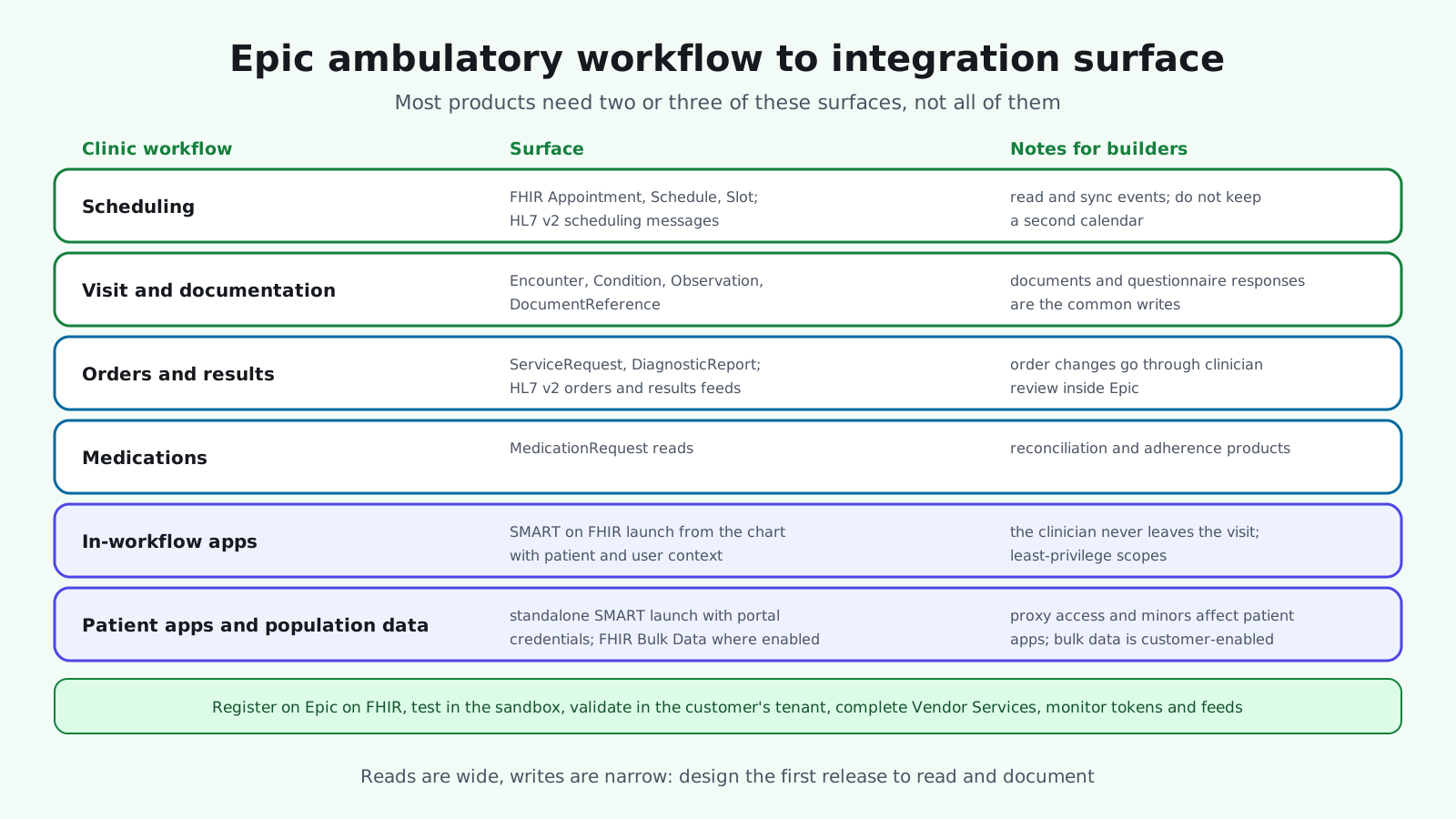
The diagram maps each part of the clinic workflow to the surface an integration uses. Most products need two or three of them, not all.
- Scheduling: FHIR Appointment, Schedule and Slot resources for reads and bookings where enabled, and HL7 v2 scheduling messages for event-driven sync.
- Visits and documentation: Encounter, Condition, Observation and DocumentReference for reads; documents and notes written back where the customer allows.
- Orders and results: ServiceRequest and DiagnosticReport reads, and HL7 v2 orders and results feeds through the interface engine.
- Medications: MedicationRequest reads for reconciliation and adherence products.
- In-workflow apps: SMART on FHIR launch from the chart with patient and user context, so the clinician never leaves the visit.
- Patient apps: Standalone SMART launch with the patient's portal credentials, for apps patients choose.
- Population data: FHIR Bulk Data Access for registries and analytics, where the customer enables it.
Where Epic mobile apps integration fits
Mobile products connect to the ambulatory workflow from two sides. Patient apps authenticate with the patient's portal account and read the record the patient permits, which is the path for remote monitoring, pre-visit intake and condition programs. Clinician mobile apps launch with the user's context and respect the same role-based access as the desktop workspace. Both are registered through Epic on FHIR and validated in the customer's tenant.
Reads, writes and review
Reading ambulatory data is widely available. Writing is narrower: documents, questionnaire responses and flowsheet data are commonly accepted, while orders and medication changes go through clinician review inside Epic. Design products so the first release reads and documents, and treat write-back of clinical decisions as a later, governed step.
Scheduling is the hard part
Clinic schedules are the most configured part of ambulatory Epic: templates, visit types, departments and provider rules differ by site and change often. Products that book or reschedule must respect those rules through the API rather than assume them, and must reconcile against Epic as the source of truth when a slot changes underneath them.
Structured intake and questionnaires
Pre-visit questionnaires are the most common write-back and the most valuable: responses that land as structured data flow into the visit, into health maintenance and into quality reporting. Map each question to the codes the clinic already uses, and confirm with the customer where responses should appear in the chart before you build.
How does an Epic ambulatory integration proceed step by step?
- 1. Write the clinic scenario: Which step of the visit your product touches, for which roles, and what it reads and writes.
- 2. Map to surfaces: FHIR resources, SMART launch type, HL7 v2 messages and bulk data, with least-privilege scopes.
- 3. Register and prototype: Epic on FHIR app registration and sandbox tests against example data.
- 4. Engage the customer: Their Epic analysts, interface team and security review, with a Business Associate Agreement in place.
- 5. Validate in the tenant: Patient matching, launch context, scheduling sync and any write-back against real configuration.
- 6. Pilot in one clinic: Measure launches, completed workflows and support tickets before widening.
- 7. Complete the program steps: Vendor Services requirements and listing where appropriate.
- 8. Monitor: Tokens, API errors, interface delays and Epic upgrade schedules.
What are Epic ambulatory integration best practices?
- Launch where the clinician already is: In-workflow SMART launch beats a separate login every time.
- Read the schedule, do not copy it: Sync events and query slots rather than maintaining a second calendar.
- Write structured data: Questionnaire responses and observations as coded data, not PDFs.
- Keep scopes minimal: Request the resources the scenario needs; vendor review will check.
- Make mappings configurable: Visit types, departments and document types differ by customer.
- Handle the patient side with care: Proxy access, minors and portal enrollment affect patient apps.
- Track Epic releases: APIs and workflows change on a schedule you can plan for.
The practices above are what makes an ambulatory integration feel native to the clinic. The mistakes below are what makes staff stop using it.
What are the common mistakes with Epic ambulatory integration?
- A second schedule: Appointments maintained in the product and in Epic, with double bookings.
- Sandbox as proof: A working sandbox app that fails on the first customer tenant.
- Assuming write-back: Products designed around order changes that the customer will not allow.
- One customer's build as the standard: Hard-coded visit types and departments.
- Patient apps without proxy rules: Caregivers locked out, so they call the clinic.
- No BAA before data: Clinic data flowing before the agreement is signed.
What does Epic ambulatory integration mean for your build plan?
- Scenario and roles: Which visit steps and which users, clinician or patient.
- Surfaces: FHIR, SMART launch type, HL7 v2 feeds and bulk data.
- Program steps: Registration, sandbox, customer tenant and Vendor Services.
- Configurability: Mappings for visit types, departments and documents per customer.
- Compliance: BAAs, scope minimization and audit logging.
- Operations: Monitoring, release tracking and per-customer support.
For the platform overview, our Epic EHR guide covers the developer programs, and our EHR mobile app development guide covers building the apps themselves.
How Agnotic can help
Agnotic Technologies is a software development services company. We build Epic ambulatory integrations for digital health companies and clinic groups: SMART on FHIR apps launched in the visit, patient apps on portal credentials, scheduling and results feeds over HL7 v2, structured write-back and the configurable mappings that make one product work across many Epic customers, with HIPAA safeguards designed in. Your product joins the visit instead of interrupting it.
Build your Epic ambulatory integration with Agnotic
Explore our Epic integration services or browse more articles in our EHR integration hub.
Related reading on Agnotic
Go deeper on the Epic, mobile and integration topics covered in this guide.
Sources
- Epic: Epic on FHIR developer resources
- Epic: open.epic
- Epic: Vendor Services and Showroom
- ASTP/ONC: Standardized API for patient and population services, 170.315(g)(10)
- ASTP/ONC: HTI-1 final rule
- HL7: SMART App Launch
- 45 CFR Part 171: Information blocking
- 45 CFR 164.502: Uses and disclosures of PHI, including business associates