Epic modules are the applications that make up the Epic EHR, each named and owned separately on one shared patient record: EpicCare for clinical work, Cadence for scheduling, Resolute for billing, Beaker for the lab, MyChart for patients and dozens more. For software teams, the module decides the users, the workflow your product joins and the data surfaces you use.
This Epic modules guide covers what the modules are, why the map matters now, the Epic modules list by area, how each maps to an integration surface, how to plan an integration, best practices, common mistakes and your build plan.
What are Epic modules?
Not sure which Epic module your product touches?
Agnotic maps your use case to the right Epic module and surface, then builds the app, SMART launch or HL7 v2 interface it needs.
Epic modules are the named applications within the Epic EHR that serve specific care settings, departments and business functions, all built on one shared database so a patient's record is the same in every module. Health systems license and implement the modules they need, staff them with certified analysts, and connect outside software to the workflows those modules run.
Why the names matter
- Ownership: Each module has analysts, a build and a change process. Your integration request goes to the owners of the module it touches.
- Users: Module names describe roles. A product for infusion nurses lives in a different workflow from one for schedulers.
- Data: The shared record is one, but the events and screens differ by module, which decides the surface you integrate through.
- Timing: Modules go live in waves during an implementation, and your connection follows the module's wave.
Why does the Epic module map matter for builders now?
- Developer access is open: Epic on FHIR describes itself as a free resource for developers who create apps for use by patients and healthcare organizations, with FHIR DSTU2, STU3 and R4 resources, OAuth 2.0 and a testing sandbox.
- The catalog is large: open.epic states that over 750 no-cost APIs and interfaces are available, and that USCDI v3 support is available to app developers for free.
- Customers discover apps by need: Epic's Showroom lets Epic customers discover products that work with Epic, and products are filtered by category, which follows module and workflow lines.
- Certification sets the API floor: Under ONC criterion 170.315(g)(10) and the HTI-1 rule, certified EHRs expose a FHIR API supporting USCDI v3, US Core 6.1.0, SMART App Launch 2.0 and Bulk Data Access from January 1, 2026.
- Data must flow across modules and vendors: The information blocking rules at 45 CFR Part 171 restrict practices that interfere with access, exchange or use of electronic health information.
- Every vendor is a business associate: Under 45 CFR 164.502(e), a vendor that handles PHI for a covered entity needs a Business Associate Agreement before any module's data reaches it.
What is on the Epic modules list?
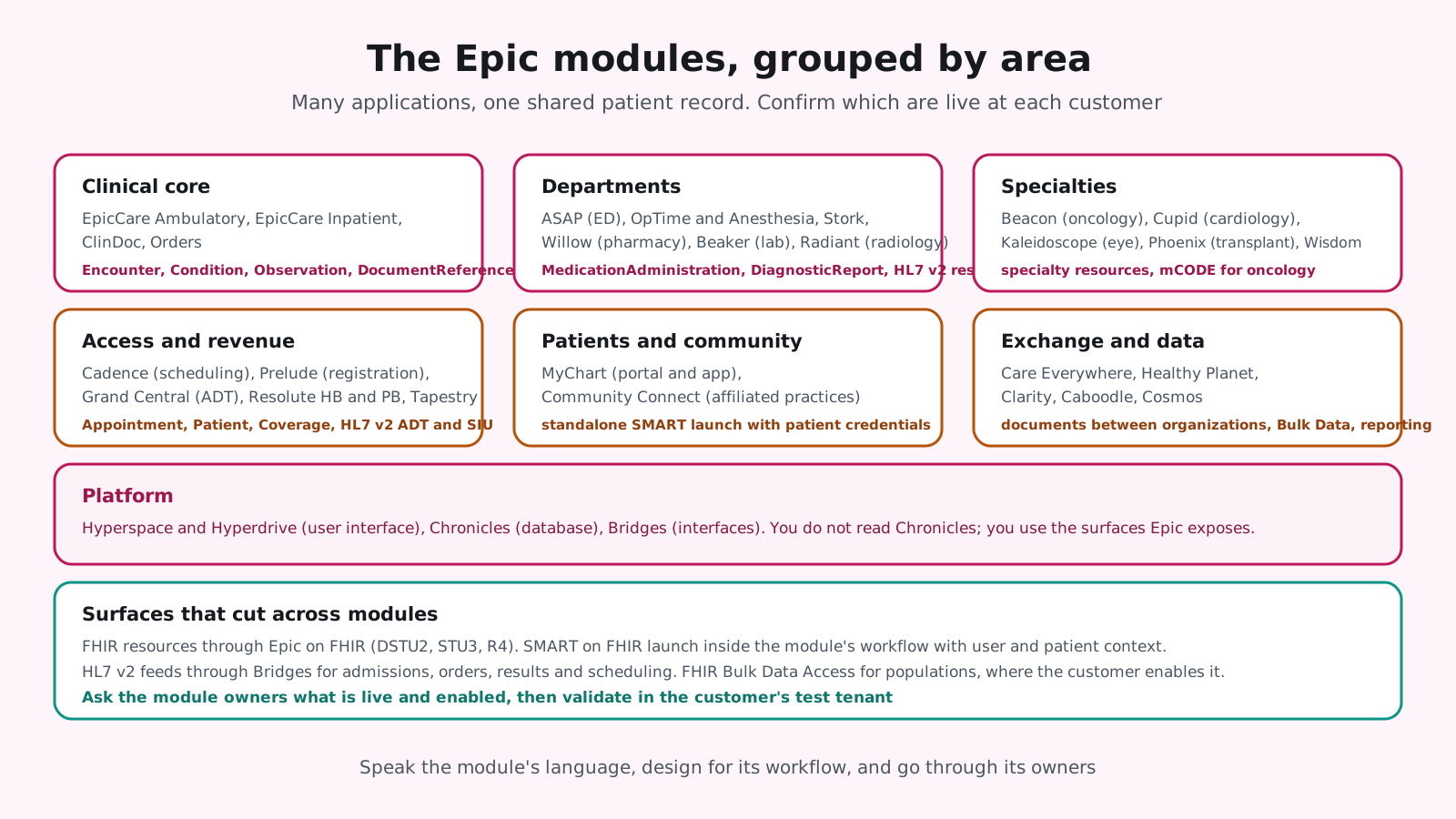
The Epic modules list below groups the applications by area, using the names Epic customers use. Licensing and exact scope vary by organization, so confirm with the customer's Epic team which modules are live.
- Clinical core: EpicCare Ambulatory for clinics and EpicCare Inpatient for hospital units, with ClinDoc for nursing documentation and Orders for order entry.
- Departments: ASAP for the emergency department, OpTime and Anesthesia for surgery, Stork for obstetrics, Willow for pharmacy, Beaker for the laboratory and Radiant for radiology.
- Specialties: Beacon for oncology, Cupid for cardiology, Kaleidoscope for ophthalmology, Phoenix for transplant and Wisdom for dental.
- Access and revenue: Cadence for scheduling, Prelude for registration, Grand Central for admissions and bed management, Resolute Hospital Billing and Professional Billing for claims, and Tapestry for health plans.
- Patients and community: MyChart for the patient portal and app, and Community Connect for extending Epic to affiliated practices.
- Exchange and data: Care Everywhere for record exchange between organizations, Healthy Planet for population health, Clarity and Caboodle for reporting, and Cosmos for de-identified research data.
- Platform: Hyperspace and Hyperdrive as the user interface, Chronicles as the database, and Bridges for interfaces.
Modules and integration surfaces
Every module reads and writes the same record, so FHIR resources cut across them: Appointment data comes from Cadence, MedicationAdministration from Willow and Beacon workflows, DiagnosticReport from Beaker and Radiant, Encounter and Condition from EpicCare. HL7 v2 feeds through Bridges carry admissions, orders, results and scheduling events. SMART on FHIR apps launch inside the module's workflow with the user and patient in context.
Reading the customer's build
Two health systems with the same modules can expose different data, because configuration decides which fields are captured, which documents are shared and which APIs are enabled. Ask the customer's Epic team for the module list, the live interfaces and what is enabled for third parties before you design, and validate in their test tenant before you promise a feature.
Modules go live in waves
Large implementations bring modules live in waves over years, and a product that depends on a module not yet live cannot be connected. Ask the customer for the module roadmap, align your integration milestones to the wave that carries your users, and plan for configuration changes when later waves touch the same workflows.
Shared record, separate owners
The shared record is why one FHIR resource serves many modules, and separate ownership is why one request can need three approvals. A product that reads schedules and writes documents into oncology visits touches Cadence, EpicCare and Beacon owners. Name all of them early, and give each what they need to say yes.
How do teams plan an integration by module step by step?
- 1. Name the users and the moment: Which role, in which module, at which step of their work.
- 2. Identify the module owners: The analysts and interface team who own that module at the customer.
- 3. Map the surface: FHIR resources, SMART launch type, HL7 v2 messages or bulk data for that module's data.
- 4. Register on Epic on FHIR: App, scopes and sandbox tests with least privilege.
- 5. Validate in the tenant: Against the customer's configuration for that module, with their security review and a BAA.
- 6. Pilot in one unit or clinic: The module's users, their workflow, measured.
- 7. Complete the program steps: Vendor Services requirements and listing where appropriate.
- 8. Monitor and track releases: Module-specific changes arrive with Epic upgrades.
What are Epic modules best practices for integrators?
- Speak the module's language: Use the customer's module names and roles in every conversation and document.
- Design for the workflow, not the data: The same FHIR resource is used differently by a scheduler and a pharmacist.
- Standards first: FHIR and SMART through Epic on FHIR, HL7 v2 through Bridges only where events or legacy formats require it.
- Least privilege per module: Request only the resources the workflow needs; vendor review will check.
- Configurable mappings: Departments, visit types and document types differ by customer and module.
- Respect module governance: Order and medication changes go through the owning module's review.
- Track module upgrades: Each Epic release touches modules differently.
The practices above keep an integration aligned with the people who own the module. The mistakes below come from treating Epic as one system with one owner.
What are the common mistakes with Epic modules?
- Wrong owner: Weeks lost asking the ambulatory team about a pharmacy workflow.
- Assuming a module is live: Building for a module the customer has not licensed or implemented.
- One build as the standard: Hard-coded departments and types from the first customer.
- Direct database thinking: Expecting to read Chronicles or Clarity rather than the APIs and feeds Epic exposes.
- Skipping the program: Vendor Services requirements discovered after the build.
- Ignoring the wave: A connection planned for go-live when the module goes live a year later.
What do Epic modules mean for your build plan?
- Modules in scope: Each adds owners, workflows and surfaces.
- Surfaces: FHIR, SMART launch, HL7 v2 and bulk data per module.
- Program steps: Registration, sandbox, customer tenant and Vendor Services.
- Configurability: Mappings per customer and module.
- Compliance: BAAs, scope minimization and audit logging.
- Operations: Monitoring and release tracking by module.
For the platform overview, our Epic EHR guide covers the developer programs, and our Epic Beacon guide goes deep on one specialty module.
How Agnotic can help
Agnotic Technologies is a software development services company. We map products to the Epic modules they touch and build the integration: Epic on FHIR apps, SMART on FHIR launches inside the module's workflow, HL7 v2 interfaces through Bridges, bulk data pipelines and configurable mappings that work across customers, with HIPAA safeguards designed in. We talk to the module owners, in their terms, from the first meeting.
Map your product to Epic's modules with Agnotic
Explore our Epic integration services or browse more articles in our EHR integration hub.
Related reading on Agnotic
Go deeper on the Epic and integration topics covered in this guide.
Sources
- Epic: Epic on FHIR developer resources
- Epic: open.epic
- Epic: Vendor Services and Showroom
- Epic: Software
- ASTP/ONC: Standardized API for patient and population services, 170.315(g)(10)
- HL7: SMART App Launch
- 45 CFR Part 171: Information blocking
- 45 CFR 164.502: Uses and disclosures of PHI, including business associates