Catering food safety teams ask this question once paper logs stop scaling. The HACCP plan itself is usually sound. The trouble is that readings get written up after the fact, corrective actions sit in a separate notebook, and every site keeps its records its own way.
This guide follows food through a central kitchen and out to the serving site, one stage at a time. For each stage it covers what to capture, which readings sensors can take without staff, where alarms belong, and the failure points that undo a digital rollout.
What does a digital HACCP system cover from receiving to serving?
Moving HACCP off paper?
Agnotic Technologies builds food safety software for caterers and central kitchens, from receiving checks and sensor capture to corrective actions and audit records.
A digital HACCP system covers every critical control point from receiving to serving in one record: delivery checks, storage, thawing, prep, cooking, holding, transport and waste. Sensors and connected probes capture temperatures automatically, staff confirm checks on a tablet, and any reading outside a critical limit opens a corrective action that stays linked to its batch.
The structure comes from your existing plan. FDA's HACCP Principles and Application Guidelines set out seven principles: hazard analysis, critical control points, critical limits, monitoring, corrective actions, verification, and record keeping. The same guidelines say continuous monitoring is always preferred when feasible, which argues for wiring sensors in from the start.
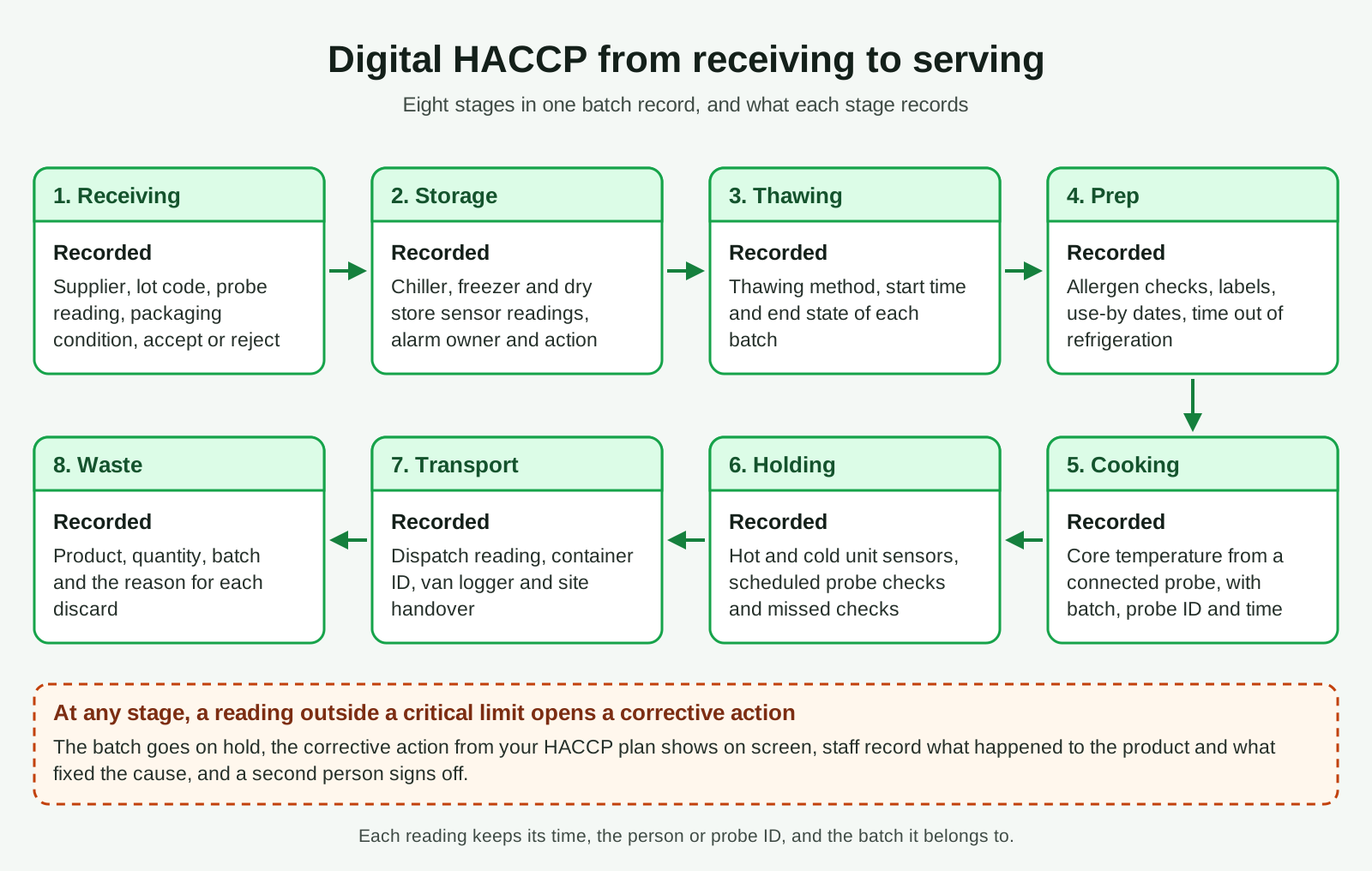
One system means one data model. A delivery, a batch and a dish keep the same identifier from dock to plate, so any reading traces back to the supplier lot and forward to the event where the food was served. Food moves through eight stages:
- 1. Receiving: supplier, lot, delivery temperature and condition, then accept or reject.
- 2. Storage: chiller, freezer and dry store readings from sensors.
- 3. Thawing: method, start time and end state.
- 4. Prep: allergens, labels, use-by dates and time out of refrigeration.
- 5. Cooking: core temperature of each batch from a connected probe.
- 6. Holding: hot and cold units, checked at the intervals your plan sets.
- 7. Transport: van or container readings and site handover.
- 8. Waste: what was discarded, why, and from which batch.
What should a food receiving checklist capture?
A food receiving checklist should capture the supplier, product, lot code, delivery temperature, packaging condition and the accept or reject decision for every delivery. Reading the delivery temperature with a connected probe and scanning the lot code from the case label removes the two fields that are hardest to fill in honestly on a busy dock.
- Supplier: picked from the approved supplier list, so an unknown name cannot be typed in.
- Temperature: read from a Bluetooth probe, with the critical limit from your plan shown on screen.
- Condition: packaging, seals and pests, answered yes or no, with a photo for any failure.
- Decision: accept, accept with a note, or reject, with the person and time recorded automatically.
Tie each delivery to its purchase order. When the product or supplier differs from the order, the checklist should ask why before the receiver can accept, because substitutions are where an unapproved supplier slips in. A rejection needs a reason, a photo and a message to purchasing.
Speed is the usual failure point at receiving. If the checklist takes longer than a driver will wait, staff sign first and check later, so keep it to the fields your hazard analysis needs.
How should chillers, freezers and cold rooms raise alarms?
Chillers, freezers and cold rooms should raise alarms from wireless sensors that report around the clock, with a short delay before alerting so that a door opening does not page anyone. A cold room temperature alarm system only works when every alert has a named owner, an escalation path and a required corrective action.
- Delay: set per unit, so a busy walk-in during service is not treated like a freezer nobody opens overnight.
- Escalation: the cook on shift, then the kitchen manager, then the food safety lead.
- Out of hours: a call or text route that reaches a person when the kitchen is closed.
- Sensor health: low battery and lost signal raise their own alerts, because a silent sensor looks like a cold room in control.
Decide early what the stored readings must prove. For facilities covered by FDA's preventive controls rule, 21 CFR 117.145(c)(2) allows refrigeration temperature records for food that needs time and temperature control to be either affirmative records showing temperature is controlled or exception records showing a loss of control. Confirm which rules apply to each site, then design the log to match.
Alarm fatigue is the failure point here. Once staff learn that most alerts are door openings, they stop reading them, so review every alarm that closed without an action and tune delays unit by unit.
How should thawing and prep be controlled?
Thawing and prep are controlled by recording the method, start and end state of each thawing batch, and by checking allergens, labels and time out of refrigeration during prep. These steps depend on people more than sensors, so the system has to make the right action the quickest one.
For thawing, staff choose a method your plan allows and the system starts a timer against the limit in your plan. A product still thawing when that limit arrives raises a task for the shift lead.
During prep, printing the label and writing the record should be one step, so the label on the container and the entry in the log cannot disagree.
Prep is also where written procedures matter most. SOP management software inside the HACCP system shows the current allergen changeover procedure at the station, records who has read it, and retires old versions so last year's laminated sheet cannot overrule the plan.
How are cooking core temperatures captured automatically?
Cooking core temperatures are captured automatically by a connected probe thermometer that sends each reading to the batch record on a tablet or phone. The cook picks the batch, probes the thickest part of the product, and the system compares the reading with the critical limit in your HACCP plan before marking the step done.
That is the heart of a HACCP temperature monitoring system: the number on the record is the number the probe read, stored with its time and the probe's ID. Manual entry stays as a flagged fallback, so a reviewer can see which readings were typed.
Pairing a probe must take seconds, or cooks go back to pen and paper. A probe that fails its calibration check is blocked until someone checks it, and each calibration result is stored against the probe's ID.
Where ovens or blast chillers export their own core probe data, pull it in through the equipment's interface. Cooling is its own control in many plans, so the cooling timer should start when the cook step closes.
How should hot and cold holding be monitored?
Hot and cold holding should be monitored by sensors in fixed units such as hot cabinets, bain-maries and display chillers, and by scheduled probe checks for food that sensors cannot reach. The system schedules those checks at the intervals your plan sets and flags any that are missed.
Treat a missed check as a finding in its own right, shown on the manager's dashboard alongside failed readings. When food reaches the end of its holding period under your plan, the system prompts the discard and writes it to the waste log.
How do you keep temperature control during transport to the serving site?
Temperature control during transport is kept by logging the food's temperature at dispatch, monitoring the van or insulated container on the way, and checking again at handover on site. Each reading belongs to the same batch record, so the serving team can see the whole journey before the food goes out.
This is where a central kitchen management system and the HACCP record meet. The dispatch list, the route and the event or site receiving each batch should come from the same data, so a batch cannot leave without its readings or arrive at a site that did not order it.
- Dispatch: a probe reading and the container ID, recorded as the batch is loaded.
- In transit: a logger in each van or container, uploading on arrival if there is no live signal.
- Handover: the site probes a sample, confirms the quantity and signs on the device.
Offline working is a requirement. Vans and event venues lose signal, so the app must store readings and signatures on the device and sync them later with their original timestamps.
How should food waste be recorded in a HACCP system?
Food waste should be recorded with the product, quantity, batch and reason for each discard, so the waste log shows which controls are failing. A discard reason such as held too long or failed core temperature points straight to the control that slipped.
Keep waste reasons to a short fixed list, each mapped to a HACCP step or to a cause outside the plan, such as over-production. A site that reports no discards for weeks is either running perfectly or skipping the step, which tells reviewers where to look first.
What happens when a reading breaks a critical limit?
When a reading breaks a critical limit, a digital HACCP system opens a corrective action at once, puts the affected batch on hold and tells the responsible person what to do next. The corrective action stays open until someone records what happened to the product, what fixed the cause and who checked the outcome.
- Hold: the batch cannot be dispatched or served while the action is open.
- Instruction: the screen shows the corrective action your plan sets for that step, not a blank text box.
- Disposition: release, re-cook, re-chill or discard, from the options your plan allows.
- Verification: a second person signs off, and the record keeps both names and times.
Records have to stand up to review. Under 21 CFR 117.305, records kept for the preventive controls rule must contain the actual values and observations from monitoring, be created when the activity is performed, and identify the facility, the date and time where appropriate, and the person who did the work by signature or initials. Paragraph (g) of the same section exempts electronic records kept only to meet Part 117 from 21 CFR Part 11.
Never let anyone overwrite a reading. A correction is a new entry that points to the original with a reason, and the audit trail keeps both.
What are the best practices for rolling out digital HACCP across sites?
The best practices for rolling out digital HACCP across sites are to pilot one kitchen first, keep one master HACCP plan with site-level settings, and run paper and digital records side by side until the pilot team trusts the new ones. Each later site then adopts a configuration that has already been tested in real service.
- 1. Map the plan: turn each control point, critical limit, monitoring step and corrective action into configuration your food safety lead signs off.
- 2. Survey the equipment: decide which chillers, ovens, holding units and vans get a fixed sensor and which get probe checks.
- 3. Pilot one site: run real service with paper alongside, and review every missed check and alarm with the team.
- 4. Roll out by template: copy the tested configuration to each new site, changing only units, people and schedules.
- 5. Review centrally: compare sites each week on missed checks, open corrective actions and waste reasons.
Worker safety can sit on the same platform. An AI JSA generator can draft a job safety analysis for tasks such as changing fryer oil, which a supervisor reviews before it reaches the team. Decide too who owns the tablets at each site, because a lost device sends a site back to clipboards.
How Agnotic can help
Agnotic Technologies builds digital HACCP systems for caterers, central kitchens and multi-site food businesses around the plan they already run. The work covers receiving and prep apps, sensor and probe integration, alarm routing, corrective actions and the audit trail, connected to purchasing, production and EHS systems where needed.
Agnotic starts from your HACCP plan and equipment list, then maps each control point to what can be captured automatically and what still needs a person.
Build a digital HACCP system with Agnotic
Share your HACCP flow, or see the food safety, cold chain, IoT, AI and EHS work Agnotic builds for clients.
Related reading on Agnotic
Go further on document automation, digital transformation, intelligent automation, multi-site asset registers, hot work permits and building software that holds up in an audit.