


ABDM integration connects a hospital, clinic, lab or health app to India's Ayushman Bharat Digital Mission, the national digital health network run by the National Health Authority. Once connected, the software can create and verify patients' ABHA identities, link their records, and share or request records with the patient's consent.
This guide walks through the ABDM building blocks, helps you choose whether your software acts as a health information provider, a user or both, sets out the integration steps, and covers consent, FHIR records and the places projects stall.
What is ABDM integration?
Connecting your health software to ABDM?
Agnotic builds EHR and health record integrations, including national network connections with consent flows and FHIR records.
ABDM integration is the work of connecting health software to India's Ayushman Bharat Digital Mission APIs so it can create and verify ABHA identities, register facilities and professionals, link patient records as care contexts, and exchange those records as FHIR bundles through the consent manager, only after the patient approves each request.
ABDM is a federated network, not a central record store. Records stay with the facilities that created them. The network provides identities, registries and a consent and exchange layer, so a record moves from one facility to another only when the patient agrees.
What are the ABDM building blocks?
ABDM's building blocks are the identities, registries and exchange services that every integration uses. Understanding which ones your software calls is the first design decision.
- ABHA number: A system-generated 14-digit health identity number for each person who enrolls, separate from the ABHA address.
- ABHA address: A user-chosen handle, in a name-at-domain style, used to link records and to log in to personal health record apps.
- Health Facility Registry: The registry of public and private facilities, such as hospitals, clinics, laboratories, imaging centers and pharmacies.
- Healthcare Professionals Registry: The registry of doctors, nurses and other professionals, used to verify who provided care.
- Health Information Exchange and Consent Manager: The gateway that routes consent requests to patients and passes approved consent artefacts to providers and requesters.
- Health information providers and users: Software at facilities that holds records and shares them (HIP), and software that requests and views them with consent (HIU).
- Personal health record apps: Patient apps where people approve consent requests, view linked records and manage their ABHA address.
Which role should your software play: HIP, HIU or both?
Your software should act as a health information provider if it creates records that patients may want to share, and as a health information user if clinicians need to see records from elsewhere. Hospital information systems and EHRs usually do both, while a lab system starts as a provider.
- Provider only: A diagnostic lab or imaging center that issues reports and links them to patients' ABHA addresses.
- User only: A telemedicine app or second-opinion service that requests records from other facilities before a consultation.
- Both: A hospital or clinic system that shares its own records and requests others' at admission or referral.
- Identity only: A registration or front-desk system that creates and verifies ABHA numbers and passes them to other software.
Start with the role that matches the workflow the software already runs every day. A practical order is ABHA creation and verification at registration first, then record linking as a provider, then record requests as a user.
How do you integrate with ABDM step by step?
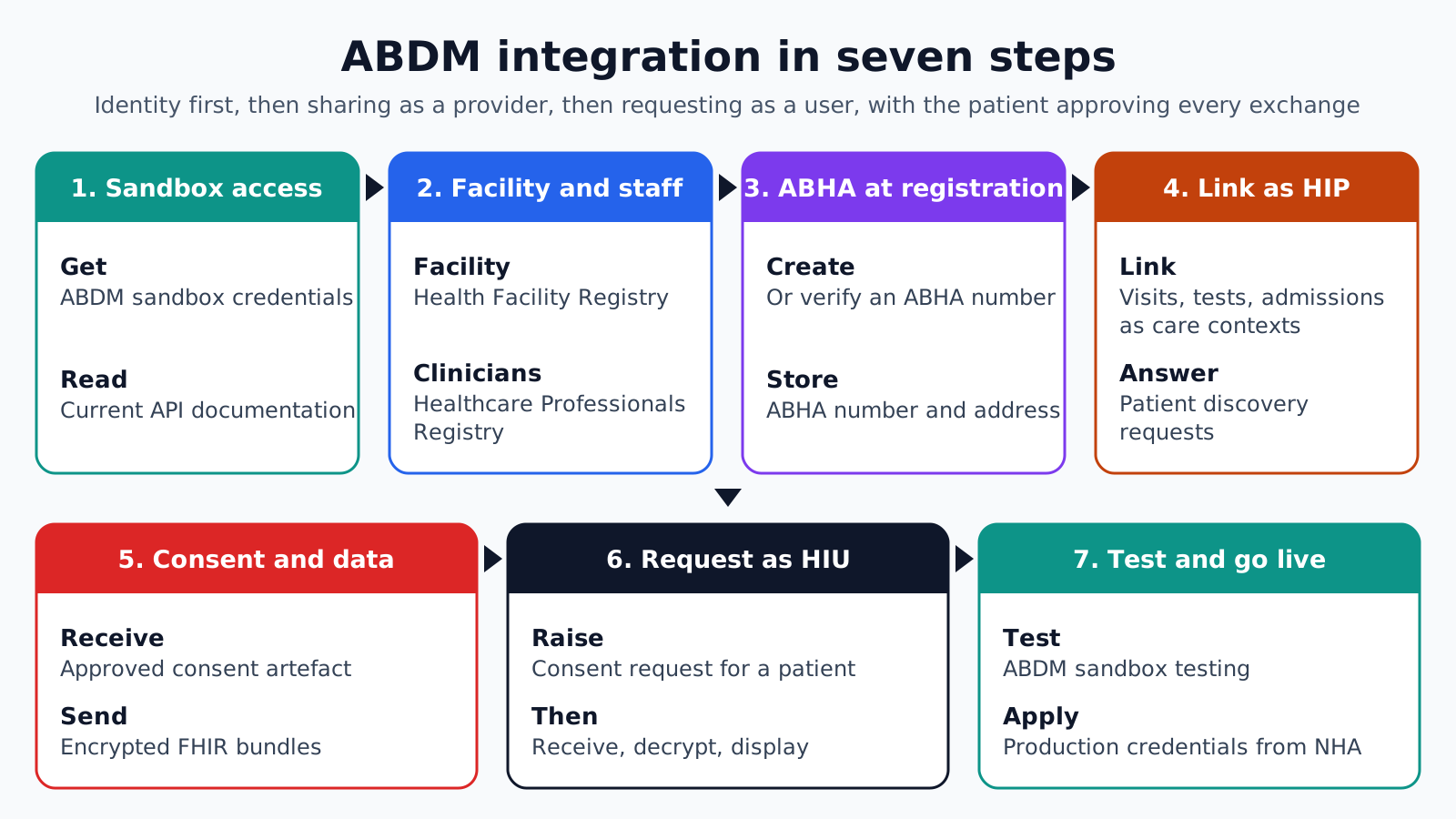
ABDM integration runs through the building blocks in order. Identity comes from ABHA, facility and professional identity from the two registries, record sharing from the HIP side, record requests from the HIU side, and the consent manager sits between them, with the patient approving each exchange in a personal health record app.
1. Register for the sandbox: Apply for ABDM sandbox access and credentials, and read the current API documentation for the services you need.
2. Register the facility and professionals: Make sure the facility is in the Health Facility Registry and its clinicians are in the Healthcare Professionals Registry, so records carry verified identities.
3. Add ABHA at registration: Let staff or patients create an ABHA number or verify an existing one, and store the ABHA number and address on the patient record.
4. Link care contexts as a HIP: When a visit, test or admission creates records, link them to the patient's ABHA address as care contexts, and answer discovery requests when patients look for their records.
5. Handle consent and data requests: When the consent manager sends an approved consent artefact, build the FHIR bundles for the consented care contexts and send them encrypted to the requester.
6. Request records as a HIU: Raise consent requests for a patient, wait for approval in their app, then receive, decrypt and display the records within the consent's purpose and time limits.
7. Test and move to production: Complete the testing ABDM requires in the sandbox, then apply for production credentials under NHA's process and repeat key tests against production.
How do care contexts and consent work?
A care context is a group of records from one episode, such as an outpatient visit, a lab test or an admission, that a facility links to a patient's ABHA address. Consent requests name care contexts, health information types and a date range, and the patient approves or denies them.
Linking can start from the facility or the patient. A facility can link a care context at the end of a visit when it knows the patient's ABHA address. A patient can also search for records from a facility in their app, which sends a discovery request that the facility's software answers by matching the patient.
- Consent artefact: The approved consent, stating who may see which types of record, for what purpose and until when.
- Purpose and expiry: The HIU may use the data only for the stated purpose and must respect the expiry.
- Revocation: Patients can revoke consent, and the software must stop using data under that consent.
- Audit: Each request, approval, transfer and access should be logged on both sides.
Discovery is where patient matching matters. The facility must be confident the person searching is its patient before it offers records for linking, so matching rules and any verification step deserve as much design as the API calls.
Building FHIR records to the NRCeS profiles
Records shared through ABDM are FHIR documents built to the profiles published by NRCeS, India's national resource center for EHR standards. Its FHIR Implementation Guide for ABDM, version 6.5.0, is based on FHIR R4 (4.0.1) and defines record profiles such as OPConsultRecord for outpatient consultations and DiagnosticReportRecord for lab and imaging reports.
Each record is a document bundle with a Composition that sets the record type and sections, referencing Patient, Practitioner, Organization and the clinical resources. Map the facility's data to those profiles once, generate bundles from the mapping, and validate them against the published package before sending.
Terminology needs early attention. The profiles bind codes from value sets the guide specifies, and local codes for tests or diagnoses need mapping. Check the guide's version against what ABDM currently expects, since the guide has been republished several times.
How should ABDM software protect health data?
ABDM software should protect health data at every point where it is stored, sent or shown, because a single integration holds identity data, consent records and clinical documents. NHA's policies and India's data protection law set the obligations; the engineering has to make them hold.
- Credentials: Keep ABDM client secrets in a secrets manager, rotate them, and never ship them inside a mobile app.
- Transport: Use encrypted connections for every API call, and encrypt shared records for the requesting party as the exchange specification requires.
- Storage: Encrypt stored ABHA details, consent artefacts and received records, and separate them from general application data.
- Access: Show records received through ABDM only to staff involved in the consented purpose, and log each view.
- Retention: Delete or stop using received records when the consent expires or is revoked, unless another lawful basis applies.
Treat the consent artefact as an access rule, not a receipt. The software should check it each time a received record is opened, so an expired or revoked consent takes effect without a manual clean-up.
Plan for security review. Production access involves checks on the software and the organization, so keep architecture diagrams, data flow descriptions and test evidence up to date from the start of the project.
Where ABDM integrations stall
ABDM integrations tend to stall on data and operations rather than the API calls. These failure points are worth planning for before the sandbox work starts.
- Unregistered facilities: Facility or professional registry entries missing or out of date, so records cannot carry verified identities.
- Weak matching: Discovery requests matched on too little information, either missing the patient or offering the wrong records.
- Unstructured records: Notes and reports held only as free text or scans, which limits the structured data in bundles.
- Code mapping: Local test and diagnosis codes not mapped to the guide's value sets.
- Consent handling: Records used after a consent expires or is revoked, because the software does not track consent state.
- Staff workflow: ABHA creation added to registration without training or time, so staff skip it at busy counters.
- Version drift: Bundles built to an older guide version than ABDM now expects.
How Agnotic can help
An ABDM connection touches registration, clinical records, consent and security at once. Agnotic Technologies builds these integrations for health software vendors and providers: ABHA creation and verification, care context linking, discovery matching, consent state handling, FHIR bundle generation to the NRCeS profiles and validation in the build pipeline.
The client's clinical and compliance teams decide which records to share and how consent is explained to patients. Agnotic implements those decisions and the sandbox-to-production testing that follows.
Connect your software to ABDM
Read how Agnotic approaches EHR integration, or continue with more interoperability articles.
Related reading on Agnotic
Continue with interoperability, the US TEFCA network, FHIR implementation guides and FHIR integration.


