


CDS Hooks is the HL7 specification that lets an EHR call an outside decision support service at a defined moment in a clinician's workflow and show the reply as cards. The current published version is CDS Hooks 2.0.1, built on FHIR R4.
This guide follows a single hook call from trigger to response: discovery, prefetch, the signed request, the cards and suggestions that come back, the SMART app launch and the feedback call. It also covers where services fail in production and what to agree with the EHR team before any code is written.
What is CDS Hooks?
Building a CDS service an EHR will call?
Agnotic builds CDS Hooks services and SMART on FHIR apps for the client, from discovery and prefetch design to cards, JWT checks and feedback.
CDS Hooks is an HL7 standard for event-driven decision support. The EHR, called the CDS Client, sends a JSON request to an external CDS Service when a hook such as patient-view or order-sign fires. The service replies with cards that carry information, suggested FHIR changes, or a link that launches a SMART on FHIR app.
The split of duties is the point of the standard. The EHR owns the workflow event, the user's screen and the decision to apply anything. The service owns the logic: rules, a guideline, a payer requirement or a model.
That also means the EHR decides which hooks it fires, which services it registers and how cards look on screen. A service written to the specification still needs a site-by-site agreement on hooks, prefetch and display.
Which hooks can a service listen for?
A service can listen for any hook in the CDS Hooks library that the EHR chooses to fire, but only a few are mature. The library versions hooks separately from the base specification and gives each one a maturity level.
- patient-view: Fires when a user opens a patient's record. Its context carries the user, the patient and, optionally, the encounter. It is the usual home for care-gap and risk reminders.
- order-select: Fires while a clinician picks orders, before signing. It suits dose and duplicate checks that should appear while the order is still being built.
- order-sign: Fires when the clinician is ready to sign. Its context includes userId, patientId, an optional encounterId and draftOrders, a FHIR Bundle of request resources still in draft status. In R4 those are MedicationRequest and ServiceRequest resources.
- Earlier-stage hooks: The library also lists encounter-start, encounter-discharge, appointment-book, medication-refill and others at low maturity. Confirm the EHR actually fires one before you design around it.
- Deprecated hooks: medication-prescribe and order-review are deprecated. order-sign is intended to replace both.
Pick the hook by the decision you want to influence. Advice that changes an order belongs at order-select or order-sign. Advice about the whole patient belongs at patient-view, where it does not interrupt signing.
How does one hook call run from trigger to SMART launch?
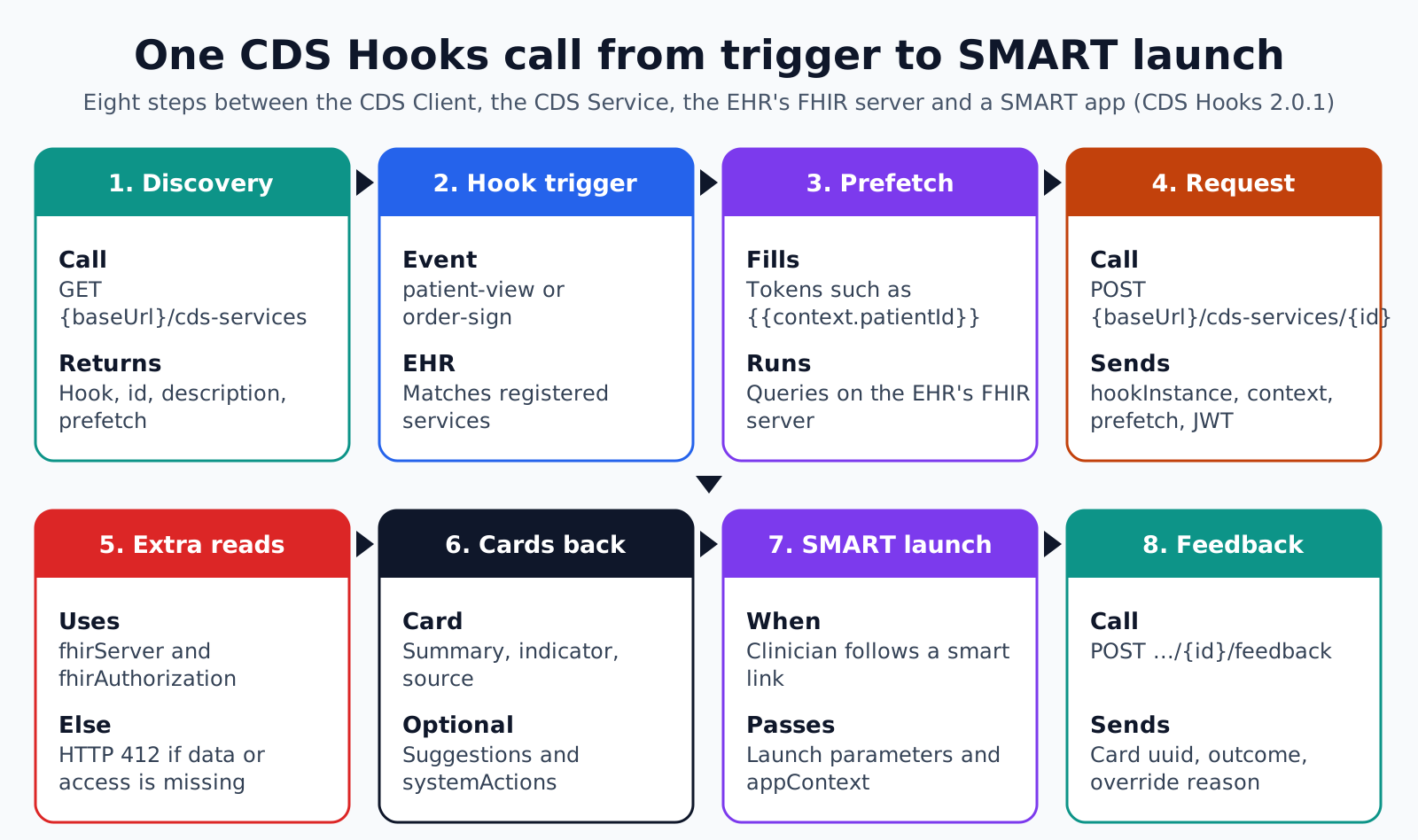
One hook call runs in eight steps between the CDS Client, the CDS Service and, when needed, the EHR's FHIR server and a SMART app. The sequence below follows the CDS Hooks 2.0.1 specification.
- 1. Discovery: Before any call, the EHR sends GET to {baseUrl}/cds-services. The service answers with a services array. Each entry has a hook, an id, a description, an optional title and an optional prefetch map of FHIR query templates.
- 2. Hook trigger: A clinician acts in the EHR, for example opening a chart (patient-view) or pressing sign (order-sign). The EHR matches that event to the registered services for the hook.
- 3. Prefetch: The EHR fills each prefetch template, replacing tokens such as {{context.patientId}} or {{userPractitionerId}} with real values, and runs the queries against its own FHIR server.
- 4. Request to the CDS service: The EHR sends POST to {baseUrl}/cds-services/{id} with the hook name, a unique hookInstance UUID, the hook context, the prefetch results and, optionally, fhirServer and fhirAuthorization. A signed JWT goes in the Authorization header.
- 5. Extra reads, if needed: When prefetch is missing or incomplete, the service may query fhirServer with the short-lived access token from fhirAuthorization. If it has neither the data nor the access it needs, it returns HTTP 412.
- 6. Cards and suggestions back: The service returns a cards array, which can be empty. Each card has a summary, an indicator and a source, and may hold suggestions with create, update or delete actions. The response may also hold systemActions.
- 7. SMART app link launch: If the clinician follows a card link of type smart, the EHR launches that SMART on FHIR app with its own launch parameters and passes any appContext string the service supplied.
- 8. Feedback: When the clinician accepts or overrides a card, the EHR may POST to {baseUrl}/cds-services/{id}/feedback with the card uuid, the outcome, any accepted suggestions, an optional override reason and a timestamp.
Steps 3 and 5 run FHIR queries while the clinician waits, so they set most of the response time. Steps 6 and 7 are where clinicians decide whether the service is worth keeping.
Prefetch versus live FHIR queries
Prefetch is faster for the clinician because the EHR runs the queries before it calls the service. Live queries give the service more freedom but add round trips while the clinician waits.
Prefetch templates have firm limits. Tokens may only reference root-level primitive context fields or the user identifiers userPractitionerId, userPractitionerRoleId, userPatientId and userRelatedPersonId. Queries are limited to instance reads, type searches, references, equality token searches, specified date searches, _count and _sort.
The EHR must omit a prefetch key it cannot fill, for example during a connectivity problem. A service that treats a missing key as "no data" will give wrong advice. It must treat a missing key as unknown and either fetch the data or stay silent.
Keep prefetch small and specific. Ask for the last few relevant observations or active medications, not every resource for the patient. Large prefetch sets slow every chart open, including the ones where the service has nothing to say.
What belongs on a card?
A card needs a short summary, an urgency indicator and a named source; everything else is optional and should earn its place. Cards compete with the clinician's own work, so less is usually better.
- Summary: Required, one sentence under 140 characters. It should state the issue and the action, not the service name.
- Indicator: Required, one of info, warning or critical, in rising urgency. Reserve critical for advice that should stop the clinician.
- Source: Required, with a label and an optional url, so the clinician can see where the advice comes from.
- Detail: Optional GitHub Flavored Markdown for evidence and reasoning that does not fit the summary.
- Suggestions: Optional proposed changes, each with a label and actions of type create, update or delete. If suggestions are present, selectionBehavior must be at-most-one or any.
- Override reasons: Optional coded reasons the EHR can show when the clinician declines, each with a display text.
- Links: Optional, each with a label, a url and a type of absolute or smart. Only smart links get SMART launch parameters and appContext.
Actions inside one suggestion apply together. The EHR processes them like a FHIR transaction, deletes first, then creates, then updates. Separately, systemActions in the response are never shown to the user, and the EHR alone decides whether to apply them.
How does the EHR prove who is calling?
The EHR proves its identity with a JSON Web Token signed with its private key and sent as a Bearer token on every request. The service verifies the signature before it reads the body.
The JWT header carries alg, kid and typ, and may carry jku, the URL of the EHR's public JWK Set. The payload must carry iss, aud, exp, iat and jti, and aud must be the exact service endpoint being called. The specification prohibits the none algorithm and symmetric algorithms, and recommends ES384 or RS384.
Services should keep an allowlist of trusted iss and jku values and reject anything else. Without one, any party that can publish a key set could call the service and probe its logic. Track jti values for the token lifetime to stop replays.
Which rules apply to a CDS service?
A CDS service is shaped by FDA device policy, HIPAA and anti-discrimination rules, and each applies to a different question. These are the ones to check first.
- FDA: The final Clinical Decision Support Software guidance, issued 6 January 2026 and re-issued 29 January 2026, explains when CDS software is not a device. Software that analyzes a medical image or a signal from a signal acquisition system falls outside the carve-out.
- HIPAA: Prefetch data and FHIR reads carry ePHI, so the service must meet the HIPAA Security Rule safeguards in 45 CFR Part 164 Subpart C, and a vendor running it for a provider is a business associate under 45 CFR 164.502(e).
- Section 1557: Under 45 CFR 92.210, covered entities must not discriminate through patient care decision support tools, with compliance required from 1 May 2025. A service's logic and inputs should be reviewable on that basis.
- ASTP/ONC certification: The HTI-1 rule replaced the old CDS criterion with Decision Support Interventions at 45 CFR 170.315(b)(11). That criterion applies to developers of certified health IT, not to an outside service the EHR calls.
Where CDS Hooks services break in production
Most production problems come from the contract between EHR and service, not from the rule logic. This failure-point list is worth walking through with the EHR team before go-live.
- Slow first call: Cold starts or heavy FHIR reads push the response past the EHR's timeout, and the EHR drops the cards silently. Ask the EHR team for its timeout and test against it.
- Missing prefetch read as absence: The service sees no medication key and advises starting a drug the patient already takes.
- Card floods: Every chart open returns an info card, clinicians learn to dismiss them, and the one critical card is dismissed too.
- Suggestions that cannot apply: The resource in a create action fails the EHR's own validation, so the accept button errors in front of the clinician.
- Broken SMART links: The smart link opens an app that has not been registered or approved at that site, so the launch fails.
- No feedback loop: The EHR never sends feedback, or the service never stores it, so nobody can see the override rate.
- Unchecked JWTs: The service accepts any well-formed token instead of checking signature, aud and the iss allowlist.
- Shared hookInstance assumptions: The service caches by patient instead of hookInstance and mixes context between two users on the same chart.
How Agnotic can help
A CDS Hooks project succeeds when the hook choice, prefetch set and card design are agreed with the EHR team before the logic is coded. Agnotic Technologies builds CDS Hooks services and the SMART on FHIR apps their cards launch, for health systems and digital health companies.
Agnotic writes the discovery document and prefetch templates, implements JWT verification with an issuer allowlist, designs cards with clinicians, stores feedback for override analysis and tests against the EHR's real timeout and validation rules.
Plan a CDS Hooks service with Agnotic
Explore FHIR and SMART on FHIR development services, or browse more articles in the FHIR hub.
Related reading on Agnotic
Continue with clinical decision support, choosing an AI CDS, Epic SMART on FHIR integration and SMART on FHIR OAuth scopes.
Sources
- HL7: CDS Hooks specification 2.0.1
- HL7: CDS Hooks hook library and maturity levels
- CDS Hooks: order-sign hook context
- HL7: SMART App Launch implementation guide
- FDA: Clinical Decision Support Software guidance
- 45 CFR Part 164 Subpart C: HIPAA Security Rule
- 45 CFR 92.210: Patient care decision support tools


