


Imaging departments were among the last parts of a hospital to leave the server room. Studies are large, radiologists expect images to open instantly, and modalities speak a protocol older than most cloud platforms. That has changed: cloud archives, browser-based viewers and DICOMweb now make it practical to run PACS and vendor neutral archives in the cloud.
This guide covers cloud-based imaging from the planning side. It explains how a study moves from modality to cloud viewer, why an edge gateway stays on site, how to choose between cloud PACS, cloud VNA and hybrid models, how to plan bandwidth, what HIPAA requires, how to migrate an existing archive, and where cost surprises come from.
What is cloud-based imaging?
Planning to move PACS or a VNA to the cloud?
Agnotic builds cloud imaging platforms, edge gateways, DICOMweb integrations and archive migrations for imaging providers.
Cloud-based imaging is the storage, management and viewing of medical images on cloud infrastructure instead of on-premises servers. Modalities send studies through an on-site gateway to a cloud PACS or vendor neutral archive, and clinicians open them in browser-based viewers, using DICOM and DICOMweb, from any approved location.
The images and the workflow stay the same for the technologist at the scanner. What changes is where studies live, how they are reached, who runs the servers and how the organization pays for storage.
How does a study move from modality to cloud viewer?
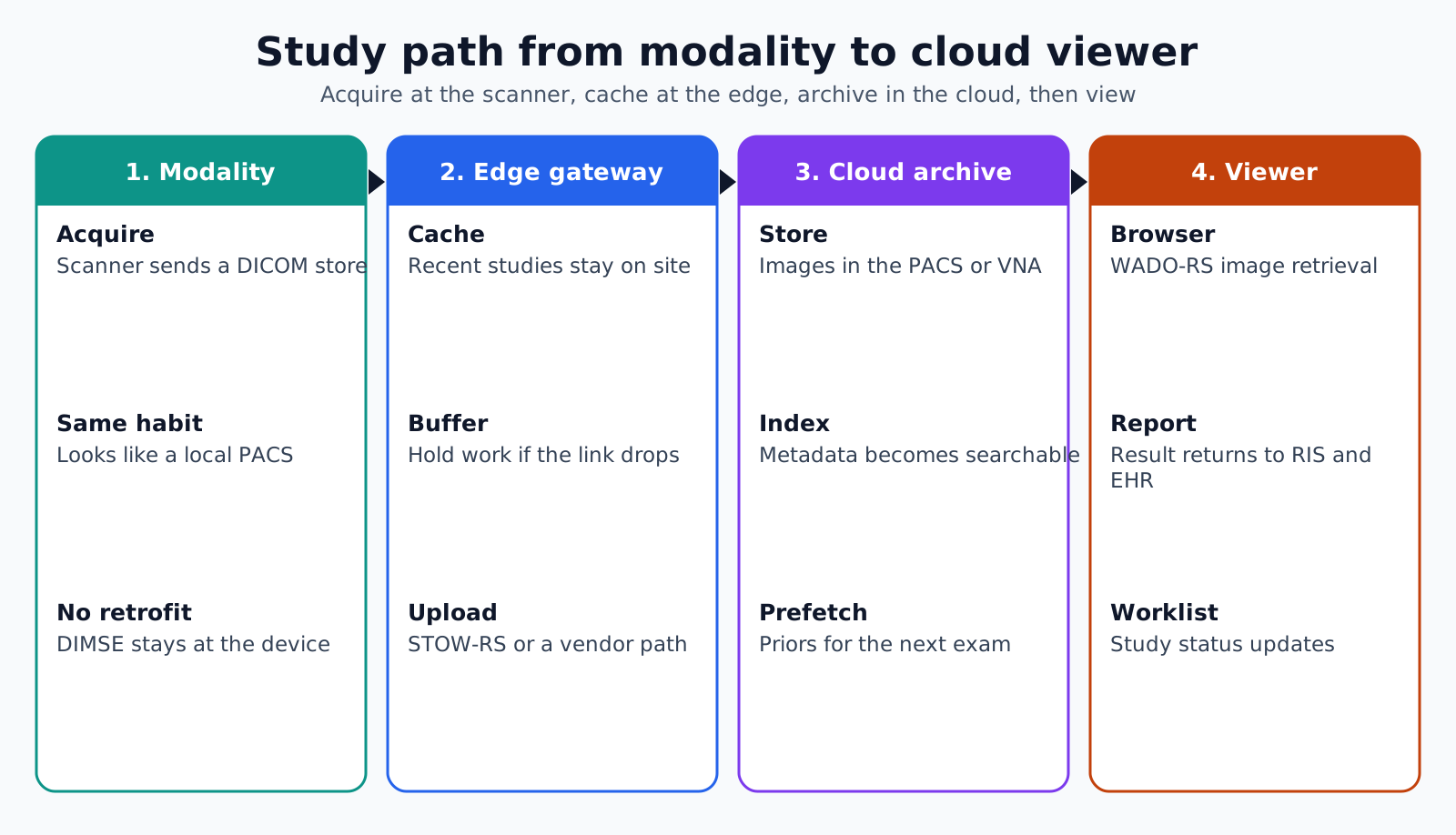
A study moves from the modality to a local edge gateway, from the gateway to the cloud archive, and from the archive to the viewer, with reports and status flowing back to the RIS and EHR. Each hop uses the protocol best suited to it.
- 1. Acquire: The modality sends the study to the edge gateway with a DICOM store request, exactly as it would to a local PACS.
- 2. Cache: The gateway keeps a local copy for a set period, so recent studies stay available if the internet link fails.
- 3. Upload: The gateway sends the study to the cloud archive over an encrypted connection, often using DICOMweb STOW-RS.
- 4. Index: The cloud archive stores the images, indexes the metadata and makes the study searchable.
- 5. View: Radiologists and clinicians open the study in a browser viewer that retrieves images with DICOMweb WADO-RS.
- 6. Report: The radiologist's report returns to the RIS and EHR, and the study status updates on the worklist.
- 7. Prefetch: For scheduled exams, the gateway or viewer pulls relevant prior studies before the patient arrives.
DICOM's overview of DICOMweb lists the RESTful services defined in PS3.18, including QIDO-RS for search, WADO-RS for retrieval, STOW-RS for storage and UPS-RS for worklist tasks. It also notes that DICOMweb can act as a proxy for traditional DIMSE services, which is why existing modalities do not need to be retrofitted to work with a cloud archive.
Why keep an edge gateway on site?
Keep an edge gateway on site because modalities, local workstations and the hospital network need something close by to talk to. It translates between the scanner's protocol and the cloud, buffers studies when the link is slow and keeps recent images local for speed.
- Protocol bridge: Receives DIMSE traffic from modalities and forwards it to the cloud with DICOMweb or a vendor's upload service.
- Outage buffer: Holds studies and keeps them viewable locally when the internet connection drops.
- Local speed: Serves the current day's studies and prefetched priors from the local network.
- Routing rules: Sends specific studies to AI tools, teleradiology partners or research archives.
- Tag cleanup: Fixes inconsistent patient identifiers or accession numbers before studies reach the archive.
Size the gateway for the worst day, not the average one. A trauma surge or a backlog after an outage can push far more data through it than normal volume suggests.
Which model fits: cloud PACS, cloud VNA or hybrid?
Choose cloud PACS when you want the whole reading workflow managed in the cloud, a cloud VNA when you want one long-term archive behind several viewing systems, and a hybrid when you need local performance for reading with cloud scale for storage.
- Cloud PACS: Worklist, viewer and archive all run in the cloud. Suits imaging centers, teleradiology groups and smaller hospitals without imaging IT staff.
- Cloud VNA: A vendor neutral archive in the cloud stores studies from radiology, cardiology and other departments, while each department keeps its own viewer.
- Hybrid: A local PACS handles reading and short-term storage, and older studies move to a cloud archive for long-term retention and disaster recovery.
- Cloud for recovery only: A second copy of every study in the cloud, used when the local archive fails.
Many organizations start with cloud for recovery or long-term storage, then move reading to the cloud once radiologists trust the viewer performance.
How do you plan bandwidth and viewer performance?
Plan bandwidth from your own study volumes and sizes by modality, measured at peak hours, not from vendor averages. Radiologists will judge the whole project on how fast the first image appears.
- Measure volume: Count studies per hour by modality and size, using a few weeks of logs from the current PACS.
- Plan uploads: Make sure the uplink can clear the peak hour's studies without a growing queue.
- Use streaming viewers: Viewers that load the visible images first make large studies usable before every slice has arrived.
- Prefetch priors: Pull comparison studies before the exam, so reading does not wait on a cloud retrieval.
- Use lossless compression: Reduce transfer size where the archive and viewer support it, without changing diagnostic quality.
- Test remote reading: Measure image load times from radiologists' home networks, not only from the hospital.
Run a reading pilot with a few radiologists on real worklists before cutover. Their feedback on scroll speed, hanging protocols and tools matters more than any network test.
What does HIPAA require for cloud imaging?
HIPAA treats the cloud provider as a business associate and requires the imaging organization to plan for backup, recovery and emergency operation. Images and their metadata are protected health information like any other part of the record.
HHS guidance on cloud computing states that a cloud service provider that creates, receives, maintains or transmits ePHI for a covered entity is a business associate, even if the data is encrypted and the provider has no key. A BAA is required with the cloud provider and with any imaging vendor that runs the platform. The Security Rule's contingency plan standard at 45 CFR 164.308(a)(7) also requires a data backup plan, a disaster recovery plan and an emergency mode operation plan.
- Access controls: Viewer access tied to the organization's identity provider, with roles for radiologists, referring clinicians and staff.
- Audit logs: Every study opened, downloaded or shared recorded with user and time.
- Sharing links: Time-limited, revocable links for patients and outside clinicians, never open public URLs.
- Downtime plan: A tested procedure for reading from the edge cache during a cloud or network outage.
Keep a second copy of the archive in a separate region or account, and restore a sample of studies from it on a schedule. That test is the only proof the recovery plan works.
How do you migrate an existing archive to the cloud?
Migrate an existing archive in waves, starting with recent studies that radiologists need for comparison and moving older studies in the background. A full archive can hold many years of data, so migration often runs for months alongside live work.
- Inventory: Count studies, series and images by year and modality, and find studies with missing or conflicting identifiers.
- Priority order: Move recent studies and priors for scheduled patients first.
- Tag mapping: Fix patient identifiers, accession numbers and institution names during the move, with a log of every change.
- Verification: Compare study and image counts, and spot-check images in the cloud viewer against the source.
- Dual running: Keep the old archive readable until the migration is verified and the retention plan is signed off.
- Deletion: Retire the old archive only under the organization's records retention policy.
Old archives often hold proprietary formats, compressed studies or reports stored inside the PACS database. Find those early, because they can add weeks to a migration that looked simple on paper.
Where do cloud imaging costs surprise teams?
Cloud imaging costs surprise teams in storage growth, data retrieval and egress, and in duplicate copies that nobody planned for. Model costs over the full retention period, not just the first year.
- Storage tiers: Move older studies to cheaper archive tiers, but check retrieval time and price for those tiers.
- Egress: Charges for data leaving the cloud, such as large exports to outside providers or a future migration away.
- Copies: Backup copies, cross-region replicas and AI processing copies each add storage cost.
- Retention: Studies kept past the required period because nobody owns the deletion process.
Ask each vendor for a five-year cost model built on your own study growth, including retrieval of older studies and a full export at the end of the contract. Comparing vendors on those totals avoids choosing the one with the lowest first-year storage price and the highest exit bill.
Cloud imaging failure points
- No local cache: A single internet outage stops reading across the department.
- Slow priors: Comparison studies are fetched only when opened, and radiologists wait on every case.
- Dirty identifiers: Mismatched patient IDs from old systems split one patient's history across several records.
- Untested recovery: Nobody has restored a study set from the backup copy since go-live.
- Exit not planned: The contract does not define how studies are returned in standard DICOM if the vendor changes.
How Agnotic can help
Agnotic Technologies builds cloud imaging systems for hospitals, imaging centers and teleradiology groups: edge gateways that bridge DIMSE and DICOMweb, cloud archives, browser viewer integrations, routing to AI and reading partners, and archive migrations with tag cleanup and verification.
Each project includes a downtime plan, recovery tests and an exit clause that returns studies in standard DICOM, so the archive stays yours whichever vendor runs it.
Move imaging to the cloud without slowing reads
Plan a cloud PACS or VNA with our imaging engineers, or read more guides in the imaging hub.
Related reading on Agnotic
Read about imaging standards, AI in imaging, cloud computing in healthcare, managed cloud operations and radiology workflow software.


