



A diagnosis model that scores well in a notebook is a long way from one clinicians can rely on. Between the two sit data that must stay protected, labels that must be trusted, validation that must convince a clinical lead, a release process that must be repeatable and monitoring that must catch a model going stale.
This post walks through that pipeline on Amazon SageMaker AI, stage by stage: data, labels, training, validation, deployment and monitoring. It also covers where these projects fail, who owns each stage and how to tell whether the automation is helping.
What does health diagnosis automation with SageMaker involve?
Planning a diagnosis model on AWS?
Our machine learning development service builds, validates and runs clinical models for healthcare teams.
Health diagnosis automation with Amazon SageMaker AI is a pipeline that turns labeled clinical data into a validated model, serves its predictions inside a clinical workflow and watches the model for drift. The work spans protected data storage, training, clinical validation, controlled release and monitoring. Agnotic Technologies builds these pipelines on AWS for clinical teams.
AWS lists Amazon SageMaker AI among its HIPAA eligible services, excluding Studio Lab, Ground Truth Plus and the public and vendor workforce features, and says covered entities and business associates must enter an AWS business associate agreement before using these services with protected health information.
What should automation mean for a diagnosis model?
In most projects, automation means the model suggests, ranks or flags, and a clinician decides. A model that reorders a worklist or highlights a possible finding is far easier to validate and govern than one that issues a diagnosis on its own.
Write the intended use down before any data work: who sees the output, at what point in the workflow, and what they do with it. That statement drives the labels, the validation plan and the regulatory review.
FDA's Clinical Decision Support Software guidance explains which decision support functions meet the non-device criteria in section 520(o)(1)(E) of the FD&C Act and which remain device software functions.
What does the pipeline look like from end to end?
The pipeline has six stages, and each one hands a versioned artifact to the next: stored data, a labeled cohort, a trained model, an approved model package, a serving endpoint and monitoring reports. Monitoring feeds back into the data stage when the model needs retraining.
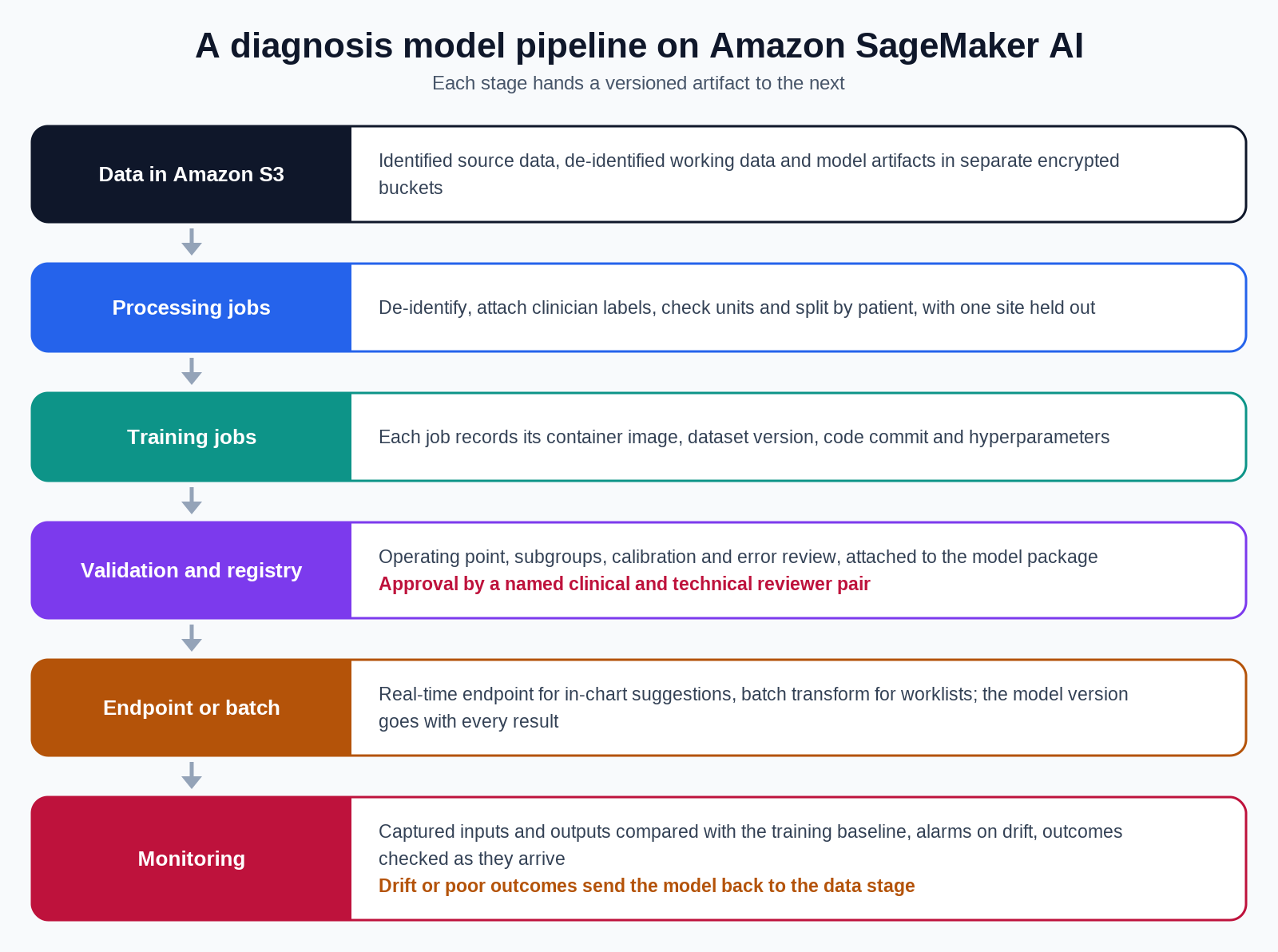
Keep every stage in code. A pipeline that someone rebuilds by hand from notebooks cannot be audited, and it will not produce the same model twice.
How should the data layer be set up?
Store source extracts and derived datasets in encrypted Amazon S3 buckets inside your own AWS account, with access limited to the roles that need each one. Keep raw data with identifiers apart from the training copies.
- Separation: identified source data, de-identified working data and model artifacts in different buckets.
- Encryption: customer managed keys, with key use limited to pipeline roles.
- Network: processing and training jobs run in private subnets with no open internet route.
- Versions: every dataset gets an identifier that the trained model records.
How are labels and cohorts built?
Labels decide what the model learns, so they need the same care as the model. Record who labeled each case, from which source, and how disagreements were settled.
Split data by patient, never by record, so one person's visits cannot appear in both training and test sets. Where data comes from several sites, hold one site out entirely to see how the model behaves somewhere it has never seen.
Check the cohort against the intended use. A model meant for adult outpatients should not be trained mostly on inpatient records from one specialty.
Training jobs on SageMaker AI
Run training as SageMaker AI training jobs, not inside a notebook. Each job then has a recorded container image, input data location, hyperparameters and output model, which makes results repeatable and reviewable.
Tag each job with the code commit and dataset version. When a reviewer later asks why version three behaves differently from version two, the answer should come from records, not memory.
Tune on the validation split only. Touching the held-out test set during tuning makes the final numbers look better than the model is.
How do you validate a diagnosis model before release?
Validate against the intended use with clinicians, not only against a metric. Agree the operating threshold, the subgroups to check and the results that would stop the release before anyone sees the numbers.
- Operating point: sensitivity and specificity at the threshold clinicians will use.
- Subgroups: results by age, sex, site and device or lab source.
- Calibration: whether predicted risk matches what actually happened.
- Error review: a clinician reads a sample of false positives and false negatives.
Register each candidate in the SageMaker Model Registry with its validation report attached. Only a named clinical and technical reviewer pair should be able to change its status to approved.
Should predictions run in real time or in batches?
Choose by where the output is used. A suggestion shown while a clinician has the chart open needs a real-time endpoint; a ranked worklist built before a clinic session can run as a batch transform job.
Either way, results reach clinicians through the integration layer, written back as an HL7 v2 result message or a FHIR resource that the EHR displays. Include the model version with every prediction so any result can be traced.
How does a new model version reach clinicians?
Release new versions in steps. Run the new model in shadow first, scoring the same cases as the live model without showing results, and compare the two before switching any traffic.
Then move a small share of traffic, watch the measures agreed at validation, and keep the previous version ready to restore. A rollback should be one approved action, not a rebuild.
How do you monitor a diagnosis model in production?
Monitor inputs, outputs and outcomes. Inputs drift when a lab changes an assay or a site changes a device; outputs drift when the share of flagged cases moves; outcomes show whether flags were right once ground truth arrives.
AWS documentation for Amazon SageMaker Model Monitor lists four kinds of production monitoring, data quality, model quality, bias drift and feature attribution drift, and notes that Model Monitor is no longer open to new customers.
New projects therefore plan their own checks: scheduled processing jobs that compare captured inputs and outputs with a training baseline, with Amazon CloudWatch alarms on the results. Outcome checks lag, because confirmed diagnoses often arrive weeks after the prediction.
Where do SageMaker diagnosis pipelines fail?
Most failures are in data and process, not in the training code.
- Leakage: features that are recorded only after the diagnosis, such as a treatment order.
- Patient overlap: the same person in training and test data.
- Single-site validation: a model that never saw a second hospital.
- Silent input change: a new lab unit or device that nobody told the model team about.
- No version on the prediction: results that cannot be traced to a model.
A worked example: flagging possible kidney disease from routine labs
A primary care group wanted to flag adults whose routine lab results suggested undiagnosed chronic kidney disease. The intended use was a weekly list for care managers, so the team chose a batch transform job rather than a real-time endpoint.
Validation exposed a problem: one site reported a key lab value in different units, and the model scored those patients poorly. The team added a unit check in processing, retrained, and validated again with that site held out.
After release, a drift check on input distributions caught a lab vendor change at another site before care managers noticed odd lists. The team paused that site's scoring until the mapping was fixed.
Who owns what?
A diagnosis pipeline needs clear owners at each stage.
- Clinical lead: intended use, labels, operating threshold and release approval.
- Data engineering: extracts, de-identification, dataset versions and unit checks.
- ML engineering: training jobs, registry entries, endpoints and drift checks.
- Security and compliance: AWS account controls, the business associate agreement and access reviews.
- Integration team: delivering results into the EHR with the model version attached.
How do you know the automation is helping?
Measure the clinical workflow, not only the model. A model with strong validation results that nobody acts on has not automated anything.
- Use: how often flagged cases are opened and acted on.
- Agreement: how often clinicians accept or override the suggestion, and why.
- Outcome: confirmed findings among flagged cases once ground truth is available.
- Stability: drift alerts raised, investigated and resolved per month.
What are SageMaker diagnosis automation best practices?
Write the intended use first, keep data and models in your own encrypted AWS account under a business associate agreement, split by patient and hold out a site, and run every stage as versioned pipeline code.
Validate with clinicians at the real operating threshold, release through shadow and partial traffic, put the model version on every prediction, and build your own drift and outcome checks from the start.
How Agnotic can help
Agnotic builds diagnosis model pipelines on Amazon SageMaker AI for healthcare teams: data layers with protected health information kept apart, labeled cohorts, training jobs, clinical validation packages, staged releases, EHR delivery of results and drift monitoring.
Plan a clinical decision support model with Agnotic
Our clinical decision support page covers how we bring model output into clinician workflows.
Related reading on Agnotic
Diagnosis AI, validation and clinical integration.


