Video is the part of a telehealth product that patients notice first and engineers underestimate most. A visit that freezes, drops or leaks a patient's name into a vendor dashboard costs more trust than any other bug.
This post is about the video layer itself: whether to build on WebRTC, use a video SDK or embed a meeting tool, which parts of that stack need a business associate agreement, when to record, how relay servers fit, and what the call logs end up holding. It is written for teams choosing the stack, not for clinics choosing an app.
What is HIPAA compliant video conferencing?
Building a telehealth product with video?
Our HIPAA-ready development page explains how we design the safeguards, vendor agreements and logs around each feature.
HIPAA compliant video conferencing is a video visit setup where every system that carries, stores or logs the call protects it under the HIPAA Rules, and every vendor in that path has signed a business associate agreement. Agnotic Technologies treats the video layer as several data paths, each with its own owner and controls.
HHS ended its COVID-19 enforcement discretion for telehealth in August 2023, so covered health care providers must now use remote communication technologies in line with the HIPAA Rules.
Should you build on WebRTC, use a video SDK or embed a meeting tool?
Most telehealth products should use a video SDK from a vendor that signs a BAA, unless video quality is the product itself. Building directly on WebRTC gives full control but makes your team responsible for relay servers, scaling and every browser quirk.
- Build on WebRTC: you run signaling, relay and media servers. Most control, most operational work, and a team that must keep up with browser changes.
- Video SDK: the vendor runs the media infrastructure and you build the visit experience. Faster to ship, but you depend on their BAA, regions and logging.
- Embedded meeting tool: quickest to launch, least control over the waiting room, branding, data and what the vendor stores.
Decide on the questions that matter to your product: group visits or one to one, interpreters joining, recording, low-bandwidth regions and whether video must run inside a native app.
Where does a telehealth call's data actually go?
A call's data goes to at least three places: your signaling server, which sets up the room; the media path, which carries audio and video; and the logs that each system writes. Recording, if enabled, adds a fourth.
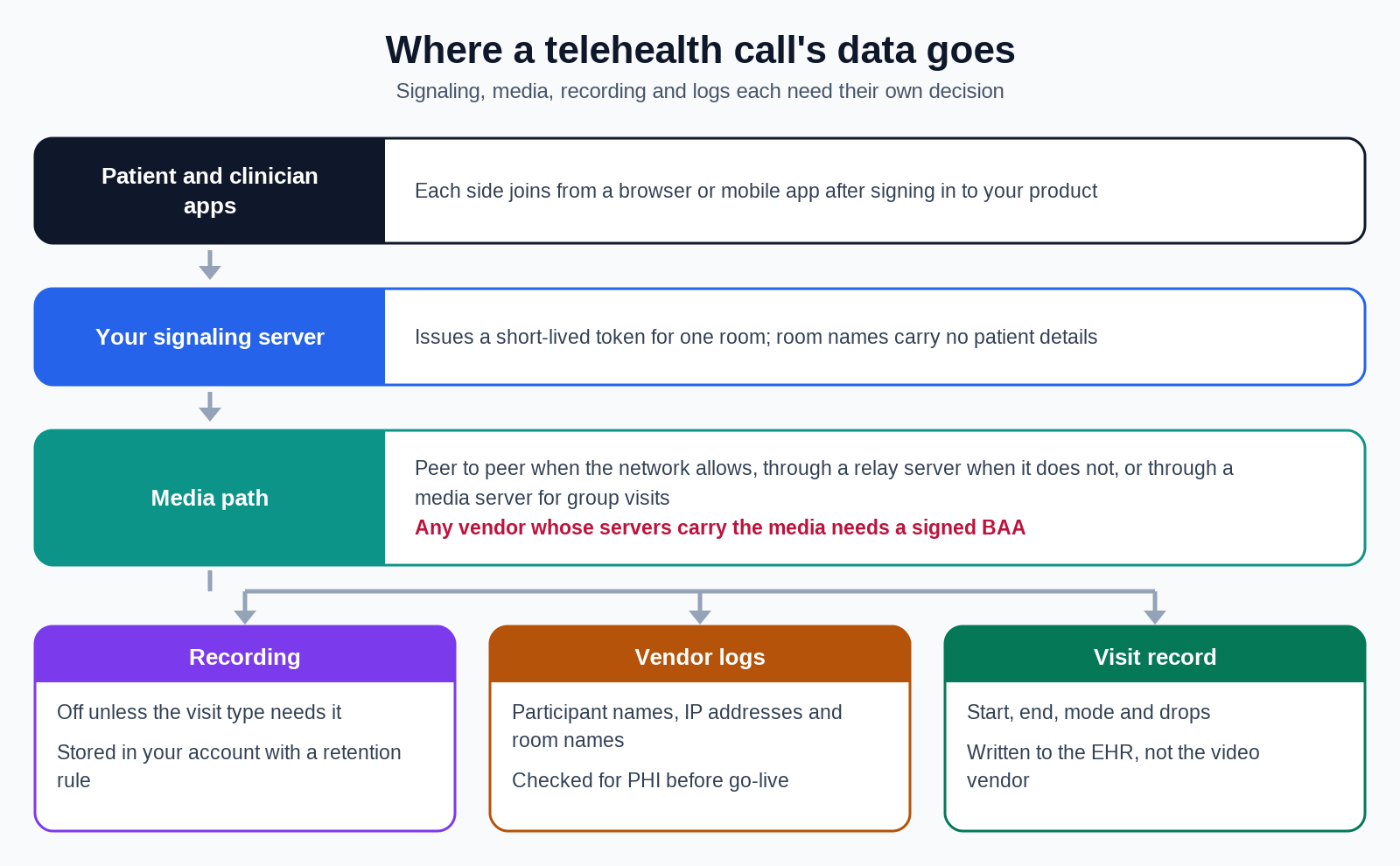
Draw this for your own stack before choosing a vendor. Each box is a place where protected health information can land, and each needs a decision about storage, access and retention.
Which parts of the video stack need a BAA?
Any vendor whose servers carry the media, store recordings or keep logs that identify patients needs a BAA. That often includes more companies than the video vendor itself.
A HIPAA covered entity may share protected health information with a business associate, such as a software vendor, only under a business associate agreement that commits the vendor to safeguard it.
- Relay servers: if a third party runs them, media passes through their network even when encrypted.
- Recording storage: the bucket that holds visit recordings and the service that processes them.
- Add-ons: transcription, captioning or interpreter services connected to the call.
- Monitoring: call quality and error tools that receive participant details.
Should telehealth visits be recorded?
Most visits should not be recorded. A recording is a large, sensitive record that must be stored, protected, retained and produced on request, and few clinical workflows need it.
If a visit type does need recording, such as supervised training or a documented assessment, switch it on per visit type rather than globally. Tell the patient on screen, store the file in your own cloud account with a retention rule, and limit playback to named roles.
Relay servers and media servers
Relay servers carry media when two devices cannot connect directly, which is common on hospital and corporate networks. Media servers route streams for group visits and are needed when more than two people join.
Both should run in regions you have chosen, with encryption from end to end of each hop. If you host them yourself, size them for peak clinic hours and monitor them like any other production service, because a full relay server looks to users like a broken app.
What do video logs reveal about patients?
Video logs often reveal more than teams expect: display names, room names, IP addresses, device details and call timings. Put together, these can show who saw which clinician and when.
- Room names: generate random identifiers, never a patient name or appointment reason.
- Display names: show first name or initials in the call, and keep full names in your own system.
- Vendor dashboards: check what support staff at the vendor can see, and who on your side has access.
- Retention: set the shortest log retention the vendor allows that still supports troubleshooting.
Security Rule safeguards in the video layer
The HIPAA Security Rule requires administrative, physical and technical safeguards for electronic protected health information.
In the video layer, technical safeguards mean short-lived room tokens tied to a signed-in user, encrypted transport on every hop and a join and leave log per visit. Administrative safeguards mean a named owner for the vendor relationship and a review of the vendor's settings at least once a year.
What goes wrong with telehealth video builds?
Most problems come from defaults that were never changed and paths that were never mapped. These are the ones we fix most often.
- Reusable meeting links: the same room link sent for every visit, so a forwarded link lets anyone join.
- Patient names in room titles: visible to the vendor and in every log line.
- Recording on by default: files piling up in vendor storage with no retention rule.
- No relay fallback: calls fail on hospital Wi-Fi because direct connections are blocked.
- Uncovered add-ons: a captioning service switched on without its own agreement.
A worked example: a behavioral health practice
Consider a behavioral health practice adding video to its patient app. Visits are one to one, a few involve an interpreter, and the practice does not want recordings at all.
The team picks a video SDK whose vendor signs a BAA and runs relay servers in the right region. Their own server issues a token per visit that expires after the appointment window, and the interpreter joins with a separate token and role.
Recording is disabled in the vendor settings and blocked in code. Room names are random, display names are first names only, and the visit record in the EHR holds start, end and connection drops, while the vendor keeps only short-lived quality logs.
Who owns the video layer?
One engineering owner should hold the video stack, and one compliance owner should hold the vendor agreements. Without both, settings drift after launch.
- Engineering owner: SDK upgrades, relay capacity, token rules and call quality monitoring.
- Compliance owner: BAAs for each vendor in the path, settings reviews and access to vendor dashboards.
- Clinical lead: which visit types allow recording, interpreters or group participants.
- Support lead: the script for a patient who cannot connect, including the phone fallback.
How do you test the video layer before launch?
Test it on the networks and devices your patients and clinicians really use, and test the data paths, not only the picture quality.
- Networks: a hospital guest network, a home connection and a weak mobile signal.
- Fallback: block direct connections and confirm the call moves to the relay server.
- Links: try to join with an expired token and with a forwarded link.
- Logs: read the vendor dashboard and your own logs after a test call and look for patient details.
- Settings: confirm recording stays off when a user tries to switch it on.
What are HIPAA compliant video conferencing best practices?
Map every data path, sign a BAA with every vendor on it, keep recording off unless a visit type needs it, and keep patient details out of room names and logs. Use short-lived tokens per visit and review vendor settings on a schedule.
Choose the stack on product needs first, then confirm the vendor can meet the safeguards, rather than adapting the product to whatever the vendor offers by default.
How Agnotic can help
Agnotic builds the video layer inside telehealth products: vendor selection against your visit types, token and room design, relay and region setup, recording rules and the logging review. We also connect the visit record back to the EHR, so the clinical record stays the source of truth.
Build your telehealth video layer with Agnotic
We design the data paths, vendor agreements and fallbacks before the first patient joins.
Related reading on Agnotic
Telehealth rules, security and platform choices.