



Not every remote consult needs a video call. A dermatologist can review a rash from good photos, a retina specialist can read a fundus image, and a cardiologist can interpret an ECG, all without the patient and clinician being online at the same time.
That is store and forward telehealth. This guide covers how it works, where it fits and where it does not, what Medicare allows, and how to design the capture, routing and EHR steps so the consult answers the question the first time.
What is store and forward telehealth?
Building an asynchronous consult service?
Agnotic builds telemedicine platforms with store and forward capture, specialist queues and EHR integration.
Store and forward telehealth is asynchronous care: a clinician or patient captures images, recordings or test results with a short history, sends them securely, and a specialist reviews them later and returns a written answer. Nobody needs to be online at the same time, which suits specialties that diagnose mainly from what they see.
The federal Medicare rules use the same idea. Under 42 CFR 410.78(a)(1), asynchronous store and forward technologies means the transmission of a patient's medical information from an originating site to the physician or practitioner at the distant site.
How does a store and forward consult work?
A store and forward consult moves through five steps: capture, send, queue, review and return. The quality of the first step decides whether the last one is an answer or a request for more information.
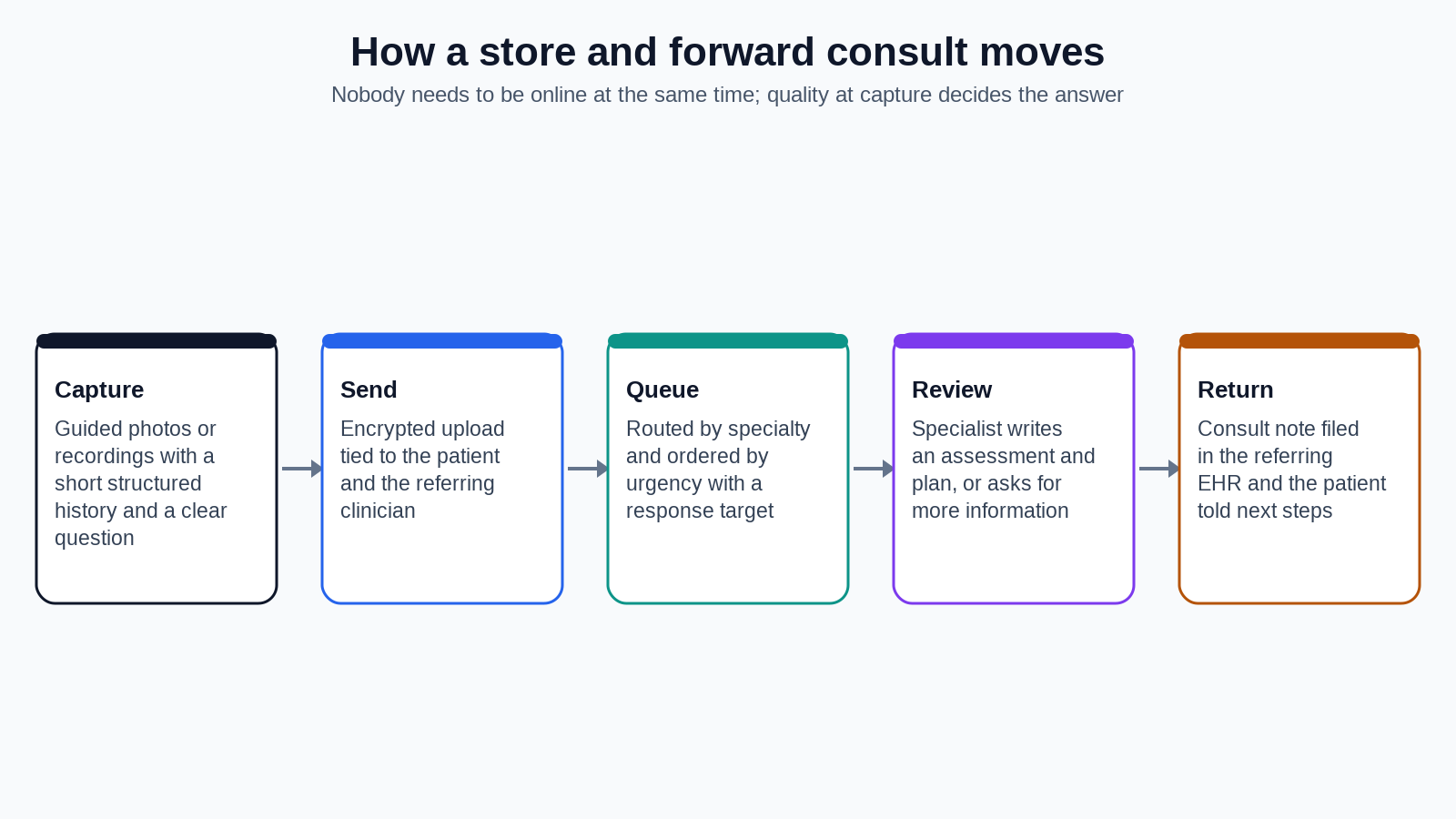
- 1. Capture: The referring clinic or the patient takes the images or recording and answers a short structured history for the condition.
- 2. Send: The case is encrypted and uploaded with the patient's identity, the referring clinician and the question being asked.
- 3. Queue: The platform routes the case to the right specialty and orders it by urgency, with a target response time for each level.
- 4. Review: The specialist reads the case, asks for more information if needed, and writes an assessment and plan.
- 5. Return: The answer goes back to the referring clinician, ideally into their EHR, and the patient is told what happens next.
The two ends are the hard parts. Capture fails when photos are blurred or the history is missing, and return fails when the answer arrives as a PDF in an inbox nobody checks. The middle three steps are ordinary workflow software.
Which specialties use store and forward the most?
The specialties that use it most diagnose from images or tracings: dermatology, ophthalmology, radiology, cardiology and wound care. They share one trait: a specialist can reach a decision without examining or questioning the patient in real time.
- Dermatology: Close-up and overview photos of a lesion or rash, with location, duration and changes.
- Ophthalmology: Retinal images from screening cameras in primary care, read for diabetic eye disease.
- Radiology: Imaging studies read remotely, often the oldest form of store and forward.
- Cardiology: ECGs and ambulatory rhythm recordings interpreted by a cardiologist.
- Wound care: Serial photos of a wound over weeks, with measurements, to track healing.
- E-consults: A primary care question to a specialist, answered in writing from the chart, often with no images at all.
Start with one specialty and one referral path. A dermatology service for a group of primary care clinics, for example, teaches you what good capture looks like and how long reviews really take, and those lessons carry over when the second specialty joins.
When is store and forward the wrong choice?
It is the wrong choice when the specialist needs to examine, question or reassure the patient, or when the condition may be urgent. In those cases a live visit, by video or in person, is safer and usually faster overall.
- Urgent symptoms: Anything that might need same-day action should go to a live channel, with the store and forward form screening for it.
- Complex history: Conditions where the diagnosis depends on follow-up questions lead to long back-and-forth threads.
- Physical findings: Problems that need touch, movement or sound to assess cannot be judged from photos.
- Difficult news: Results that need a conversation should not arrive as a written message.
Build the escape route into the product. A reviewer who decides a case needs a live visit should be able to book one from the case screen, with the history carried over, instead of starting again.
What does Medicare allow for store and forward?
Medicare's telehealth rules allow store and forward only in narrow circumstances, so most programs rely on other payment routes. Check the current rules, state Medicaid policies and commercial contracts before designing a service around reimbursement.
42 CFR 410.78(a)(4) states that, for asynchronous store and forward telecommunications technologies, the only originating sites are Federal telemedicine demonstration programs conducted in Alaska or Hawaii. Paragraph (d) repeats the limit for Medicare telehealth payment.
Many services are paid in other ways, such as e-consult arrangements between clinics, health system budgets, employer programs or commercial plans. That is a business decision for your finance and compliance teams. What matters for the build is recording the referring and reviewing clinician, the time spent and the question answered, so whichever billing route applies has the data it needs.
How do you design capture so cases are reviewable?
Design capture around what the specialist needs to decide, and guide the person taking the photos step by step. A structured form with required images beats a free upload box every time.
- Required views: For skin, an overview photo for location and a close-up for detail, each with an on-screen guide.
- Quality checks: Warn on blur, poor light or a missing scale marker before the case can be sent.
- Structured history: Short condition-specific questions, such as duration, change, symptoms and treatments tried.
- Clear question: Make the referrer state what they want answered, such as diagnosis, management or whether to refer.
- Identity: Tie every image to the patient record at capture, never by matching file names later.
Test capture with the people who will do it, in the room where they will do it. Exam room lighting, phone models and busy clinic days produce problems no lab test shows.
How should store and forward connect to the EHR?
The referral should start from the referring clinician's EHR and the answer should land back in it, filed against the patient as a consult note. Anything less creates a parallel record that gets missed.
- Launch: Start the referral from the chart with SMART on FHIR or an order, so patient and clinician details come across.
- Images: Store clinical images in the platform or a PACS, and link them from the note rather than pasting them in.
- Answer: Return the assessment as a structured consult note through FHIR or an HL7 v2 result message.
- Status: Show the referring clinician whether the case is waiting, in review, needs more information or is complete.
Every party that touches the case needs the right contract. Under 45 CFR 160.103, a business associate includes a person that creates, receives, maintains or transmits protected health information on behalf of a covered entity, which describes most store and forward platform and hosting vendors.
What are store and forward telehealth best practices?
The best practices all aim at one thing: a complete case that gets a usable answer in one round. These are the ones we build into every asynchronous service.
- Set response targets: Publish a turnaround time for each urgency level and track it per specialty.
- Close the loop: Every case ends with an answer, a booked visit or a documented reason, never silence.
- Measure rejects: Track how many cases come back for more information, and fix the capture step that caused them.
- Audit access: Log every view of a case and its images, as with any other part of the record.
- Keep consent clear: Tell patients in plain words that a specialist will review their case later, not live.
How Agnotic can help
Agnotic Technologies builds store and forward services end to end: guided capture apps with quality checks, specialty queues with response targets, reviewer workspaces, and the EHR integration that sends the answer back into the chart. We work alongside your clinical leads so the forms match the questions your specialists actually need answered.
If you already run live video visits, we can add an asynchronous path to the same platform, so cases move between the two without being entered twice.
Add asynchronous consults to your service
Plan a store and forward platform with our engineers, or read more articles in the telehealth hub.
Related reading on Agnotic
Read about building the wider telemedicine platform, keeping it secure and HIPAA-ready, specialty services and connecting telehealth to the EHR.


