


Maternal health startup Epic integration is the work of moving pregnancy, postpartum and maternal mental health data between a startup's product and the Epic chart a health system's obstetric team uses. It decides whether clinicians see your data without a second login, and whether your product starts at the right moment in a patient's care.
This guide compares the main integration paths, explains which privacy rules follow from each, covers writing home readings back to the chart, and lists what to agree with the first health system customer before code is written.
What does Epic integration involve for a maternal health startup?
Connecting a maternal health product to Epic?
Agnotic builds maternal health apps and the Epic connections behind them, from SMART on FHIR launches to HL7 v2 feeds agreed with the health system.
Epic integration for a maternal health startup means exchanging data between the startup's product and a health system's Epic instance through one of three paths: a patient app that reads the record after the patient signs in, a clinician app launched inside the Epic chart, or a back-end feed of admissions, discharges and results.
Epic's obstetric module, Stork, holds much of the prenatal, labor and delivery documentation a maternal product cares about. The path you choose decides who signs in, how much of that data you can read, and whether anything your product collects can be written back.
Are you building for the patient or for the health system?
The first decision is whose product this is in HIPAA terms, because it sets your contracts and your privacy duties. The same app code can fall under different rules depending on who offers it to the patient.
- Patient-chosen app: HHS guidance on the HIPAA right of access says an app the individual chooses, with no relationship to the provider, is not the provider's business associate just because it receives her records at her request. Once the data reaches that app, HIPAA no longer protects it.
- App offered for the health system: If your app is developed for the health system or provided on its behalf, for example a postpartum program the hospital enrolls its own patients into, HHS says a business associate agreement is required before PHI flows.
- Consumer apps outside HIPAA: The FTC's 2024 amendments to the Health Breach Notification Rule (16 CFR Part 318), effective 29 July 2024, make clear the rule covers health apps not covered by HIPAA, and that an unauthorized disclosure of health data counts as a breach.
If one codebase serves both a consumer audience and health system customers, keep the two populations in separate tenants with separate privacy notices and data flows. That separation makes it clear which rule applies to each record.
Which Epic integration path should a maternal health startup take?
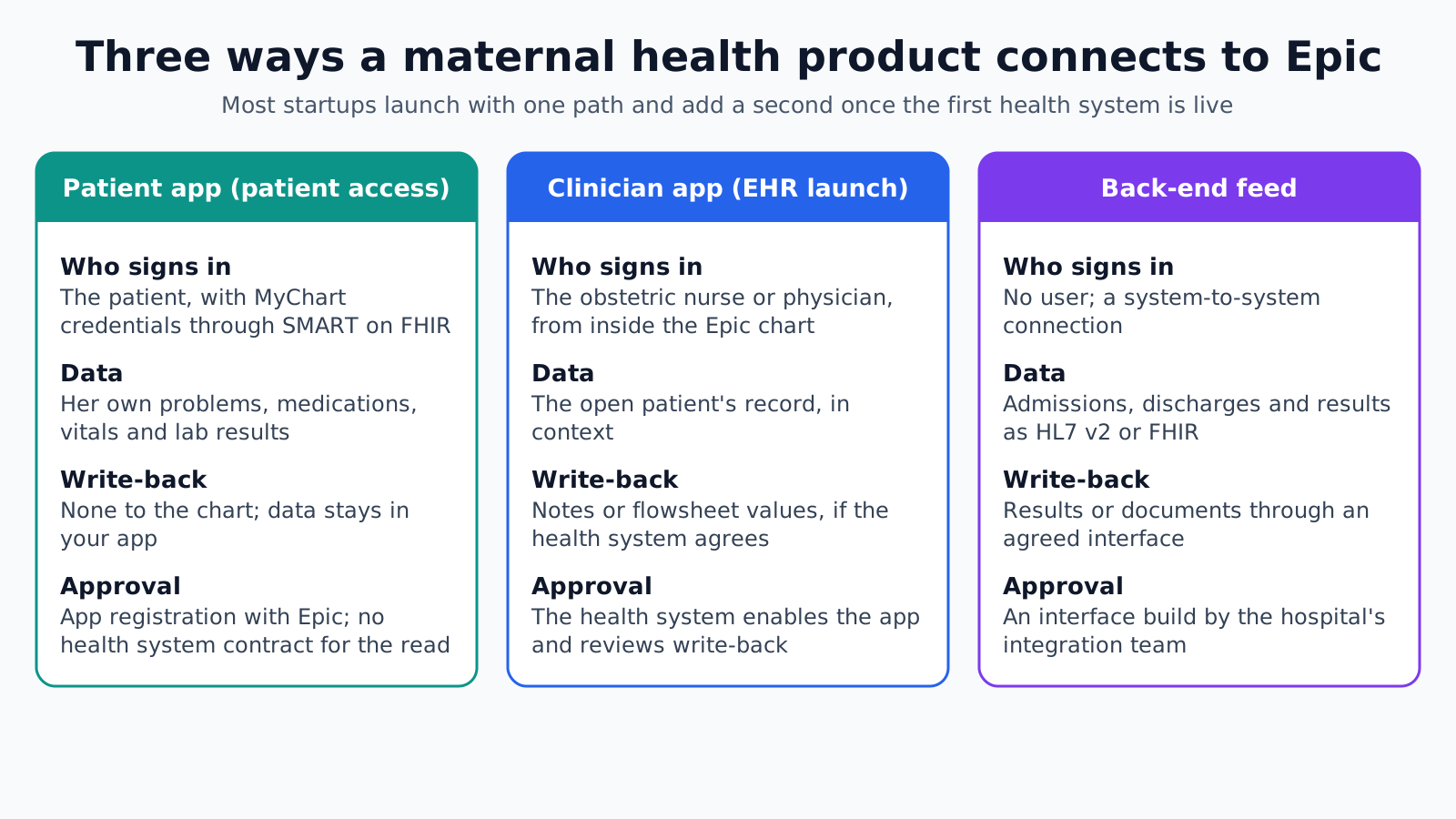
The right path depends on what the product must do first: show the patient her own record, put your tool in front of the obstetric team, or start a program when a clinical event happens. The three paths differ on who signs in, which data you receive, whether you can write back and who must approve the connection.
- Patient app with patient access: The patient signs in with her MyChart credentials through a SMART on FHIR standalone launch, and your app reads her own record through Epic's FHIR R4 APIs. The read rests on her authorization rather than a contract with the health system, though the app must be registered with Epic first. There is no write-back on this path.
- Clinician app launched in Epic: The obstetric nurse or physician opens your app from inside the chart with a SMART EHR launch, which passes the patient, encounter and user context. The health system must enable the app in its Epic build and usually runs a security review first.
- Back-end feed: HL7 v2 ADT and result messages from the health system's interface engine or Epic Bridges, or a FHIR backend services connection, send events to your platform. A typical use is enrolling a patient in a postpartum program at discharge. The hospital's interface team has to build it.
A product can start with one path and add another when a health system goes live. A postpartum blood pressure program, for example, might use a discharge feed to enroll patients and a clinician launch to show the trend inside the chart.
What does the (g)(10) API give you, and what does it not?
The (g)(10) API gives you standardized read access to core clinical data, and nothing more. ONC (ASTP) certification criterion 45 CFR 170.315(g)(10) requires certified EHRs, Epic included, to offer a standardized API for patient and population services: USCDI data through US Core profiles, SMART App Launch for authorization and Bulk Data for populations.
For a maternal product, that read usually covers Patient, Condition, Observation for vitals and labs, MedicationRequest, AllergyIntolerance, Encounter and clinical notes through DocumentReference. It is enough to show a patient her own labs or to pre-fill an intake form.
It does not cover writing. Filing a note, a flowsheet value or a questionnaire result into the chart needs Epic's own write APIs or an inbound HL7 v2 interface, and the health system decides whether to turn either on.
Obstetric detail is the other gap. Values such as the estimated due date, gravida and para counts or labor flowsheet rows may not appear in standard US Core resources at every site. Check what each health system's build returns, first in the Epic sandbox and then against its own test environment.
Writing home readings back to the chart
Home readings can reach the chart in three forms, and each health system picks the one it will support. Agree the form before you build, because it changes your data model and who is responsible for reviewing each value.
- Flowsheet rows: Each blood pressure or glucose value is filed to a flowsheet row the health system maps for you. Clinicians can trend it beside clinic readings, but the mapping differs between Epic customers.
- Summary note: Your platform files a periodic summary, such as a weekly report with averages and out-of-range events. This is lighter for the chart but hides single readings.
- Link only: Readings stay in your platform and the chart holds a link or an in-chart launch. This needs the least interface work but keeps clinicians switching views.
Provenance matters as much as the value. Each reading you send should say whether it came from a connected device or was typed in by the patient, which device took it, the time it was measured and the time it was received. Clinicians weigh a cellular cuff reading differently from a number entered from memory, and a reading synced two days late should not look current.
Volume is the next question. A patient taking blood pressure twice a day for several weeks after delivery produces dozens of values, so agree whether every reading is filed or only a daily summary plus any out-of-range values.
Whichever form is chosen, the chart is not an alerting system. A severe-range blood pressure reading needs its own escalation path to a named person by phone or page, because a value filed to a flowsheet or a message sent to an In Basket may not be seen for hours.
What does the first health system need from you?
The first health system needs a clear, written description of what your product reads, writes and stores, and who on your side answers when something breaks. Having these ready shortens the review cycle.
- Data list: Every FHIR resource or HL7 v2 message you read or write, field by field, and why the product needs it.
- Security questionnaire: Your hosting, encryption, access control, logging and incident response, answered for the environment that will hold their patients' data.
- Contract: A signed business associate agreement before any production PHI flows, if you are acting for the health system.
- App registration: Your Epic client registration details, redirect URLs, requested scopes and the launch type for each user group.
- Test plan: Test patients and scenarios, including a delivery, a newborn record and a readmission, run with their Epic analysts.
- Support and downtime: A named contact, a support process and a manual fallback, such as a fax or portal message, for the first weeks live.
Where Epic projects for maternal products stall
Maternal integrations tend to stall on the same handful of points. Each one is cheaper to settle in the first scoping call than after the build.
- Promised write-back: A sales deck that promises chart write-back before the health system has agreed to it.
- One configuration assumed: Code written as if every Epic customer has the same flowsheet rows, enabled APIs and launch settings.
- Sandbox-only data: Test patients in a sandbox often lack obstetric detail, so gaps appear only in the customer's environment.
- Mother and newborn mixed up: After delivery the newborn has a record of their own. A postpartum program must follow the mother's identifier and never attach her readings to the baby's chart.
- Unwatched inbox: Urgent alerts sent to an In Basket or portal inbox that nobody watches at night or at weekends.
- PHI too early: Production data flowing before the business associate agreement is signed.
How Agnotic can help
For a maternal health startup, the Epic connection is often the item a health system buyer checks first. Agnotic Technologies builds the maternal product and the integration together, choosing the path, mapping data to US Core and HL7 v2, and working with your customer's Epic analysts on what is enabled and what is written back.
Your clinical team owns the escalation rules and what counts as an urgent reading. Agnotic turns them into software, tests it against the Epic sandbox and each customer's build, and documents the data list your buyers ask for.
Plan your first Epic connection with Agnotic
Explore maternal health app development, or browse more articles in our Women's Health hub.
Related reading on Agnotic
Continue with maternal RPM, fertility clinic records, women's health tracking apps and Epic SMART on FHIR integration.


