



Nurses do not need more apps. They need fewer gaps: a handoff that misses the one thing the next nurse had to know, a task buried in a chart nobody had time to open, a message sent to a colleague who already went home.
This post is about nursing apps built to close specific gaps like those: structured shift handoff, task lists that follow assignments, and secure messaging that reaches the right person. It covers how each should work, how they connect to hospital systems, design for a real shift, failure points, a worked example, owners and measures.
Which nursing problems can an app actually solve?
Building tools for nursing teams?
Our AI nursing solutions page covers the workflow and assistant tools we build for nurses.
Problem solving nursing apps target specific workflow failures: incomplete shift handoffs, tasks that are missed or done late, and messages that reach the wrong person or no one. Each app pulls its data from the EHR and staffing systems rather than asking nurses to type it again. Agnotic Technologies builds these apps with nursing teams.
Start with one problem a unit can name and measure. An app that tries to fix handoff, tasks, messaging and documentation at once usually fixes none of them.
Why start from a problem, not a feature list?
Feature lists come from vendors; problems come from nurses. Shadow a few shifts, write down where information is lost or work waits, and rank those gaps by how often they happen and what they cost the patient.
The winning problem is usually small and frequent, such as a pending lab nobody owned after shift change, rather than rare and dramatic. Small, frequent problems also give you enough cases to measure a change within one pilot.
How should a shift handoff app work?
A handoff app gives the outgoing and incoming nurse the same structured view of each patient, filled from the chart, with space for the judgement only the nurse can add. It replaces paper sheets and memory, not the conversation.
AHRQ's TeamSTEPPS communication curriculum includes I-PASS, a structured handoff tool that covers illness severity, a patient summary, an action list, situation awareness and contingency planning, and synthesis by the receiver.
- Prefilled facts: diagnosis, allergies, lines, recent vitals and pending results from the EHR.
- Nurse input: concerns, what to watch and what to do if it happens.
- Acceptance: the incoming nurse confirms receipt, so ownership changes clearly.
- History: past handoffs kept, so a pattern of concern is visible.
What makes a nurse task list useful?
A useful task list shows the nurse's own patients and work due now, built from orders, schedules and protocols. If nurses must add most tasks by hand, the list will be abandoned within a week.
- Sources: medication times, ordered assessments, protocols and reminders.
- Assignment-aware: tasks follow the patient's current nurse, including after reassignment.
- Completion: marking a task done updates the chart, not only the app.
- Escalation: overdue critical tasks go to the charge nurse.
What does secure messaging need in a hospital?
Hospital messaging must reach a role, not just a name, because the right person changes every shift. It must be secure, logged and connected to the record when messages carry clinical decisions.
CMS memo QSO-24-05-Hospital/CAH says hospitals and critical access hospitals may text patient information and orders among the care team through a HIPAA compliant secure texting platform in line with the Conditions of Participation, while computerized provider order entry remains the preferred way to enter orders.
- Role addressing: message the nurse for bed 12 or the charge nurse, resolved from assignments.
- Read status: the sender sees whether the message was read.
- Escalation: urgent messages reroute when unanswered.
- Record: messages that matter clinically saved to the chart.
The HIPAA Security Rule's audit controls standard requires mechanisms that record and examine activity in information systems that contain or use electronic protected health information.
How do these apps connect to hospital systems?
Nursing apps depend on three feeds: patient movement from the EHR, orders and results, and the staffing assignments that say which nurse has which patient. Without assignments, nothing can be routed correctly.
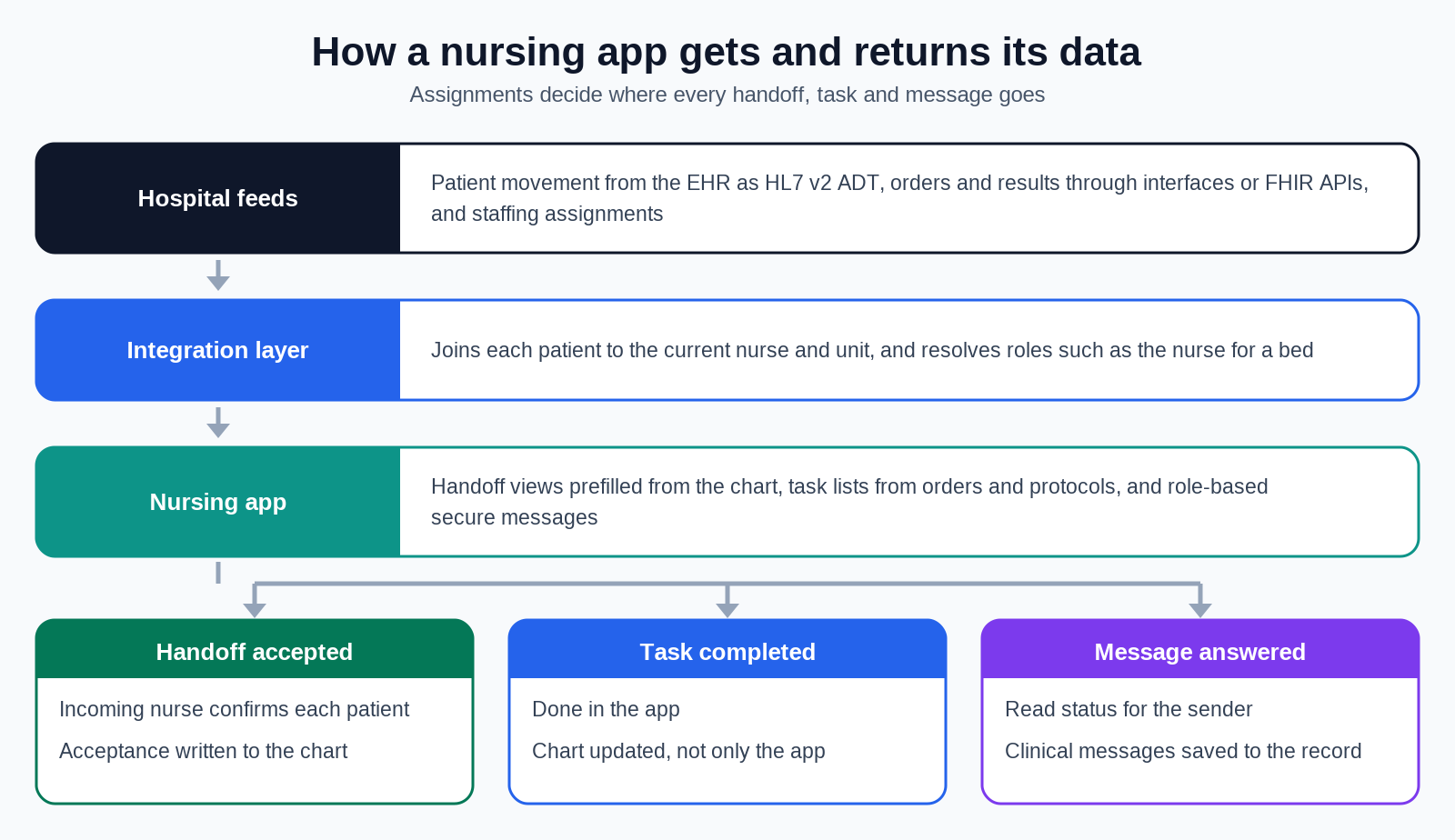
Patient movement usually arrives as HL7 v2 ADT messages, and newer EHR interfaces offer FHIR APIs for orders and observations. Write completed tasks and accepted handoffs back, so the chart stays the record.
Designing for a real nursing shift
Nurses use apps standing up, wearing gloves, between interruptions and often on shared devices. The design must survive all of that.
- Fast sign-in: badge tap or short PIN on shared devices, with quick timeout.
- One-hand use: large targets and the main actions reachable with a thumb.
- Interruptions: unfinished work saved and easy to resume.
- Quiet by default: only urgent items make noise.
How should nursing apps protect patient information?
Nursing apps show patient data on small screens in busy corridors, so privacy depends on design as much as on encryption. Show what the nurse needs for the current task and hide the rest until asked.
- Lock screens: no patient names or details in notifications.
- Scope: each nurse sees their assigned patients first, others only with a reason.
- Devices: hospital-managed, encrypted and wiped remotely when lost.
- Retention: messages kept for a set period agreed with privacy and legal teams.
Should a hospital buy or build nursing apps?
Buy when a product already fits your EHR, devices and staffing system and solves the problem you ranked first. Build or extend when your workflow, unit mix or data feeds differ enough that a product would force nurses to work around it.
Many hospitals do both: a purchased messaging platform with custom handoff and task views built on top, sharing the same assignment feed.
Where do nursing app projects fail?
Most failures come from extra work or wrong routing.
- Double entry: nurses type what the EHR already holds.
- Stale assignments: messages and tasks reach last shift's nurse.
- Alert noise: every update makes a sound, so nurses mute the app.
- No write-back: work done in the app is missing from the chart.
- Personal phones: apps that depend on devices the hospital does not manage.
A worked example: replacing paper handoff sheets
A medical-surgical unit used printed handoff sheets that nurses updated by hand. Pending results and recent changes were often missing, and incoming nurses called the outgoing nurse after shift change.
The team built a handoff view filled from the EHR with pending results, new orders and recent vitals, plus fields for concerns and contingencies. The incoming nurse accepted each patient in the app.
Nursing leaders tracked calls made after shift change as the main measure, and the unit chose overdue task escalation as the next feature.
How should the app handle a patient transfer?
Transfers between units are a handoff of their own and a common point of loss. When the EHR reports a transfer, the app should start a transfer handoff, move open tasks to the receiving unit and reroute messages for that patient.
The sending nurse stays responsible until the receiving nurse accepts. Show both units the transfer status, and alert the charge nurse if acceptance does not happen.
Who owns what?
Nursing apps need nurses in charge of the content and IT in charge of the plumbing.
- Nursing leadership: which problems to solve, handoff content and escalation rules.
- Unit champions: pilot feedback and training on their unit.
- Clinical informatics: EHR data, write-back and order logic.
- IT and engineering: integrations, devices, messaging and security.
- Privacy and compliance: messaging rules, logging and retention.
How do you measure whether a nursing app solves the problem?
Measure the gap you set out to close, before and after, on the units using the app.
- Handoff: share of patients with an accepted, complete handoff at shift change.
- Tasks: overdue critical tasks per shift.
- Messaging: time from urgent message to response, and messages to the wrong person.
- Burden: nurse time in the app and nurse feedback on extra work.
What are nursing app best practices?
Pick one measurable problem, prefill from the EHR, route by current assignment, and write work back to the chart. Make acceptance explicit wherever responsibility moves.
Design for gloves, interruptions and shared devices, keep alerts for urgent items only, and let unit champions decide when the app is ready for the next unit.
How Agnotic can help
Agnotic builds nursing workflow apps with nurses at the center: structured handoffs filled from the EHR, assignment-aware task lists, role-based secure messaging, transfer handoffs and EHR write-back, designed for shared devices and busy shifts.
Plan a virtual nursing assistant with Agnotic
Our virtual nursing assistant page covers the assistant tools we build to take routine work off nurses.
Related reading on Agnotic
Nursing technology, messaging and hospital data.


