


Epic EHR integration strategies are the decisions a vendor or health system makes about which route data takes into and out of Epic for each job a product does. The usual candidates are HL7 v2 interfaces built in Bridges, SMART on FHIR apps, backend FHIR and Bulk Data jobs, and reporting extracts from Clarity or Caboodle.
This article helps you name the job first, choose the path that fits it, compare the common paths side by side, test each one properly, and spot the signs that a project picked the wrong route.
What are Epic EHR integration strategies?
Choosing how to connect to Epic?
Agnotic builds Epic integrations across Bridges, SMART on FHIR, Bulk Data and reporting extracts, then tests them with the hospital team.
Epic EHR integration strategies are the choices of route for each data job between an outside product and a health system's Epic. Event feeds usually run as HL7 v2 interfaces in Bridges, in-chart work as SMART on FHIR apps, population pulls as FHIR Bulk Data, and analytics as scheduled Clarity or Caboodle extracts.
Epic does not offer one integration door. open.epic groups the interfaces Epic publishes by type, including HL7 v2, FHIR, IHE profiles, web services, DICOM, NCPDP and ASC X12, and each health system decides which ones it turns on for a given vendor.
A strategy, then, is a short list: one path per job, with an owner and a test plan for each. A single slide that says Epic API hides the choices that set the timeline.
What job is the integration doing?
Every Epic integration job falls into one of four shapes: reacting to events, helping a user in the moment, pulling a population, or analyzing history. Naming the shape first removes most of the debate about which technology to use.
- React to events: The product must know about each admission, order, result or appointment as it happens, for example a bed management tool or a lab system.
- Help a user in the moment: A clinician or patient needs data for one person now, for example a specialty view opened from the chart or a patient app.
- Pull a population: The product needs the same data for a defined group, for example a care management panel or a quality measure run.
- Analyze history: The product needs years of structured data for reporting, research or model training, for example a readmission dashboard.
Write one sentence per job in this form: the job, the path, the hospital owner, the vendor owner and the test that proves it. If a job does not fit one shape, it is usually two jobs.
Separate the direction of each job too. Data coming out of Epic and data going into Epic often take different routes for the same feature, for example results read through FHIR but filed back through an inbound HL7 v2 interface.
How do you pick the right Epic path for each job?
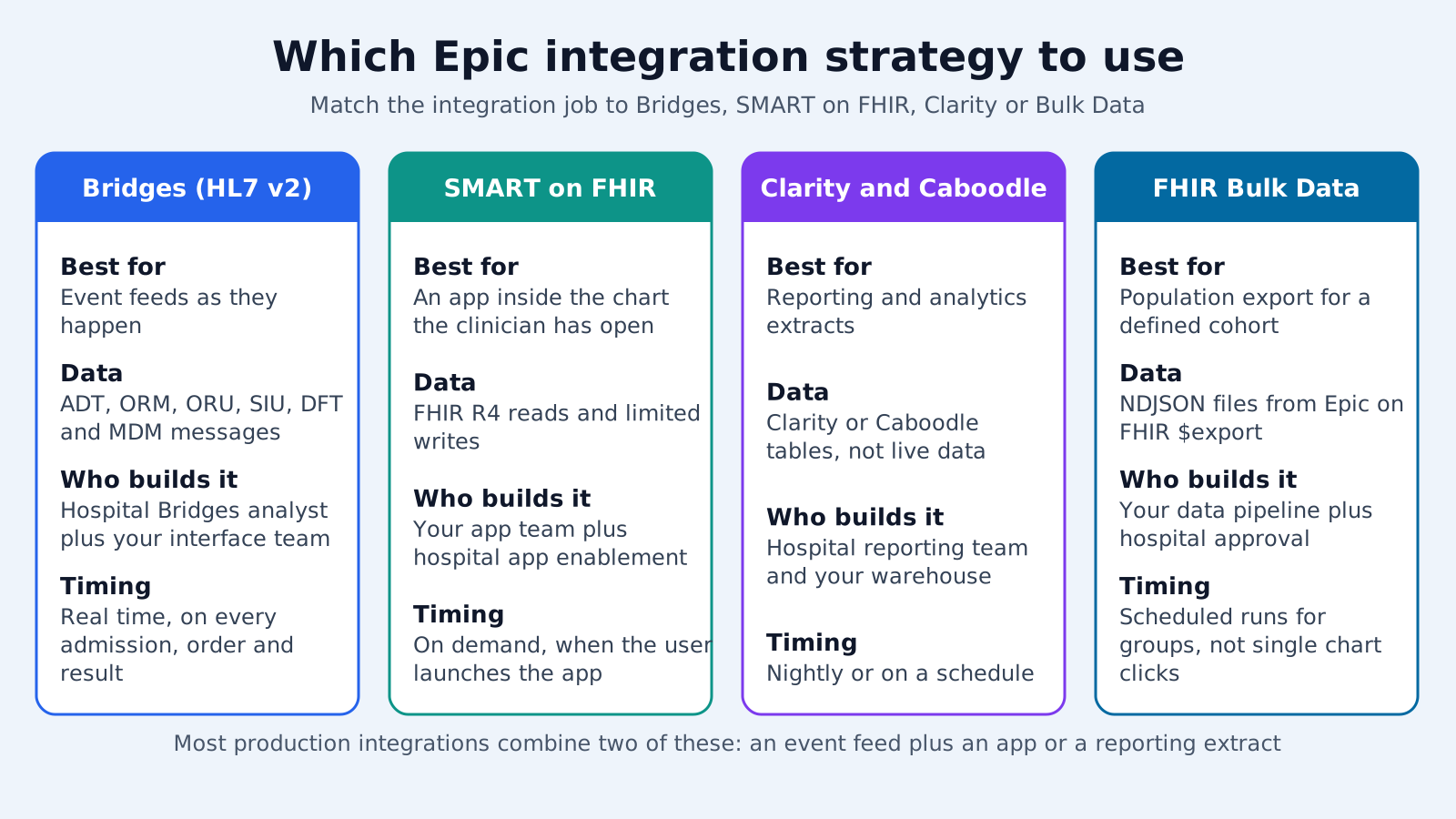
Pick the path by matching the job's timing and data shape to what each route delivers, then confirm the health system will support that route for you. The order below works for most products.
- 1. Events go to HL7 v2: If the job is to react to events, plan an HL7 v2 interface built by the health system's Bridges team. Ask in writing whether the organization offers any FHIR-based notification for that event before designing around one.
- 2. Users go to SMART on FHIR: If a person needs data for one patient now, build a SMART app with an EHR or standalone launch and the smallest scopes that work.
- 3. Populations go to Bulk Data: If the job needs the same data for a group, use a backend services client and a FHIR Bulk Data export, scheduled to fit the health system's limits.
- 4. History goes to reporting extracts: If the job is analytics over time, ask the health system's reporting team for a scheduled extract from Clarity or Caboodle.
- 5. Confirm and record: Take the list to the health system's integration lead, confirm each path is available to you, and record any job that must change route.
Writes need their own check. The certified FHIR API is read only, so filing data into Epic runs either through an HL7 v2 inbound interface or through a specific Epic write API that the organization enables for your app.
Common Epic integration paths compared
The common Epic paths differ in who builds them, what the data looks like and how fresh it is. Use this comparison when a stakeholder asks why a job uses one route and not another.
- Bridges HL7 v2: Job is events. Data is one message per event. Hospital analysts configure Bridges; the vendor owns the receiving endpoint. Timing is as events occur.
- SMART on FHIR app: Job is in-the-moment work for one patient. Data is FHIR resources returned on request. The vendor builds the app and each organization activates it. Timing is on demand.
- Backend FHIR and Bulk Data: Job is a population pull. Data is NDJSON files per resource type from an asynchronous export. The vendor builds the client and the organization grants access. Timing is per scheduled job.
- Clarity or Caboodle extract: Job is analytics over history. Data is relational tables. The health system's reporting team controls access and the extract. Timing follows the load schedule, often nightly.
- Other published interfaces: Job is a specialized exchange such as imaging, pharmacy or claims. Data follows DICOM, NCPDP or X12. Ownership and timing depend on the interface type.
Clarity is a relational reporting database that is loaded by ETL from Chronicles, Epic's operational database, and Caboodle is Epic's data warehouse. Neither is a live feed, so neither should sit behind an alert or a workflow trigger.
How should each Epic path be tested?
Test each path against the ways that path fails, not only against a clean first message or call. A good EHR integration testing strategy has a separate script per path, run at every new site.
- Bridges HL7 v2: New, updated, cancelled and merged records, transfers, unusual characters, ACK errors and a downtime resend.
- SMART on FHIR: EHR and standalone launch, expired and refreshed tokens, fewer scopes granted than requested, an API the site has not enabled, and an OperationOutcome.
- Bulk Data: Kick-off, status polling, a long-running job, partial failure, file download and a retry that does not duplicate data.
- Clarity or Caboodle: Row counts against a known query, a late-arriving diagnosis, a held-out patient checked by hand, and a failed load rerun.
- Writes: Each write checked in the Epic chart by the site's clinical owner, including what happens on a duplicate submission.
Keep the test scripts with the per-site configuration. The second health system will run the same scripts with its own test patients, and differences show up as configuration changes rather than surprises in production.
Agree the test data with the health system before the first cycle. Named test patients with known histories, including a merged record and a cancelled order, let both teams check results against the chart instead of debating what the right answer should be.
Which rules apply across every Epic path?
Every path that carries patient data carries ePHI, so the HIPAA Security Rule applies whether the data arrives as a message, an API response, an export file or a table. These facts apply across the strategy.
- open.epic lists Epic's published interfaces by type, including HL7 v2, HL7 v3, IHE profiles, FHIR, web services, DICOM, NCPDP and ASC X12.
- The ASTP/ONC test method for 45 CFR 170.315(g)(10) limits the criterion to read services and leaves write capabilities out of scope.
- ASTP/ONC lists FHIR Bulk Data Access among the standards for (g)(10), which is why certified EHRs support population exports for backend clients.
- Audit controls are a required safeguard under 45 CFR 164.312(b) on every system holding ePHI, and that includes the warehouse copies and export files a strategy creates.
- Under 45 CFR Part 171, an actor (a health care provider, a certified health IT developer or a health information network or exchange) that interferes with access, exchange or use of electronic health information may be information blocking unless an exception applies.
Signs a project picked the wrong path
A wrong route usually shows up as a workaround. If any of these appear in a design, revisit the job before writing more code.
- Polling FHIR every minute: The product needed events and should have planned an HL7 v2 feed.
- Alerts built on Clarity: A nightly reporting load is driving something clinicians expect to happen now.
- Bulk exports for one patient: A user-driven feature runs a population job because the SMART app was never built.
- Chart writes through a read API: The design assumes the certified API accepts writes, and there is no inbound interface or enabled write API.
- One mapping for all sites: Identifiers and code sets are hard-coded from the first health system.
- No owner per path: The strategy names technologies but not the hospital and vendor people who own each one.
How Agnotic can help
Choosing Epic paths is cheap on a whiteboard and expensive after go-live. Agnotic Technologies helps product and hospital teams map each job to a path, then builds and tests the vendor side of each one: Bridges HL7 v2 endpoints, SMART on FHIR apps, backend Bulk Data clients and warehouse loads from reporting extracts.
Agnotic keeps one patient and encounter model across those paths, so data that arrives by different routes still lines up in the product.
Plan your Epic strategy with Agnotic
Explore EHR integration services, or browse more articles in our EHR Integration hub.
Related reading on Agnotic
Continue with Epic Bridges, Epic SMART on FHIR, Epic Clarity data integration and HL7 v2 versus FHIR.


