



An audit trail that can be edited by the same admin it is supposed to watch is not a trail. It is a table. When a privacy officer asks who opened a chart last Tuesday, the answer has to come from a record that the application cannot quietly rewrite.
This guide explains the HIPAA audit trail as a software design: what 45 CFR 164.312(b) requires you to record, how that differs from the duty to review the logs, and how to store events so they survive the person who triggered them. It is for teams building EHRs, patient APIs, and the admin tools around them. Network security and API authorization are covered in other pieces. Here the subject is the trail itself.
What must a HIPAA audit trail record?
Need an audit trail that survives the user who triggered it?
Agnotic builds append-only audit stores and the review path privacy and security teams actually run.
A HIPAA audit trail must record activity in systems that contain or use electronic protected health information, so a reviewer can see who did what, to which record, and when. The HIPAA Security Rule's audit controls standard at 45 CFR 164.312(b) requires mechanisms that record and examine that activity.
The regulation does not hand you a field list. It does require mechanisms, hardware, software, or procedural, that record and examine activity in information systems that contain or use electronic protected health information. In an application, that means an event written at the time of the activity, with a user the system can identify. The access control specification at 45 CFR 164.312(a)(2)(i) makes the 'who' possible: assign a unique name or number for identifying and tracking user identity. A shared login makes the rest of the trail decorative.
How do audit controls differ from activity review?
Audit controls are the recording and the ability to examine. Information system activity review is the procedure that makes someone actually look. Building the log and never reading it meets only half of the pair.
The review duty is in the Security Rule's administrative safeguards. 45 CFR 164.308(a)(1)(ii)(D) requires procedures to regularly review records of information system activity, such as audit logs, access reports, and security incident tracking reports. It is a required implementation specification under the security management process. The software has to make those records reviewable. The organization has to name who reviews them, how often, and what they do when a line looks wrong. A dashboard nobody opens is not a procedure.
- Record: The application writes the event as the action happens, not in a nightly guess from incomplete web logs.
- Examine: A reviewer can filter by patient, user, action, and time without a database administrator running an ad hoc query.
- Review: A named owner follows a written cadence, and exceptions are tracked to a disposition.
- Separate duties: The person who can silence an alert should not be the only person who can delete the evidence that it fired.
Which events should the application log?
Log access to ePHI, changes to ePHI, exports, permission changes, and authentication failures that matter. Do not log every mouse move. A trail that records everything equally is a trail nobody can review.
- Read: Opening a chart, a note, a result, or a billing screen that shows identifiers, with patient and user.
- Write: Create, amend, and entered-in-error on clinical data, with the before and after or a pointer to the version.
- Export: Downloads, prints, API bulk reads, and reports that leave the system, including the query that defined the set.
- Auth: Sign-in success and failure, second-factor failure, session end, and emergency access with the reason text.
- Admin: Grant, change, and revoke of a role, plus changes to audit settings themselves.
- Interface: A message accepted or rejected when it creates or updates ePHI, with the sending system, not only the human user.
Keep the payload small and deliberate. An audit row should identify the record. It should not paste the whole note, the password, the session token, or a card number into the log. Reviewers need who, what, which, and when. Investigators who need the clinical text can open the versioned record under their own audited access.
How should the audit store be built?
Write events to an append-only store that the clinical application cannot update or delete, and put a review queue on top of the patterns you decided to watch. The clinical database and the audit store are different systems with different jobs.
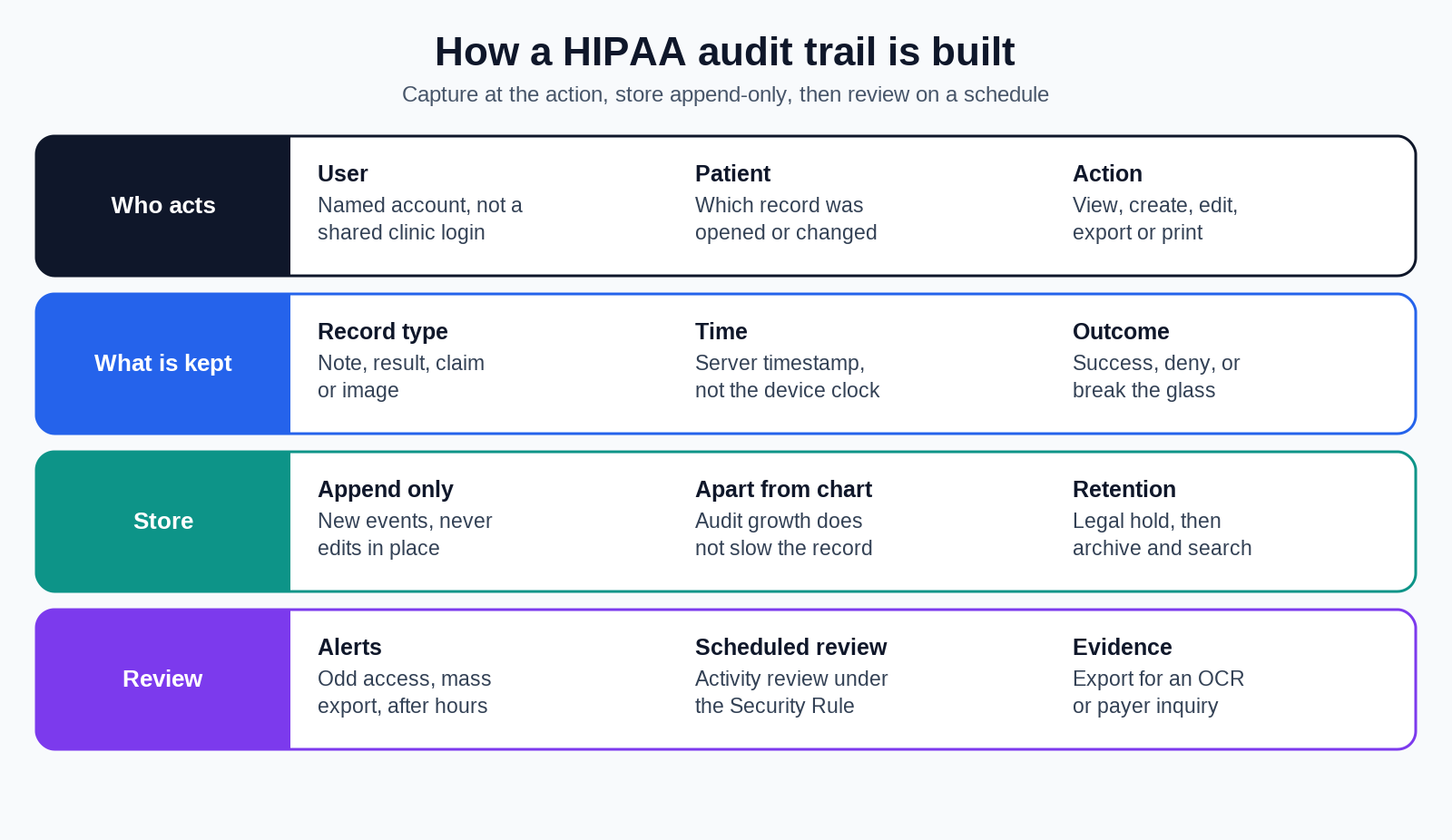
- EHR and clinical apps: Chart opens, edits, and order signings emit an event at the service that performed the action, not only at the browser.
- Patient and partner APIs: Each read or export emits an event with the app identity, the patient scope, and the resource type.
- Admin console: Role grants and audit-setting changes emit events through the same pipeline, so they cannot bypass it.
- Append-only store: Inserts only. Corrections are new events. Retention is an archive rule, not a row delete in the hot store.
- Review queue: Exceptions, such as emergency access or a large export, land in a queue with an owner and a disposition.
Ship the event in the same transaction as the clinical write when you can, or accept a durable outbox so a crash cannot leave a changed row with no trail. Clock the event in one time source, stored in UTC, and display it in the reviewer's zone. Investigators waste days on trails whose timestamps disagree by the offset between the app server and the database.
How do you review logs without drowning in them?
Review exceptions on a schedule, and sample ordinary access often enough to prove the procedure is real. Reading every chart-open by hand does not scale, and pretending that you do is how the review becomes fiction.
- Always look: Emergency access, access to a VIP or employee chart if you flag those, bulk export, and repeated authentication failures.
- Sample: A random set of ordinary chart opens each cycle, checked against the schedule and the care relationship.
- Threshold: An export over a size you set, or a user querying patients outside their department.
- Disposition: Each reviewed exception ends as expected, incident, or policy change, with the reviewer's own identity in the trail.
- Silence: If the audit pipeline stops, that is itself an alert. A quiet log is not a safe week.
Write the cadence in the procedure the regulation asks for: who reviews, which reports, how often, and where the disposition is stored. Match the cadence to volume. A clinic and a hospital network will not look at the same number of rows, but both need a named owner. The security official required under 45 CFR 164.308(a)(2) is a natural owner. The software still has to produce the report they can finish in the time you assigned.
Who may read the trail, and for how long?
Limit trail readers to the security, privacy, and compliance roles that need them, and log their access too. Retention is a legal and policy choice. The software has to be able to keep events for whatever period counsel sets, and to archive them without rewriting history.
Do not pick a retention number because a framework blog suggested one. Ask counsel, write the number into policy, and test that you can still retrieve an event from the start of that window. Archiving to a cheaper store is fine if the archive is still append-only and access to it is audited. A backup that nobody has restored is not a retention plan. Restore a sample on a schedule and confirm the user, patient, action, and time survived.
How do APIs and emergency access fit the trail?
An API client is a user for audit purposes. Emergency access is a normal path that must be louder, not a hidden back door. Both need a reason the reviewer can read later.
- App identity: Record the client id and the human user when SMART on FHIR or another OAuth flow has both. Record the client alone for a backend service.
- Scope: Record the patient and the resource types returned, not the full payload.
- Break-the-glass: Require a reason, show it on the review queue the same day, and do not let the same user clear their own event.
- Failed calls: Log authorization failures on ePHI endpoints. Ignore noisy health checks that never touch patient data.
Emergency access is also an access-control requirement, at 45 CFR 164.312(a)(2)(ii): procedures for obtaining necessary ePHI during an emergency. The audit design is how you prove those procedures were used as intended. If break-the-glass does not emit an event, you have a shortcut, not a control.
What breaks audit designs in production?
These failures show up when someone asks a real question, not during the demo. Design against them before the first clinic.
- Mutable log table: Admins can update or delete rows in the same database, with the same credentials, as the app.
- Shared accounts: The trail says 'front desk' and cannot name a person.
- Payload dumps: Notes, tokens, and identifiers copied into a log tool the vendor's support staff can search.
- Client-only events: The browser logs a view, and a direct API call leaves no event at all.
- Clock skew: Two servers disagree, and the sequence of an edit cannot be rebuilt.
- Review theater: A report is generated monthly and filed unread.
How Agnotic can help
Agnotic Technologies designs and builds the audit path for systems that hold ePHI: the event list, the append-only store, the outbox so a write cannot land without a trail, and the review queue for emergency access and exports. We tie events to unique users and to API clients, and we keep clinical text out of the log line.
For a product that already has logs scattered across servers, we map which actions are missing, close the gaps that hide chart access, and leave a review procedure your security official can run without a custom query each time.
Build a trail you can defend
Plan HIPAA audit controls with our engineers, or read more compliance articles in the hub.
Related reading on Agnotic
Read the wider EHR security design, how healthcare data is protected, and how APIs meet the same Security Rule.


