



Interoperability projects fail after the architecture diagram is approved. The failure is a message nobody owns, a vocabulary that was mapped on a whiteboard, and a go-live with no test patient.
Agnotic Technologies treats the first successful round trip, with a named owner, as the milestone. The diagram is not the milestone. This post walks the path a message takes, names where it breaks, and lists the habits that keep a program from stalling between kickoff and the first useful data.
Why do healthcare interoperability projects fail?
Healthcare interoperability projects fail when no one owns the interface after go-live, the first real message was never tested, and coded values were mapped without a sample from production. Agnotic Technologies makes that round trip the acceptance test, not a signed specification.
Recovering an interface program?
Interoperability services cover the standards and the operating ownership around them.
None of these causes is technical in the narrow sense. The standards work. What fails is the agreement between two organizations about who sends what, who checks it, and who answers the phone when it stops.
Which failures show up most often?
The same few show up whether the payload is HL7 v2, FHIR or a flat file. They are operating failures, not a missing logo on a slide.
- No owner: the engine alerts, and nobody is on the rota.
- No test patient: the first production patient is the test.
- No sample: code sets were mapped from a spreadsheet, not from a real message.
- No ack path: a failure looks like success because the sender did not wait.
- No scope line: every department adds one more message type before the first one works.
Where along the message path does it break?
It breaks at the handoffs. A message leaves a source system, passes through an interface engine, crosses a network, lands at a receiver and should come back as an acknowledgement. Each step has its own typical fault.
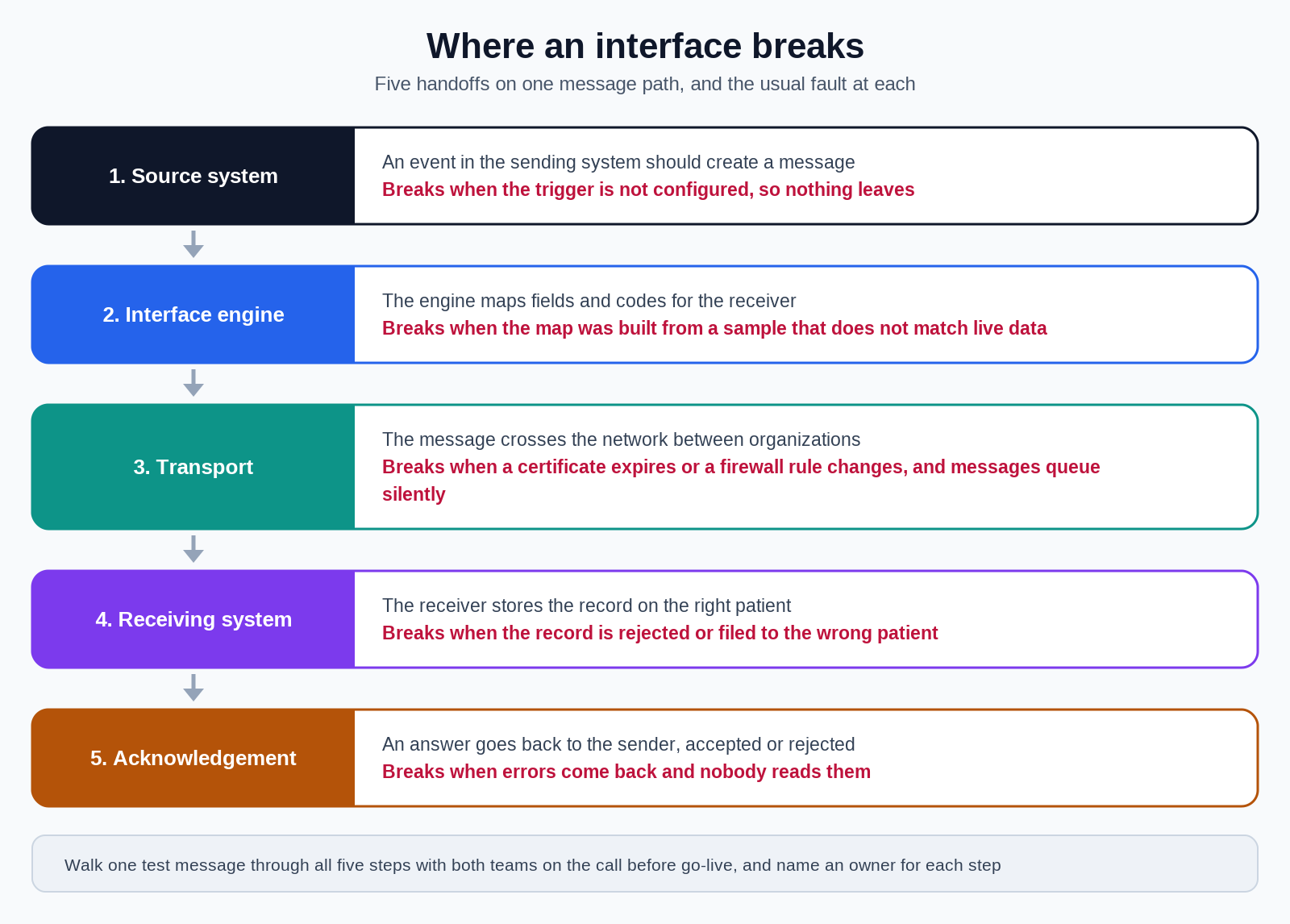
- Source: the event that should send a message is not configured, so nothing leaves.
- Engine: the map was built from a sample that does not match live data, so fields land empty.
- Transport: a certificate expires or a firewall rule changes, and messages queue silently.
- Receiver: the record is rejected, or filed to the wrong patient because identifiers differ.
- Acknowledgement: errors come back, but nobody reads them, so the sender assumes success.
Walk one message through all five steps with both teams on the call before go-live. Most projects find at least one gap this way that the specification never mentioned.
Why does the data set need agreeing first?
Because two systems can exchange perfectly formed messages that still mean different things. Agree which data elements matter, in which code systems, before anyone builds a map.
HHS adopts the United States Core Data for Interoperability (USCDI) as the standard set of health data classes and data elements for certified health IT.
Use that national data set as the starting list for clinical exchange, then add the local fields the workflow truly needs. Every extra field is one more thing to map, test and own.
How do FHIR projects fail differently?
FHIR projects usually fail later, not sooner. The API answers in the sandbox, so teams assume the hard part is done, then find that live sites return fewer fields, different codes or slower responses.
US Core is the HL7 FHIR implementation guide that profiles FHIR resources for the USCDI data classes used in the United States.
- Profile drift: the app expects fields a live site does not populate.
- Scope surprises: production grants fewer permissions than the sandbox did.
- Volume: searches that were fast for one patient time out for a clinic list.
- Write-back: the receiving EHR accepts reads from you but not writes.
Who should own an interface?
One named person on each side, plus a shared contact list that both teams keep current. Ownership means watching the queue, answering alerts and approving changes, not only having built the interface.
- Sender owner: confirms messages leave and fixes source configuration.
- Receiver owner: confirms records land on the right patient and fixes filing rules.
- Engine owner: watches queues, errors and certificates.
- Business owner: decides what happens when the data is late or wrong.
Write the owners into the go-live checklist. If a name is missing, the interface is not ready, however well the tests went.
What does a useful test plan include?
Real message samples, an agreed test patient on both sides, and a round trip that ends with a person finding the data where they expect it. Synthetic happy-path messages alone prove very little.
- Samples: de-identified real messages from the source system, including the awkward ones.
- Test patients: agreed identities that exist in both systems' test environments.
- Negative tests: a malformed message, an unknown code and a patient who does not exist.
- Volume: a realistic burst, such as a full clinic day sent at once.
- Sign-off: a clinician or clerk confirms the result looks right on their screen.
Why do programs stall after the first interface?
Because the first interface was built as a project, and the second one starts from scratch. Nothing from the first was written down as a pattern: not the map, not the test patients, not the runbook.
After the first interface goes live, spend time turning it into templates. A reusable mapping table, a standard test pack and a runbook format make the second interface faster and the tenth one routine.
How do you tell an interface is healthy?
By watching a few numbers every day, and alerting a person when they move. Healthy interfaces are boring: steady volumes, few errors and short queues.
- Volume: messages per hour against the normal pattern for that weekday.
- Errors: rejected or negatively acknowledged messages, by reason.
- Latency: time from the source event to the record being stored.
- Queue depth: messages waiting in the engine.
A sudden drop in volume is often the first sign of trouble. An interface that sends nothing produces no errors, so error alerts alone will miss it.
Send these numbers to the named owners, not to a shared mailbox. Review them together once a month, and treat any alert that nobody acted on as a gap in the runbook rather than as noise.
Scope creep before the first message
Many programs stall because every department adds its own message type before the first one works. Each addition looks small, but together they push the first useful data further away and spread the team across half-finished maps.
Agree one message type and one direction for the first release, and keep a written list of what comes next. A new request joins the list; it does not join the current build. The first round trip in production does more for the program than ten specifications in review.
Questions the kickoff should answer
A kickoff that ends without these answers has only scheduled the next meeting. Put them in the first agenda and do not close the meeting until each has a name or a date beside it.
- Owners: who watches the queue on each side, and who is their backup?
- Data: which elements and code systems are in scope for the first message type?
- Identity: which identifier links a patient across the two systems?
- Test: which test patient will both sides use, and in which environments?
- Errors: who reads rejections, and how quickly must they act?
- Change: how will either side announce an upgrade that could affect the feed?
Keep the answers in one shared document that both teams can edit. When people change roles, that document is how the next owner learns what was agreed.
Revisit it at every milestone. If an answer has changed, such as a new identifier or a new owner, update the document before the next message type is built, not after it fails in production.
How do you avoid these failures?
Name an owner on each side, agree one test patient, and send one real message type before you add a second. Our interoperability in healthcare post is the landscape and adopting interoperability is the program plan; this post is the short list of why those programs stall.
What should you stop calling done?
A signed interface specification with no message sent, or a FHIR capability statement that no app has called. Done means a receiver stored the payload and a person can find it.
How Agnotic can help
Agnotic rescues and builds interface programs for providers, payers and product teams. We usually start by walking one stalled interface end to end with both sides, naming the owners and the missing tests, then turning the fix into a pattern the next interface can reuse.
Get your interfaces moving with Agnotic
We trace the message path, set up the tests and hand over a runbook your team can operate.
Related reading on Agnotic
The landscape, the adoption plan and the interface details that break most often.


