


Apple CareKit is an open source framework for building iOS apps that help patients follow a care plan: take medicines, do exercises, log symptoms and share progress with their care team. It supplies the data store and the screens, and leaves the server, the clinician view and the clinical content to the team building the app.
This guide explains what CareKit includes, how it works alongside HealthKit and a FHIR backend, the steps to build a CareKit app, how its data maps to FHIR, and the App Store rules that apply to health data.
What is Apple CareKit?
Building an iOS care plan app?
Agnotic builds HealthKit and CareKit apps with secure backends and EHR integration for providers and digital health companies.
Apple CareKit is an open source framework from Apple for building iOS apps that manage a patient's care plan. It provides a local store for tasks, schedules and outcomes, ready-made views such as task checklists, charts and contact cards, and controllers that keep the screens in sync with the store. The backend is the developer's to build.
CareKit is published on GitHub under a BSD license as three Swift packages that can be used separately: CareKit, which ties views to data; CareKitUI, the cards and views; and CareKitStore, the data layer. Its default OCKStore is built on Core Data and keeps versioned records on the device.
That split matters for planning. A team can use CareKitUI with its own data layer, or CareKitStore with custom screens, rather than adopting the whole framework.
How do CareKit, HealthKit and a backend fit together?
CareKit, HealthKit and a backend form three layers with different jobs. CareKit holds the care plan and what the patient did about it. HealthKit holds health measurements from the iPhone, Apple Watch and connected devices. The backend holds the shared copy that clinicians and other systems use.
- CareKit on the device: Tasks, schedules, outcomes, patients, care plans and contacts, stored locally and shown in CareKit views.
- HealthKit on the device: Steps, heart rate, weight, blood pressure and other samples, read only with the patient's permission for each data type.
- Sync layer: App code that sends CareKit outcomes and selected HealthKit samples to the server and pulls care plan changes back.
- FHIR backend: A server that stores care plans and results as FHIR resources, applies access rules and feeds the clinician view and the EHR.
Neither CareKit nor HealthKit sends data off the device on its own. Moving data to a server is a decision the app makes with the patient's consent, and it is the point where HIPAA, if the app serves a covered provider, starts to apply to the backend.
What does CareKitStore model?
CareKitStore models a care plan as tasks with schedules, and the patient's results as outcomes recorded against each scheduled occurrence. Around them sit records for the patient, the care plan and the care team's contacts.
- Tasks: Activities the patient should do, such as taking a medicine, doing a stretch or answering a symptom question, each with instructions.
- Schedules: When each task occurs, built from schedule elements such as daily at a set time or every other day.
- Outcomes: What the patient recorded for an occurrence, such as done, a pain score or a reading, with values and timestamps.
- HealthKit links: Tasks that can be tied to a HealthKit data type, so a measurement counts as the outcome without manual entry.
- Patients, care plans and contacts: Who the plan is for, how tasks are grouped and whom the patient can call or message.
The store is append-only and versioned, which suits care plans because a changed schedule should not rewrite history. When a clinician changes a dose, the app adds a new version of the task with a new effective date, and past outcomes stay attached to the old one.
How do you build a CareKit app step by step?
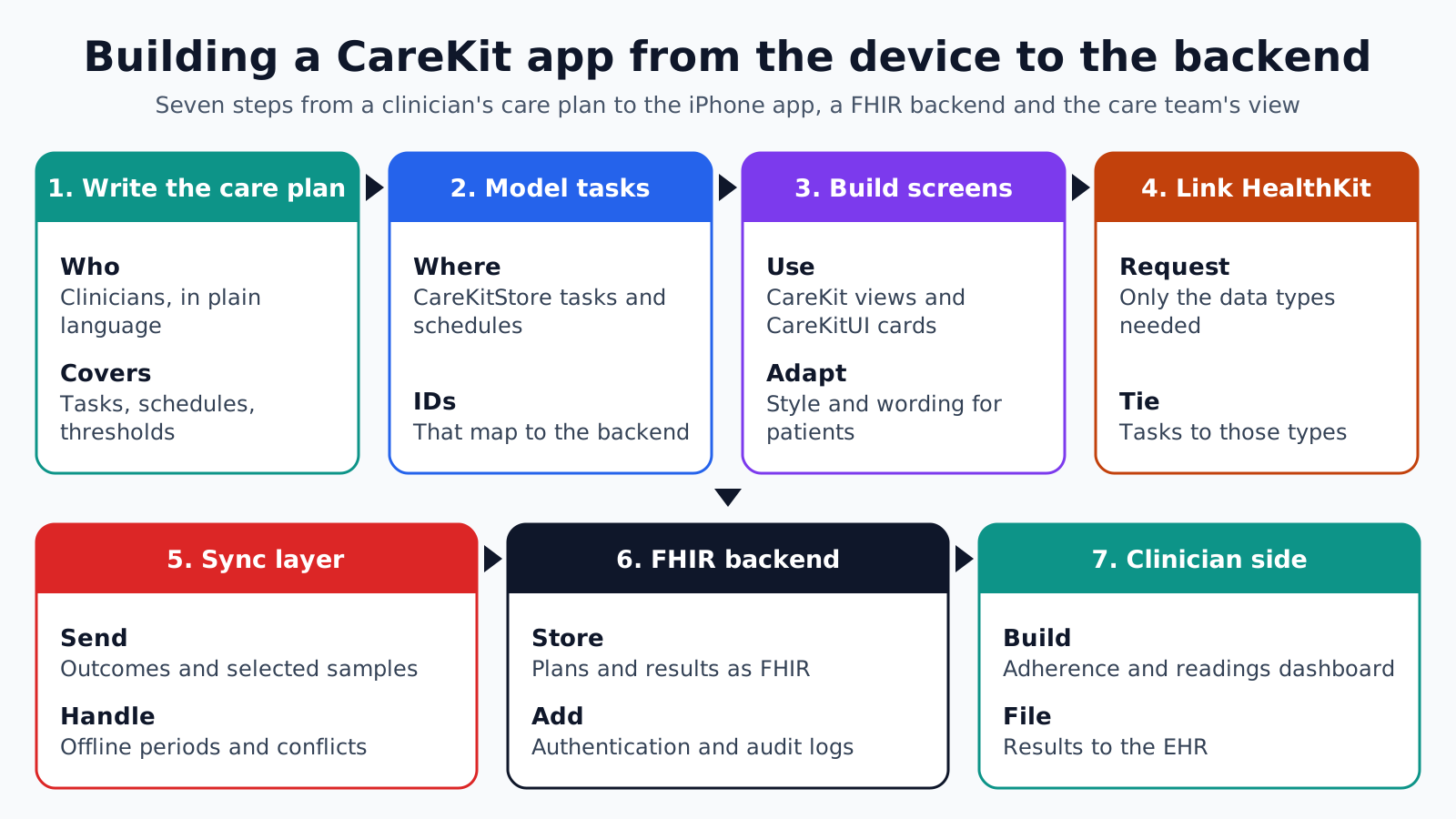
A CareKit app is built from the device up to the backend in seven steps. The stack runs from the patient's iPhone app with CareKit views, through CareKitStore and HealthKit on the device, to a sync layer, a FHIR backend, and finally the clinician view and the EHR.
1. Write the care plan: Clinicians define the tasks, schedules, instructions and thresholds in plain language before any code is written.
2. Model tasks and schedules: Engineers translate the plan into CareKitStore tasks and schedules, with identifiers that will map to the backend.
3. Build the screens: Use CareKit view controllers and CareKitUI cards for daily tasks, charts and contacts, then adapt their style and wording for the patient group.
4. Link HealthKit: Request read permission only for the data types the plan needs, and tie the relevant tasks to them.
5. Build the sync layer: Send outcomes and selected samples to the server, pull plan changes back, and handle offline periods and conflicts.
6. Stand up the FHIR backend: Store plans and results as FHIR resources behind authentication, with audit logging and the access rules clinicians need.
7. Connect the clinician side: Build the dashboard where the care team reviews adherence and readings, and file results to the EHR where the workflow requires it.
Mapping CareKit data to FHIR
CareKit data maps to FHIR resources reasonably well, which makes a FHIR server a natural backend. The mapping should be written down early, because the identifiers chosen on the device have to survive the round trip.
- Patient: The CareKit patient record maps to a FHIR Patient, linked to the EHR identity after verification.
- Care plan: The CareKit care plan maps to a FHIR CarePlan, with activities that reference the plan's tasks.
- Tasks with measurements: A blood pressure or weight outcome maps to a FHIR Observation with the right LOINC code and units.
- Question tasks: Symptom or survey answers map to a QuestionnaireResponse against a published Questionnaire.
- Completion tasks: Simple done or not done outcomes can be recorded as activity progress on the CarePlan or as Observations, depending on what the clinician view needs.
Keep units and codes on the device. If the app records weight in pounds for a US patient, the outcome should carry the unit, and the backend should not guess it later. The same goes for time zones: store each outcome with its offset so a dose logged at night is not filed against the wrong day.
What does the care team need on its side?
The care team needs a view of adherence and readings across all enrolled patients, a way to change a patient's plan, and alerts that follow rules clinicians wrote. CareKit includes none of this, so it is usually the largest piece of custom work in the project.
Start with the review queue. Clinicians want to see who missed tasks, whose readings crossed a threshold and who has not opened the app, sorted so the patients needing attention come first. Each item should open the patient's recent outcomes and the plan version they were following.
Plan edits must flow back to the phone. When a clinician changes a schedule or adds a task, the backend creates a new plan version, the sync layer delivers it, and the app confirms it arrived. A plan change that never reaches the device is a silent safety gap, so the dashboard should show the version each patient's app is running.
Decide what reaches the EHR. Not every completed stretch belongs in the chart, but readings that drive decisions and summaries of adherence often do, filed as discrete results or documents under the ordering clinician.
Which App Store and privacy rules apply?
Apple's App Store Review Guidelines set specific rules for health apps. Under guideline 5.1.3, apps may not use or disclose HealthKit and other health data for advertising, marketing or use-based data mining, other than improving health management or for health research with permission, and may not store personal health information in iCloud.
Guideline 1.4.1 asks apps that have received regulatory clearance to submit a link to that documentation. If a CareKit app's functions make it a medical device, the regulatory work comes first, and the clearance link goes with the App Store submission.
Outside Apple's rules, the usual health privacy rules apply. An app offered by a covered provider, with a backend holding PHI, falls under HIPAA, and the hosting and analytics vendors need business associate agreements. For a consumer app that HIPAA does not reach, the FTC Health Breach Notification Rule is the one to plan for. Tracking and analytics SDKs need the same scrutiny as the backend.
Where CareKit projects need extra work
CareKit covers the device side well, and projects tend to need extra work in the places it leaves to the developer. These failure points are worth planning for at the start.
- Android patients: CareKit is for Apple platforms only, so a service with Android users needs a parallel app and a shared backend model.
- Sync conflicts: A care plan changed on the server while the patient was offline needs clear rules for which version wins.
- Plan versioning: Dose and schedule changes must create new task versions, or past adherence data is misread.
- Clinician tools: The dashboard, alerts and review queues are custom work, often larger than the app itself.
- Content ownership: Task instructions and education need clinical owners and review dates.
- Accessibility: CareKit views support standard iOS accessibility, but customized cards must be retested with VoiceOver and large text.
How Agnotic can help
A CareKit app is only as useful as the backend and clinician tools behind it. Agnotic Technologies builds the full stack for clients: the iOS app with CareKit and HealthKit, the sync layer, a FHIR backend designed to HIPAA Security Rule safeguards where PHI is involved, the clinician dashboard, and EHR integration.
The client's clinicians own the care plan and its content. Agnotic turns it into tasks, schedules and FHIR mappings that can be versioned and audited.
Build a CareKit app with a real backend
Read how Agnotic approaches HealthKit integration, or browse more articles in our Wearables and Devices hub.
Related reading on Agnotic
Continue with wearable apps, mHealth apps, EHR mobile apps, remote monitoring and women's health tracking.


