


Wearable app development is the work of building the software that turns a sensor on someone's body into information a patient, caregiver or clinician can act on. In healthcare that means four pieces built together and released on different schedules: device firmware, a phone companion app, a cloud platform and the clinical connection.
This guide follows the build lifecycle for a health wearable. It covers the rules that set the paperwork, how the layers fit, how a build moves from prototype to release, how firmware updates stay safe and what a build plan should contain.
What is wearable app development?
Planning a wearable device and its companion app?
Agnotic builds BLE medical device software: firmware protocols, iOS and Android companion apps, cloud ingestion and the update path between them.
Wearable app development is designing and building the firmware, companion app, cloud services and clinical integrations behind a body-worn device such as an ECG patch, glucose sensor or blood pressure cuff. In healthcare it starts with an intended use decision, because that decides whether the software is a regulated device and what evidence the build must produce.
Three starting points for a health wearable
- Your own device: You make the hardware, so you control the firmware, the Bluetooth Low Energy protocol and the update path. This gives the most control and the most regulatory responsibility.
- Third-party clinical devices: You connect to cleared cuffs, scales, pulse oximeters or glucose sensors through standard Bluetooth profiles or the maker's cloud API, and the maker keeps the device file.
- Consumer platforms: You read watch and ring data through Apple HealthKit, Android Health Connect or a vendor cloud. Setup is faster, but each platform controls permissions and data quality.
Which standards and rules apply to a wearable build?
The rules that apply depend on intended use. Once the software is a device, the quality system, software life cycle and cybersecurity rules set much of the engineering paperwork.
- FDA device status: FDA treats software intended for a medical purpose as Software as a Medical Device, while its General Wellness guidance (final, January 2026) describes low-risk wellness products it does not intend to regulate as devices.
- Quality system: FDA's Quality Management System Regulation, 21 CFR Part 820, incorporates ISO 13485:2016 by reference and took effect on 2 February 2026. A device maker's design controls now sit under the QMSR.
- Software life cycle: IEC 62304 is a voluntary, FDA-recognized standard for medical device software. It assigns safety classes A, B or C and expects verification of every software requirement, not only those linked to risk.
- Cybersecurity: Section 524B of the FD&C Act requires cyber device submissions to include a software bill of materials, a plan to monitor and address postmarket vulnerabilities, and processes that give reasonable assurance of cybersecurity.
- Accessibility: The HHS Section 504 rule at 45 CFR 84.84 adopts WCAG 2.1 Level AA for the mobile apps of HHS funding recipients, with compliance from 11 May 2027 for recipients with 15 or more employees.
What are the layers of a wearable product?
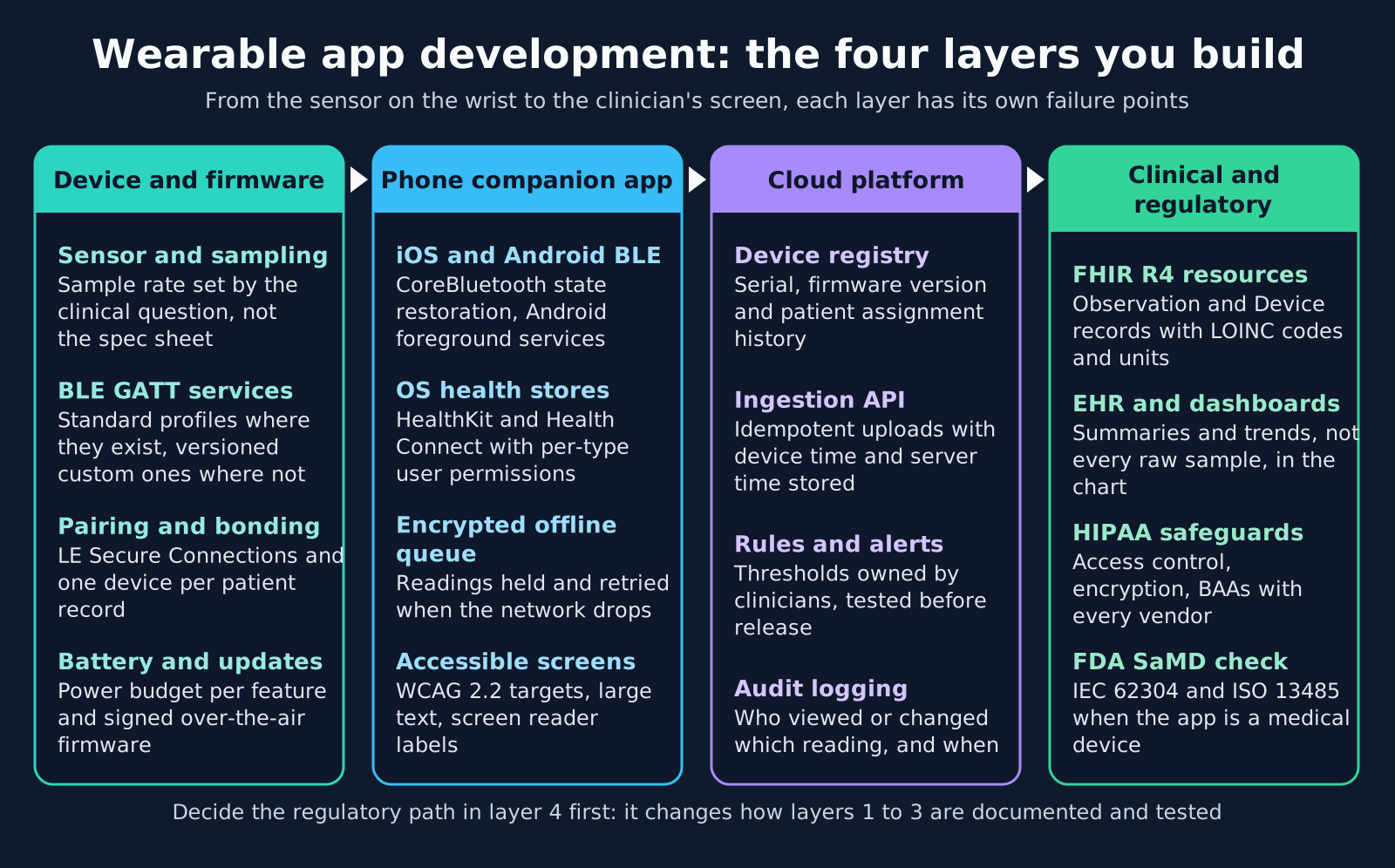
A wearable product has four layers. The middle two are where home use exposes problems, such as dropped connections, duplicate uploads and lost readings, that bench testing never shows.
- Device and firmware: Sample rates chosen for the clinical question, standard Bluetooth SIG profiles such as Heart Rate, Blood Pressure, Glucose or Pulse Oximeter where they fit, versioned custom services where they do not, LE Secure Connections pairing and a battery budget per feature.
- Companion app: State restoration on iOS and a foreground service on Android so the app reconnects after the OS suspends it, per-type health store permissions, an encrypted offline queue and screens built to WCAG 2.2 AA as the design target.
- Cloud platform: A device registry with serial, firmware version and patient assignment history, an idempotent upload API that stores device time and server time, clinician-owned alert rules and an audit trail.
- Clinical and regulatory: FHIR R4 Observation mapping with LOINC codes, UCUM units and a Device reference, summaries rather than raw samples for the EHR, HIPAA safeguards and the FDA path.
Native, cross-platform or watch apps
Native Swift and Kotlin give the most reliable access to background Bluetooth and health stores. Flutter or React Native can share most screens, but the Bluetooth and background code usually still needs native modules. A watchOS or Wear OS app is worth building only when the patient must act on the wrist, for example to start a measurement or confirm a symptom.
How does a wearable build move from prototype to release?
A wearable build moves through seven stages, and the order matters. Evidence produced late, such as traceability or a threat model, is expensive to reconstruct.
- 1. Intended use: Write who uses the device, what it measures and which decisions it supports, then check it against FDA SaMD and wellness guidance before choosing features.
- 2. Hardware and protocol: Choose the sensor, radio and battery, then define the Bluetooth services, characteristics and message versions as a written contract shared by firmware and app teams.
- 3. Connection prototype: Test pairing, reconnection and background sync on older iPhones and low-cost Android phones, with Bluetooth toggled, the app closed and power saving on.
- 4. Data contract: Define how each reading becomes a FHIR Observation, which timestamps it carries and which summaries clinicians want.
- 5. Design evidence: Keep requirements, risk analysis, traceability, a threat model and the software bill of materials current from the first sprint, so QMSR and IEC 62304 records are produced, not rebuilt.
- 6. Verification: Run requirement-based tests on every layer, plus end-to-end tests with real devices and a simulated poor network.
- 7. Home pilot and release: Put the device on a small group of patients, track missing data, connection failures and support calls, fix the causes, then release in stages.
Testing the connection the way patients use it
- Out of range: Walk away with the phone for an hour, then return. The device should buffer readings and the app should upload them with their original timestamps.
- App killed: Force-quit the app and reboot the phone. Check whether the app relaunches for Bluetooth events and what the patient sees if it does not.
- Phone replaced: Pair the same device to a new phone and confirm the cloud keeps one device record and one patient history.
- OS update: Install the next iOS or Android beta on test phones before release, because background and Bluetooth behavior can change between versions.
Firmware updates and protocol versioning
Firmware, app and cloud update on different schedules, so the protocol between them must tolerate mismatched versions. A device in a patient's drawer may wake up months later on old firmware.
- Signed images: The device accepts only firmware signed with the maker's key and verifies the signature before it switches images.
- Rollback: Keep the previous image so a failed update returns the device to a working state instead of leaving it unusable.
- Version handshake: The app reads firmware and protocol versions on connect and refuses or adapts to combinations it has not been tested with.
- Battery checks: Block an update when the battery is low, and resume an interrupted transfer instead of restarting it.
- Staged rollout: Release new firmware to a small share of devices first and watch connection and error rates before widening.
- Update records: Log which device received which image and when, because a postmarket vulnerability plan depends on knowing what is in the field.
Where wearable builds slip
These failure points tend to surface only once real patients wear the device at home. Test for each one before the pilot.
- Medical claims on a wellness device: Marketing copy that mentions diagnosing or treating a condition can move a wellness product into device territory.
- Flagship-only testing: Bluetooth behavior and background limits vary by phone maker and OS version, and patients often use older phones.
- Battery left until late: Frequent sampling and constant connections can drain a device in a day, and patients stop wearing it.
- Unversioned protocol: A firmware change that renames a characteristic breaks every app build already in the field.
- One device clock: Wearable clocks drift and devices batch-upload hours later, so a single timestamp gives wrong trends.
- Logistics outside the plan: Shipping, replacing, charging and returning devices are part of the product, and they need tools and owners.
What goes into a wearable build plan?
A wearable build plan lists each layer's deliverables and the evidence each one produces. Use this checklist to scope the work.
- Regulatory: The intended use statement, the device or wellness assessment and, if the software is a device, the QMSR design control and IEC 62304 plans.
- Firmware: Sensor choice, Bluetooth service design, pairing security, battery budget, signed updates and rollback.
- Companion app: iOS and Android apps, background reconnection, health store permissions, encrypted offline queue and accessibility testing.
- Cloud and integration: Device registry, upload API, alert rules, audit trail and FHIR delivery into the EHR or monitoring dashboard.
- Security: Threat model, software bill of materials, vulnerability monitoring plan and business associate agreements where a vendor handles ePHI.
- Operations: Device logistics, patient support scripts and a test plan for each new phone OS release.
How Agnotic can help
A health wearable is several products that must release together without breaking each other. Agnotic Technologies builds the software side for device makers and digital health teams: Bluetooth protocol design, firmware integration, native and cross-platform companion apps, cloud ingestion, FHIR delivery and the design records a regulated product needs.
Agnotic works alongside the client's hardware, clinical and regulatory teams. The client owns the device file and the intended use, and Agnotic produces the software requirements, tests and traceability that file needs, built to HIPAA Security Rule safeguards where the product handles ePHI.
Build your wearable app with Agnotic
Explore BLE medical device integration, or browse more articles in the Wearables hub.
Related reading on Agnotic
Continue with wearable data integration, medical device software testing, medical devices and mHealth apps.
Sources
- FDA: Software as a Medical Device (SaMD)
- FDA: General Wellness: Policy for Low Risk Devices (January 2026)
- eCFR: 21 CFR Part 820, Quality Management System Regulation
- ISO: IEC 62304 Medical device software, software life cycle processes
- FDA: Cybersecurity in Medical Devices: Quality System Considerations and Content of Premarket Submissions
- Federal Register: Extension of Section 504 web and mobile accessibility compliance dates (11 May 2026)
- 45 CFR Part 164 Subpart C: HIPAA Security Rule safeguards


