


mHealth apps are mobile health applications that patients and clinicians run on phones and tablets to log symptoms, take readings from connected devices, message a care team or follow a treatment plan. Building one is a product job as much as a coding job, because the app has to survive weak signal, shared phones, permission prompts and two app store reviews.
This guide follows an mHealth build from the first scoping decision to the store release. It covers which rules apply, how the app is structured, the onboarding and offline decisions that set adherence, where projects break and what a first release should contain.
What are mHealth apps?
Scoping a patient or clinician mobile app?
Agnotic builds mHealth apps for iOS and Android, from onboarding and encrypted offline storage to device pairing and store release.
mHealth apps are mobile health applications on phones and tablets that record health data, guide self-management or connect patients with clinicians. A production mHealth app needs a settled regulatory lane, encrypted offline storage, operating system health permissions, a clean third-party SDK list and a release process that passes Apple App Store and Google Play review.
The phone is a hostile place for health software. It goes offline, it is lent to a family member, the operating system suspends background work to save battery, and the user can revoke a permission at any moment. An mHealth app is designed around those facts from the first sprint.
Five kinds of mHealth app
- Remote monitoring and chronic care apps: Daily readings from a cuff, scale or glucometer, symptom check-ins and a link to a clinical review queue.
- Patient portal and front door apps: Results, medications, appointments, intake forms and secure messages, usually over the health system's FHIR API.
- Device companion apps: Configuration, live readings and session upload for a connected sensor or therapeutic device.
- Clinician and field care apps: Offline charting, wound photos, barcode scanning and team messaging for home health nurses and paramedics.
- Wellness and self-management apps: Sleep, nutrition, cycle or rehabilitation tracking without diagnostic or treatment claims.
Which rules shape an mHealth app?
Who offers the app and what it claims decide which rules apply. Settle that before the backlog, because it changes the SDK list, the consent screens and the store submission.
- HIPAA: When a covered entity or its business associate offers the app, the HIPAA Security Rule at 45 CFR 164.312 requires access control, audit controls, integrity, person or entity authentication and transmission security standards for ePHI. Encryption at rest is an addressable specification.
- FTC: The amended Health Breach Notification Rule, 16 CFR Part 318, took effect on 29 July 2024 and covers health apps outside HIPAA. An unauthorized disclosure of identifiable health data, including to an advertising SDK, can be a breach under that rule.
- FDA: The Policy for Device Software Functions and Mobile Medical Applications and the General Wellness guidance (final, January 2026) separate wellness features from device software functions. Intended use, not the code, decides which side the app sits on.
- Apple: App Review Guideline 1.4.1 asks medical apps to disclose the methods behind health measurements and to submit regulatory clearance documentation where it exists. Guideline 5.1.3 bars using HealthKit and other health data for advertising or data mining.
- Accessibility: The HHS Section 504 rule at 45 CFR 84.84 adopts WCAG 2.1 Level AA for the web content and mobile apps of HHS funding recipients. A May 2026 interim final rule moved compliance to 11 May 2027 for recipients with 15 or more employees.
How is a production mHealth app structured?
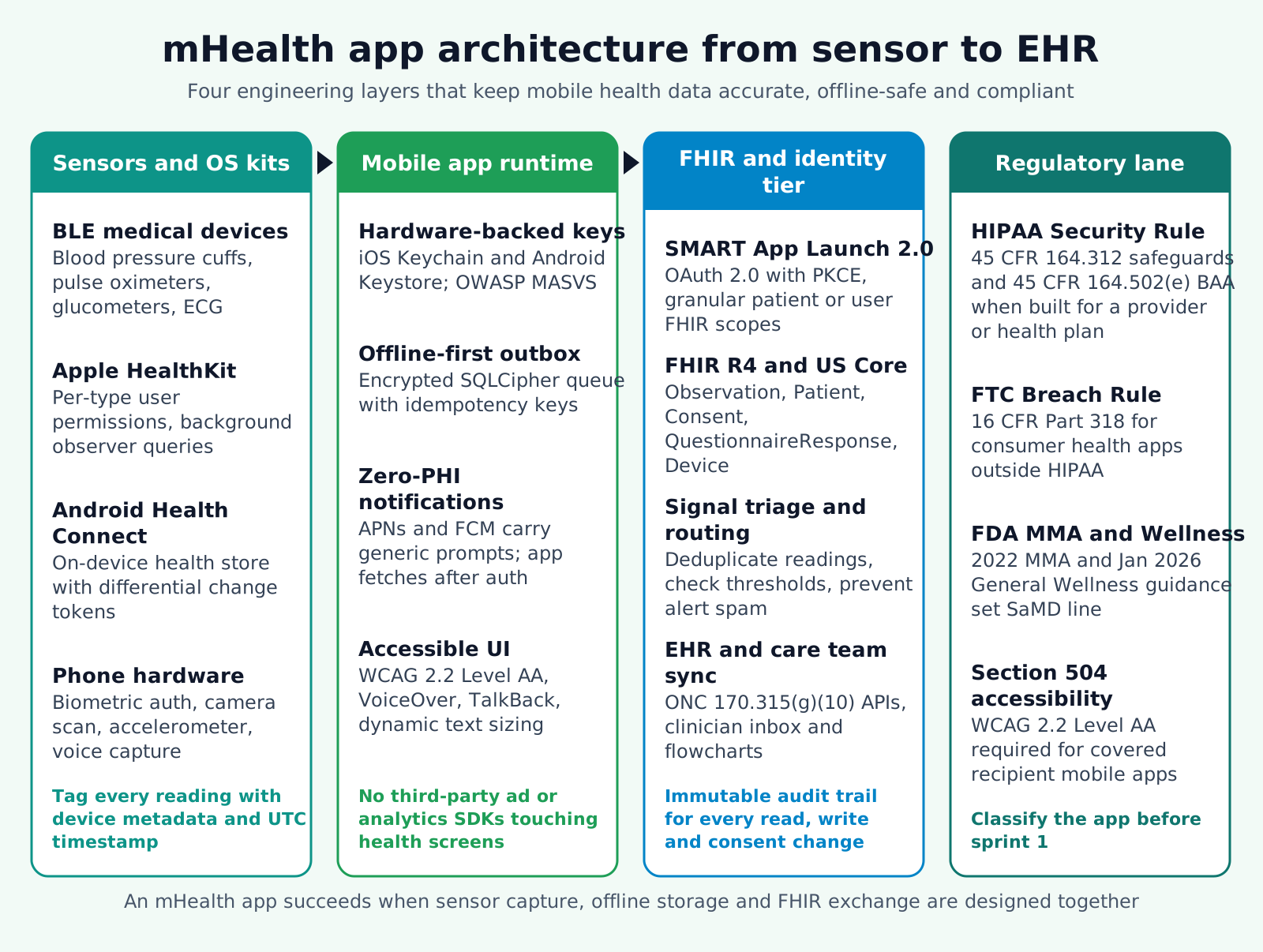
A production mHealth app has four layers, and each one owns a different failure. Keeping them separate stops two classic problems: readings lost when the signal drops, and health data leaking into analytics or notifications.
- Capture layer: Bluetooth Low Energy peripherals, the camera and the operating system health stores. Each reading is stored with its unit, a UTC timestamp and the source device or app, so later layers never guess where it came from.
- Client layer: Screens, session handling and an encrypted local database whose key lives in the iOS Keychain or Android Keystore. Outbound records wait in an outbox with a client-generated ID, so a retry never creates a duplicate.
- Service layer: An API you own that checks tokens, records consent and validates payloads. Clinical systems connect here, never directly from the phone with stored vendor keys.
- Boundary layer: Push services, crash reporting and analytics. Push payloads carry no clinical values. Crash and analytics events pass through a scrubber that removes identifiers before they leave the device.
Why HealthKit returns nothing instead of an error
Apple's HealthKit documentation states that an app cannot tell whether the user denied read access to a data type. A denied query simply returns no samples. The app therefore needs an empty state that explains how to check the Health app settings, plus a manual entry or direct device path so a denied permission does not look like a healthy patient.
How do teams build an mHealth app from scope to store?
Teams build an mHealth app in eight steps, and the first two decide most of the cost. Skipping the classification or the dataset step usually means rework after the first store rejection or legal review.
- 1. Classify the app: Write down whether it is offered for a covered entity, sold direct to consumers, a wellness product or a device software function. Record the decision with the intended use statement.
- 2. Fix the minimum dataset: List each reading, questionnaire and event the app captures, the code it maps to, who reviews it and what action it triggers. Cut every field nobody acts on.
- 3. Prototype with real users: Test onboarding, pairing and daily logging with older adults, screen reader users and clinic staff on clickable prototypes before production code.
- 4. Lay the security base: Hardware-backed key storage, an encrypted local store, idle timeout with biometric re-entry, and screen-capture protection on views that show health data.
- 5. Add capture paths: HealthKit and Health Connect bridges, one or two validated Bluetooth devices and a manual entry path, each with clear source labels.
- 6. Connect the service layer: Identity, consent records and the API contract that clinical systems will use, versioned so older app builds keep working.
- 7. Audit every SDK and network call: Remove advertising and session-replay SDKs from health flows, and list each remaining vendor with what it receives.
- 8. Test and release in stages: Run a device matrix of older iPhones and low-cost Android phones, VoiceOver, TalkBack and large text, then a phased store rollout.
Onboarding, permissions and offline use
Onboarding is where a patient decides whether the app is worth the effort. A good flow asks for one thing at a time, explains why, and proves success before moving on.
- Permission timing: Ask for HealthKit, Health Connect, Bluetooth and notification access at the moment the feature needs it, with a plain sentence about what the app will read. A wall of prompts on first launch gets denied.
- First reading as the finish line: Onboarding ends when the first reading or check-in reaches the service layer and the app confirms it on screen, not when the account is created.
- Proxy and caregiver access: Parents, adult children and home aides often run the app. Model proxy access as its own role with its own login, instead of a shared password.
- Offline as the default: Every write goes to the local outbox first. The app shows what is waiting to sync and when the last successful sync happened.
- Notification text: Push and SMS text is visible on lock screens and in carrier systems. Say "You have a new message from your care team" and keep clinical content behind sign-in.
- Session length: Health apps on shared phones need a short idle timeout. Biometric re-entry keeps that from becoming a daily annoyance.
Where mHealth app builds go wrong
These are the failure points to test for before launch, not after the first support ticket.
- Analytics SDK on a symptom screen: A default marketing or session-replay tracker that fires on a health screen can be an FTC or HIPAA disclosure, whatever the privacy policy says.
- Posting straight from the UI: Without an outbox, a dropped connection loses the reading and a double tap creates two.
- Too many devices in release one: Each Bluetooth peripheral has its own pairing and firmware quirks. Two validated devices plus the health stores are enough to learn from.
- Accessibility left for later: Custom charts and gesture controls are hard to retrofit for VoiceOver focus order and large text.
- One API version for all builds: Patients do not update promptly. A backend change that breaks last quarter's build strands real users.
- Store review as a final step: A clinical app submitted from a personal developer account, or without disclosure and clearance documents, can stall at review.
What belongs in the first release?
A first release needs fewer features and more evidence than most teams plan. Use this checklist before the store submission.
- Regulatory record: The intended use statement, the HIPAA, FTC or FDA classification, and the list of vendors with a business associate agreement where one is needed.
- Security record: Key storage, encrypted local data, idle timeout, a scrubbed crash pipeline and an OWASP MASVS review of the build.
- Capture scope: The exact HealthKit and Health Connect data types, the validated devices and the manual entry path.
- Accessibility record: VoiceOver and TalkBack test notes and large text checks against WCAG 2.1 AA, with WCAG 2.2 AA as the design target.
- Store package: Privacy disclosures, health data declarations, medical disclaimers and any clearance documents, submitted from an organization account.
- Support plan: Who answers pairing problems, how sync failures are monitored, and how the team tests each new iOS and Android release before it ships.
How Agnotic can help
A mobile health product succeeds or fails on details that sit between design and engineering: the permission flow, the outbox, the SDK list and the store package. Agnotic Technologies builds mHealth apps for digital health teams, device makers and care programs, covering native or cross-platform clients, device pairing, health store integration and the service layer behind them.
Agnotic works from the client's regulatory classification and builds to HIPAA Security Rule safeguards when the app handles ePHI, with WCAG 2.2 AA as the design target for every screen.
Build your mHealth app with Agnotic
Explore mHealth app development, or browse more engineering guides in the Guides and Playbooks hub.
Related reading on Agnotic
Continue with healthcare apps, EHR mobile apps, progressive web apps and remote patient monitoring MVPs.
Sources
- 45 CFR 164.312: HIPAA Security Rule technical safeguards
- FTC: Health Breach Notification Rule, 16 CFR Part 318
- FDA: Policy for Device Software Functions and Mobile Medical Applications
- FDA: General Wellness: Policy for Low Risk Devices (January 2026)
- Apple: App Review Guidelines, 1.4.1 and 5.1.3
- Apple: Authorizing access to health data (HealthKit)
- Federal Register: Extension of Section 504 web and mobile accessibility compliance dates (11 May 2026)
- OWASP: Mobile Application Security Verification Standard (MASVS)


