



A claim scrubber is a rules engine that reads every claim before it leaves the billing system and stops the ones a payer would reject. Off-the-shelf scrubbers exist, but billing companies, health systems and software vendors often need their own, because their payer mix, specialties or product make generic rules too noisy or too thin.
This post covers how to build one: the edit types, where the rule library comes from, how to represent rules with effective dates and payer layers, how to show results to billers, and how to test edits so a rule change never breaks a clean claim.
What does building claim scrubber software involve?
Building claim edits into your billing product?
Our claims processing automation page covers the scrubbing, routing and remittance tools we build.
Building claim scrubber software means creating a rules engine that checks each claim against code set, national, payer and in-house rules before submission, explains every failure in plain words and keeps its rule library current. Agnotic Technologies builds scrubbers with rules held as versioned data and a test for every edit.
The engine itself is the smaller part of the work. Most effort goes into the rule library, its upkeep and its tests.
How does a scrubber process a claim?
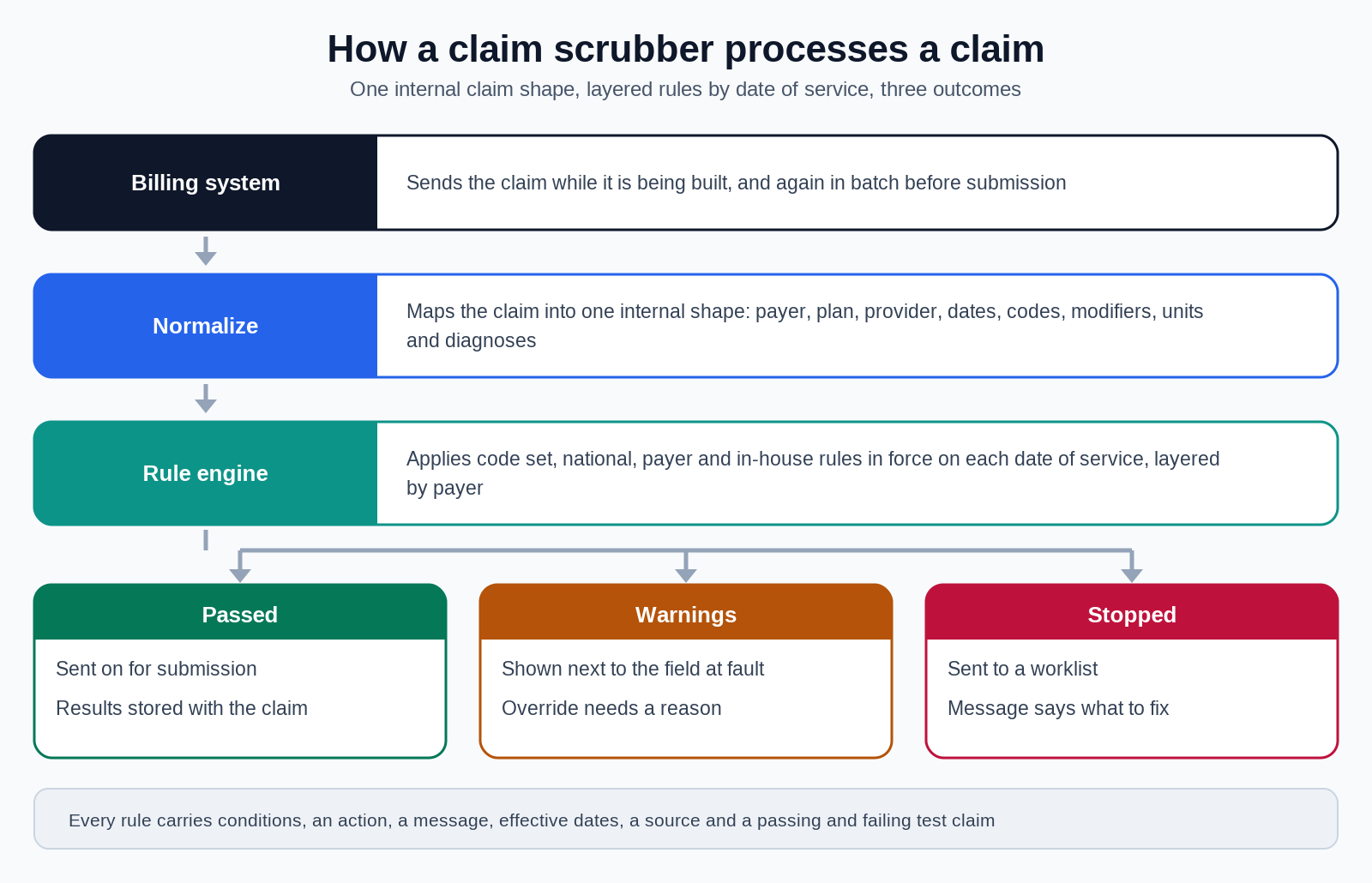
A scrubber takes a claim from the billing system, normalizes it into one internal shape, runs every applicable rule for the claim's payer and dates of service, and returns each claim as passed, passed with warnings or stopped.
HIPAA adopts ASC X12 standards for electronic transactions, including health care claims (837), payment and remittance advice (835), eligibility inquiries (270/271) and prior authorization requests (278).
Normalize from the internal claim, not only from the outgoing file. Rules written against the billing system's own fields are easier to read, and the same engine can run while the claim is still being built.
Which edit types does a scrubber need?
A scrubber needs edits for format, code validity, code relationships, units, payer requirements and claim history. Each type has its own data source and its own owner.
- Format: required fields, valid identifiers and values the transaction standard allows.
- Code validity: codes that exist and are active on the date of service.
- Code pairs: procedures that cannot be billed together, or only with a modifier.
- Units: limits on units of a service for one patient on one day.
- Diagnosis support: procedures linked to diagnoses that support them.
- Payer rules: requirements of one payer or plan, such as attachments or place of service limits.
- History: duplicates and frequency limits that need earlier claims to check.
Where does the rule library come from?
The library comes from four places: published code sets, national edits, payer policies and the organization's own denial history. Each needs a loader, a refresh schedule and an owner.
CMS developed the National Correct Coding Initiative to promote correct coding of Medicare Part B claims: its procedure-to-procedure edits prevent improper payment when incorrect code combinations are reported, and its Medically Unlikely Edits do the same for incorrect units of service.
Load national edit files as published, rather than retyping them as rules. Payer policies and in-house lessons are where most hand-written rules come from, and they need the closest review.
How should rules be represented?
Represent rules as data with conditions, an action, a message and an effective date range, not as code buried in the billing application. Analysts can then read and propose rules, and engineers review them like any other change.
- Conditions: payer, plan, codes, modifiers, place of service, provider type and dates.
- Action: stop, warn or fix automatically, with a severity level.
- Message: what is wrong, which field, and how to fix it.
- Dates: effective from and to, so a claim is checked against the rules in force on its date of service.
- Source: the policy, file or denial pattern behind the rule.
CMS updates the NCCI procedure-to-procedure and Medically Unlikely Edit files every quarter, and changes can also arrive between quarters through replacement files.
Payer-specific rule layers
Hold payer rules as a layer on top of national rules, so a payer can add, tighten or switch off an edit for its own claims without copying the whole library. A rule for one plan should never fire on another.
Give each payer layer a named owner who tracks that payer's bulletins, and record why each payer rule exists. Rules with no recorded reason are hard to retire when the payer drops a requirement.
How should edit results be shown to billers?
Show results inside the claim screen, next to the field at fault, with a message that says what to change. A list of rule numbers sends billers hunting through the claim.
Group results by severity, so hard stops come first, and record every override with a reason. Override rates per rule are the clearest sign that a rule is wrong or badly worded.
How do you test claim edits?
Test every rule with at least one claim it should stop and one it should pass, and run the full set on every rule change. A rule that stops clean claims costs as much trust as one that misses errors.
- Rule tests: a passing and a failing claim stored with each rule.
- Regression set: a library of real, de-identified claims with known outcomes, run on every change.
- Date tests: claims on both sides of a rule's effective date.
- Shadow mode: new rules run without stopping claims, and their results compared with what payers rejected.
Feeding rejections back into the library
Send clearinghouse rejections and payer denials back to the rule library team as evidence. Each one is either a rule that fired and was overridden, a rule that is missing, or a payer behavior that has changed.
Tag each traced rejection with the rule that should have caught it, or open a draft rule with that claim attached as its failing test. The library then grows from real evidence instead of guesses.
Real time, batch and performance
Run the scrubber in real time while a claim is being built, and again in batch before submission. The first catches errors while the biller still has the chart open; the second catches anything that changed afterwards.
Load rules into memory by payer and date, index them by code, and measure time per claim. A biller will not wait several seconds for each save, and a slow batch delays the whole day's submission.
What goes wrong when teams build scrubbers?
Most problems come from the library rather than the engine. These patterns recur.
- Rules in code: every payer change needs a developer and a release.
- No effective dates: corrected claims for old dates checked against today's rules.
- No tests: a new rule silently stops a class of clean claims.
- Cryptic messages: billers override edits they do not understand.
- Stale national files: quarterly updates missed, so edits drift from what payers apply.
A worked example: a billing company builds its own scrubber
A billing company serving several specialties found its purchased scrubber too noisy for some clients and silent on rules that caused repeat denials. It built a scrubber that loaded national edit files and held payer and client rules as data.
Each rule carried a test claim, a source and an owner. New rules ran in shadow mode before they could stop claims, and override rates were reviewed every week with the analysts who wrote the rules.
Billers stopped working around the scrubber, because each message named the field and the fix.
Who owns what?
Rules need business owners, and the engine needs an engineering owner.
- Coding and billing analysts: payer and in-house rules, messages and test claims.
- Rule library owner: national file loads, quarterly updates and retirements.
- Engineering: the engine, loaders, performance and the regression run.
- Revenue cycle lead: which denial patterns become rules first.
How do you measure a scrubber?
Measure whether it catches what payers would reject without stopping clean claims.
- Claims accepted on first submission, by payer.
- Rejections and denials the scrubber should have caught, traced to a missing rule.
- Override rate by rule.
- Time per claim in real time and per batch.
What are claim scrubber software build best practices?
Hold rules as data with effective dates and sources, load national edit files rather than retyping them, layer payer rules on top of national ones, and give each layer an owner.
Write every message as a fix, test every rule with passing and failing claims, run new rules in shadow mode, and review override rates and missed denials every month.
How Agnotic can help
Agnotic builds claim scrubbers for billing companies, health systems and software vendors: rule engines, loaders for national edit files, payer rule layers, rule editors for analysts, test libraries and the screens billers use to fix claims.
Build your claim scrubber with Agnotic
Our medical billing software page covers claim, scrubbing and remittance systems we build.
Related reading on Agnotic
Claims, coding and denials.


