



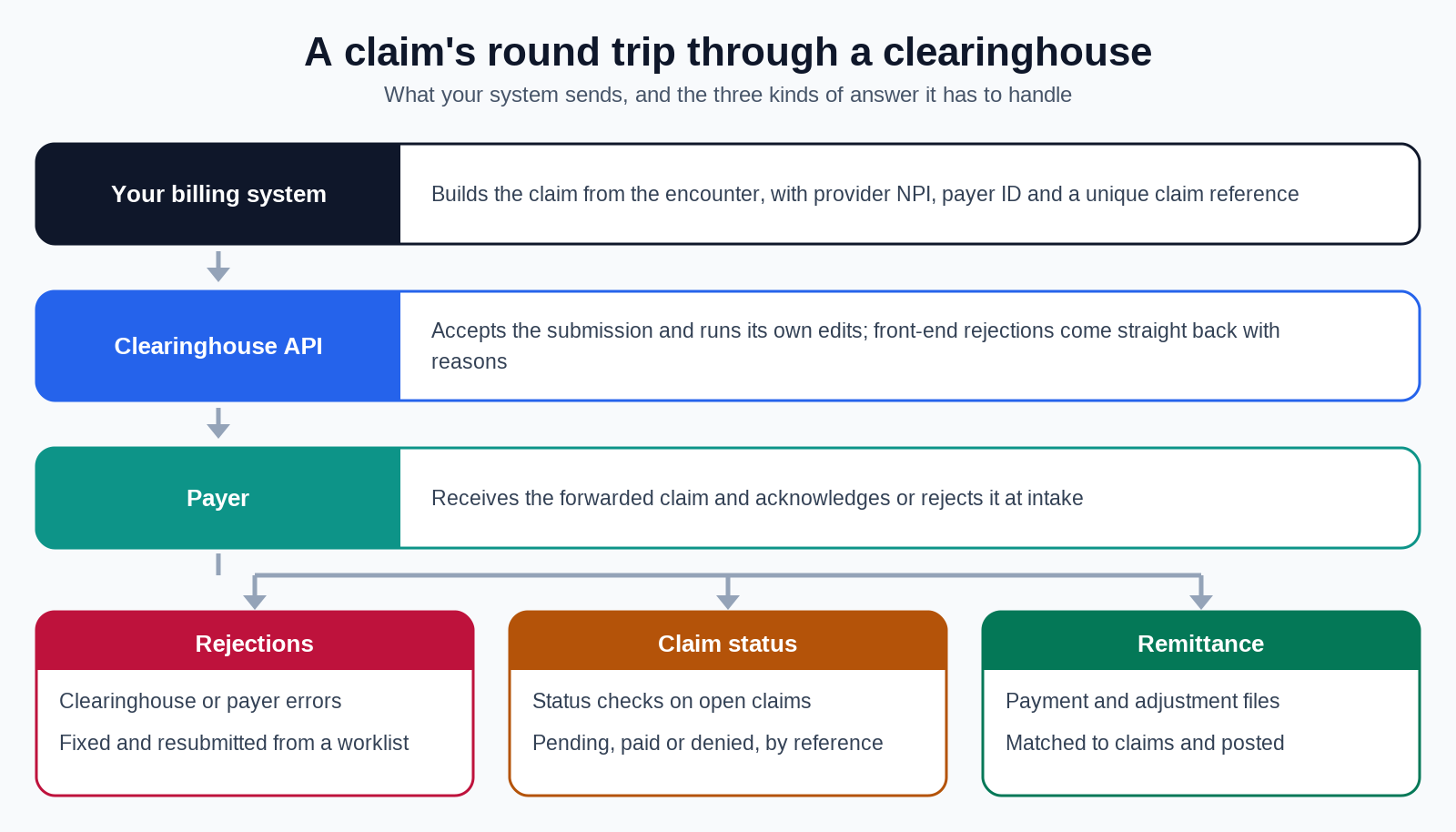
Most software that sends medical claims does not talk to payers directly. It talks to a clearinghouse, which checks claims, routes them to hundreds of payers and passes back rejections, status updates and remittances. The clearinghouse API is where a billing product either runs quietly or generates a daily pile of manual work.
This post covers a clearinghouse integration from the developer's side: enrollment before the first claim, submitting claims through an API, handling rejections, checking claim status, retrieving remittances and the identifiers that tie it all together. It applies whether your product is a practice system, a billing service or a specialty app adding claims.
What is medical billing API integration?
Adding claims to your product?
Our medical billing software page covers the claim, clearinghouse and payment workflows we build.
Medical billing API integration is connecting your software to a clearinghouse so it can submit claims, receive rejections, check claim status and download remittances without manual uploads. Agnotic Technologies builds these integrations with a claim reference that follows each claim from submission to payment.
The submit call is the easy part. Handling every answer that comes back is where the work is.
What does a clearinghouse do between you and payers?
A clearinghouse receives your claims, runs format and content checks, rejects what fails, translates and forwards the rest to each payer, and returns acknowledgments, status responses and remittances. One connection replaces many payer connections.
HIPAA adopts ASC X12 standards for electronic transactions, including health care claims (837), payment and remittance advice (835), eligibility inquiries (270/271) and prior authorization requests (278).
Many clearinghouses offer JSON APIs on top of these transactions. Your code may never build an X12 file, but the rules and codes inside them still apply, so learn them.
What has to happen before the first claim?
Before the first claim, the provider must be enrolled with the clearinghouse and, for many payers, enrolled separately for electronic claims and electronic remittances. These enrollments take time and often need signatures from the provider.
HIPAA requires covered health care providers to obtain a National Provider Identifier (NPI) and use it on standard transactions, such as claims, wherever a provider identifier is required.
- Clearinghouse account: credentials per environment and per customer, never shared.
- Payer enrollment: per payer and per provider, tracked with status and dates.
- Remittance enrollment: a separate step for many payers, often forgotten until payments go missing.
- Test first: a sandbox or test mode that accepts claims without sending them to payers.
How should claim submission work through an API?
Claim submission should send each claim once with a unique reference, record the clearinghouse's acceptance or rejection, and never resend blindly after a timeout. Duplicate claims cause denials and refund work.
- Reference: your own claim identifier in every submission, stored before the call.
- Retries: check by reference whether the claim arrived before resending.
- Validation: run your own checks before submitting, so obvious errors never leave.
- Batching: submit in small batches with per-claim results, not one large file with one answer.
How should rejections be handled?
Rejections should land in a worklist with the reason in plain words, the claim and the field at fault, so billing staff fix and resubmit quickly. A rejection means the claim never reached adjudication, which is different from a denial.
Separate clearinghouse rejections, which are about format and content, from payer rejections at intake, which often concern eligibility or identifiers. Track rejection reasons over time; the top few usually point to one fix upstream.
How do you track claim status?
Track claim status with scheduled status requests for open claims, matched by your reference and the payer's claim number. Poll at sensible intervals, since claims move slowly and payers limit request volume.
Show status in the product with the date of the last check. A claim pending for a long time without movement should alert someone before the filing window closes.
- Open claims: checked on a schedule until a final status arrives.
- Stale claims: no change after a set period, flagged to billing staff.
- Payer limits: request rates kept within what each payer and the clearinghouse allow.
- History: every status response kept, so the claim's path can be shown later.
How do you retrieve remittances?
Retrieve remittances by downloading payment files from the clearinghouse on a schedule, recording each file once, and matching each payment line to the claim it pays. Unmatched lines go to a worklist, never to a best guess.
Keep the original files as received. When a payment question comes up months later, the raw remittance is the record everyone trusts.
Should you use a JSON API or raw X12?
Use the clearinghouse's JSON API when your team is new to billing and the clearinghouse covers your payers; use raw X12 when you need full control, work with several clearinghouses or already have X12 expertise. Many products start with JSON and keep X12 as an option.
- JSON API: faster to start and easier to validate, but tied to one clearinghouse's model.
- Raw X12: portable between clearinghouses, with more parsing and testing work.
- Hybrid: build claims in your own model and generate either format through an adapter.
- Either way: store what you sent and what came back, exactly as exchanged.
Credentials, access and audit
Claims carry diagnoses, procedures and patient identifiers, so the integration needs the same protection as clinical data. Credentials and logs are the usual weak points.
Keep clearinghouse credentials per customer in a secrets store, rotate them on a schedule, and limit who can download remittance files. Log each submission and download with user, time and reference, but keep claim bodies out of general application logs.
Identifiers that tie it all together
Several identifiers follow a claim: your claim reference, the clearinghouse's tracking number, the payer's claim number, the patient account number and the provider's NPI. Store all of them on the claim record.
Most matching problems come from losing one of these, for example a resubmitted claim that gets a new reference and no link to the original.
What goes wrong in clearinghouse integrations?
Integration problems tend to show up as money that never arrives rather than errors on a screen. These are the frequent causes.
- Missing remittance enrollment: claims are paid but no payment file ever arrives.
- Blind retries: timeouts lead to duplicate claims and duplicate denials.
- Rejections in email: reports sent to an inbox nobody works.
- Shared credentials: one login for every customer, so one revoked account stops all.
- Lost links: corrected claims with no link to the original submission.
A worked example: a therapy practice platform adds claims
A platform for physical therapy practices wants to submit claims directly instead of exporting files. Each practice is enrolled with the clearinghouse through an onboarding flow that tracks payer enrollments, including remittances.
Claims are built from signed visit notes, checked by the platform's own rules, and submitted with a unique reference. Rejections appear in a billing worklist with the field highlighted, and status checks run each night for open claims.
Remittance files download daily, payments post automatically when they match, and the rest go to a review queue. A monthly report shows each practice its top rejection reasons, and the product team uses the same report to decide which intake fields should become required.
Who owns what in a billing integration?
Engineering owns the connection; billing operations own the work it produces. Both need to see the same claim record.
- Engineering: API client, credentials, retries, file storage and matching logic.
- Billing operations: rejection and unmatched payment worklists.
- Onboarding team: clearinghouse and payer enrollments per customer.
- Compliance: agreements with the clearinghouse and access to claim data.
How do you test a clearinghouse integration?
Test with the clearinghouse's test mode and with deliberately broken claims, then follow each one to its result.
- Bad claims: missing NPI, wrong payer ID and invalid codes, each producing the expected rejection.
- Timeouts: cut the connection after submission and confirm no duplicate is sent.
- Status: open claims polled and updated correctly.
- Remittance: sample payment files matched, with unmatched lines sent to review.
What are medical billing API integration best practices?
Track enrollments, including remittances, submit each claim once with a stored reference, work rejections from a worklist, poll status at sensible intervals, keep raw remittance files and store every identifier on the claim.
Measure rejection reasons, time to payment and unmatched payments, and use them to fix problems upstream.
How Agnotic can help
Agnotic builds clearinghouse integrations for billing products and practices: enrollment tracking, claim submission, rejection worklists, status checks and remittance matching, using JSON APIs or X12 directly.
Connect to clearinghouses with Agnotic
We build X12 and API connections for claims, status and remittance.
Related reading on Agnotic
Billing workflows and EHR billing.


