



Revenue cycle bots are useful when a payer or a legacy system has no API and a person is retyping the same screen. They are a poor fit when a standard transaction already exists.
Agnotic Technologies puts the transaction first and the bot only on the screen that has no interface.
Where does RPA fit in the healthcare revenue cycle?
RPA fits in the healthcare revenue cycle on screens that have no API, such as a payer portal for a status a transaction cannot return. Agnotic Technologies uses X12 where a standard exists and a bot only where the screen is the interface.
HIPAA adopts ASC X12 standards for electronic transactions, including health care claims (837), payment and remittance advice (835), eligibility inquiries (270/271) and prior authorization requests (278).
Automating eligibility, claims or posting?
Revenue cycle management software covers the transactions. A bot is the exception, not the design.
Which steps are a transaction, and which are a bot?
If a named X12 transaction carries the data, build that. Use a bot only after you have confirmed the payer or the vendor will not offer the transaction.
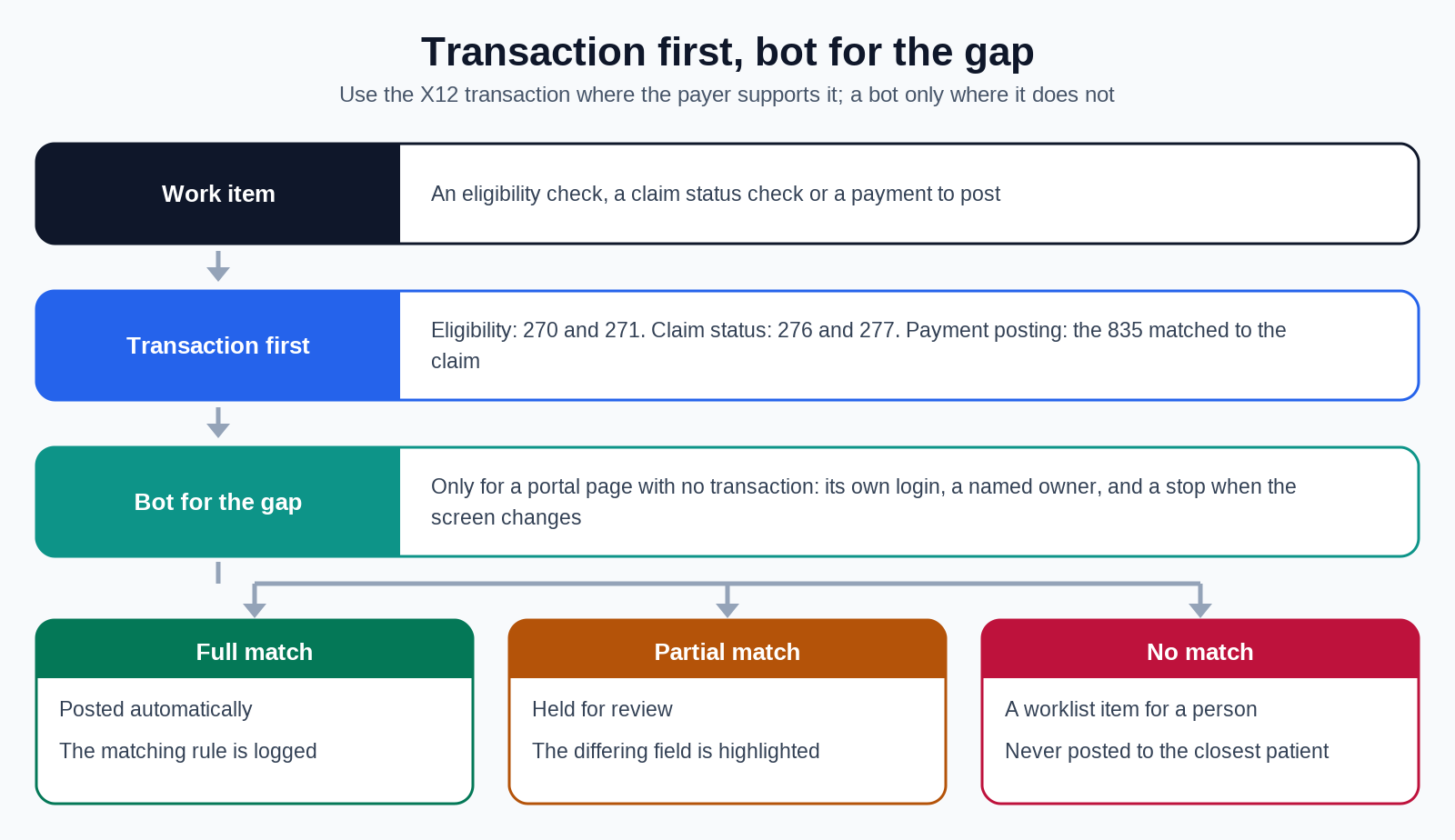
- Eligibility: 270 and 271, not a portal login, when the payer supports them.
- Claim status: 276 and 277 where the payer returns them.
- Payment posting: the 835, matched to the claim.
- Bot: a portal page with no transaction, with a person named when the page changes.
Ask your clearinghouse before you ask an automation vendor. A payer that seems to have no transaction may support it through a different connection or enrollment step.
Write the answer down per payer and per step. That table becomes the scope of the bot work, and it shows the billing lead exactly why each bot exists.
How is this different from a general RPA post?
The general RPA post is the choice between a bot and an API across healthcare. This post is only the revenue cycle, and it names the transactions to prefer. Our eligibility verification post is the 270 and 271 path in more detail.
What breaks a revenue cycle bot?
A portal redesign, a bot that posts a payment with no human check on a low match, and credentials shared across staff. Log every run. Do not let the bot be the only copy of what the payer said.
Expired passwords and session timeouts break bots too, usually overnight. Schedule runs when someone who can reset the login is working.
Which eligibility screens still need a bot?
An eligibility screen needs a bot only when the payer's 271 response leaves out a detail the front desk needs and the portal shows it. Examples include plan-specific benefit notes or a referral requirement that appears only on the portal page.
Before building, compare the 271 with the portal for a sample of real patients, with a biller beside you. If the transaction already carries the field, fix the parsing instead of adding a bot.
- Run the 271 first, and let the bot fill only the fields it leaves blank.
- Store which source answered each field, transaction or portal.
- Write the portal result into the eligibility record staff already use.
- Flag any patient where the two sources disagree, for a person to review.
How should a claim status bot be scoped?
Scope a claim status bot to the claims the 276 and 277 exchange cannot answer, for example with a payer that does not support it. Every other claim stays on the transaction.
Work from a queue, not a full sweep. The bot checks claims that passed the follow-up date the billing team set, records what the portal said, and routes anything needing action to a worklist.
- Input: a claim list from the billing system, filtered by payer and age.
- Output: the status text, the date checked and a page capture stored with the claim.
- Action: denied or pended claims go to a named worklist, not an inbox.
- Limit: the bot never corrects or resubmits a claim on its own.
Where does payment posting need a person?
Payment posting needs a person whenever the 835 and the claim do not line up cleanly. A bot may copy remittance detail from a portal when no 835 arrives, but the posting rules stay with the billing team.
Agree a match rule with the billing lead, such as claim number, patient, date of service and billed amount. A full match can post on its own, and anything partial goes to review with both records side by side.
- Full match: post, and log the rule that matched.
- Partial match: hold for review with the differing field highlighted.
- No match: create a worklist item, and never post to the closest patient.
- Adjustments and denials: keep the payer's reasons exactly as sent.
Portal logins and access
Each bot needs its own portal login, issued and owned like a staff account. With a shared login, nobody can tell whether a person or a bot looked up a patient.
Keep credentials in a secrets vault, rotate them when staff leave, and agree how multi-factor prompts are handled with the payer instead of working around them. Read each portal's terms of use before automating it.
A bot should open only the screens its task needs, and nothing it happens to be able to reach.
The HIPAA Privacy Rule's minimum necessary standard requires covered entities to limit uses and disclosures of protected health information to the minimum needed for the purpose.
How do you monitor a bot in production?
Monitor each run like an interface: it starts, it finishes and it reports what it did. A bot that fails quietly is worse than none, because staff assume the work was done.
- Run log: start, end, claims checked and exceptions raised.
- Screen check: stop the run when a field the bot expects is missing.
- Daily summary: sent to the billing lead, not only to IT.
- Fallback: a written manual procedure the team can pick up the same day.
Who owns revenue cycle bots?
The revenue cycle team owns what a bot does, and IT owns how it runs. Both names go on the bot's record before it touches a live claim.
- Billing lead: scope, match rules and exception handling.
- IT or automation team: credentials, hosting, logs and updates.
- Compliance: access reviews and the list of portals automated.
- Payer relations: asks each payer about transaction support at every contract renewal.
When should you retire a bot?
Retire a bot as soon as the payer offers the transaction or an API for the same data. Keep a register of every bot with the payer and screen it covers, and review it when contracts or clearinghouse options change.
Plan the exit from the start. A bot that outlives its reason keeps costing maintenance and keeps a portal login open.
A worked example: one payer, three screens
Picture a clinic group where one regional payer returns 271 and 835 files but no claim status transaction. Billers log in to that payer's portal each morning to check aging claims.
The build keeps eligibility and posting on the transactions. A single bot covers the status screen for that payer only, works from the aging list, and writes each result into the claim note with a page capture.
Anything denied or pended lands on the follow-up worklist with the portal text attached. The billers stop the morning lookups and spend that time on the claims that need a decision.
How should a bot react when a portal changes?
It should stop, not guess. Before each step the bot confirms the fields it expects are on the page, and it halts the run and alerts its owner when one is missing or renamed.
Keep a short test script per portal: one known claim and one known patient whose answers you already have. Run it after every bot update and whenever the payer announces a portal release, before the bot goes back on the live queue.
How do you measure the result?
Measure the manual work removed and the errors avoided, against a baseline taken before the bot went live.
- Portal lookups staff still do by hand, by payer.
- Exceptions raised and how quickly they are cleared.
- Corrections needed after automatic posting.
- Runs stopped by screen changes, by portal.
What are RPA best practices in the revenue cycle?
- Use the X12 transaction wherever the payer supports it.
- Give each bot its own login and a named owner.
- Post automatically only on a full match.
- Route every exception to a worklist a person clears.
- Stop the run when the screen changes, and alert the owner.
- Keep a register of bots and retire each one when a transaction appears.
How Agnotic can help
Agnotic builds revenue cycle automation for billing teams, starting with the X12 transactions each payer supports. We add a bot only for the portal screens that remain, with its own login, a run log and a worklist for exceptions.
Automate your revenue cycle with Agnotic
Eligibility, claim status and posting built on standard transactions, with bots only where a payer leaves no other option.
Related reading on Agnotic
The wider RPA choice, eligibility, claims and the billing process itself.


