



A healthcare SaaS product that works well in a few clinics can still struggle when the count keeps growing. The software rarely breaks first. What breaks is the work around it: settings changed by hand in the database, migrations rebuilt from scratch for every clinic, and support staff who cannot tell how one clinic differs from the next.
This post covers how to make each new clinic a repeatable project: an onboarding playbook, clinic settings held as layered data, data migration that reuses its mappings, integrations by template, support organized around clinics, safe releases and a clean exit when a clinic leaves.
What does scaling healthcare SaaS to clinics involve?
Rolling your product out to more clinics than the team can onboard by hand?
Our fractional CTO service helps health product teams plan onboarding, configuration and support for growth.
Scaling healthcare SaaS to clinics means turning each new clinic into a repeatable project: a set onboarding plan, clinic settings stored as versioned data rather than code, a tested migration from the clinic's old system, and support that knows each clinic's setup. Agnotic Technologies builds the tooling that keeps later clinics as smooth to onboard as early ones.
None of it is visible in a demo, which is why it is so often left until the backlog of waiting clinics forces the issue.
Why do early clinic launches not scale?
Early launches succeed because the founding team does them by hand: engineers edit settings in the database, a product lead trains staff in person, and requests go straight into code. That effort does not repeat cheaply, and every hand-made change becomes something support has to remember.
The first sign is usually a queue of signed clinics waiting for a go-live date. The second is a support team that answers the same question differently for different clinics.
What should a clinic onboarding playbook include?
A playbook should list every step from signed contract to handover, with an owner, inputs and a definition of done for each. It turns onboarding from a favor engineers do into a process anyone on the implementation team can run.
- Step 1, kickoff: confirm scope, contacts, go-live window and the clinic's current systems.
- Step 2, configuration workbook: the clinic fills in locations, providers, visit types, forms and payers.
- Step 3, data migration: extract, map, trial load and reconcile the clinic's existing data.
- Step 4, integrations: connect the clinic's EHR, lab or clearinghouse from a tested template.
- Step 5, training: role-based sessions and short guides for front desk, clinicians and billing staff.
- Step 6, go-live and close support: daily check-ins with the clinic for the first weeks.
- Step 7, handover: the clinic moves to standard support with its setup documented.
How should per-clinic configuration be handled?
Hold configuration as data in layers: platform defaults, a template for each type of clinic, the clinic's own settings and finally user preferences. Each layer changes only what it must, and everything else is inherited from the layer above.
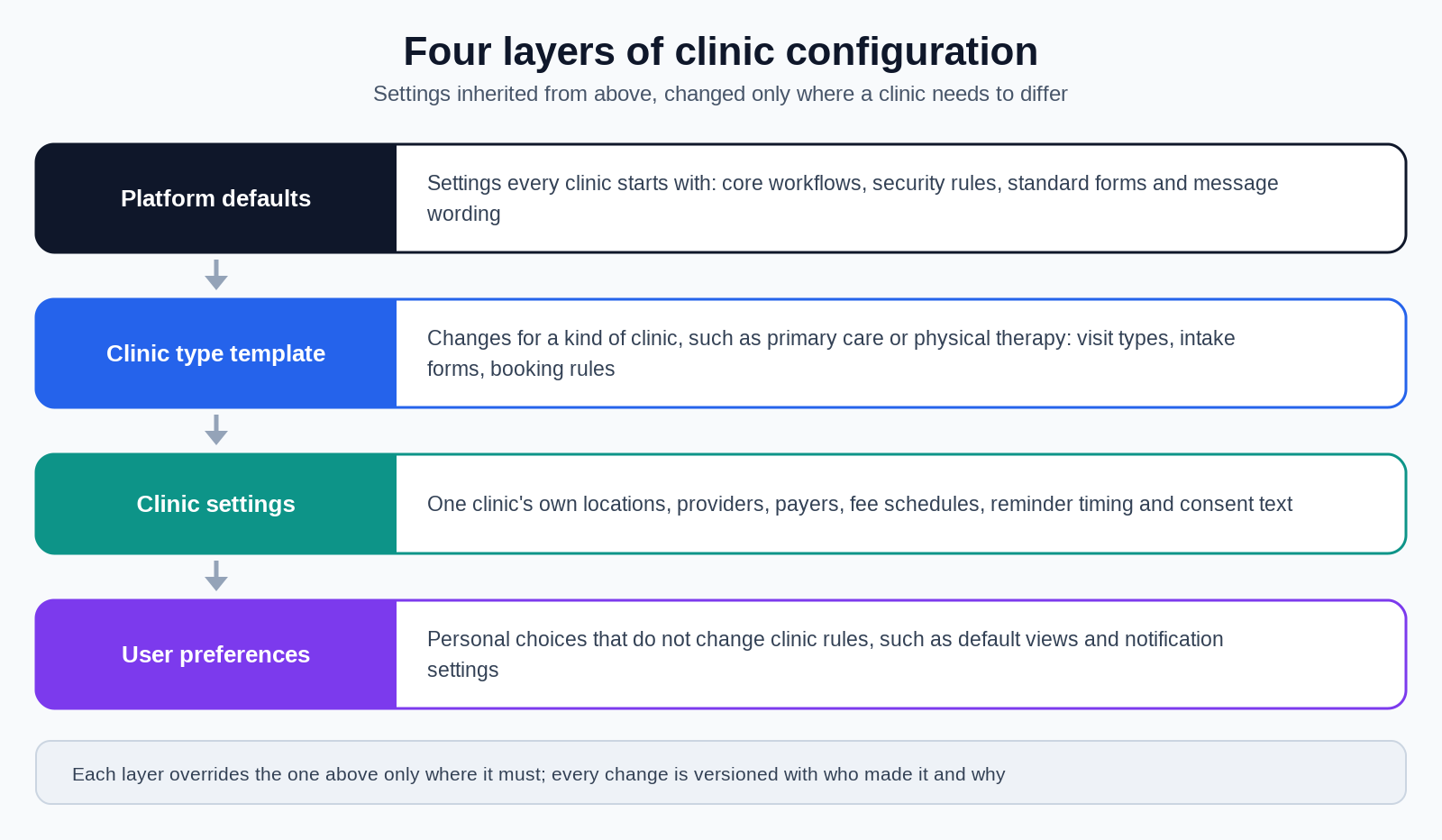
Version each clinic's settings, record who changed what and when, and let support compare any clinic with its template. A setting that differs from the template without a recorded reason is a question to ask before it becomes a ticket.
Which settings vary from clinic to clinic?
The settings that vary are the ones tied to how each clinic runs its day and gets paid. Keep them editable by trained implementation staff, never only by engineers.
- Scheduling: visit types, durations, provider templates and booking rules.
- Forms: intake questions, consent text and the languages offered.
- Billing: payers, fee schedules and claim settings.
- Messages: reminder timing, wording and sender details.
- Roles: which staff can see and change what.
How should data migration work for each clinic?
Migration should reuse mappings by source system, so a later clinic moving from a known practice system starts from a mapping that has already been tested. Each clinic still gets a trial load and a reconciliation that the clinic signs off.
- Source profiles: one mapping per source system and version, improved with each clinic.
- Trial load: a full load into a test copy, checked by clinic staff on real patients they know.
- Reconciliation: counts of patients, appointments and balances compared before and after.
- Cutover: a planned freeze, final load and sign-off, with a way back if checks fail.
Integrations, clinic by clinic
Build each integration once as a template for a vendor or partner, then connect each clinic by supplying its own endpoints, credentials and codes. A clinic's lab or EHR connection should never mean new code unless the vendor itself behaves differently.
Keep credentials per clinic in a secrets store, send test messages before go-live, and monitor every connection by clinic, so a failed interface shows up on a dashboard before the clinic calls.
How should support be organized as clinics grow?
Organize support around clinics: every ticket carries the clinic, its configuration version and recent changes, and first-line staff can answer setup questions without asking engineers. Engineers should see only problems that need code.
The HIPAA Privacy Rule's minimum necessary standard requires covered entities to limit uses and disclosures of protected health information to the minimum needed for the purpose.
Support often needs to look inside a clinic's data to solve a problem. Grant that access per ticket and per clinic, for a limited time, and log every view, so the clinic can be told exactly who looked at what.
The HIPAA Security Rule's audit controls standard requires mechanisms that record and examine activity in information systems that contain or use electronic protected health information.
Releasing changes without disrupting clinics
Release new features behind switches that can be turned on per clinic, starting with clinics that agreed to go first. A workflow change that surprises a front desk in the middle of a clinic day costs more trust than the feature earns.
Send short release notes written for clinic staff, avoid changing screens during clinic hours, and keep a way to turn a feature off for one clinic without a new deployment.
What happens when a clinic leaves?
When a clinic leaves, it should receive its data in a usable format, and the product team should close its access, integrations and stored data under the agreement.
A HIPAA business associate contract must require the business associate, at termination and where feasible, to return or destroy all protected health information it still holds, and to keep protecting any it cannot.
Build the export and the closure steps early, as part of the product. An exit handled by a one-off script is slow for the clinic and hard to prove later.
What goes wrong when healthcare SaaS scales to clinics?
Most problems come from work that was fine once and became a habit. These patterns recur.
- Settings in code: each clinic's needs added as conditions in the codebase.
- Fresh mappings: every migration written from scratch instead of from a source profile.
- Hidden differences: clinics drift from their template with no record of why.
- Engineers on support: every question escalated because first-line staff cannot see clinic setup.
- Big-bang releases: every clinic changed at once, including those mid-launch.
A worked example: a scheduling product's regional rollout
A scheduling and intake product won a contract with a regional group of independent clinics after a handful of early launches. Each early clinic had been set up by an engineer, and nobody could list how they differed.
The team wrote a playbook, moved clinic settings into layered configuration with two clinic templates, and built source profiles for the two practice systems most clinics were leaving. Support gained a clinic view with configuration history and time-limited data access.
Later clinics went live with fewer engineering hours, and differences from the template were visible and explained.
Who owns what?
Implementation, support and engineering each own a part, and the product team owns the boundaries between them.
- Implementation team: playbook, configuration workbook, migration and training.
- Support: tickets, clinic view and handover from implementation.
- Engineering: templates, migration tooling, integrations and release switches.
- Product: which settings are configurable and which requests become features.
- Security and privacy: support access rules, logs and exit procedures.
How do you measure scaling?
Measure how much each new clinic depends on engineers and how stable clinics are after go-live.
- Time from signed contract to go-live, by clinic type.
- Engineering hours spent per onboarding.
- Migration defects found after go-live.
- Tickets per clinic in the first month and after handover.
- Clinics whose settings differ from their template without a recorded reason.
What are best practices for scaling healthcare SaaS to clinics?
Write the playbook before the backlog builds, hold clinic settings as versioned layered data, reuse migration mappings by source system, build integrations as templates and give support a clinic view with logged, time-limited data access.
Release behind switches per clinic, design the exit as carefully as the onboarding, and review the measures every month to find the next manual step to remove.
How Agnotic can help
Agnotic builds the parts of a healthcare SaaS product that make growth repeatable: configuration layers and admin tools, migration tooling with source profiles, integration templates, support consoles with audited access and clinic-level release switches.
Plan your clinic rollout tooling with Agnotic
Our SaaS consulting team helps health product companies design onboarding, configuration and support for many customers.
Related reading on Agnotic
SaaS products, tenancy, migration and implementation.


