



Role-based access control looks simple on a whiteboard: doctors see charts, billers see claims, admins see everything. Then the first real requirement arrives. A nurse should see patients on her unit, but not her neighbor's chart. A covering physician needs access for one weekend. A billing team in another company needs claims but not notes. Roles alone stop being enough within weeks.
This guide covers how to design a secure authorization server for a healthcare backend: what HIPAA asks for, how to model roles together with care relationships, where the policy decision should live, how emergency access works, and how access is reviewed and logged so it stays right after launch.
What is a secure healthcare RBAC server?
Designing access control for health data?
Agnotic builds identity and authorization services for healthcare platforms, with roles, care relationships and full audit.
A secure healthcare RBAC server is the service that decides, on every request, whether a user or system may perform an action on a piece of health data. It combines role-based access control with the context healthcare needs, such as the patient relationship, the organization and the purpose, and records each decision for audit.
In practice it is rarely a single box. It is a policy decision point that services call, a store of roles and relationships, and an audit stream. Keeping those three separate from application code is what keeps the rules consistent as the platform grows.
What does HIPAA require of access control?
HIPAA requires that systems holding electronic protected health information allow access only to people and software that have been granted access rights. The Security Rule's access control standard, 45 CFR 164.312(a)(1), requires technical policies and procedures to do that, tied to the access rights set under 164.308(a)(4).
The administrative side sets how those rights are managed. Under 45 CFR 164.308(a)(4)(ii), the access authorization and access establishment and modification specifications cover policies for granting access and for establishing, documenting, reviewing and modifying a user's right of access. Both are addressable, which means you assess and document how you meet them, not skip them.
- Unique users: Every person and every service has its own identity, never a shared account.
- Granted rights: Access comes from a recorded decision, such as a role assignment, not from default openness.
- Change and review: Rights change when jobs change and are reviewed on a schedule.
- Emergency access: A documented way to reach data in an emergency, which is itself controlled and logged.
How should roles and care relationships be modeled?
Model roles for what a person may do, and relationships for whose data they may do it to. Healthcare access almost always needs both: a nurse role grants the ability to chart vitals, and the unit assignment decides which patients.
- Roles: Clinician, nurse, care coordinator, front desk, biller, auditor, patient, proxy and service accounts, each with a list of permitted actions.
- Scopes of data: Clinical notes, results, medications, demographics, billing and sensitive categories such as behavioral health or substance use records.
- Relationships: Treating team, unit or location, organization or tenant, and patient-to-proxy links.
- Time limits: Coverage and temporary assignments that expire on their own.
- Sensitive flags: Records that need an extra condition, such as a specific consent, before access.
Keep the role list short. Teams that create a role for every exception end up with hundreds that nobody can review. Put the exceptions in relationships and conditions instead.
Sensitive categories deserve their own condition rather than their own role. A clinician on the treating team may see most of the chart, while records with extra legal protection open only when a matching consent or purpose is recorded. Modeling that as a condition keeps the rule in one place and makes it testable.
Where should the policy decision happen?
Make the decision in one place and enforce it everywhere. Services ask a central policy decision point whether a request is allowed, and the answer is applied at the API gateway and again inside each data service.
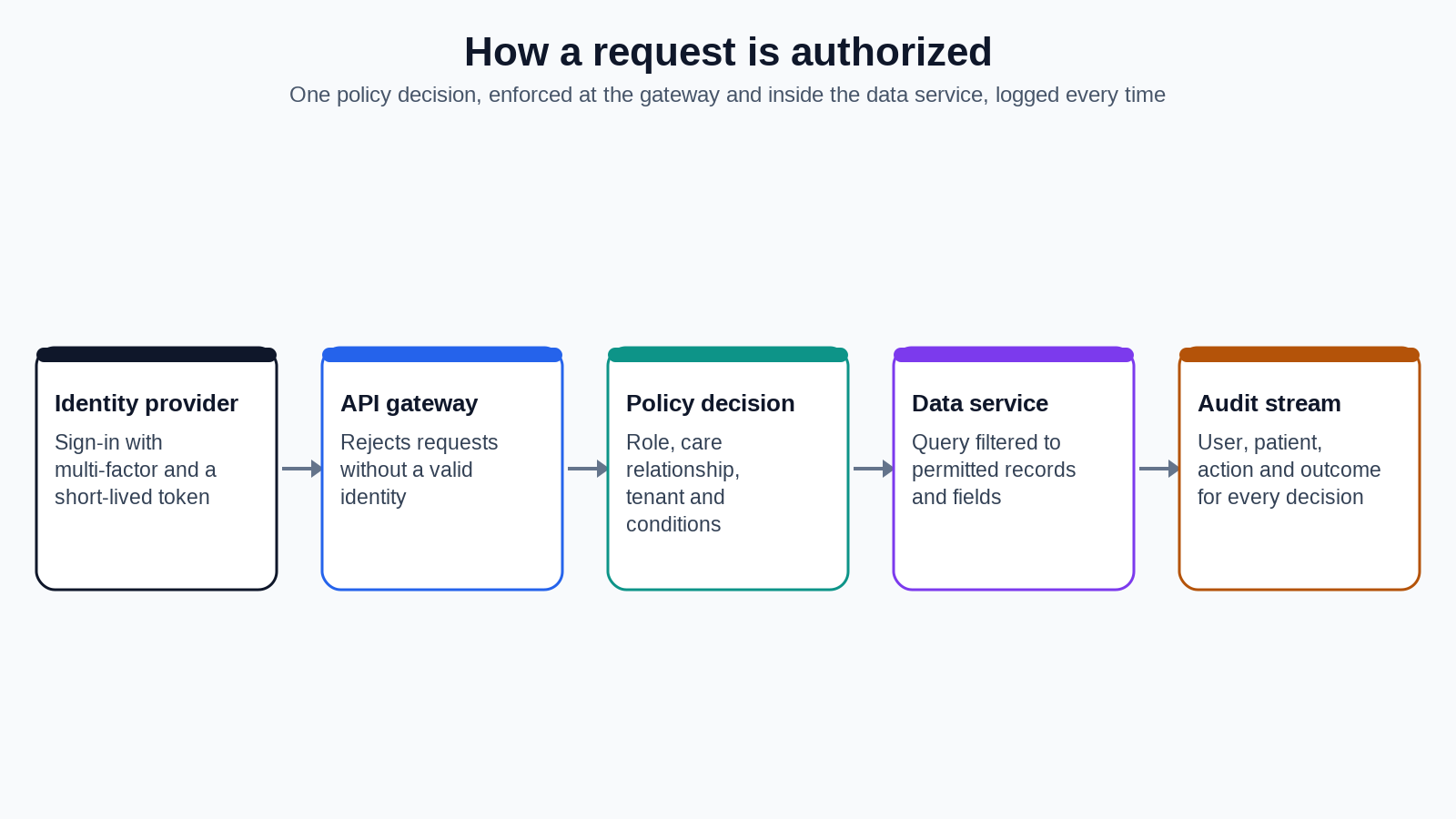
- 1. Identity: The user signs in through an identity provider with multi-factor authentication, and receives a short-lived token.
- 2. Gateway check: The API gateway validates the token and rejects requests without a valid identity.
- 3. Policy decision: The service asks the policy point whether this user may perform this action on this patient's data, given role, relationship and conditions.
- 4. Data filtering: The data service applies the decision to the query, so only permitted records and fields come back.
- 5. Audit: The decision, with user, patient, action and outcome, goes to the audit stream.
Filtering inside the data service matters. A check that only says yes or no at the front door can still return a list of patients the user should not see. The query itself must be shaped by the decision.
How does break-the-glass access work?
Break-the-glass lets a user reach data outside their normal access in an emergency, with a stated reason, extra logging and review afterwards. It keeps patients safe without leaving permanent wide access in place.
- Reason required: The user selects or types why they need access before anything opens.
- Narrow and timed: Access covers one patient for a limited period, then closes on its own.
- Visible: The screen shows that emergency access is active.
- Reviewed: Every use goes to a privacy or compliance queue for review within a set time.
How do service accounts and APIs fit the model?
Service accounts and partner APIs need the same model as people: an identity, a role, scopes and audit. Many breaches start with an integration account that has far more access than its job requires.
- One identity per integration: Never share credentials between partners or services.
- Least scopes: Give each integration only the resources and actions it uses, such as reading results for one practice.
- Short-lived credentials: Rotate secrets and prefer short-lived tokens issued by your authorization server.
- Patient context: For patient-facing apps, tie tokens to the patient and their proxies, using standard scopes where the API is FHIR.
Keep an inventory of every integration identity with its owner, scopes and last use. When a partner contract ends, the inventory tells you exactly which credentials to revoke the same day.
How should access be reviewed after launch?
Review access on a schedule and on every job change, using reports the RBAC server produces. Access that was right at launch drifts as people move teams and integrations change.
- Joiner, mover, leaver: Connect role changes to HR or credentialing events, so access follows the job.
- Periodic review: Managers confirm their team's roles and relationships on a set cycle.
- Unused access: Flag roles and service accounts with no activity and remove them.
- Unusual access: Alert on patterns such as a user opening many unrelated charts or records of coworkers.
Make the review easy to do well. A list of names and roles with one approve button gets approved without reading; a list that highlights changes and unusual access gets real attention.
What are the common RBAC mistakes in healthcare backends?
The mistakes are usually shortcuts that work for the first customer. These are the ones we find most often in reviews.
- Checks in the UI only: Screens hide data, but the API returns it to anyone who asks.
- Role explosion: Hundreds of roles created for exceptions, impossible to review.
- No tenant boundary: A query without an organization filter returns another customer's patients.
- Shared service accounts: One integration identity used by several partners.
- Permanent emergency access: Break-the-glass that never closes or never gets reviewed.
What are secure healthcare RBAC server best practices?
The practices that hold up keep the policy central, the decisions logged and the access reviewed.
- Central policy, local enforcement: One decision point, applied at the gateway and in each data service.
- Roles plus relationships: Short role list, with care relationships and conditions doing the fine-grained work.
- Deny by default: No access without a recorded grant.
- Log every decision: Allowed and denied decisions both go to the audit stream.
- Test the policy: Automated tests for who can and cannot see each data type, run on every release.
How Agnotic can help
Agnotic Technologies designs and builds authorization for healthcare platforms: identity provider integration, role and relationship models, a central policy decision point, data filtering in services, break-the-glass workflows, audit streams and access review reports. We test the policy with automated cases for every role and data type.
For platforms already in production, we review where access checks happen today, find the paths that bypass them, and move the rules into one place without disrupting users.
Get access control right once
Plan your authorization server with our engineers, or read more healthcare guides in the hub.
Related reading on Agnotic
See the layers of EHR security, how audit trails are built, how health APIs and SMART on FHIR scopes are secured, and how health data is protected.


