



Secondary claims are where clean billing often comes apart. The primary payer has paid, but the balance sits for weeks because someone has to notice there is a second plan, pull the primary remittance, rebuild the claim with the primary's figures and send it before the secondary payer's deadline.
This post covers how to automate that work: capturing other coverage and payer order at registration, building secondary claims from the primary payer's remittance, deciding when to send, avoiding duplicates when the primary forwards the claim, and handling tertiary payers and exceptions.
What is coordination of benefits automation for secondary claims?
Secondary balances piling up after the primary pays?
Our claims processing automation page covers the claim, remittance and follow-up tools we build.
Coordination of benefits automation for secondary claims is software that records which plans a patient has and in what order, then builds and sends each secondary claim from the primary payer's remittance as soon as it is posted. Agnotic Technologies builds this into billing systems so balances move to the next payer without manual rework.
It touches registration, eligibility, payment posting and claim submission, so it works only when all four share the same coverage record.
Why are secondary claims hard to get right?
Secondary claims are hard because they depend on information from three places: the coverage order from registration, the primary payer's adjudication from its remittance, and the secondary payer's own rules. A gap in any one leaves the claim stuck or denied.
They also arrive at an awkward time. The primary decision can come weeks after the visit, when staff have moved on, and secondary payers have their own filing limits.
How is the order of payers decided?
Payer order is decided by coordination of benefits rules that depend on the type of coverage and the patient's situation, such as employment, age or a dependent's coverage. The billing system must store the order, not just the list of plans.
CMS explains that coordination of benefits rules decide which entity pays first when a Medicare beneficiary also has other coverage, and that under the Medicare Secondary Payer provisions Medicare should not be the first payer in certain situations.
Ask about other coverage at every registration, record the order with the date and source, and recheck it when the patient's job, age or plan changes.
How does a secondary claim move between payers?
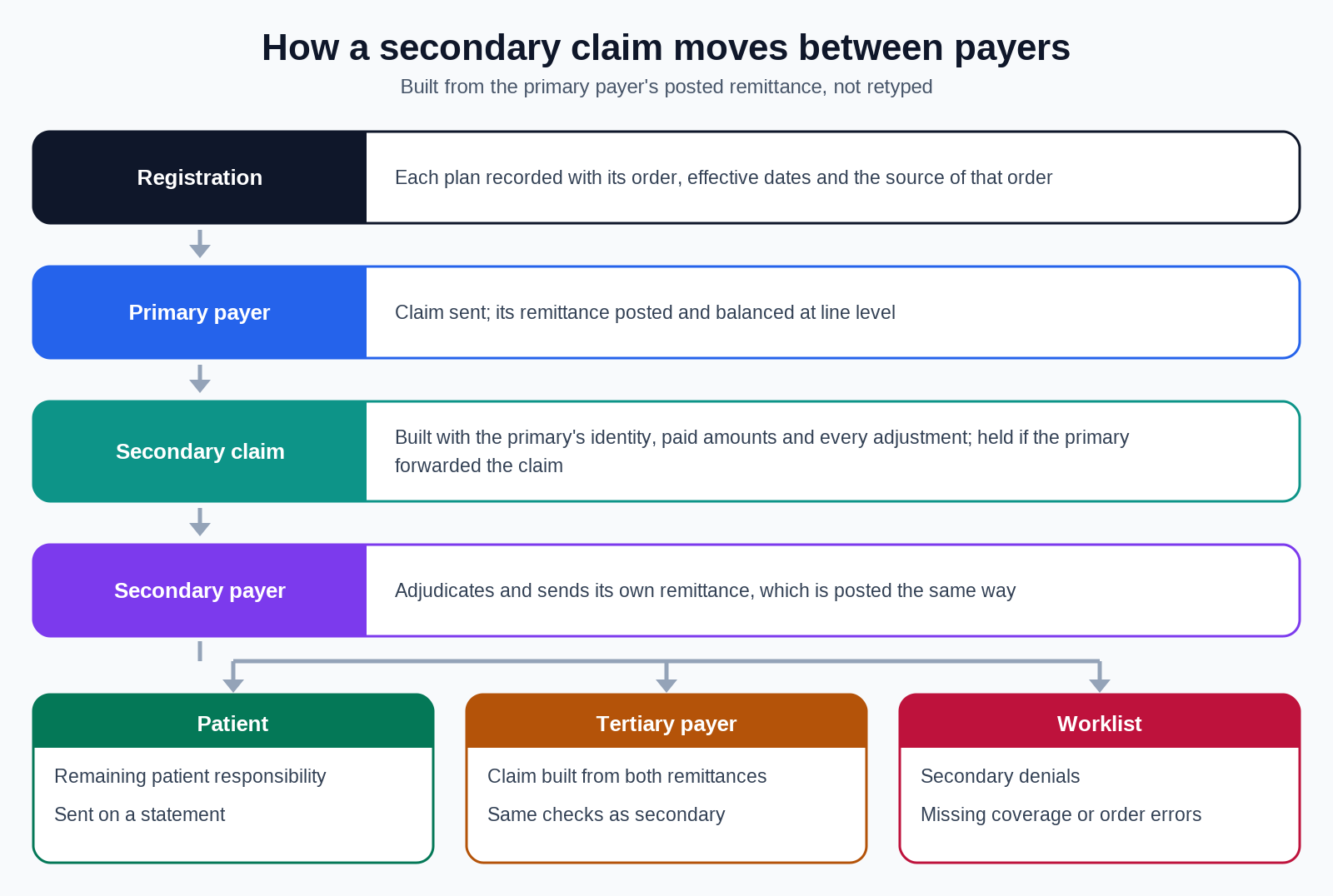
A secondary claim moves in sequence: the primary claim is paid and remitted, the payment is posted, and the secondary claim is built with the primary's paid amounts and adjustments and sent to the next payer.
HIPAA adopts ASC X12 standards for electronic transactions, including health care claims (837), payment and remittance advice (835), eligibility inquiries (270/271) and prior authorization requests (278).
When the secondary payer remits, the remaining balance goes to the patient, to a tertiary payer if there is one, or to a worklist if the secondary denied.
What does the secondary claim need from the primary?
The secondary claim needs the primary payer's identity, what it paid and every adjustment it made, at claim and service line level, carried over exactly as the primary reported them.
X12 Claim Adjustment Group Codes generally assign responsibility for an adjustment amount: CO for contractual obligation, OA for other adjustment, PI for payer-initiated reductions and PR for patient responsibility.
Copy adjustments from the posted remittance rather than retyping them. A secondary payer that sees a contractual write-off reported as patient responsibility may pay the wrong amount or deny the claim.
Capturing other coverage at registration
Most secondary claim problems start at the front desk, when a second plan is not recorded or the order is wrong. Registration should ask directly about other coverage and store each plan with its order and effective dates.
- Questions: a short set of coverage questions at every visit, not only the first.
- Eligibility responses: flags when a payer's response mentions other coverage.
- Order: primary, secondary and tertiary recorded, with the reason and date.
- Changes: a prompt to recheck when age, job or plan changes.
When should the secondary claim be sent?
Send it automatically once the primary remittance is posted and balanced, the patient still owes an amount the secondary could cover, and the secondary plan was active on the date of service.
- Trigger: primary payment posted and balanced at line level.
- Balance: an amount remaining that the secondary may cover.
- Coverage: secondary plan active on the date of service.
- Not already sent: no sign the primary forwarded the claim itself.
- Deadline: days left before the secondary payer's filing limit shown on the worklist.
Forwarded claims and duplicates
Some primary payers forward claims to the secondary payer themselves, and the primary's remittance remark codes can say so. Sending another claim on top of a forwarded one creates a duplicate that the secondary payer denies.
Read the remark codes on the primary remittance before building a secondary claim, keep a table of payers known to forward, and wait a set period for the secondary's response before sending your own claim.
Tertiary payers and paper-only payers
A tertiary claim works like a secondary one, carrying the decisions of both earlier payers. Build it from both posted remittances, in order, and keep the same checks for balance, coverage and duplicates.
Some secondary payers still accept only paper claims with the primary's explanation of benefits attached. Generate the form and attach the remittance automatically, and track it on the same worklist as electronic claims.
What goes wrong with COB automation?
Automation fails when the coverage record or the primary data is wrong. These patterns recur.
- Wrong order: the secondary billed as primary and denied for other coverage.
- Missing plan: a second plan never recorded, so the balance goes to the patient.
- Retyped adjustments: primary figures entered by hand with errors.
- Duplicates: secondary claims sent after the primary already forwarded them.
- Missed limits: secondary claims left until after the filing deadline.
A worked example: older patients with supplemental plans
A practice with many older patients found secondary balances sitting for weeks, because staff built each secondary claim by hand after reading the primary remittance.
The team added coverage questions at every visit, recorded payer order, and set rules to build the secondary claim from the posted remittance. They mapped which primaries forward claims and held those for the secondary's response.
Secondary claims now went out the day the primary payment posted, and the worklist showed only exceptions such as denials and missing coverage.
Who owns what?
COB spans the front desk and the back office, so each step needs a named owner.
- Front desk: coverage questions, plan details and payer order.
- Eligibility team: responses that show other coverage and follow-up.
- Payment posting: primary remittances posted and balanced on time.
- Billing: secondary claim rules, forwarding table and exceptions.
How do you test COB automation?
Test it with sample patients and remittances that cover each path a secondary balance can take, before any rule sends real claims. Run the tests again whenever a payer changes its forwarding behavior.
- Order: a patient whose plans are recorded in the wrong order, and the denial that should follow.
- Forwarded: a primary remittance that says the claim was forwarded, so no secondary is sent.
- Partial payment: a primary that pays part of a line, with adjustments carried over exactly.
- Inactive plan: a secondary plan that ended before the date of service.
- Tertiary: a patient with three plans, built from both earlier remittances.
How do you measure COB automation?
Measure how quickly balances move to the next payer and how often secondary claims fail.
- Days from primary payment to secondary claim sent.
- Secondary claims sent automatically versus by hand.
- Denials for coverage order, missing primary data or duplicates.
- Secondary claims past the filing limit.
What are coordination of benefits automation best practices?
Ask about other coverage at every visit, store payer order with dates, build secondary claims from posted remittances rather than retyped figures, and send them as soon as the primary posts and balances.
Check remark codes for forwarded claims, keep a table of payers that forward, handle tertiary and paper claims on the same worklist, and track filing limits for every secondary payer.
How Agnotic can help
Agnotic builds coordination of benefits into billing systems: coverage and payer order capture, eligibility flags for other coverage, secondary and tertiary claim builders from posted remittances, forwarding rules and exception worklists.
Build secondary claim automation with Agnotic
Our secondary claims and COB software page covers the coverage, claim and remittance tools we build.
Related reading on Agnotic
Remittances, eligibility, denials and claims.


