



An electronic remittance advice tells a practice what a payer paid, what it did not pay and why. It arrives as an X12 835 file that most billing systems turn into a screen, and the same few questions come up every day: why is the payment lower than expected, who owes the rest, and is this a denial or just a contractual write-off?
This post explains how to read an ERA: its parts from payment header to service line, how group, reason and remark codes combine, what provider-level adjustments mean, and the logic billing software should follow when it posts each line automatically.
What is an ERA and how do you read one?
Posting remittances by hand?
Our medical billing software page covers the claim, remittance and posting systems we build.
An ERA, or electronic remittance advice, is the X12 835 file a payer sends to explain a payment: which claims and service lines it covers, what was paid, and every adjustment with a code saying why. Reading one means following the money from billed to paid. Agnotic Technologies builds software that posts ERAs line by line.
HIPAA adopts ASC X12 standards for electronic transactions, including health care claims (837), payment and remittance advice (835), eligibility inquiries (270/271) and prior authorization requests (278).
What are the parts of an ERA?
An ERA has a payment header, payer and payee details, a section for each claim and, inside each claim, its service lines with their adjustments. Provider-level adjustments that belong to no single claim come at the end.
- Payment header: total amount, payment method, date and a trace number that matches the deposit or check.
- Payer and payee: who paid and which provider or group was paid.
- Claim: your claim number, status, billed amount, paid amount and patient responsibility.
- Service lines: each billed code with its billed, allowed and paid amounts and its adjustments.
- Provider-level adjustments: amounts taken or added across the whole payment, such as recoveries of earlier overpayments.
Reading always starts with the trace number, because it ties the ERA to the money that actually arrived in the bank.
How do group, reason and remark codes work together?
Every adjustment carries a group code that says who is responsible for the amount, a reason code that says why it was adjusted and sometimes remark codes that add detail. Read them together, never one alone.
X12 Claim Adjustment Group Codes generally assign responsibility for an adjustment amount: CO for contractual obligation, OA for other adjustment, PI for payer-initiated reductions and PR for patient responsibility.
X12 describes Remittance Advice Remark Codes as codes that add explanation to an adjustment already described by a Claim Adjustment Reason Code, or, as alerts, convey information about remittance processing that is not tied to any adjustment.
The group code decides the posting: a contractual amount is written off, a patient responsibility amount moves to the patient's balance, and other groups need someone to look at them.
How do the amounts add up?
On each service line, the billed amount minus all adjustments should equal the paid amount. If it does not, the ERA was read or loaded wrongly, and the line should not post.
Check the same balance at claim level and at payment level, where provider-level adjustments make the difference between the sum of claim payments and the deposit. Software should reject any ERA that does not balance before it touches an account.
A worked example: reading one service line
A line is billed at the practice's standard charge. The payer allows less under its contract, so the difference appears as group CO with reason 45, meaning the charge exceeds the fee schedule or contracted amount, and it is written off.
Part of the allowed amount is the patient's deductible, shown as group PR with reason 1, and part is coinsurance, group PR with reason 2. Both move to the patient's balance. The payer pays the rest, and billed minus the three adjustments equals the payment.
If the same line came back with nothing paid and a group CO adjustment for missing information, that is a denial, not a write-off, and it belongs on a worklist.
What does the claim status tell you?
The claim status says how the payer treated the claim as a whole: processed as primary, processed as secondary, denied, or a reversal of an earlier payment. Read it before the lines, because it changes what the line amounts mean.
A claim processed as primary with patient responsibility may need a secondary claim sent to another payer. A denied claim needs its line adjustments read for the reason, and a reversal needs special handling.
Reversals and corrected payments
Payers sometimes take back an earlier payment and pay the claim again in a new form, and both can appear in the same ERA. The reversal shows the original amounts as negatives, followed by the corrected claim.
Post the reversal against the original posting, then the correction as new activity, and keep both linked. Posting the correction alone double counts the payment.
How do you tell a denial from a write-off?
Tell them apart by the reason code and the paid amount, not by the group code alone. A contractual adjustment for a fee schedule difference is expected, while a contractual adjustment that zeroes a line for missing information or a lacking authorization is a denial that needs work.
Billing software should hold a table that classifies each reason code as expected, patient responsibility, denial or needs review, with an owner who maintains it.
Provider-level adjustments
Provider-level adjustments change the payment without belonging to one claim: a recovery of an earlier overpayment, interest, or a balance carried forward. They explain why the deposit differs from the sum of claim payments.
Post them to their own account with the reference the payer supplies, and link recoveries to the original claim where the reference allows. Left unposted, they make the bank deposit impossible to reconcile.
What logic should automatic posting follow?
Automatic posting should match, balance, classify and then post, stopping any line that fails a step rather than guessing.
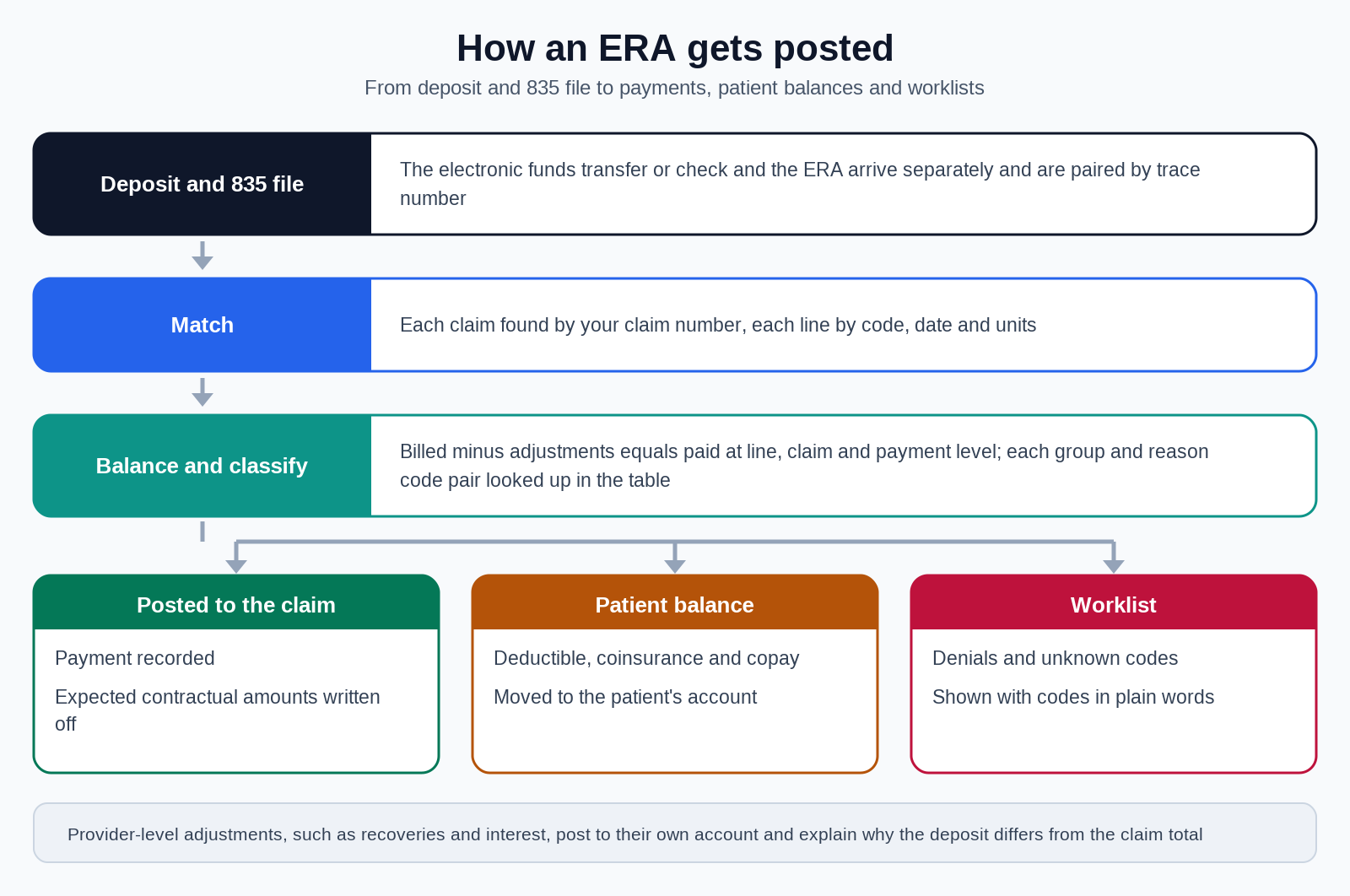
- Step 1, match: find the claim by your claim number, and the line by code, date and units.
- Step 2, balance: confirm billed minus adjustments equals paid at line, claim and payment level.
- Step 3, classify: look up each group and reason code pair in the classification table.
- Step 4, post: payments and expected write-offs to the claim, patient responsibility to the patient.
- Step 5, route: denials and unknown codes to worklists with the codes shown in plain words.
Reassociating the ERA with the deposit
The ERA and the money travel separately, so the billing system must pair each ERA with its deposit before posting is final. The trace number on the ERA should match the reference on the electronic funds transfer or check.
Keep a list of ERAs without deposits and deposits without ERAs, and work it daily. An ERA posted with no matching deposit is a receivable recorded as cash.
What goes wrong when reading ERAs?
Most errors come from reading codes in isolation or posting without checks. These patterns recur.
- Group code only: every CO adjustment written off, including denials.
- Ignored remark codes: the detail that explains a denial never shown to the biller.
- Unbalanced loads: lines posted when the amounts do not add up.
- Unposted provider adjustments: deposits that never reconcile.
- Stale code table: new reason codes treated as write-offs by default.
Who owns what?
Payment posting staff work the ERAs, but the rules behind automatic posting need owners.
- Payment posting team: exceptions, unmatched lines and reassociation.
- Billing manager: the reason code classification table and write-off policy.
- Denials team: worklists fed by the ERA.
- Finance: deposit reconciliation and provider-level adjustment accounts.
- Engineering: the 835 loader, balancing checks and posting rules.
How do you measure ERA posting?
Measure how much posts without a person and how much of what is left gets resolved quickly.
- Lines posted automatically, by payer.
- Exceptions by cause: unmatched, unbalanced or unknown code.
- ERAs and deposits still unpaired at the end of each day.
- Denials found on ERAs and routed to worklists.
What are ERA reading and posting best practices?
Start with the trace number, read group, reason and remark codes together, check that every line, claim and payment balances, and classify each code pair with a maintained table rather than by group code alone.
Post provider-level adjustments to their own account, pair every ERA with its deposit, route denials and unknown codes to worklists in plain words, and review the code table whenever new codes are published.
How Agnotic can help
Agnotic builds ERA handling into billing systems: 835 loaders with balancing checks, code classification tables, automatic posting with exception worklists, deposit reassociation and reports that show where posting stops.
Connect your billing system to 835 remittances with Agnotic
Our X12 EDI integration page covers claim, eligibility and remittance connections we build.
Related reading on Agnotic
Billing, claims and denials.


