


Most new clinical software does not replace the EHR. It sits beside it: a care-gap panel in the chart, a specialty documentation tool, a risk score that opens with the patient. Clinicians stay in the record they already use, and the new app supplies what the record cannot. That pattern is often called a sidecar.
This guide explains EHR sidecar architecture from the app builder's side. It covers when a sidecar is the right pattern, how the app gets from launch to write-back, where CDS Hooks fit, what belongs in the sidecar's own backend, how to write data back to the chart, and how to run one sidecar across several EHR vendors.
What is EHR sidecar architecture?
Building an app that lives beside the EHR?
Agnotic builds SMART on FHIR sidecar apps for clients, from launch and authorization through backend services and write-back.
EHR sidecar architecture is a pattern in which a separate application runs alongside an electronic health record, launched from the chart with the current patient and user as context. It reads data through the EHR's FHIR API, adds its own logic and storage, and writes results back, so clinicians gain new capability without leaving the EHR they already use.
The EHR stays the system of record. The sidecar owns a narrow workflow, keeps only the data it needs, and hands its results back to the chart, where they become part of the legal record.
When does a sidecar app make sense?
A sidecar makes sense when the new capability is a focused workflow that must happen during the visit, inside the clinician's existing EHR session. It is the wrong pattern when the workflow needs to own the chart itself.
- Good fit: Decision support panels, specialty documentation, care-gap and registry views, patient-reported outcome review, and device or remote monitoring summaries.
- Good fit: A digital health company that sells to health systems on different EHRs and needs one product to appear inside each of them.
- Poor fit: Workflows that replace core charting, orders or medication administration, which the EHR's own build or a full platform should handle.
- Poor fit: Population work for thousands of patients at once, which belongs in a backend service using bulk data, not a user-launched app.
Compared with building inside the EHR's own tools, a sidecar can run at several health systems and keeps your code under your control. Compared with a separate portal, it saves clinicians a second login and a second patient search, which is often the difference between an app that gets used and one that does not.
How does a sidecar app flow from launch to write-back?
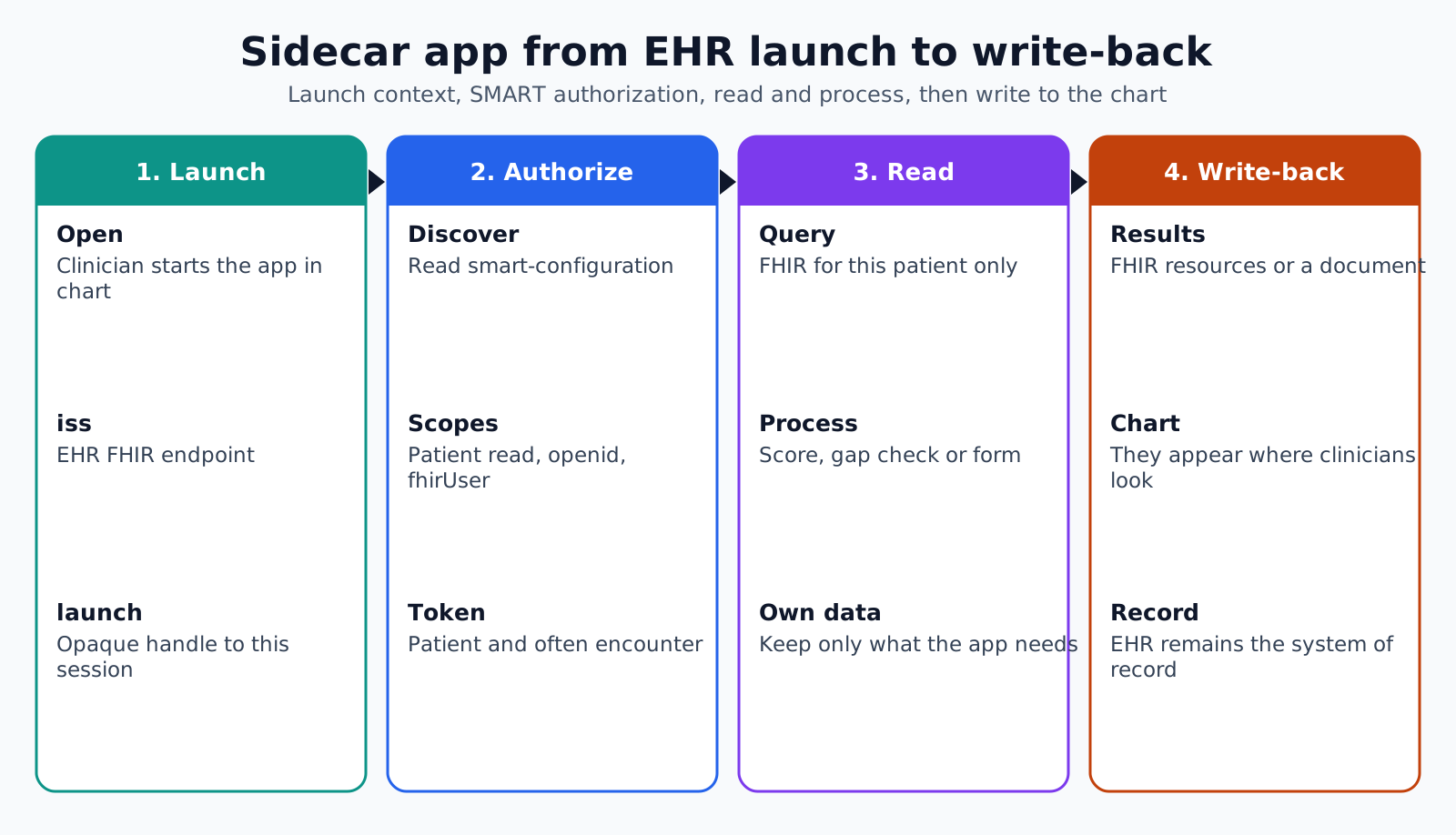
A sidecar app flows through four stages: the EHR launches it with context, the app authorizes and receives a token, it reads and processes data, and it writes results back to the chart. Each stage has its own failure modes, so design and test them separately.
The HL7 SMART App Launch guide defines the start. In an EHR launch, the EHR opens the app's launch URL with two parameters: iss, the EHR's FHIR endpoint, and launch, an opaque handle to the current EHR context. The app then fetches the server's configuration from the .well-known/smart-configuration path and includes the same launch value in its authorization request, where the aud parameter matches iss.
- 1. Launch: The clinician opens the app from a chart tab or menu, and the EHR sends iss and launch to the app's launch URL.
- 2. Discovery: The app reads the authorization and token endpoints from the server's SMART configuration.
- 3. Authorization: The app requests scopes, such as patient-level read access plus openid and fhirUser for the user's identity, and passes the launch value.
- 4. Token and context: The token response carries the patient, and often the encounter, that the clinician has open.
- 5. Read: The app queries the FHIR API for the data it needs, filtered to this patient and the relevant categories and dates.
- 6. Process: The app's backend applies its logic, such as a score, a gap check or a structured form.
- 7. Write-back: Results return to the chart as FHIR resources, a document, or through an interface, then appear in the clinician's view.
ONC's companion guide for the certified API criterion lists the EHR launch capabilities a certified product must support for clinician access, including launch-ehr, context-banner, context-style and context-ehr-patient. That gives sidecar builders a common floor across certified EHRs, though each vendor adds its own registration steps and scope rules.
How do CDS Hooks fit into a sidecar?
CDS Hooks let the EHR call the sidecar at a moment in the workflow instead of waiting for a clinician to open it. The sidecar answers with a card, and the card can launch the full app when more interaction is needed.
The HL7 CDS Hooks specification describes the EHR as a CDS client that calls services at hooks such as patient-view, order-select and order-sign. Each request carries hook-specific context, and a service can ask the EHR to prefetch the FHIR data it needs. Services return cards, which may be informational, may offer suggestions the user accepts or rejects, or may launch a SMART app.
- Fast answers: Hook services run inside the clinician's click, so prefetch the data and keep responses quick.
- Few cards: Return a card only when it changes a decision; every unnecessary card trains clinicians to ignore the next one.
- Hand-off: Use the card's app link to open the sidecar with context when the clinician needs detail.
What belongs in the sidecar's own backend?
The sidecar's backend holds the logic and the data the EHR cannot, and as little patient data as the workflow allows. Every copy of chart data in the sidecar is protected health information you now have to secure, retain and delete.
- Own data: Information the EHR does not hold, such as app-specific scores, device streams or patient-reported answers.
- Minimal cache: Short-lived copies of chart data needed for speed, with a clear expiry, rather than a shadow chart.
- Tenant separation: Each health system's data kept apart, with its own configuration, keys and audit trail.
- Audit: A log of who opened which patient in the app, matching the user identity from the launch.
- Token handling: Access tokens kept on the server side where possible, never in browser storage that other scripts can read.
Because the sidecar handles data on the health system's behalf, it will normally sign a business associate agreement with each customer, and its hosting provider will need one too.
How should a sidecar write back to the EHR?
Write back in the form the EHR supports and the clinician will actually see. The most elegant FHIR write is useless if it lands in a part of the chart nobody opens.
- Observations: Scores and measurements as Observation resources, where the EHR accepts them, so they trend with other results.
- Documents: A signed note or summary as a DocumentReference, which most EHRs can file and display.
- Questionnaire responses: Structured forms as QuestionnaireResponse, where supported.
- Interfaces: An HL7 v2 message through the health system's interface engine when the FHIR API does not accept the write.
- Clinician review: Results that need sign-off go back as drafts or tasks for the clinician, not as final entries.
Check write support per vendor and per customer early. Write access often needs separate approval from the health system's governance group, and that review can take longer than building the feature.
How do you run one sidecar across several EHRs?
Run one sidecar across EHRs by separating the app's logic from a thin adapter per vendor. The adapter handles registration, scopes, quirks in FHIR responses and the write-back route.
- Per-vendor registration: Each EHR has its own app registration, review and listing process.
- Per-customer configuration: Endpoints, client identifiers, enabled features and write routes per health system.
- Response normalization: Code systems, extensions and missing fields differ, so normalize before the app's logic sees the data.
- Conformance tests: A test suite per vendor sandbox, run before every release.
Where sidecar apps go wrong
- Slow launch: The app loads too much data on open, and clinicians close it before it renders.
- Wrong patient: The app caches the previous patient and shows it after the clinician switches charts.
- Shadow chart: The backend keeps full copies of chart data, creating a second record to secure and reconcile.
- Invisible write-back: Results file to a place clinicians do not look, so the app seems to do nothing.
- Scope creep: The app asks for broad scopes it does not need, and the health system's review stalls.
How do you test a sidecar before go-live?
Test a sidecar in each vendor sandbox first, then in the customer's test environment with realistic patients, and finally with a small group of clinicians in live use. Sandbox data is tidy, so many problems only show up against a real health system's records.
- Launch tests: Open the app from every entry point the customer enables, with and without an encounter in context.
- Patient switch tests: Change charts quickly and confirm the app never shows data from the previous patient.
- Token tests: Let tokens expire mid-session and confirm the app refreshes or asks the user to relaunch cleanly.
- Data shape tests: Run the app against patients with long histories, missing fields and local codes.
- Write-back tests: Confirm each result appears where the clinician expects it, with the right author and date.
- Timing tests: Measure time from click to first useful screen on the customer's network, not just your own.
Keep a short pilot with named clinicians and a feedback channel before wider rollout. Their first week of use will show which screens they skip and which results they never open.
How Agnotic can help
Agnotic Technologies builds sidecar apps for digital health companies and health systems: SMART launch and authorization, CDS Hooks services, a backend that keeps only the data it needs, per-vendor adapters and write-back that lands where clinicians look.
Agnotic also prepares the documentation health system reviewers ask for, such as scopes requested, data stored and write-back behavior, which shortens the approval path at each new customer.
Put your app inside the chart
Plan a sidecar app with our EHR integration engineers, or browse more guides in the EHR integration hub.
Related reading on Agnotic
Read about SMART apps in Epic, CDS Hooks, OAuth scopes, the headless alternative to a sidecar and EHR integration methods.


