


The Epic scheduling API question usually starts with a product goal: let patients book their own visits, let a referral partner book on a clinic's behalf, or let a voice agent fill open slots. Each of those depends on what Epic actually publishes for appointments, and on how the clinic has built its schedule.
This guide sticks to the interfaces Epic lists publicly on open.epic and fhir.epic.com. It covers which FHIR and HL7 v2 interfaces exist for scheduling, how a booking runs from finding a slot to cancelling it, what the search needs from the caller, and where these builds tend to break.
What is the Epic scheduling API?
Building appointment booking against Epic?
Agnotic builds Epic FHIR and HL7 v2 integrations for the client, including slot search, booking and schedule sync across Epic customers.
The Epic scheduling API is the set of public interfaces Epic lists for appointments: FHIR Appointment, Slot and Schedule APIs, including find and book operations in STU3, plus HL7 v2 scheduling interfaces for event feeds. Together they let an outside app search open times, book a visit and stay in step with the clinic's Epic schedule.
There is no single scheduling endpoint that works the same at every Epic customer. Each health system decides which interfaces it turns on, which visit types outside apps may book, and which departments and providers are open to them.
Which scheduling interfaces does Epic list publicly?
Epic lists scheduling interfaces in two places on open.epic: the FHIR interface list and the HL7 v2 interface list. The FHIR list covers reading and booking; the HL7 v2 list covers event feeds and incoming appointments.
Under Appointment, Schedule and Slot, open.epic's FHIR list names Appointment.$find, Appointment.$book, Schedule.Read, Slot.Read, Appointment.Read and Appointment.Search in STU3, and Appointment.Read and Appointment.Search in R4, with separate R4 entries for scheduled surgeries and prior authorization. The open.epic HL7 v2 list names Incoming Appointment Scheduling, Outgoing Appointment Scheduling and Incoming Schedule Query interfaces.
- Find and book (FHIR STU3): Search for open appointment options and book one of them for a patient.
- Read and search (FHIR STU3 and R4): Retrieve existing appointments for a patient, for display, reminders or analytics.
- Outgoing Appointment Scheduling (HL7 v2): Epic sends messages when appointments are created, rescheduled, updated, cancelled or marked as no-shows.
- Incoming Appointment Scheduling (HL7 v2): An outside system sends new, rescheduled, updated and cancelled appointments, and no-show notices, into Epic.
- Incoming Schedule Query (HL7 v2): An outside system asks about a patient's scheduled appointments and gets them back.
Two things are worth noticing in that list. The find and book operations are published in STU3, not R4, so an R4-only client needs a version path for scheduling. And the FHIR list does not include a cancel operation, which shapes how cancellation is designed.
How does a booking run from find to cancel?
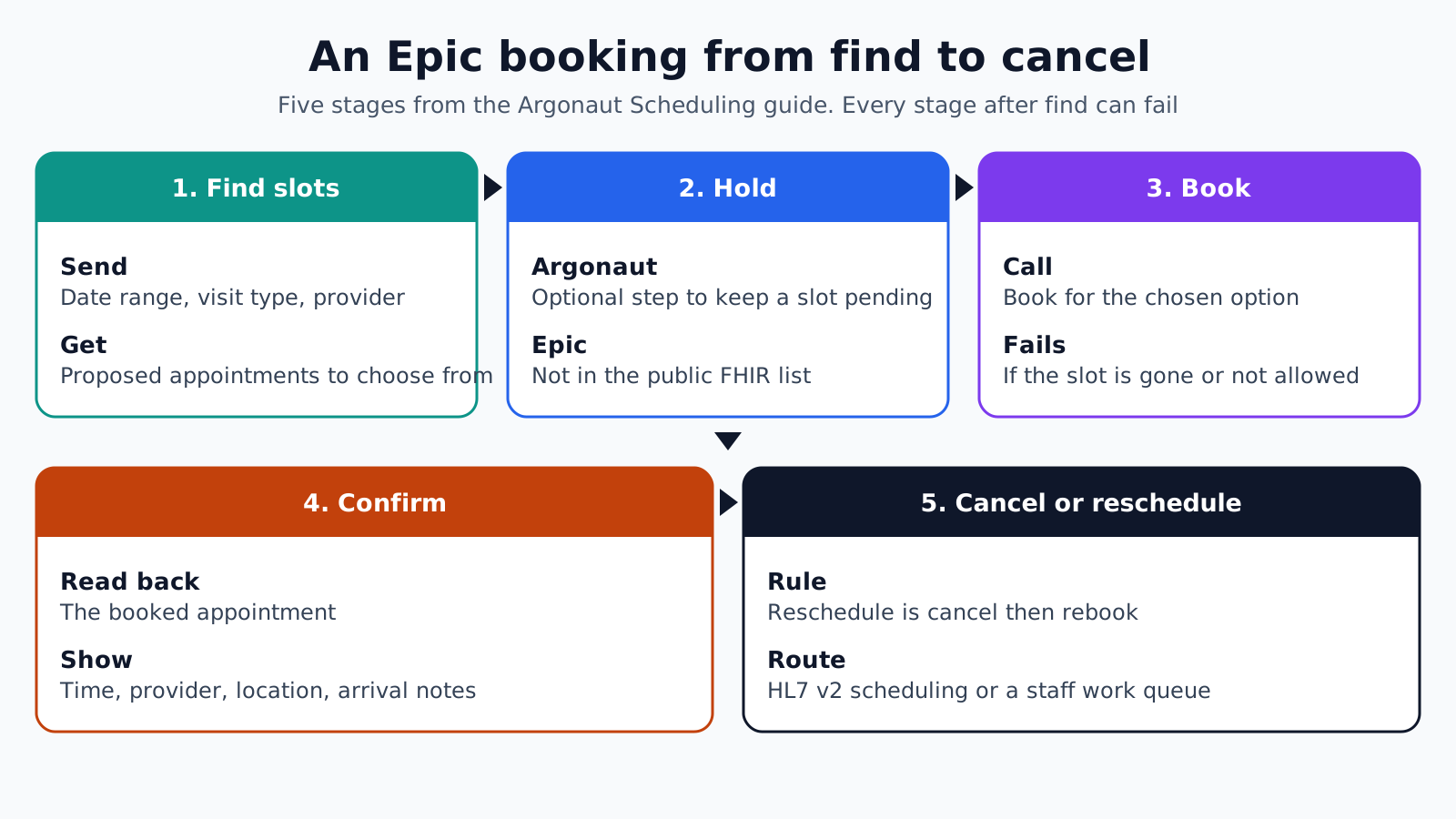
A booking runs in five stages: find slots, hold, book, confirm, then cancel or reschedule when plans change. The flow follows the Argonaut Scheduling implementation guide, which Epic's find and book operation names match, but each stage needs checking against the Epic customer's build.
- 1. Find slots: The app calls the find operation with a date range, visit type and, where needed, provider and location. The response is a set of proposed appointments the patient can choose from.
- 2. Hold: The Argonaut guide defines an optional hold step that keeps a slot pending while the user finishes entering details. Epic's public FHIR list does not include a hold operation, so the app shortens the gap between choice and booking instead.
- 3. Book: The app calls the book operation for the chosen option and the patient. Epic decides whether the booking succeeds, and a failure means the slot is gone or the rules do not allow it.
- 4. Confirm: The app reads the booked appointment back, shows the final date, time, provider, location and arrival instructions, and sends the patient a confirmation.
- 5. Cancel or reschedule: The Argonaut guide treats rescheduling as cancel then rebook, and cancels with a status update. With no cancel operation in Epic's public FHIR list, cancellation runs through the HL7 v2 incoming scheduling interface where the customer enables it, or through a staff work queue.
Treat every stage after find as able to fail. A slot shown a minute ago can be taken by a scheduler on the phone, so the app retries the search and offers new options rather than showing an error with no way forward.
Settle the cancellation path during scoping, not after launch. Patients expect to cancel where they booked, and an app that can book but not cancel sends them back to the phone queue for the second half of the job.
What does the find operation need from the caller?
The find operation needs enough detail for Epic to work out which provider, room and time the visit requires. In practice that means a date range, a visit type the customer has opened to the app, and often a department or provider.
Visit types are the hard part. Each Epic customer builds its own, with its own names, lengths and rules about new versus returning patients. An app that serves several health systems needs a mapping table per customer from its own visit categories, such as "new patient dermatology", to that customer's visit type identifiers.
- Visit type: The single most important input. Get the list of bookable types from the customer's scheduling team, not from a test run.
- Date range: Keep it short. A narrow window returns faster and gives the patient a manageable set of choices.
- Department and provider: Needed when the patient must see a specific clinician, such as a follow-up with their own physician.
- Patient: Some rules depend on the patient, such as whether they count as new to the department. Pass the patient where the flow allows it.
Store the mapping as configuration the customer's analyst can review. When the clinic changes a visit type in Epic, the change should be one row in a table, not a code release.
Keeping the app in step with the Epic schedule
Epic is the source of truth for the schedule, and the app should treat its own copy as a cache. Changes made by schedulers, clinicians or other apps must reach the app quickly, or patients see appointments that no longer exist.
The Outgoing Appointment Scheduling feed is the usual way to stay current. Each message tells the app that an appointment was created, moved, changed, cancelled or marked as a no-show, and the app updates its copy and any reminders it has queued.
Pair the feed with a periodic check. A nightly read of the coming days' appointments for the app's patients catches messages that were lost or processed out of order, and a mismatch report shows where the feed needs attention.
Make every write idempotent. If a booking call times out, the app should check whether the appointment exists before trying again, so a slow network does not turn one visit into two.
Handle time zones explicitly. A health system with clinics in more than one zone, or a patient booking while travelling, can see the wrong arrival time if the app converts times on the device. Keep the department's time zone with each appointment and show it on the confirmation and every reminder.
Which interface fits which kind of app?
The right interface depends on who is booking and whose system holds the appointment. Match the app type to the interface before writing any code.
- Patient self-scheduling app: Find and book over FHIR, with reads to show upcoming visits and the outgoing HL7 v2 feed to keep them current.
- Partner booking for a clinic: A referral service or contact center booking into the clinic's Epic schedule uses the same find and book flow under its own app registration, with the customer's approval.
- Outside scheduling system: A system that owns its own schedule, such as a separate practice management product, sends appointments into Epic through the incoming HL7 v2 scheduling interface.
- Reminder and outreach tools: These usually only read. FHIR appointment search or the outgoing HL7 v2 feed gives them what they need without booking rights.
- Voice or chat agents: These are front ends for the same find and book flow, so they inherit its visit type rules and failure handling.
Ask for the least access the app needs. An outreach tool with booking rights is a larger review for the customer's security team and a longer path to go-live.
Where Epic scheduling builds break
- Unmapped visit types: The app offers a visit category that has no matching bookable type at one customer, so the search returns nothing.
- R4-only clients: The team builds on R4 and finds that find and book are published in STU3.
- No cancel path: Booking works, but cancellation was never designed, so patients call the clinic.
- Stale copies: The app ignores the outgoing feed and shows visits that were moved or cancelled in Epic.
- Retries that double-book: A timed-out booking is sent again without checking whether the first one succeeded.
- Sandbox confidence: Searches work against test data, then return nothing at a customer whose templates and rules differ.
- Long holds in the app: The app keeps a slot in its own state while the patient fills a long form, and the slot is gone by the time it books.
How Agnotic can help
Scheduling is where an Epic integration meets the clinic's daily work, so small mapping errors become missed or doubled visits. Agnotic Technologies builds this for the client: find and book flows over Epic's published FHIR APIs, per-customer visit type mapping held as configuration, HL7 v2 scheduling feeds for sync, and reconciliation reports that catch drift.
Agnotic also designs the cancel and reschedule path with each customer's scheduling team during scoping, so patients can finish what they started in the same app.
Build Epic scheduling that stays in step
Start with Epic FHIR capabilities, or browse more articles in the EHR integration hub.
Related reading on Agnotic
Continue with the Epic FHIR API, Epic ambulatory integration, SMART on FHIR in Epic, HL7 v2 structure and voice booking agents.


