


The Epic FHIR API is the set of HL7 FHIR endpoints that health systems running Epic expose to outside applications, documented for developers on Epic on FHIR at fhir.epic.com. A vendor reads the catalog, registers an app, chooses the APIs it needs and then calls each organization's endpoint.
Most of the effort sits before the first line of product code: choosing APIs, user types and authentication, and planning for separate test and production identities. This guide walks through the catalog, registration, the call sequence and the habits that keep an Epic FHIR integration maintainable.
What is the Epic FHIR API?
Scoping an Epic FHIR integration?
Agnotic builds Epic FHIR integrations for the client, from API selection and app registration to tested calls at each health system.
The Epic FHIR API is Epic's implementation of HL7 FHIR REST endpoints, which each Epic customer runs on its own server and which outside apps call after registering on Epic on FHIR. Epic publishes the catalog of resources, interactions and required scopes at fhir.epic.com, along with a shared sandbox for testing.
There is no single national Epic endpoint. Each health system, clinic group or payer on Epic hosts its own FHIR base URL, and open.epic publishes a directory of those endpoints. An app registered once can connect to many organizations, but each one decides whether to enable it.
The API covers more than the certified read APIs that every certified EHR must offer. Epic's catalog also lists write APIs and Epic-specific operations, and each one is enabled per app and per organization rather than switched on for everyone.
How is the Epic on FHIR catalog organized?
The catalog lists APIs by FHIR resource and interaction, such as Patient.Read, Observation.Search or Observation.Create, with separate entries for each FHIR version Epic supports. Read each entry for its parameters, the user types it allows and any notes on how Epic behaves differently from the base specification.
- Resource and interaction: Each API names one resource and one action. Registering Observation.Search does not grant Observation.Create.
- FHIR version: Many resources appear under more than one version. New builds should target R4 unless a specific API exists only in an older version.
- User types: Entries say whether patients, clinicians or administrative users, or backend systems may call them, which decides how the app authenticates.
- Search parameters: Supported parameters are listed per API, and Epic may require some, such as a patient or category, where the base specification treats them as optional.
- Epic-specific notes: Category codes, extensions and paging behavior are documented in the entry, and these notes are where most surprises are found.
Build a short API inventory from the catalog before registering. For every feature, list the API, version, user type and the fields the feature depends on, then confirm each field is actually returned in the sandbox.
The inventory pays for itself in the first health system review. When an analyst asks why the app needs a given API, the answer is already written, with the feature that depends on it and the fields it reads.
How does an app get from registration to its first FHIR call?
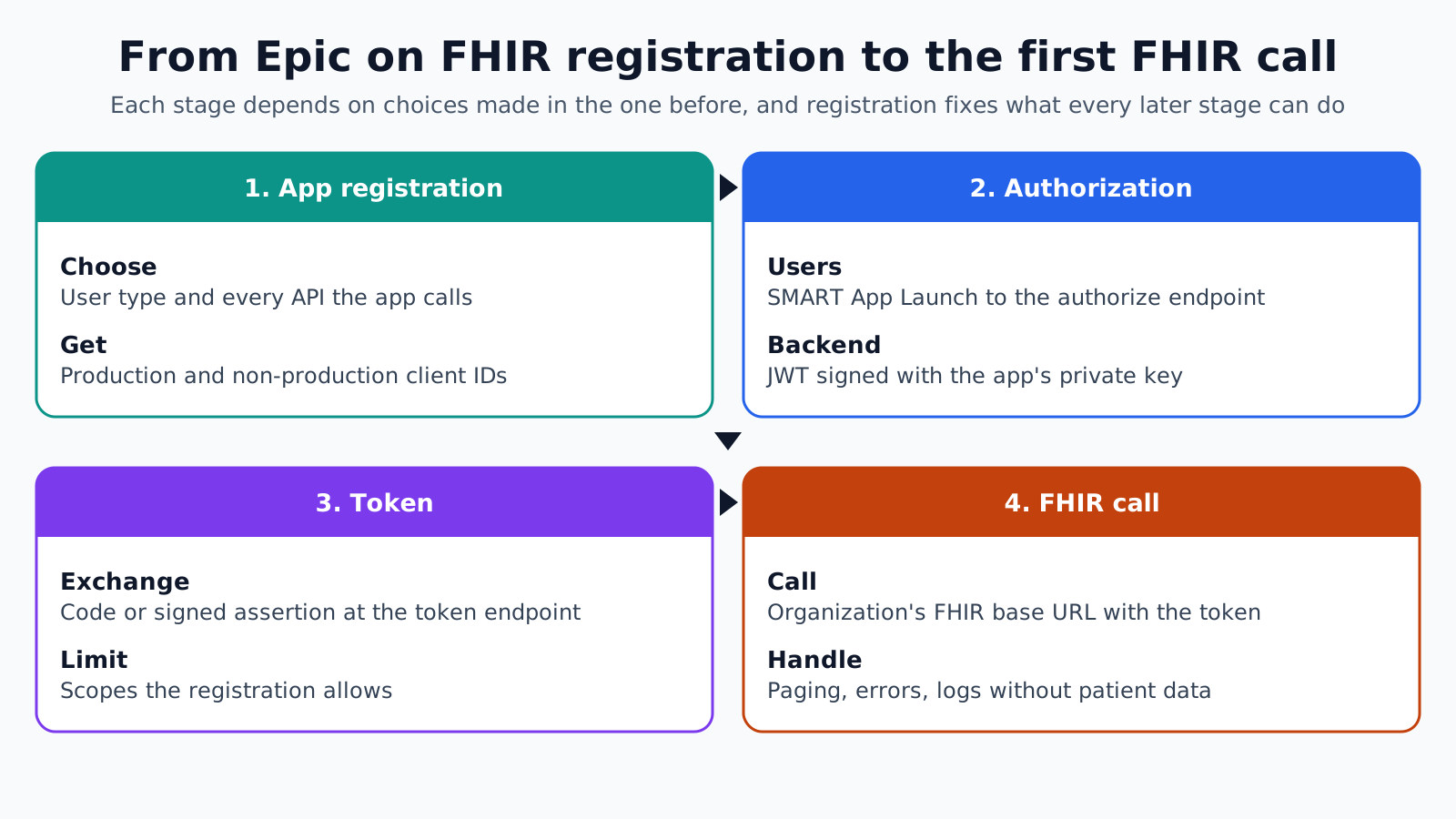
An app passes four stages: app registration on Epic on FHIR, authorization by a user or a backend credential, a token from the organization's authorization server, and the FHIR call with that token. Each stage depends on choices made in the one before.
- 1. App registration: Create the app on Epic on FHIR, choose its user type, select every API it will call, enter redirect URIs or a JWK Set URL, and record the client IDs Epic assigns.
- 2. Authorization: A patient or clinician app sends the user to the organization's authorization endpoint under SMART App Launch; a backend app signs a JWT with its private key instead.
- 3. Token: The app exchanges the authorization code or signed assertion at the token endpoint and receives an access token limited to the scopes its registration allows.
- 4. FHIR call: The app calls the organization's FHIR base URL with the token, handles paging and errors, and logs the request without writing patient data to the log.
Epic's OAuth 2.0 documentation says that when a developer registers an app, the website creates an app record and assigns both a production and a non-production client ID. Keep them apart in configuration from day one: the non-production ID belongs with the sandbox and customer test environments, and the production ID with live systems.
For launch types and the detailed exchange from launch to token, see the Epic SMART on FHIR integration guide. The point here is that registration fixes what every later stage can do.
Which APIs should the registration include?
Include only the APIs the product calls today. Epic's documentation states that an app can only connect using APIs registered to its client ID, so the registration is both a technical limit and the list a health system reviews before it agrees to enable the app.
A long list makes that review slower. A security analyst at the health system reads every API as a type of patient data the app could reach, and an unexplained write API is a common reason for questions.
- Map features to APIs: Each API on the registration should trace to a named feature in the product.
- Separate apps by user type: A patient app and a nightly backend job usually need separate registrations, each with its own APIs.
- Plan for additions: Adding an API later is possible, but organizations that already run the app may need to act before it works for them.
- Explain writes: For any create or update API, write one sentence on what the app files, where it appears in the chart and who reviews it.
Write APIs deserve extra design time. Agree with the clinical owner at the first health system how filed data is labeled, whether a clinician must review it before it counts, and how the app corrects a value it filed by mistake.
Keys, environments and client IDs
Backend and confidential apps prove their identity with keys, and key changes take time to reach each system. Epic's documentation says a re-uploaded public key can take up to 60 minutes to sync with the sandbox and 12 hours at an Epic organization's instance.
Plan key rotation around that delay. Publish the new key alongside the old one in a JWK Set URL, wait for it to take effect everywhere, then retire the old key, rather than swapping keys in a single step.
- Per-site settings: Store base URL, client ID, enabled APIs and local identifiers for each organization in configuration, not code.
- Separate keys: Use different keys for non-production and production, and for each organization where the setup allows.
- Secrets storage: Keep private keys in a managed secrets store with access logging, never in the app bundle or repository.
- Endpoint refresh: Refresh endpoint information from open.epic on a schedule, so a changed base URL does not break calls silently.
What breaks when an app moves past the sandbox?
Calls that work in the sandbox can fail at a real organization because of local configuration, data and review decisions. Treat each new organization as its own test cycle.
- API not enabled: The organization has not activated an API on the registration, and the call returns an authorization error.
- Wrong client ID: The non-production ID is used against production, or the other way round, and authentication fails.
- Missing data: A field present for sandbox test patients is not documented at the organization, so a feature shows blanks.
- Local codes: Lab results or medications carry local codes alongside or instead of LOINC and RxNorm, and mapping logic misses them.
- Paging ignored: The app reads only the first page of a search Bundle, and older results disappear from the screen.
- Stale key: A key rotated in a hurry has not yet synced at the organization, and every backend call fails for hours.
Write a test script per feature with expected results for named test patients at each organization. The second and third health systems will reuse it, and differences then show up as configuration findings.
Habits that keep an Epic FHIR integration maintainable
An Epic integration lives for years, through catalog updates, new organizations and changes in the product. A few engineering habits keep the cost of each change small.
- One adapter layer: Wrap every Epic call in one client module, so version changes, paging rules and error handling live in one place.
- Contract tests: Run recorded sandbox responses through the product's parsers in CI, so a parser change cannot break a working feature.
- Change watch: Assign someone to read Epic on FHIR release notes and catalog changes for the APIs on the registration.
- Data minimization: Request only the resources and fields a feature uses, and avoid caching patient data the product does not need to keep.
- Audit trail: Log which user, app and organization made each call, with request IDs, so a health system's questions can be answered quickly.
- Graceful gaps: Give every feature a defined behavior when an API is disabled or a field is empty, such as hiding a panel with a short message instead of failing the screen.
- Onboarding runbook: Keep a written checklist for adding an organization, covering client ID sharing, API activation, test patients, key setup and sign-off.
How Agnotic can help
An Epic FHIR integration succeeds when the registration, the configuration for each organization and the test scripts are designed together. Agnotic Technologies builds those for the client: an API inventory from the Epic on FHIR catalog, registrations by user type, key and client ID handling, an adapter layer with contract tests, and test cycles at each health system.
For products already connected to one Epic organization, Agnotic reviews the registration, key rotation and per-site configuration before the next organization is added, so the second go-live reuses the first instead of repeating it.
Connect your product to Epic with Agnotic
Start with Epic FHIR capabilities, or browse more articles in the FHIR hub.
Related reading on Agnotic
Continue with Epic SMART launches, SMART scopes, Epic integration paths and FHIR integration.


