


Multi-specialty EHR architecture is the design that lets several clinical services in one group work on one patient chart. Primary care, cardiology, orthopedics and behavioral health share the patient's identity, medications and allergies, while each keeps its own templates, order sets and billing rules.
This guide sets out the layers of that design, who owns which part of the chart, how sensitive specialty records are handled, how internal referrals stay on the chart, and the tests that prove one specialty cannot overwrite another's work.
What is multi-specialty EHR architecture?
Bringing several specialties onto one chart?
Agnotic Technologies builds the shared core, specialty modules and referral interfaces that keep a multi-specialty group on one patient record.
Multi-specialty EHR architecture is a design in which several clinical services share one patient chart. A shared core holds identity, medications, allergies and owned problems; specialty modules add templates, order sets and billing taxonomies; and internal referrals move between modules without creating a second record for the same patient.
Why do groups end up with one patient in two systems?
Groups add specialties faster than they merge charts. An acquired practice keeps its own EMR, or a new service line buys a specialty product, and the same patient is registered twice.
- Two medication lists: Each system holds its own list, and neither knows what the other prescribed last week.
- Conflicting allergies: An allergy recorded in one system never reaches the clinician prescribing in the other.
- Duplicate registration: Front desks re-enter demographics and insurance, and identity matching later relies on name and date of birth.
- Two portals: The patient has separate logins, messages and results for each service.
- Split reporting: Quality measures and registries count the same patient twice, or miss care given in the other system.
- Two audit trails: A privacy review of who viewed a patient's record has to search both systems and join the results by hand.
How is a multi-specialty EHR layered?
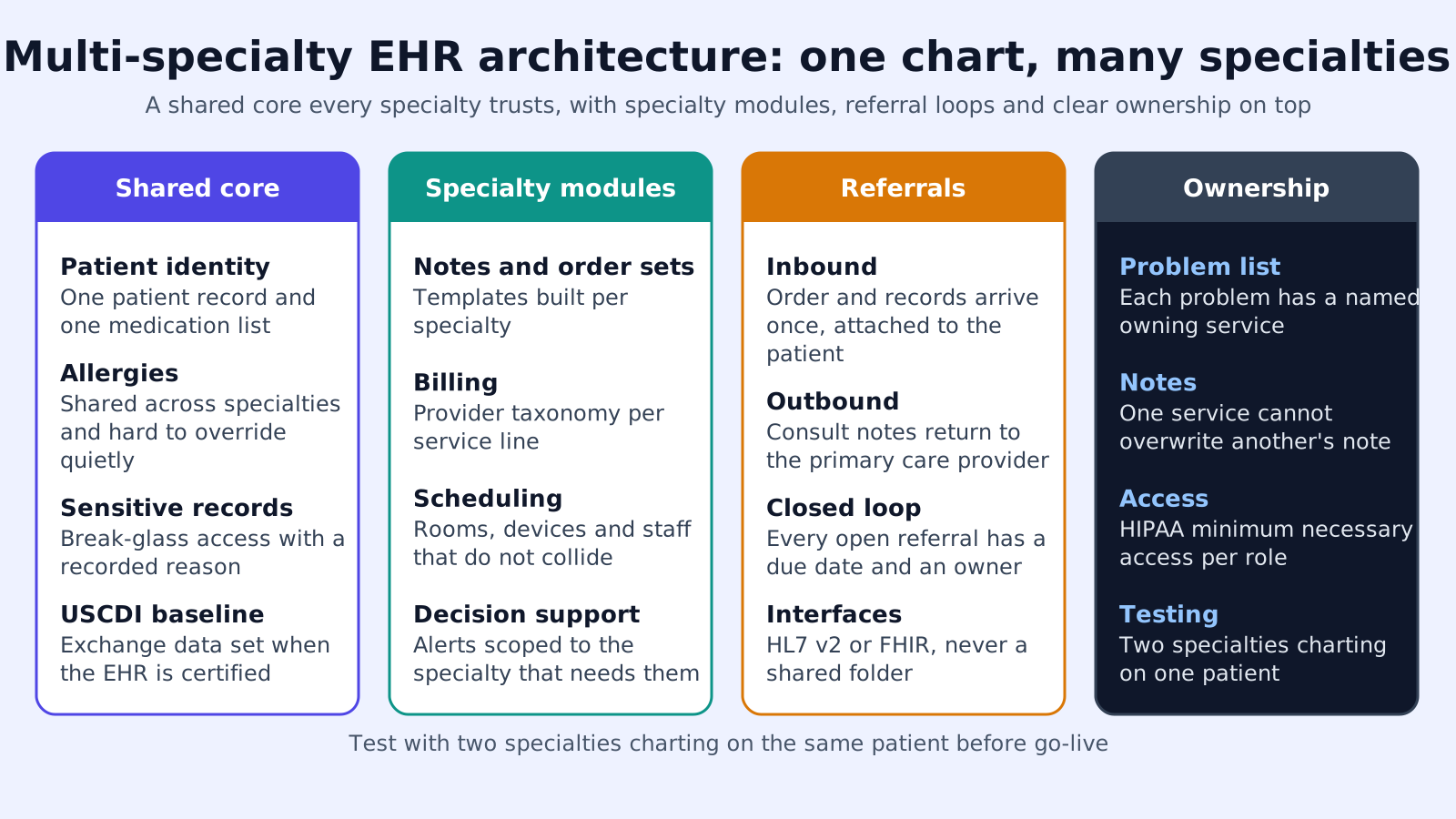
A multi-specialty EHR has four layers. The shared core sits at the bottom, specialty modules sit on top of it, a workflow layer moves work between services, and an exchange layer connects the group to everyone outside it.
- 1. Shared core: One patient identity with a single medical record number, one medication list, one allergy list, a problem list with an owner on every entry, immunizations, results and documents. Every module reads and writes these through the same services.
- 2. Specialty modules: Templates, order sets, decision rules, flowsheets and billing taxonomies for each service. Note sections are namespaced by specialty, so a save in gastroenterology cannot change an orthopedic note.
- 3. Workflow layer: Internal referrals, tasks, shared care plans and messaging between services, all attached to the same patient record.
- 4. Exchange layer: HL7 v2 feeds, C-CDA documents and FHIR R4 APIs for labs, hospitals, payers and outside clinicians, with one interface per partner instead of one per specialty.
The core should be small and strict. Anything that only one specialty uses belongs in that specialty's module, even if it looks general at first.
Where to draw the line between core and module
A data element belongs in the core when two or more specialties must read it to treat the patient safely, or when an outside party expects one answer for the patient. Medications, allergies, problems, immunizations, results and insurance pass that test.
Specialty scoring tools, procedure flowsheets, device settings and specialty-specific questionnaires usually fail it. They live in the module, and the module publishes only the summary values other services need, such as a cardiology ejection fraction stored as a coded result in the core.
Who owns which part of the chart?
Every shared element needs an ownership rule, written down and enforced in code. Without one, two services edit the same row and the last save wins.
- Identity: Registration owns demographics and insurance. Clinical modules can read them but not change them.
- Medications: The list is shared, and each entry is owned by its prescriber. Reconciliation by any service is logged with who confirmed what.
- Allergies: Any clinician can add one. Removing or downgrading an allergy requires a reason and is visible to every service.
- Problems: Each problem carries an owning specialty. Another service can comment or propose a change, but resolving the problem goes to the owner.
- Notes: Notes belong to their author and specialty, and other services read them without editing.
- Results: The ordering clinician owns follow-up of each result, even when another service sees it first.
- Care plans: Each specialty owns its own plan, and a shared care plan view shows every active plan side by side, so a patient seen by three services has one picture of what each one is doing.
How should sensitive specialty records be handled?
Some specialties hold records with extra legal protection. The architecture needs access rules for them that do not depend on each clinician remembering the law.
- Minimum necessary: This is a HIPAA Privacy Rule standard at 45 CFR 164.502(b) and 164.514(d). It asks a covered entity to set role-based access for its workforce, and it does not apply to disclosures to a provider for treatment.
- Psychotherapy notes: Under 45 CFR 164.508(a)(2), most uses and disclosures of psychotherapy notes need the patient's authorization, and by definition they are kept separate from the rest of the record.
- Substance use disorder records: Records from a federally assisted program covered by 42 CFR Part 2 carry their own consent rules. HHS's February 2024 Part 2 final rule set a compliance date of 16 February 2026.
- Security tags: The HTI-5 final rule removes the ONC security tag criteria (b)(7) and (b)(8), so a group cannot count on certified products to tag sensitive data in summary documents.
- Information blocking: A multi-specialty group is a provider actor under 45 CFR Part 171, and withholding one specialty's results from the patient can be information blocking unless an exception, such as preventing harm or privacy, applies.
How do internal referrals stay on one chart?
An internal referral is a tracked request inside the same record, not a document sent between systems. It should carry the same fields as an external referral, without the copying.
- Request: The referring clinician, receiving specialty, reason, linked problem, urgency and any questions to answer.
- Status: Sent, accepted, scheduled, seen and closed, with an owner at each step and an alert when a step stalls.
- Context: The receiving specialist opens the shared chart, so there is no packet to assemble or scan.
- Answer: The consult note returns to the referring clinician's queue and closes the request.
- External referrals: When the receiving clinician is outside the group, the exchange layer sends a C-CDA document or FHIR resources and tracks the reply the same way.
How do you merge a second system into the shared chart?
When a group already runs a second EMR for one service, the merge follows a set order. Skipping identity work first is what creates duplicate charts later.
- 1. Match identities: Run patient matching between the two systems on more than name and date of birth, and have staff review uncertain matches before any clinical data moves.
- 2. Build the module: Configure the specialty's templates, order sets, flowsheets and billing rules on the shared core, and test them with that specialty's clinicians.
- 3. Load shared data: Move medications, allergies, problems and results into the core as coded data, with the source system recorded on each entry so reviewers can see where it came from.
- 4. Reconcile on first visit: At each patient's first visit after the merge, a clinician reconciles the combined medication and allergy lists.
- 5. Archive the rest: Older specialty notes and documents move as indexed documents, and the old system becomes read-only until its retention period ends.
- 6. Switch interfaces: Lab, imaging and payer connections that served the old system move to the shared exchange layer, one partner at a time.
Tests that prove the architecture holds
Run these tests with two real specialties before adding a third. Each one targets a failure that is hard to see in a demo.
- 1. Concurrent save: Two clinicians from different specialties edit the same patient at once, and neither loses work.
- 2. Problem ownership: A non-owning service tries to resolve a problem, and the system routes the change to the owner with a reason.
- 3. Medication reconciliation: Two services reconcile the same list on the same day, and the history shows who confirmed each entry.
- 4. Sensitive notes: A user without the right role tries to open a psychotherapy note or a Part 2 record, and access is blocked and logged.
- 5. Referral round trip: An internal referral goes from sent to closed, with the consult note back in the referring queue.
- 6. Portal release: Results from each specialty reach the patient portal under documented release rules.
- 7. Export: If the product is certified, data for a test patient is available through the (g)(10) read API across every specialty.
How Agnotic can help
Keeping several specialties on one chart is mostly a question of ownership rules and the code that enforces them. Agnotic Technologies builds that layer for multi-specialty groups: the shared core services, namespaced specialty modules, internal referral tracking, sensitive-record access rules and the interfaces that replace a second system.
When a second EMR already exists, Agnotic plans the merge from identity matching through archive, so the group moves to one chart without losing the specialty's history.
Plan a multi-specialty chart with Agnotic
See how Agnotic approaches EHR integration, or read more in the EHR integration hub.
Related reading on Agnotic
Continue with EHR capabilities, EHR integrations, EHR data migration and the EHR tech stack.
Sources
- 45 CFR 164.502: Uses and disclosures, including the minimum necessary standard
- 45 CFR 164.514: Implementation of minimum necessary (164.514(d))
- 45 CFR 164.508: Uses and disclosures requiring an authorization (psychotherapy notes)
- HHS: Fact sheet, 42 CFR Part 2 final rule
- ASTP/ONC: HTI-5 final rule removals or revisions of certification criteria
- ASTP/ONC: Standardized API for patient and population services, 45 CFR 170.315(g)(10)
- 45 CFR Part 171: Information blocking


