



Every system that receives patient data has to answer one question before anything else: is this the person we already know, or a new one? Get it wrong one way and a chart is split across two records. Get it wrong the other way and two people share one chart.
This post explains how patient matching works inside healthcare software, from cleaning demographics to scoring candidates and handling merges, and what to decide before you build or buy a master patient index.
What is patient matching in healthcare software?
Need identity and consent handled together?
Our patient identity and consent page covers the master patient index, identity proofing and consent records we build.
Patient matching in healthcare software is the process of deciding whether an incoming record belongs to a patient already on file. It compares names, birth dates, addresses, phone numbers and identifiers, scores each candidate, and links, creates or queues the record for review. Agnotic Technologies builds this logic as a service the rest of the product calls.
A master patient index (MPI) is the store and service that holds those decisions. Referential matching adds an outside reference dataset of known identities to help when your own data is thin or out of date.
Why does matching fail?
Matching fails because demographic data is entered by different people, in different systems, at different times. Names change, people move, and front desks type what they hear.
- Typos and transpositions: a swapped day and month in a birth date.
- Name variation: nicknames, hyphenated surnames and names entered in a different order.
- Shared data: twins with the same birth date and address, or a parent's phone on a child's record.
- Stale data: an old address that no longer matches the newest record.
How does a matching pipeline work?
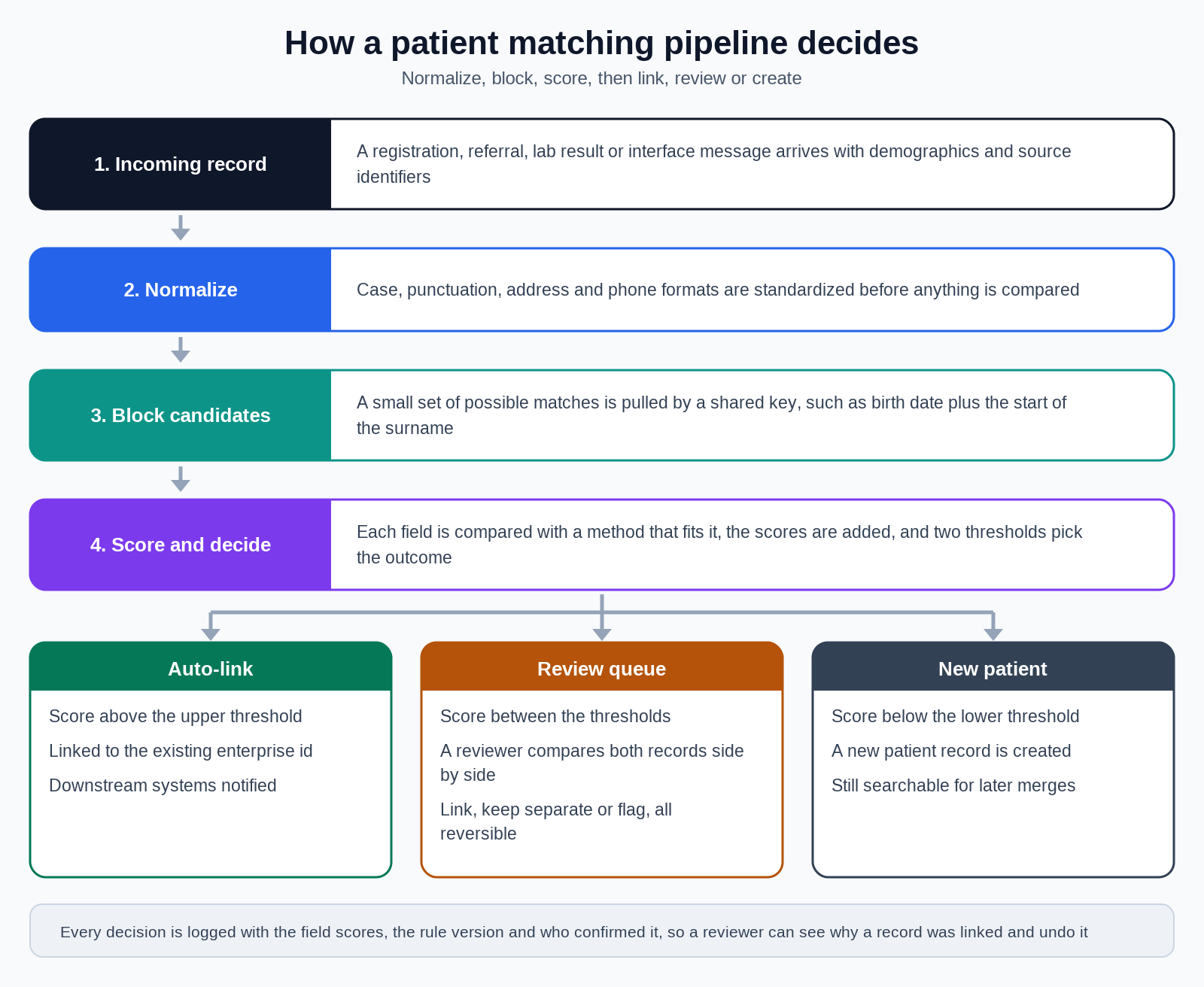
A matching pipeline runs in five steps, and each one should be logged so a reviewer can see why a decision was made.
- Step 1, normalize: standardize case, punctuation, address format and phone format before comparing anything.
- Step 2, block: pull a small set of candidates that share a key, such as birth date plus the first letters of the surname, instead of comparing against every record.
- Step 3, compare: score each field with a method that fits it, such as exact match for birth date and a similarity measure for names.
- Step 4, decide: add the field scores and apply two thresholds, one for auto-link and one for new record, with a review band between them.
- Step 5, record: save the decision, the scores, the rule version and who confirmed it.
How does FHIR support matching?
FHIR gives you a standard way to ask a server for likely matches instead of guessing from a search result.
In HL7 FHIR R4, the Patient $match operation returns a Bundle of candidate Patient records, ordered from most to least likely, and each record carries a search score from 0 to 1 and a match-grade extension (certain, probable, possible or certainly-not).
Treat the grade as advice, not a decision. Your own thresholds, review queue and audit trail still decide what happens to the record.
Deterministic, probabilistic or referential?
Most products use more than one method. The choice depends on how clean your identifiers are and how costly a wrong link would be.
- Deterministic: exact rules on a few fields. Simple to explain, but misses records with any typo.
- Probabilistic: weighted scores across many fields. Catches variation, but needs tuning and a review queue.
- Referential: checks candidates against an outside identity dataset. Helps with moves and name changes, and adds a vendor and a data agreement.
What should happen in the review queue?
The review queue is where matching quality is really decided. Give reviewers both records side by side, the field scores, and the history of each record.
Reviewers should be able to link, keep separate, or flag for follow-up, and every action should be reversible. Measure how many records enter the queue and how long they wait, because a queue nobody works is the same as no matching at all.
How do you handle merges and unmerges?
A merge must be undoable. Keep both source records, point them at a surviving enterprise id, and never delete the losing record's history.
The HIPAA Security Rule requires policies and procedures to protect electronic protected health information from improper alteration or destruction.
- Merge: link both records to one enterprise id and notify downstream systems.
- Unmerge: split them again, move each document back to its original record, and notify the same systems.
- Downstream: every system that cached the old id needs the change, or the merge only happens in one place.
The fields worth matching on
Match on the fields that are present on most records and that change least over a person's life. Weight each one by how much it tells you.
- Name: compare given and family names separately, and allow for nicknames and swapped order.
- Birth date: strong evidence when exact, weaker when only the year or month agrees.
- Sex: useful as a tie-breaker, but recorded inconsistently across systems.
- Address and phone: strong when current, misleading when years old.
- Email: helpful for patient-facing products, often shared within a household.
- Source identifiers: a medical record number from the same source system is near-certain; one from a different system means nothing on its own.
Record which source each field came from. A phone number typed by a patient in a portal is stronger evidence than one copied from an old referral.
How do you set the thresholds?
Set them from a test set, not from a vendor default. Collect pairs of records that you know are the same person and pairs you know are different, including the hard cases: twins, parents and children with the same name, and people who moved.
Run the pipeline over the test set and look at two kinds of error. A false link puts one person's data in another's chart. A missed link splits one person across two charts. The first is usually more harmful, so most teams set the auto-link threshold high and accept a larger review queue.
Then check the queue size against the people available to work it. If the review band produces more records each day than reviewers can clear, either narrow the band, improve data capture or add reviewers. A threshold the team cannot staff is not a real setting.
How do you clean up the duplicates you already have?
Treat the existing backlog as a separate project from live matching. Run the new pipeline over the whole patient table in read-only mode first, and produce a list of suspected duplicate pairs with their scores instead of merging anything.
- Sort the list by score and by clinical activity, so pairs with recent visits, open orders or active medications are reviewed first.
- Merge in small batches, and confirm downstream systems received each batch before starting the next.
- Leave low-score pairs in the queue rather than forcing a decision to empty the list.
- Keep a report of every backlog merge apart from daily matching, so an auditor can see what the cleanup changed.
Pause automatic linking for affected records while their pair is under review. Otherwise a live message can attach new data to the record you are about to merge away.
How can registration screens prevent duplicates?
Search before create. The registration screen should run the same matching service while the user types, and show likely existing patients before it allows a new record.
Ask for the fields that separate people best, such as full birth date and a current phone number, and make the reason for creating a new record a required choice when a strong candidate exists. That choice is cheap at the desk and very useful later in the review queue.
Ownership of matching decisions
A named data steward or health information management lead, not the engineering team alone. Engineers build and tune the pipeline; the steward decides thresholds, reviews hard cases and signs off rule changes.
Give the steward a monthly report: records matched automatically, records reviewed, decisions reversed and the oldest item still in the queue. Those four numbers show whether matching is healthy far better than any single accuracy figure.
What are patient matching best practices?
- Capture better data at the source: structured address entry and confirmed phone numbers at registration.
- Version the rules: store which rule set and thresholds produced each decision.
- Test with real variation: a test set of known pairs, including twins and name changes, run on every rule change.
- Separate review from registration: a dedicated person or team owns the queue.
How Agnotic can help
Agnotic builds matching services and MPIs for products that receive data from more than one EHR, lab or payer. We start with your current duplicate and overlay cases, build a test set from them, and tune the pipeline against it before it touches production records.
Build patient matching with Agnotic
We design the pipeline, the review queue and the merge history around your data sources.
Related reading on Agnotic
Data migration, the FHIR Patient resource and integration design.


