



Most patient portals that disappoint were built feature first. The team lists messaging, scheduling, results and bills, builds screens for each, and discovers late that sign-up fails for a third of patients, the EHR interface cannot keep up, and nobody owns the messages that arrive at night.
This guide is about the build itself: the architecture, how patients sign up and prove who they are, the integration layer between the portal and the EHR, notifications, testing and launch. For which features to include and how proxy access and results release should work, read our patient portals guide alongside this one.
What is patient portal development?
Planning a custom patient portal?
Agnotic designs and builds patient portals connected to your EHR, scheduling and billing systems.
Patient portal development is the work of designing, building and launching the secure web and mobile app where patients see their records, message their care team, book visits and pay bills. Beyond the screens, it covers identity and sign-up, the integration layer that reads from and writes to the EHR, notifications, security testing and the rollout to real patients.
The screens are usually the smallest part of the effort. Identity, integration and operations take most of the time, and they decide whether patients come back after their first visit.
What does a patient portal architecture look like?
A portal sits in front of the EHR, not inside it. Patients use web and mobile apps that call a portal API, which handles identity, permissions and caching, and an integration layer translates between the portal and the EHR, scheduling and billing systems.
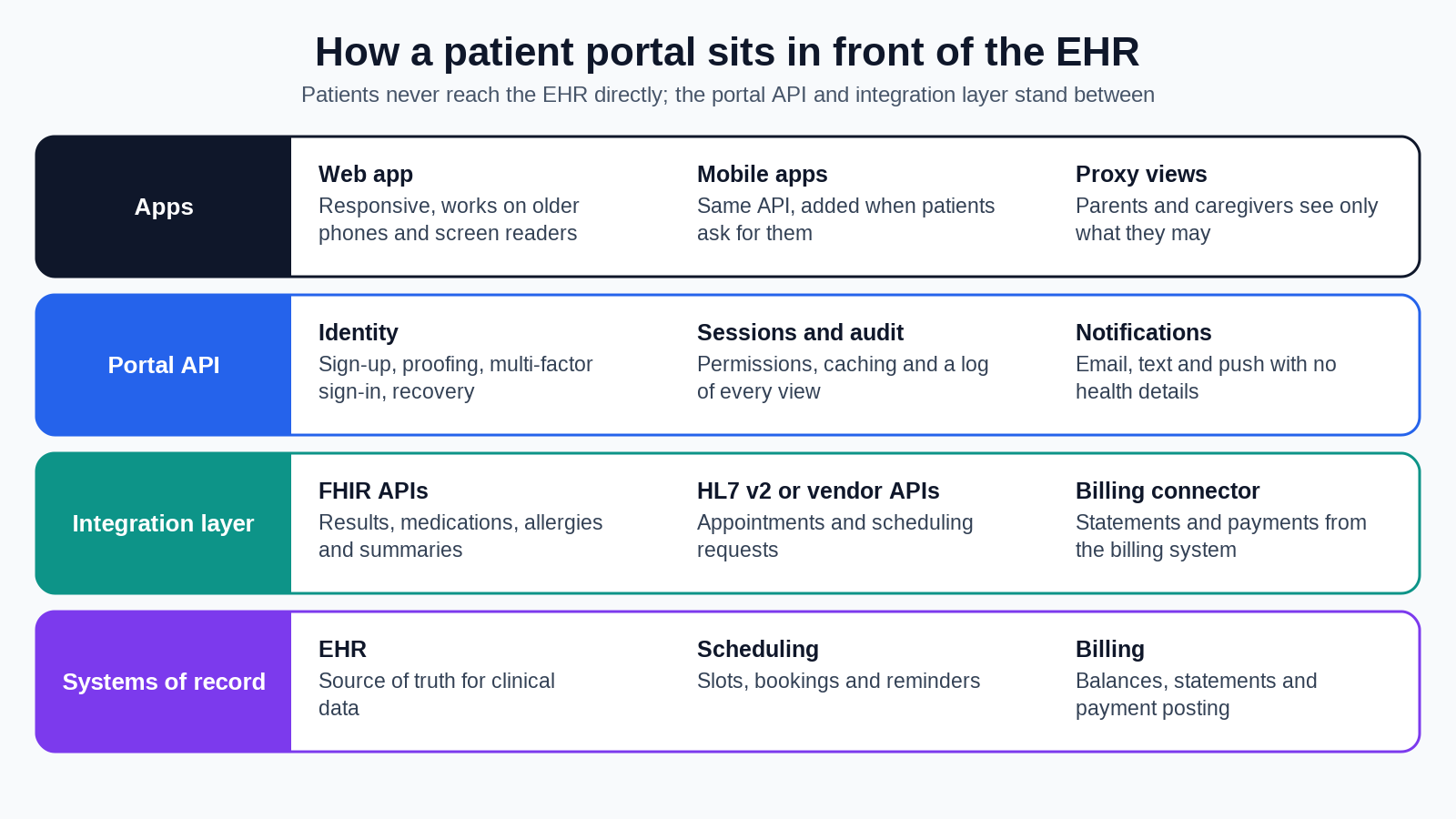
- Apps: A responsive web app and, if patients ask for it, native mobile apps sharing the same API.
- Portal API: Sessions, permissions, proxy rules, caching and the audit log, so the EHR is never exposed to the internet directly.
- Identity service: Sign-up, identity proofing, multi-factor sign-in and account recovery.
- Integration layer: FHIR APIs for clinical data, HL7 v2 or vendor APIs for scheduling, and the billing system's API for statements and payments.
- Notifications: Email, text and push messages that tell patients something is waiting, without including health details.
Keep the portal's own database small. It should hold accounts, preferences, message threads and cached copies, while the EHR stays the source of truth for clinical data.
How should sign-up and identity work?
Sign-up has to match each new account to the right patient record and prove the person is who they say they are. It is where portals lose the most patients, so it deserves as much design as any clinical feature.
The HIPAA Security Rule sets the bar. Its person or entity authentication standard, 45 CFR 164.312(d), requires procedures to verify that a person or entity seeking access to electronic protected health information is the one claimed.
- In-clinic activation: Staff hand the patient a one-time code at check-in, which links the account to the right record with little risk.
- Self sign-up: The patient enters details that are matched against the record, followed by identity checks, for patients who never visit in person.
- Multi-factor sign-in: A second factor by app or text for every account, with a recovery path that does not depend on calling the clinic.
- Duplicate records: A rule for what happens when sign-up matches two records or none, routed to a staff work queue.
Account recovery needs the same care as sign-up. A forgotten password or a new phone should not mean a call to the front desk, but recovery is also the easiest door for someone trying to take over an account. Use a recovery code issued at sign-up, or re-run the identity checks, and tell the patient by email whenever recovery is used.
How does the portal exchange data with the EHR?
Through an integration layer that uses the EHR's FHIR APIs where they exist and other interfaces where they do not. The layer decides what is read live, what is cached and what is written back.
- Read live: Upcoming appointments and message status, which patients expect to be current.
- Cache with refresh: Results, medications, allergies and visit summaries, refreshed on login and when the EHR sends a change event.
- Write back: Appointment requests, intake forms, messages and updated contact details, each with a clear owner in the clinic.
- Rate limits: Batch and queue calls so a busy Monday morning does not hit the EHR's API limits.
Plan for the EHR being slow or down. The portal should show cached data with a note saying when it was last updated, and queue write-backs until the interface returns, rather than showing an error page.
How should messaging and records requests be handled?
Route every message and request to a named team queue with a target response time, and tell the patient what that time is. The portal creates the work; the clinic's process has to absorb it.
Records requests have a legal clock. Under 45 CFR 164.524(b)(2), a covered entity must act on a request for access no later than 30 days after receiving it, with one extension of no more than 30 days if it gives the patient a written reason within the first 30.
- Message routing: By topic, such as clinical question, refill, billing or scheduling, each to the right team.
- After hours: An automatic reply with the emergency number and the expected response time.
- Records requests: Logged with the date received, so staff can see how long each one has been open.
- Attachments: Allowed with size and type limits, scanned before staff open them.
How do you build a patient portal step by step?
Start with sign-up and one high-value workflow, launch to a small group of patients, and add features only when the first ones are used. A portal with three features patients rely on beats one with twelve they ignore.
- 1. Discovery: Map the EHR's available APIs, the clinic's message and scheduling workflows, and who answers what.
- 2. Identity first: Build sign-up, multi-factor sign-in and recovery, and test them with real patients before anything else.
- 3. First workflow: Usually appointments plus messaging, or results plus visit summaries, end to end with the EHR.
- 4. Security testing: Run penetration tests and an access review before any real patient data is shown.
- 5. Pilot: Invite one clinic's patients, watch sign-up completion and message volumes, and fix what breaks.
- 6. Expand: Add bill pay, forms and proxy access in that order of demand, then the remaining clinics.
Accessibility belongs in every step, not a final audit. Test with screen readers, large text and older phones from the first sprint, because the patients who need the portal most often use exactly those.
How do you get patients to use the portal?
Patients use a portal when staff invite them in person and the first task is quick. Email campaigns alone rarely move the numbers.
- Invite at check-in: Front desk staff offer activation during the visit, with a code ready to scan.
- Quick first win: The first screen after sign-up shows something useful, such as the next appointment or the visit summary.
- Clinician mentions: A doctor saying results will appear in the portal does more than any banner.
- Language support: Offer the portal in the main languages your patients speak.
Track a few numbers from the first week: the share of invited patients who finish sign-up, the share who return within a month, and the tasks they complete most. Those three tell you whether to fix sign-up, add a feature or retrain staff, which is more useful than a single count of total accounts.
What are patient portal development best practices?
The practices that matter most are about identity, reliability and ownership. These are the ones we check before any portal launch.
- Measure sign-up completion: Track every step of sign-up and fix the one where patients drop out.
- No health details in notifications: Messages say something is waiting, never what it is.
- Log every view: Keep an audit trail of who saw which record, including proxies.
- Own every queue: Each message type has a team and a response target before launch.
- Plan EHR downtime: Cached reads and queued writes keep the portal usable when the EHR is not.
How Agnotic can help
Agnotic Technologies builds patient portals around your EHR and your clinic's workflows: identity and sign-up, the integration layer, messaging queues, bill pay and the mobile apps. We start with sign-up and one workflow, pilot it with real patients, and expand from what they use.
If you already have a portal that patients avoid, we review sign-up, performance and message handling and fix the steps that lose them.
Build a portal patients come back to
Plan your patient portal with our engineers, or read more guides in the hub.
Related reading on Agnotic
Read which features a portal needs, how to design it for patients, how engagement tools fit, and how health APIs are secured.


