



A rural visit fails in a specific way. The call connects, the video freezes, and the clinician is left with a spinner and no chart. The patient is still there. The product assumed a link the clinic does not have.
Agnotic Technologies builds telehealth so the visit can continue when video cannot: audio, stored images and a record that was downloaded before the call.
What does low bandwidth change in a rural telehealth visit?
Low bandwidth means the visit cannot depend on a stable two-way video stream. Rural telehealth software has to finish the clinical task on audio, on stored images, or on a chart that was already on the device. Agnotic Technologies builds that fallback so a frozen video tile does not end the encounter.
HRSA defines telehealth as the use of electronic information and telecommunication technologies to support long-distance clinical health care, patient and professional health-related education, public health and health administration.
Building visits for clinics with weak links?
Agnotic Technologies designs telemedicine platforms that degrade on purpose instead of dropping the visit.
Which visit patterns still work when video does not?
Three patterns cover most rural clinics. Use them in that order, and tell the user which one they are in, so a frozen video tile is not mistaken for a finished visit.
- Audio first: start the conversation without video, and add video only if the link holds.
- Store and forward: photos, documents and short clips upload when they can, and a clinician reviews them later. Our store-and-forward guide covers that queue.
- Chart first: problems, meds and the last note download before the visit, so a drop does not hide the record.
- Retry: uploads resume without creating a second copy of the same image.
The W3C Service Workers specification defines a worker that can handle network requests through a fetch event and a request and response cache, which lets web apps keep working offline.
What should the team test before rollout?
Test on the connection the clinic actually has, not on office wifi. A pass on a fast link does not predict a pass in a clinic at the end of a long backhaul.
- A visit that starts on audio and never gets video.
- A photo that uploads after the clinician has already left the call.
- A chart that opens with no network after it was synced.
- Two people joining from a shared clinic connection without kicking each other off.
Before the field test, shape the network in the lab: add delay, drop packets and cut the link at random points in a scripted visit. Then repeat the same script on site, so lab results and clinic results can be compared step by step.
How does this differ from a general telehealth build?
A general platform optimizes for a clear video visit and a live EHR launch. A rural low-bandwidth build treats video as optional and treats the local copy of the chart as the source during the visit. Policy questions, including what Medicare will pay for audio-only, stay in the telehealth expansion post. This post is about whether the visit can be completed at all.
How do you check the link before the visit starts?
Run a short network check when the patient or clinic joins the waiting room, before the clinician is pulled in. The result picks the starting mode, so nobody spends the first minutes of a visit discovering that video will not hold.
Show the result to the clinician as a plain label, such as audio only or video likely, rather than a speed number. Store the mode with the visit record, because the note and any later review should know how the patient was actually seen.
Let the patient override the choice. Someone who knows their signal improves by the window should be able to try video, and someone sharing data with a family plan should be able to stay on audio.
What should happen when the link drops mid-visit?
The visit should step down, not end. Treat the encounter as a sequence of modes and move to the next one the moment the current one fails, while the visit itself stays open.
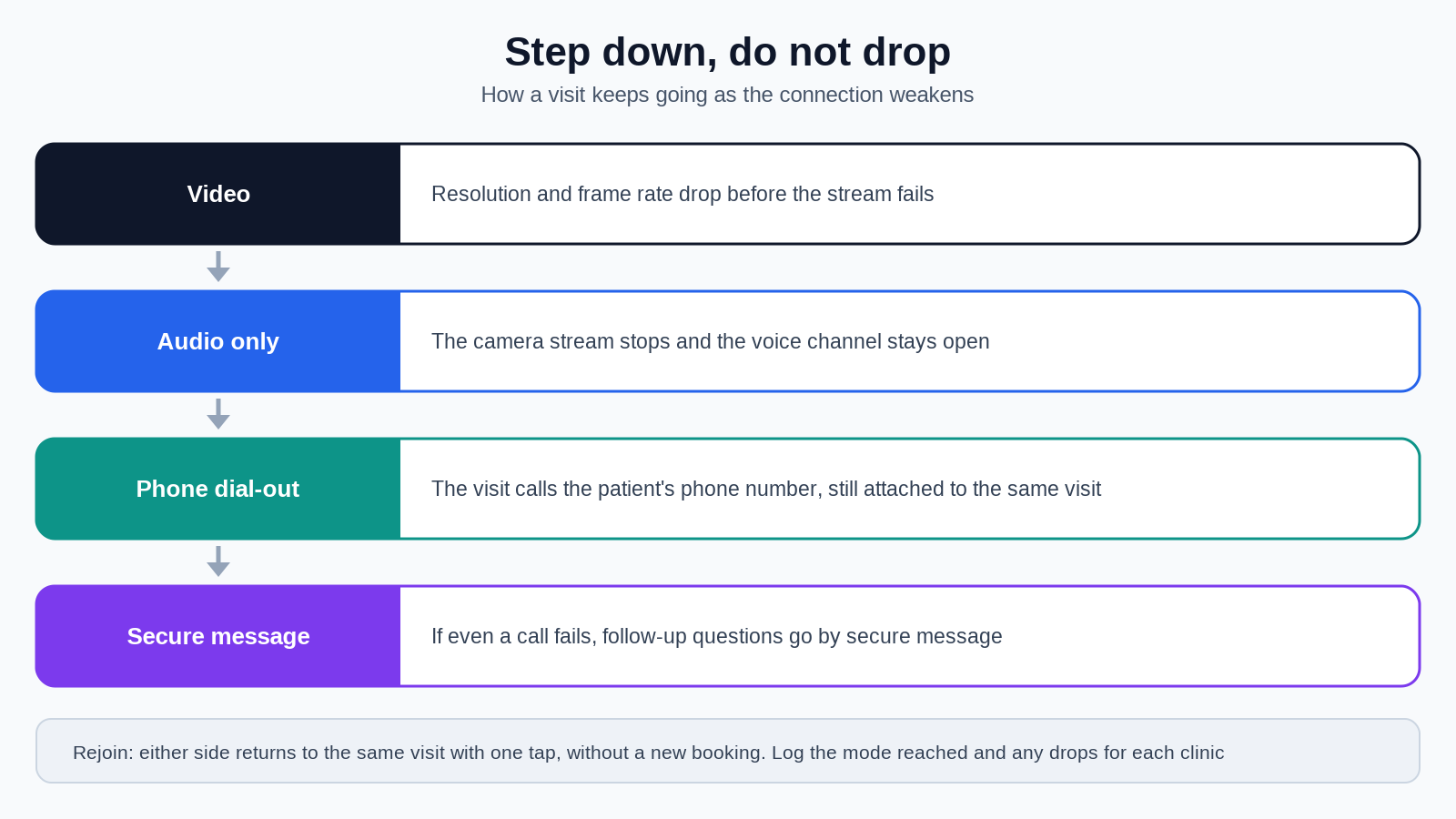
- Step 1, video to audio: drop the camera stream and keep the voice channel.
- Step 2, audio to phone: offer a dial-out to the patient's phone number from the same visit screen.
- Step 3, phone to message: send a secure message with follow-up questions if even a call fails.
- Step 4, rejoin: let either side return to the same visit with one tap, without a new booking.
The clinician's note draft should save on the device every few keystrokes. A dropped session that also loses the half-written note is the failure clinicians remember longest.
How should media be sized for a weak connection?
Size media for the link you have and give audio priority over video. When the link is congested, a clear voice with a still image beats a smooth picture with broken speech.
- Video: lower the resolution and frame rate before the stream fails, not after.
- Photos: compress on the device and keep the original for upload later if the clinician needs detail.
- Uploads: send files in small resumable pieces so a drop costs one piece, not the whole file.
- Screens: keep the visit page light, with no autoplay assets or heavy scripts.
Offline chart and note handling
The chart the clinician needs should already be on the device, encrypted, before the visit begins. Sync it at the start of the clinic session, while the link is idle, rather than at the moment of the visit.
Plan for the hard cases. Two people may edit the same record while one is offline, so the sync must flag conflicts for a person instead of silently keeping the last write. A lost or shared device must be able to wipe the local copy at sign-out.
Which patient-side choices matter most?
On the patient side, every extra step costs data and patience. A link sent by text message that opens in the browser, with no app download, removes the most common reason a rural patient never joins.
- A low-data mode the patient can choose before joining.
- A phone number on the waiting screen, so the patient can call in if the page will not load.
- Large controls and few screens, for older patients on small phones.
- Support for a caregiver joining on the same device or from a second one.
How should a clinic-to-specialist visit be set up?
In a hub and spoke visit, a nurse or presenter at the rural clinic joins a specialist at a regional center. The clinic end should capture still images from exam cameras and send them first, so the specialist can review them even if live video stays poor.
On the clinic network, put the visit device on a wired connection where possible, and ask the local IT contact to give visit traffic priority. Schedule large uploads, such as imaging and device logs, for quieter hours.
What should the team monitor after launch?
Monitor how visits actually ran, site by site. The useful signals are the mode each visit started and ended in, the number of drops and rejoins, upload retries, and visits that were abandoned before a note was signed.
Review those signals with each clinic after the first weeks of use. A site where most visits fall to audio may need a network fix, not a software fix, and the data lets you show that to the right owner.
Ask clinicians, too. A short question after each visit, asking whether the mode was good enough to decide on care, catches the visits that technically completed but should have been rebooked in person.
Who owns each part of the rollout?
A low-bandwidth rollout touches the clinic network, the visit software and the clinical workflow, so each needs a named owner. When a visit fails, the team should know within a day whether the fix belongs to IT, to the build team or to the schedule.
- Clinic IT contact: router settings, wired connections and visit traffic priority.
- Build team: mode steps, offline sync, uploads and the monitoring dashboard.
- Clinical lead: which visit types may run on audio only and when to rebook in person.
- Front desk: sending join links, calling patients who do not appear and logging the reason.
What are low-bandwidth telehealth best practices?
- Check the link first: choose the starting mode in the waiting room.
- Step down, do not drop: keep the visit open while moving from video to audio to phone.
- Prioritize voice: protect audio quality before video quality.
- Sync early: put the chart on the device before the visit and save the note locally.
- Measure by site: log the mode, drops and abandoned visits for each clinic.
How Agnotic can help
Agnotic builds telehealth apps for clinics that cannot count on a strong link. We design the mode steps, the offline chart and the resumable uploads, then test them on the connection each clinic really has.
Build low-bandwidth telehealth with Agnotic
We design visits that fall back to audio, phone and stored images without losing the encounter.
Related reading on Agnotic
Store and forward, adoption barriers and the policy outlook.


