



Many healthcare products run on AWS, and many teams assume that choosing AWS settles HIPAA. It does not. AWS signs a business associate addendum and runs secure infrastructure, but how your accounts, services, keys, identities and logs are set up is your work.
This post covers HIPAA on AWS specifically: accepting the addendum, choosing eligible services, where the shared responsibility line falls, and the account, encryption, access, logging, network and backup controls that put protected health information on a sound footing. It closes with failure points, an example, owners and ongoing checks.
How do you solve HIPAA compliance on AWS?
Setting up AWS for health data?
Our cloud security and compliance service designs and builds AWS environments for regulated workloads.
Solving HIPAA compliance on AWS means accepting the AWS business associate addendum, keeping protected health information only in HIPAA eligible services, and configuring your own accounts, encryption, identities, logging and backups, because AWS secures the infrastructure while you secure what you build on it. Agnotic Technologies sets up these environments for healthcare teams.
AWS says its Business Associate Addendum is reviewed and accepted in AWS Artifact, that customers should process, store and transmit protected health information only in HIPAA eligible services, and that there is no HIPAA certification for a cloud service provider.
Does AWS make your application HIPAA compliant?
No. AWS provides infrastructure and services that can be used with health data, but compliance depends on how you use them and on your own policies and risk analysis.
Under the AWS shared responsibility model, AWS is responsible for protecting the infrastructure that runs its cloud services, while each customer's responsibility depends on the AWS services and Regions it chooses.
In practice, the more managed a service is, the less you configure underneath it. You still own your data, who can reach it, how it is encrypted and what is logged, whatever service you pick.
Which AWS services can hold PHI?
Only services on the AWS HIPAA Eligible Services Reference should process, store or transmit protected health information. Check every service in the data path, including the ones that only move or log data.
- Check features too: some eligible services exclude specific features from eligibility.
- Watch the edges: logs, queues, caches and analytics tools can all end up holding PHI.
- Non-eligible services: allowed in the account only if PHI never reaches them.
- Recheck: review the list when adding a service or a new feature of one.
HIPAA defines a business associate as a vendor that creates, receives, maintains or transmits protected health information for a covered entity, so a cloud service that maintains ePHI falls inside the definition.
How should AWS accounts be structured for PHI?
Separate workloads that hold protected health information into their own AWS accounts under AWS Organizations, with guardrails set centrally. Account boundaries are the strongest isolation AWS offers, and they keep test and production apart.
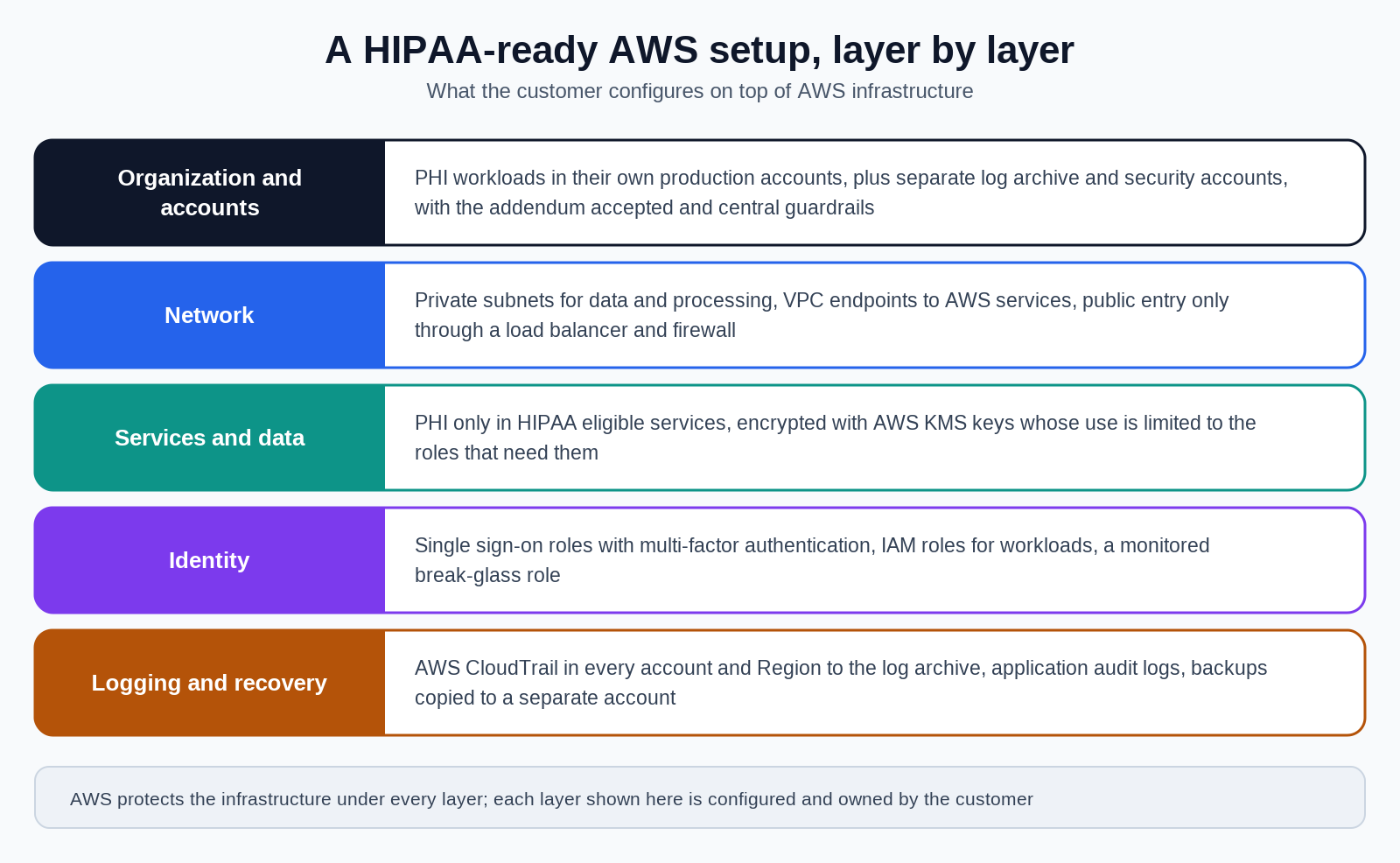
- Workload accounts: production and non-production apart, PHI only in production.
- Log archive account: logs written there and protected from deletion by workload admins.
- Security account: tooling that watches all other accounts.
- Guardrails: policies that block risky actions, such as turning off logging.
How do you encrypt PHI on AWS?
Encrypt data at rest with AWS KMS keys and in transit with TLS, everywhere PHI goes. Use customer managed keys where you need control over who can use them and an audit trail of each use.
Turn on default encryption for storage such as Amazon S3 buckets, volumes and databases, and set key policies so only the roles that need a key can use it. Encryption with a key everyone can use protects very little.
Identity and access on AWS
Give people access through single sign-on and roles, never shared users or long-lived keys. Require multi-factor authentication, keep the root user locked away, and grant only the permissions each role needs.
- Workforce access: single sign-on with roles per job, reviewed on a schedule.
- Workload access: IAM roles for services, no access keys in code.
- Emergency access: a break-glass role, alarmed and reviewed after each use.
- Separation: different people deploy code and manage keys where possible.
What should be logged on AWS?
Log every API call in every account and Region with AWS CloudTrail, delivered to the log archive account. Add data access logs where PHI is stored, and keep application audit logs that say which user saw which record.
AWS logs show who changed infrastructure; only your application can show who viewed a patient. You need both to answer an investigator's questions.
How should networks be designed for PHI workloads?
Keep databases and processing in private subnets, reach AWS services through VPC endpoints where possible, and expose only what must be public through a load balancer with a web application firewall.
Block public access to storage at the account level, so a single misconfigured bucket cannot publish patient data. Record flow logs for the networks that carry PHI.
Backups and recovery on AWS
Back up PHI stores with AWS Backup or service snapshots, copy backups to a separate account, and encrypt them with keys the production account cannot delete. Then prove the copies work by restoring them.
Write down how each system is restored and in what order, and test it. A backup that has never been restored is a hope, not a plan.
How should a team approve new AWS services?
Engineers adopt new AWS services quickly, and each one can become a path for PHI. A short approval step keeps the eligible-services rule true as the product grows.
- Request: the service, the feature used and whether PHI will reach it.
- Check: the eligible list and any excluded features, recorded with the date.
- Configure: encryption, logging and access settings agreed before first use.
- Enforce: organization policies that allow only approved services in PHI accounts.
Keep the approved list next to the risk analysis, so both change together when the architecture does.
Where do AWS HIPAA setups fail?
Most failures are small configuration choices that nobody revisits.
- Ineligible service in the path: PHI sent to a service not on the eligible list.
- BAA on the wrong account: a new account holding PHI without the addendum accepted.
- PHI in logs: application logs that capture full records in plain text.
- Shared admin keys: long-lived access keys on laptops and in scripts.
- Untested restores: backups that fail when they are finally needed.
A worked example: moving a telehealth app into a HIPAA-ready AWS setup
A telehealth startup ran everything in one AWS account, with developers holding admin keys and application logs containing visit notes. A customer's security review asked how PHI was isolated and who could read it.
The team created an organization with separate production, non-production, log archive and security accounts, accepted the addendum for the accounts that hold PHI, and moved production behind single sign-on roles with multi-factor authentication.
They checked every service in the data path against the eligible list, replaced one that was not on it, removed visit notes from logs and ran a full restore test. The customer's next review found the answers already documented.
Who owns what?
HIPAA on AWS needs owners for the platform, the application and compliance.
- Cloud platform team: accounts, guardrails, networking, logging and backups.
- Application team: data handling, application audit logs and service choices.
- Security: identity, key policies, monitoring and access reviews.
- Compliance: the addendum, the risk analysis and policies.
How do you keep the setup compliant over time?
Check configuration continuously rather than once a year. Rules that flag an unencrypted bucket or disabled logging the day it happens are worth more than an annual audit.
- Configuration rules: alerts for unencrypted storage, public access and disabled logging.
- Service list check: new services compared with the eligible list before use.
- Access reviews: roles and permissions reviewed on a schedule.
- Restore tests: each critical system restored at a set interval.
What are HIPAA on AWS best practices?
Accept the addendum before PHI arrives, keep PHI in eligible services in dedicated accounts, encrypt with keys whose use is limited and logged, and give people access only through roles with multi-factor authentication.
Log every account to a protected archive, keep PHI out of application logs, back up to a separate account, test restores and check configuration continuously.
How Agnotic can help
Agnotic builds HIPAA-ready AWS environments for healthcare products: account structures with guardrails, eligible service choices, encryption and key policies, role-based access, organization-wide logging, private networking, backups with tested restores and continuous configuration checks.
Review your AWS setup with Agnotic
Our AWS Well-Architected review service checks an existing AWS environment against AWS's own framework.
Related reading on Agnotic
Cloud, hosting and HIPAA for healthcare software.


