



A sick child rarely keeps clinic hours. A fever that climbs after dinner or a rash that appears on a Sunday leaves parents with one question: can this be handled from home, does it need a clinic tomorrow, or does it need the emergency department tonight? Pediatric virtual urgent care exists to answer that question quickly and safely, and the software behind it decides how well it does.
This guide is for digital health founders, urgent care operators and hospital technology leaders planning a pediatric telehealth service. It covers how a child's virtual visit differs from an adult's, how guardian identity and consent should work, where each visit should go next, which features and integrations the platform needs, and the mistakes that come from treating pediatrics as adult telehealth with smaller patients.
What is telehealth for pediatric urgent care?
Building a pediatric urgent care service?
Agnotic builds urgent care software, including virtual visit platforms connected to your EHR, e-prescribing and billing.
Telehealth for pediatric urgent care is a virtual visit service where a parent or guardian connects a sick child with a clinician by video or phone for problems that need same-day attention but not an emergency department. The software verifies the guardian, records the child's details, supports triage and the visit, and sends every case to the right next step.
It sits between two channels families already know. A nurse advice line can only give advice, while an urgent care clinic can examine, test and treat. A virtual visit can diagnose and prescribe for many common problems, and it has to hand the family off cleanly when it cannot.
Why does telehealth for pediatric urgent care matter now?
The service is worth planning carefully because payers can cover it, the privacy rules for minors are specific, and the data standards to model a family already exist.
- Medicaid coverage: CMS says states have broad flexibility in designing how telehealth is delivered in Medicaid, including audio-only visits where a state deems them appropriate. A state that pays for telehealth the same way it pays for face-to-face care does not need a separate reimbursement plan amendment, so each state's rules shape what a pediatric service can bill.
- Minors and privacy: Under the HIPAA Privacy Rule, 45 CFR 164.502(g)(3), a parent or guardian who can make health care decisions for an unemancipated minor is treated as the child's personal representative. The exceptions are care the minor consents to alone, care the minor may lawfully get without a parent's consent, and care where the parent agrees to confidentiality. State law then decides what a parent may see.
- Data standards: HL7 FHIR R4 defines a RelatedPerson resource for a person who is involved in the care of a patient but is not the target of the care. That gives the guardian a proper place in the record instead of a free-text note.
Together these mean a pediatric service needs payer rules by state, a consent model by age, and a data model with two people in it from the first release.
How is a pediatric virtual visit different from an adult one?
The clinical questions are similar, but almost everything around them changes. A child's visit has two people on the call, and the person answering the questions is usually not the patient.
- Two identities: The guardian is the person verified, the child is the patient, and the record has to keep them apart.
- Weight and age drive decisions: Many children's medicines are dosed by weight, so a current weight is a required field, not an optional one.
- Symptoms come second hand: Young children cannot describe pain, timing or severity, so triage depends on what the guardian has observed.
- Photos and home readings carry more weight: A clear photo of a rash or a home thermometer reading often decides the visit.
- Consent changes with age: A teenager may consent to some care alone under state law, and their privacy settings differ from a toddler's.
- The visit ends with paperwork: Families need school or daycare notes, and the parent may need a work note.
- Plan for after hours: The service has to work when the pediatrician's office is closed, so staffing and escalation must cover nights and weekends.
How does a pediatric virtual urgent care visit flow?
A well-built visit moves through six stages. Each stage writes to the record, so the next clinician, or the in-person clinic, sees the whole story without asking the family to repeat it.
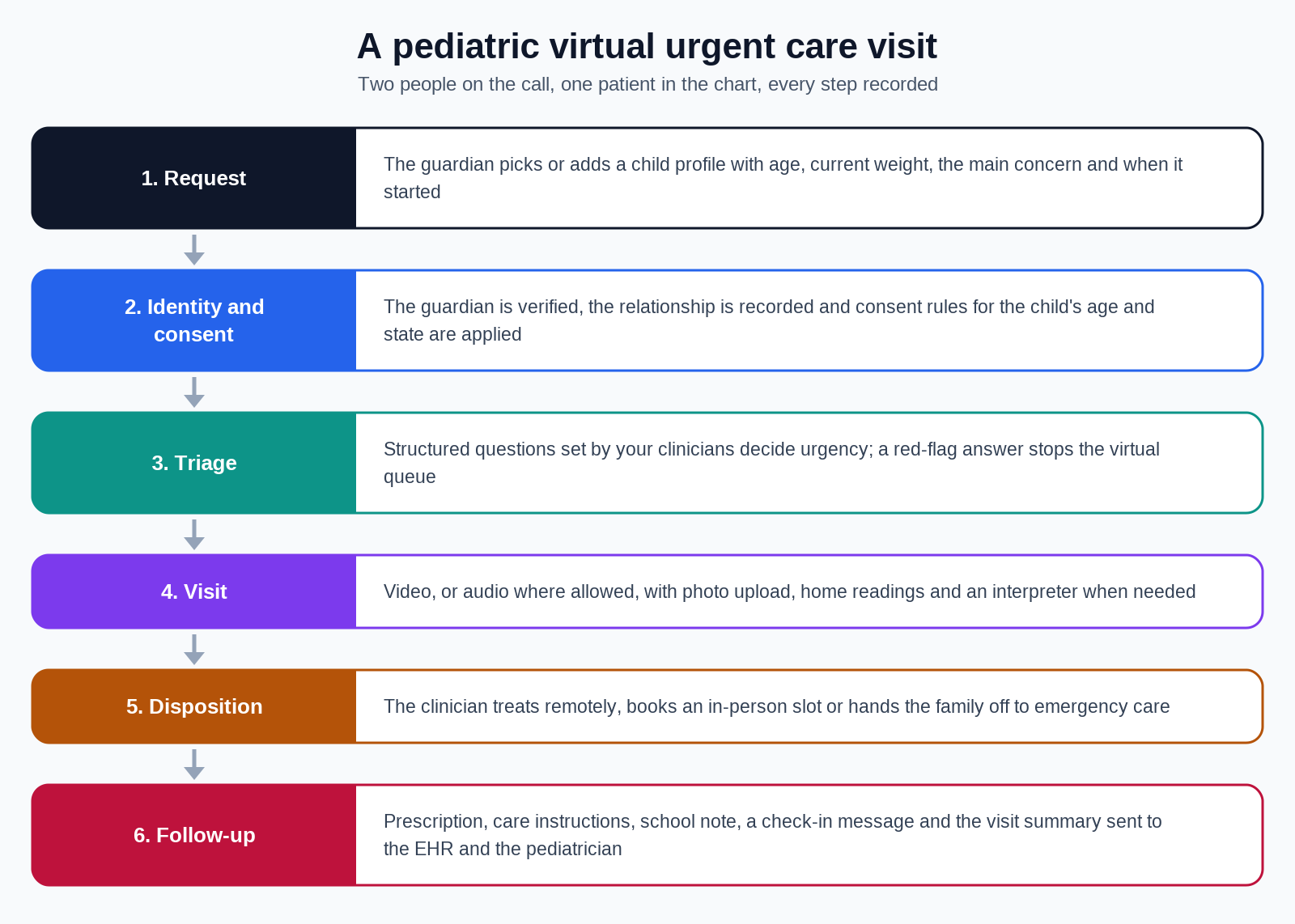
- 1. Request: The guardian picks or adds a child profile and enters age, current weight, the main concern and when it started.
- 2. Identity and consent: The guardian's identity and relationship to the child are checked, and the consent rules for the child's age and state are applied.
- 3. Triage: Structured questions set by your clinical team decide urgency, and an answer that matches one of their red flags stops the virtual queue.
- 4. Visit: Video, or audio where the payer allows it, with photo upload, home readings and an interpreter when the family needs one.
- 5. Disposition: The clinician treats remotely, books an in-person slot, or hands the family off to emergency care.
- 6. Follow-up: Prescription, care instructions, a school or daycare note, a check-in message, and the visit summary in the EHR and with the child's pediatrician.
How should guardian identity and consent work?
Treat the guardian and the child as two linked records with an explicit relationship. Decide who may consent and who may see what from the child's age and the state's rules, not from whoever happens to be logged in.
- Account model: One guardian account can hold several children, and one child can have two guardians, each with their own login.
- Relationship record: Store the relationship, such as parent, legal guardian, foster parent or other caregiver, and how it was confirmed. In HL7 FHIR this maps to a Patient resource for the child and a RelatedPerson resource for the guardian.
- Who is on the call: Record the adult who is actually present at the visit. It is not always the account holder, because grandparents and babysitters bring children too.
- Consent rules by age and state: A rules table, owned by your compliance lead, that says when a minor can consent alone and when a guardian must.
- Confidential teen visits: Care a minor may lawfully receive alone needs its own privacy flag, so notes and portal views stay hidden from the guardian where state law protects them.
- Proxy access: Guardian access to the child's portal that changes at the age your policy sets, with a review step instead of a silent switch.
Get the legal review done before the first line of code. The rules table is the part that changes from state to state, and it is far cheaper to keep it as data your team can update than to hard-code it.
Where should each virtual visit go next?
Your clinical team decides where each case belongs; the software makes sure the decision is fast, recorded and acted on. Build every exit from the virtual visit as a real path in the platform, not as a phone call someone has to remember.
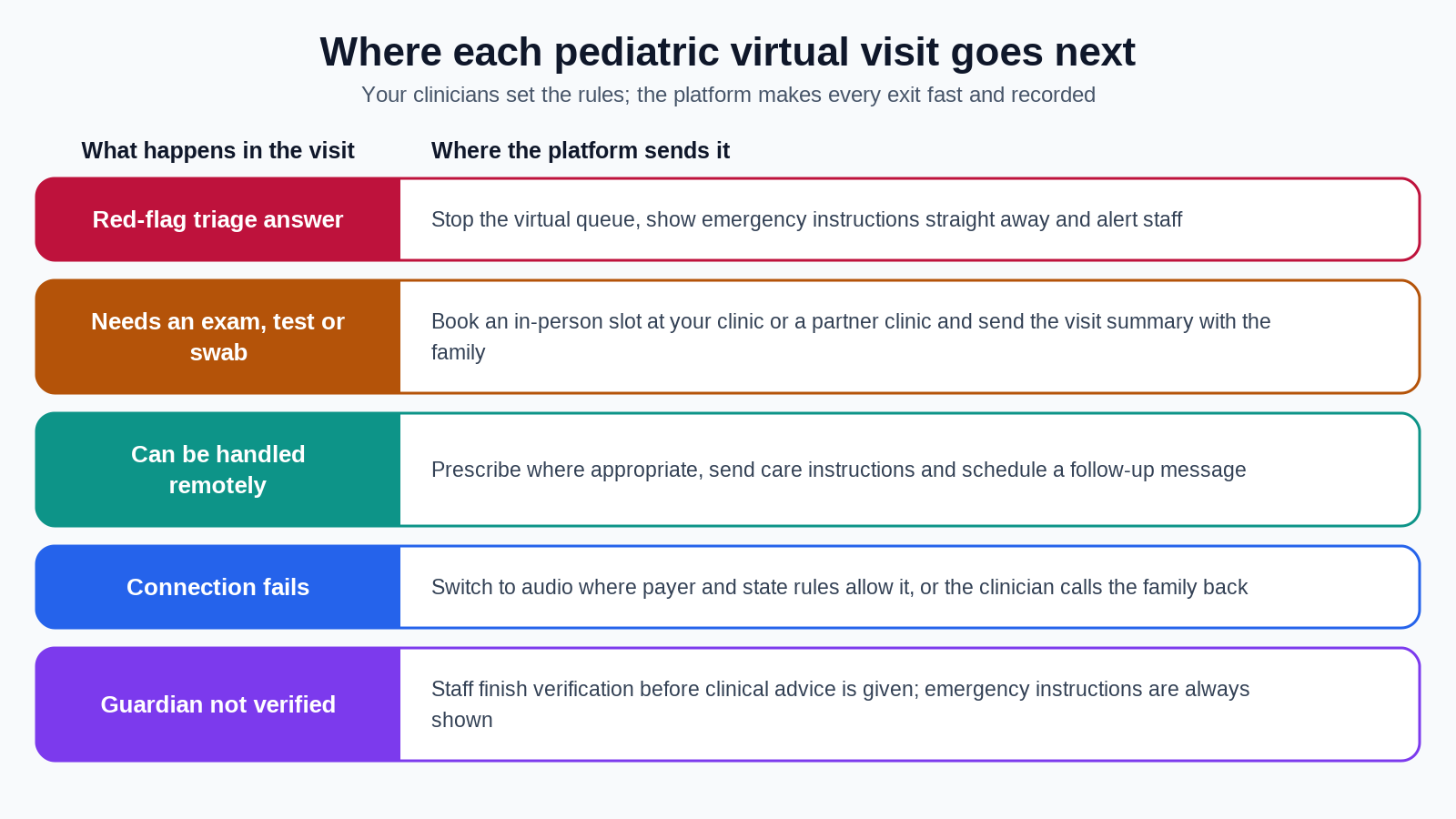
- Red-flag triage answer: The virtual queue stops, the guardian sees emergency instructions straight away, and staff are alerted.
- Needs an exam, test or swab: The clinician books an in-person slot at your own or a partner clinic, and the visit summary travels with the family.
- Can be handled remotely: A prescription where appropriate, written care instructions and a follow-up message at a set time.
- Connection fails: The visit switches to audio where the payer and state allow it, or the clinician calls the family back.
- Guardian not verified: Staff finish verification before any clinical advice is given, and emergency instructions are always shown.
The red flags themselves belong to your medical director, often drawn from a licensed pediatric triage protocol set. Keep them in a versioned rules store so every change is reviewed, dated and traceable to the visits it affected.
Which features does a pediatric telehealth platform need?
Beyond the video call, these are the features that decide whether families and clinicians trust the service enough to use it again.
- Child profiles: Age, current weight with the date it was measured, allergies, current medicines and the child's regular pediatrician.
- Photo and file upload: Rashes, wounds and home readings attached to the visit, with on-screen guidance for taking a usable photo.
- Weight-aware prescribing: E-prescribing that asks for a current weight before weight-based medicines and shows the clinician the calculation.
- Notes families need: School, daycare and work notes generated from the visit, sharing only the details the family chooses.
- Queue and staffing view: Wait times, clinician availability and after-hours coverage in one place for the operations team.
- Interpreter support: An interpreter booked into the call in the family's language, recorded in the visit note.
- Follow-up messages: A timed check-in after the visit, with a clear route back to a clinician if the child gets worse.
- Pediatrician updates: A visit summary sent to the child's regular pediatrician so the medical home stays informed.
How does the service connect to the EHR and billing?
Every visit should land in the chart the next clinician will open, and every billable visit needs the payer's telehealth rules applied before the claim leaves.
- EHR: Visit notes, orders and results written to the EHR through HL7 FHIR APIs or HL7 v2 interfaces, depending on what the EHR supports.
- E-prescribing: Prescriptions routed to the pharmacy the family chooses, with the weight used for dosing included.
- Eligibility: Coverage checked before the visit starts, including Medicaid managed care and CHIP plans.
- Telehealth billing rules: Place of service codes, modifiers and audio-only rules kept as configuration per payer and state, not hard-coded.
- Partner clinics: Appointment booking and record sharing with the in-person clinics the service hands off to.
- Pediatrician offices: Visit summaries sent by secure messaging, or by Direct messaging where the practice supports it.
Map the integrations to the visit stages before choosing tools. Eligibility belongs before triage, e-prescribing belongs at disposition, and the EHR write-back has to happen whatever the outcome, including visits that end in an emergency handoff.
How should video work on a family's phone?
Design for a parent holding an unwell child with one arm and a phone in the other hand, on a weak home or mobile connection, not for someone at a desk with a webcam.
- No install for the first visit: A browser link sent by text message, with an app offered later for families who return.
- Weak connections: Video that lowers its resolution before it drops the call, and a clear, one-tap switch to audio.
- One-handed controls: Large buttons, camera flip and mute within reach of a thumb.
- Photos during the call: Take and send a still image without leaving the video.
- Accessibility: Captions, screen reader support and plain-language instructions.
- Shared devices: Short sessions, no visit details in phone notifications and an obvious sign-out.
How do teams build it step by step?
Teams reach a safe first release faster by starting with one state, one payer mix and one partner clinic, then widening once the escalation paths have been tested with real families.
- 1. Define the service: Age range, hours, states, and the conditions your clinicians will see virtually.
- 2. Write the consent rules: With legal review, by age and state, kept as a data table.
- 3. Agree the triage protocols: With your medical director, including every red flag and where it routes.
- 4. Design the family flow: Child profiles, guardian verification and the visit screens, tested with real parents.
- 5. Build the integrations: EHR, e-prescribing, eligibility and booking with the partner clinic.
- 6. Pilot: A limited group of families and clinicians, with every escalation reviewed.
- 7. Widen: More states, payers and hours, adding each state's rules to the table as you go.
What are the common mistakes with pediatric telehealth?
Most problems come from treating a child's visit as an adult visit with a younger patient.
- One identity for two people: The guardian's login used as the patient record, so the chart is wrong from the first visit.
- Weight left optional: Prescriptions written without a current weight on file.
- Consent hard-coded: One state's rules built into the code, then rewritten for every new state.
- No exit paths: Escalation handled by phone calls and memory instead of by the platform.
- Teen notes visible to parents: Confidential visits shown in the guardian's portal.
- Video-only design: Calls that fail on weak connections with no audio fallback.
- Summaries that never reach the pediatrician: The child's regular doctor hears about the visit only from the parent.
What does this mean for your build plan?
It means three decisions before design starts, and a first release that is smaller than the full vision but complete on safety.
- Decide first: Which states and payers, which age range and which conditions are in scope.
- Build first: Child profiles, guardian verification, consent rules, triage, the visit, every escalation path and the EHR write-back.
- Add next: Interpreter booking, more partner clinics, pediatrician summaries and service analytics.
- Review every quarter: Consent rules, payer rules and triage protocols, because each of them changes.
How Agnotic can help
Agnotic Technologies builds urgent care and telehealth software for healthcare organizations and digital health companies. For a pediatric virtual urgent care service, we design the family flow, the guardian and consent model and the escalation paths, and we build the integrations with your EHR, e-prescribing and billing for your team to own.
We work from your clinical protocols and your payer mix, so the platform follows the way your clinicians already practise rather than asking them to adapt to a generic product.
Plan your pediatric virtual care service
Talk to our engineers about your urgent care platform, or read more telehealth articles in the hub.
Related reading on Agnotic
See how urgent care EMRs and billing work, which rules a telemedicine service has to meet, and where telehealth privacy and risk need attention.


