



An asset program in a hospital is only as good as the labels on the equipment. A tag that peels after a week of wiping, a barcode that smudges or an RFID inlay that cannot be read on a metal housing sends technicians back to searching wards and guessing serial numbers.
This post covers the printing side of hospital asset tagging: the three printer types, label materials that survive cleaning, which barcode or RFID encoding to use, what to print and where to place it, and how printing should connect to the asset system so every label matches a record.
Which types of printers are used for hospital asset labelling?
Tagging equipment as part of a hospital asset program?
Our hospital asset management solution page covers the registers, tags and workflows we build.
Hospital asset labelling mostly uses three printer types: direct thermal printers for short-life labels, thermal transfer printers with resin ribbons for durable asset tags, and RFID printer-encoders that print the label and program its chip in one pass. Agnotic Technologies builds the asset software that prints and reads these labels.
The right choice depends on how long the label must last, what it will be cleaned with and whether staff will scan it or readers will detect it.
Should you use direct thermal or thermal transfer?
Use thermal transfer for permanent asset tags and keep direct thermal for labels that only need to last days or weeks. Direct thermal printing darkens heat-sensitive paper without a ribbon, while thermal transfer melts ink from a ribbon onto the label. An RFID printer-encoder uses labels with an inlay, and both thermal types are read with handheld scanners.
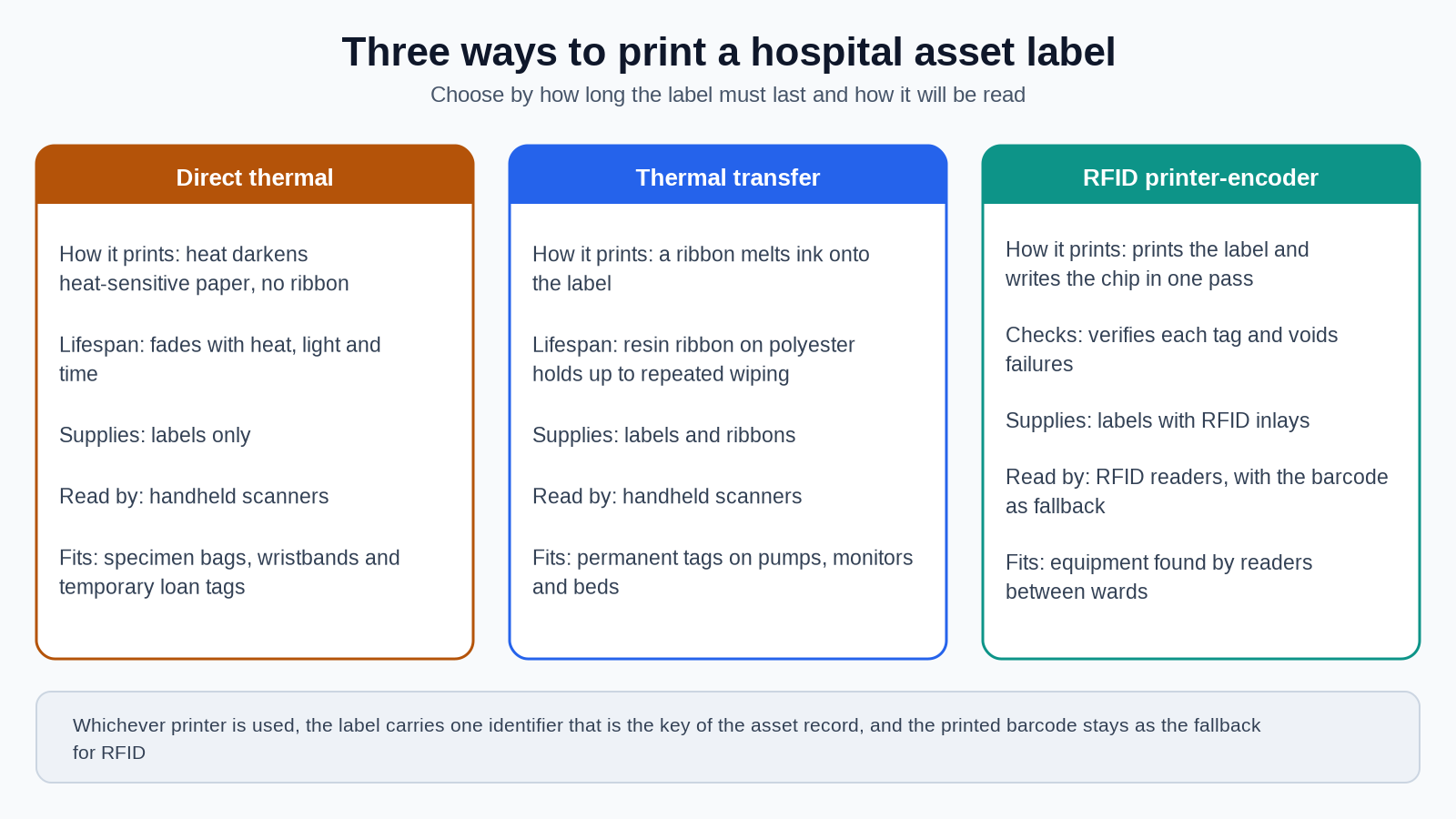
Direct thermal labels fade with heat, light and time, and they suit specimen bags, temporary loan tags and wristbands. A thermal transfer label printed with a resin ribbon on a synthetic material such as polyester holds up to repeated wiping, which is what an infusion pump or monitor goes through.
When does an RFID printer-encoder make sense?
An RFID printer-encoder makes sense when assets will be found by readers rather than by someone holding a scanner, such as equipment tracked between wards or counted at doorways. It prints the visible label and writes the tag's chip at the same time.
A good encoder checks each tag after writing and marks a failed one as void, so a dead inlay never reaches a device. The printed barcode on the same label remains the fallback when a reader misses the tag.
Which label materials survive hospital cleaning?
Synthetic face materials with resin ribbons survive best, because paper absorbs liquid and wax inks rub off under disinfectant wipes. Test samples with the hospital's own cleaning agents before ordering in bulk.
- Polyester: the common choice for equipment tags, printed with a resin ribbon.
- Polyimide: for items exposed to high temperatures, after checking the maker's test data against your process.
- Overlaminate: a clear layer over the print for tags on equipment that is cleaned many times a day.
- Adhesive: chosen for the surface, since curved plastic and textured housings need a stronger bond than flat metal.
- On-metal RFID: tags with a spacer layer for metal surfaces, where ordinary inlays read poorly.
Which barcode should an asset label carry?
An asset label should carry one identifier in a barcode that every scanner in the hospital can read, usually a two-dimensional code where space is tight and a linear code where older scanners are still in use.
GS1 Application Identifier (8004) carries the Global Individual Asset Identifier (GIAI), an identifier for a single asset made of up to 30 characters, which can be printed in a GS1 barcode.
A hospital can use GS1 identifiers or its own asset numbers. Whichever it picks, the number on the label must be the key of the asset record and must never be reused after a device is retired.
RFID tags alongside barcodes
RFID tags should carry the same identity as the printed barcode, so a reader and a handheld scanner find the same record.
The GS1 EPC Tag Data Standard, which specifies the memory contents of Gen 2 RFID tags, includes a GIAI scheme used to assign a unique identity to a specific asset.
Passive tags need no battery and suit most equipment, but metal housings and fluids weaken reads. Pilot tags on a sample of each device model, in the rooms where they will be read, before tagging a whole fleet.
What should be printed on the label?
Print only what stays true for the life of the device: the asset number in readable text, the barcode, and the hospital's name or the biomedical department's contact. Data that changes belongs in the system.
- Asset number: large enough to read aloud over the phone.
- Barcode: with a quiet margin so it scans at an angle.
- Owner: hospital name and who to call if the device is found elsewhere.
- Not on the tag: PM due dates and locations, which change and belong on a separate service sticker or in the system.
Label placement on the device
Place the label where it can be scanned without moving the device, in the same position for every unit of a model, on a flat surface away from vents, screens and the manufacturer's own labels.
Record the placement per model in the asset system, with a photo, so replacement labels go in the same place. Avoid handles and edges that are gripped or wiped hardest.
Desktop, industrial and mobile printers
Most hospitals need more than one class of printer. A desktop printer in the biomedical workshop handles new equipment as it is received, while an industrial printer suits a large tagging project.
A mobile printer worn by a technician allows a damaged tag to be replaced on the ward, after scanning or looking up the record, instead of a return trip to the workshop.
How should printing connect to the asset system?
Printing should start from the asset record, never from a label design tool where someone types the number by hand. The system creates the record, sends the print job to the right printer with a template and logs which label was printed.
- Templates: one per label size and type, stored with the asset system.
- Reprints: allowed with a reason, and logged against the asset.
- RFID: the encoder reports success or failure, and the system stores the tag identity only on success.
- Printers: registered by location, so a job from the workshop never prints on a ward.
What goes wrong with hospital asset labels?
Labels fail through material choices and manual steps more often than through printer faults. These patterns recur.
- Paper or wax: labels that look fine at go-live and smear after weeks of wiping.
- Typed numbers: labels printed outside the system, with duplicates and typos.
- Untested RFID: tags placed flat on metal and never read in the actual room.
- Changing data on the tag: PM dates printed on permanent labels that are soon out of date.
- No reprint path: damaged tags left in place because replacing one needs the workshop.
A worked example: retagging a hospital's equipment
A hospital found that many of its paper asset labels had faded or peeled, and technicians were matching devices by serial number. The biomedical team chose polyester labels with resin ribbon, printed from the asset system with one template.
For equipment tracked between wards, they piloted on-metal RFID tags on each device model and chose positions that read reliably. Technicians carried mobile printers during the retagging walk and replaced any damaged tag on the spot.
Every label now comes from a record, and a damaged tag can be reprinted on the ward with the reprint logged.
Who owns what?
Biomedical engineering owns the labels, but materials and printing involve other teams.
- Biomedical engineering: label standard, placement per model and tagging work.
- Infection prevention: approval of materials against the cleaning agents in use.
- IT: printers, drivers, network setup and RFID readers.
- Asset system team: templates, print jobs, reprint rules and tag records.
How do you test labels and printing?
Test labels under real conditions before buying in bulk, then check them on a schedule once they are in use.
- Cleaning test: wipe samples with each disinfectant in use and scan them afterwards.
- Scan test: read barcodes at an angle and in low light with the hospital's own scanners.
- RFID test: read tags on each device model in the rooms where readers sit.
- Spot audit: sample tagged devices each quarter and replace any tag that fails.
What are hospital asset labelling best practices?
Use thermal transfer with resin ribbon on synthetic labels for permanent tags, keep direct thermal for short-life labels, and pilot RFID tags on each model before tagging a fleet.
Print every label from the asset record, keep changing data off permanent tags, place labels in the same position for each model, approve materials with infection prevention, and give technicians a way to replace damaged tags on the ward.
How Agnotic can help
Agnotic builds hospital asset systems that drive the printing: asset records, label templates, print jobs to registered printers, RFID encoding with verification, logged reprints and audits that find failing tags.
Build asset tracking with Agnotic
Our asset tracking software page covers barcode and RFID tracking systems we build for hospitals.
Related reading on Agnotic
Asset registers, maintenance and hospital systems.


