


Most health products that use wearable data never touch the device itself. The watch or scale syncs to its maker's app, the app syncs to the maker's cloud, and your server pulls the data from that cloud through a web API. That last step is the wearable API integration, and it is mostly backend engineering: consent, notifications, fetching, normalizing and storing.
This guide covers that server-side path for teams building remote monitoring, care management, research and wellness products. It uses Fitbit and Withings as worked examples because their public documentation describes the notification model clearly, and it ends with the normalization to FHIR that lets the data sit beside clinical records.
What is wearable API integration?
Bringing wearable data into your platform?
Agnotic builds wearable integrations with consent, webhooks, normalization and FHIR storage for health products.
Wearable API integration is connecting your backend to a wearable maker's cloud API so that, with each user's permission, your system receives notice of new data, fetches it, converts it to your own data model and stores it. The device and the maker's phone app stay untouched; your code talks only to the vendor's web service.
This differs from building a companion app that talks to a device over Bluetooth. Cloud integration is faster to ship and covers many device models at once, but you accept the vendor's sync delays, data shapes, rate limits and terms of use.
How does data flow from a wearable to your FHIR store?
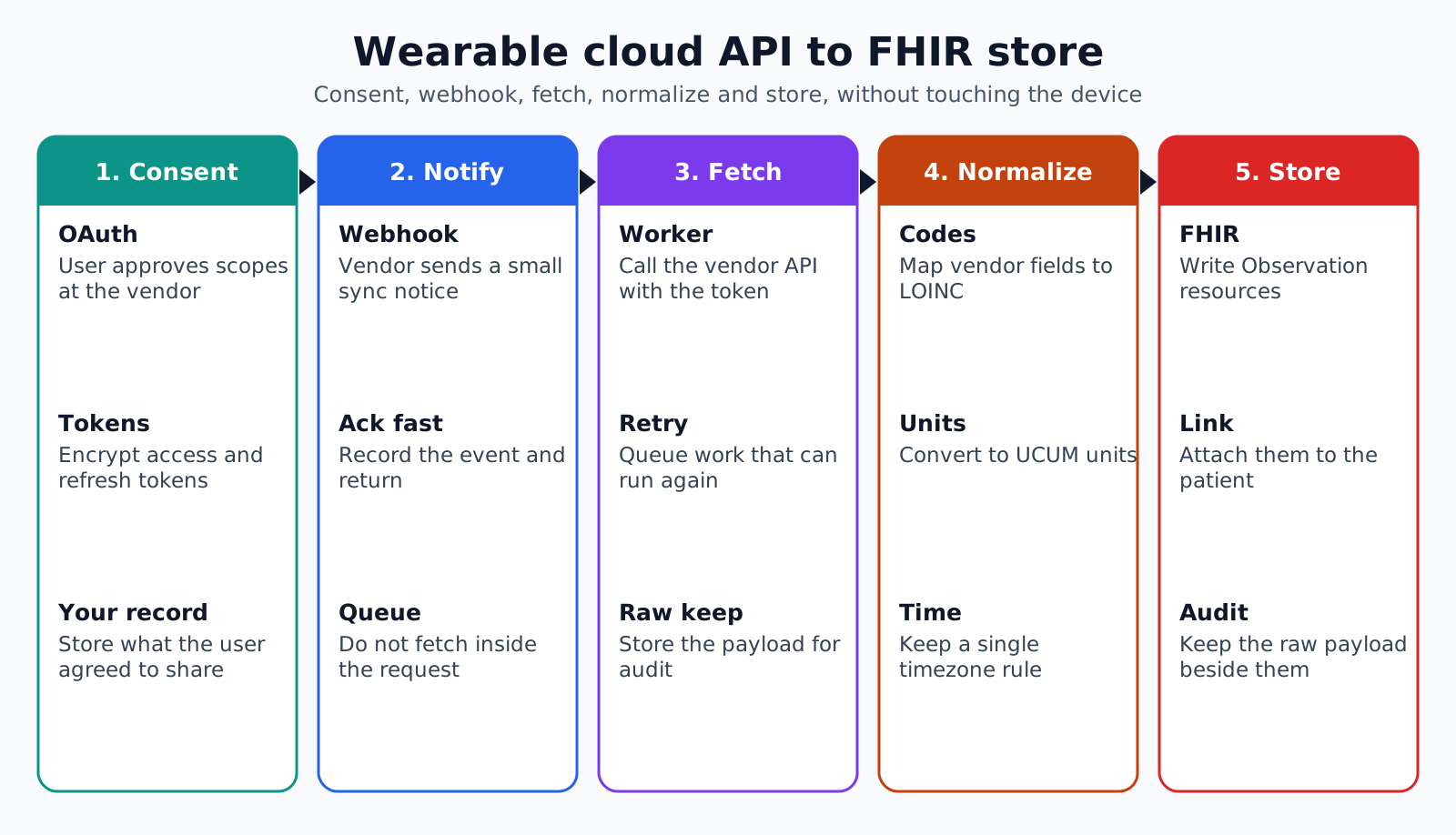
Data flows in five stages: the user grants consent, the vendor cloud notifies your webhook when new data syncs, your worker fetches the data, a normalizer converts it, and the result lands in your FHIR store or database.
- 1. Consent: The user signs in to the vendor through OAuth and approves the scopes your app requests.
- 2. Notification: When the device syncs, the vendor cloud sends a small message to your subscriber endpoint.
- 3. Fetch: A background worker calls the vendor API with the user's token to get the new data.
- 4. Normalize: Vendor fields are mapped to standard codes, units and timestamps.
- 5. Store: Observations are written to a FHIR server or clinical database, with the raw payload kept for audit.
Keep each stage independent. The webhook should only record the notification and return; fetching and normalizing belong in queued workers that can retry without the vendor noticing anything.
How does consent and OAuth work with wearable APIs?
Consent works through standard OAuth 2.0: your app sends the user to the vendor's authorization page, the user approves specific data scopes, and the vendor returns tokens your server uses for that user's data. Each vendor defines its own scopes, such as activity, sleep, heart rate or weight.
- Minimum scopes: Request only the data your product uses, since users and reviewers notice broad requests.
- Token storage: Encrypt access and refresh tokens at rest and keep them out of logs.
- Refresh handling: Refresh tokens before expiry and handle the case where refresh fails because the user revoked access.
- Your own consent: Record in your system what the user agreed to share and why, separate from the vendor's OAuth grant.
Scopes and subscriptions are linked. Fitbit's subscription guide notes that each collection you subscribe to requires the matching scope, so a missing scope shows up later as missing notifications, not as an error at sign-in.
How do wearable webhooks and subscriptions work?
Wearable webhooks work by subscription: you register a callback URL with the vendor, subscribe each user or data type, and the vendor posts a short notification when new data is available. The notification usually says that something changed, not what the values are.
- Fitbit verification: When you add a subscriber, Fitbit sends two GET requests with a verification code and expects 204 for the correct code and 404 for the wrong one, within five seconds.
- Fitbit collections: Subscriptions cover collections such as activities, foods, sleep and body, plus a notice when a user revokes access.
- Fitbit response time: Your endpoint must return 204 within five seconds, and Fitbit may disable a subscriber that consistently fails to.
- Withings options: Withings documents two ways to get new data, pulling incrementally with a lastupdate parameter or subscribing to notifications.
Fitbit's guide is explicit that notifications only alert you to new data, and the app must then call the Web API to retrieve it. Treat every vendor's notification as a prompt to fetch, never as the record itself, and your design will hold up across vendors.
How should you secure the webhook endpoint?
Secure the webhook endpoint by treating every incoming request as untrusted until it is verified. The endpoint is public by design, so anyone can post to it, and a forged notification that triggers fetches or writes is a real risk.
- Verify the sender: Use the signature or verification method the vendor documents, and reject requests that fail it.
- Do no harm on receipt: The webhook should only queue a fetch for a known user, so a forged request at worst causes an extra API call.
- Separate endpoints: Give each vendor its own path, which simplifies verification, logging and rate limits.
- Keep PHI out: Notifications usually carry vendor user IDs, not names, and your logs should keep it that way.
- Rate limit: Cap requests per source so a misbehaving client cannot flood your queue.
Because the fetch uses your stored token for that user, the vendor's API remains the source of truth. Even if a fake notification gets through, the only data you can retrieve is data the user already agreed to share.
Why fetch on notification instead of polling?
Fetching on notification is cheaper and closer to real time than polling, because you call the vendor only when there is something new. Polling thousands of users every few minutes wastes rate limits and still misses data that synced just after your last call.
A light reconciliation poll is still worth running. Notifications can be dropped during an outage on either side, so a nightly job that asks for each active user's recent data catches gaps. Make it idempotent, so fetching the same day twice does not create duplicate observations.
- Queue the work: The webhook writes a job and returns, and workers fetch at a rate the vendor allows.
- Deduplicate: Use the vendor's record identifiers, or a hash of user, type and timestamp, as a natural key.
- Back off: Respect rate limit responses and retry later rather than in a tight loop.
How should wearable data be normalized to FHIR?
Wearable data should be normalized to FHIR Observation resources with standard codes and units, so that a heart rate from one vendor and a heart rate from another look the same to every downstream system. The FHIR R4 vital signs profile gives the pattern for common measurements.
- Codes: The vital signs profile uses LOINC, such as 8867-4 for heart rate, 29463-7 for body weight and 85354-9 for a blood pressure panel.
- Units: Values carry UCUM units, such as /min for heart rate and kg for weight.
- Vendor number formats: Withings returns a measure as an integer value with a power of ten unit, so a weight of 72400 with unit -3 means 72.4 kg.
- Required elements: Each vital signs Observation needs a status, the vital-signs category, a code, the patient and a time.
- Device and source: Record the vendor and device model so clinicians can judge where a reading came from.
Not every wearable metric fits a standard code. Step counts, sleep stages and vendor scores such as readiness need a deliberate choice: use a standard code where one exists, and a local code system with a clear definition where none does. Keep vendor scores labelled as vendor scores, since their methods are proprietary.
What timing and data quality issues should you plan for?
Plan for late data, changing data and time zone confusion. Wearables sync when the phone app opens, so a day of readings can arrive hours later, and some vendors revise summaries after more data arrives.
- Late arrival: Store both the measurement time and the time you received it, and design alerts around the delay.
- Revisions: Treat daily summaries as updatable, and replace the stored value when the vendor changes it.
- Time zones: Keep timestamps with offsets, since users travel and a sleep record can span midnight.
- Gaps: A missing day might mean the user did not wear the device, or that sync failed. Show both possibilities to the care team.
For remote monitoring programs this matters clinically. A care team that sees no readings for two days needs to know whether the patient stopped measuring or the pipeline stopped working, and only your monitoring can tell them.
Write these rules down per vendor and per metric. A short data contract that states the expected sync delay, whether summaries can change and which timestamp you trust saves long debates when a clinician asks why yesterday's numbers moved.
How do you keep a wearable integration healthy in production?
You keep it healthy by monitoring each stage, handling revoked access cleanly and tracking vendor API changes. Wearable vendors change endpoints, scopes and terms, and a silent failure can leave hundreds of users without data before anyone notices.
- Stage metrics: Track notifications received, fetches made, observations stored and errors, per vendor.
- Silence alerts: Alert when a vendor's notification volume drops well below its normal level.
- Revocation: When a user revokes access, stop fetching, mark the connection inactive and tell the user how to reconnect.
- Change watch: Assign someone to follow each vendor's developer changelog and deprecation notices.
- Replay: Keep raw payloads long enough to reprocess them after a mapping fix.
How Agnotic can help
Agnotic Technologies builds wearable integrations for health products, covering OAuth consent, webhook subscribers, queued fetch workers, normalization to FHIR with LOINC and UCUM, and the monitoring that catches silent failures.
We also connect the stored data to the rest of your platform, including care team dashboards, alert rules and EHR integration where readings need to reach the clinical record.
Plan your wearable data pipeline
Explore our wearable integration services, or browse the wearables and devices hub.
Related reading on Agnotic
Read about building wearable apps, LOINC codes for device data, wearables in healthcare and real-time FHIR subscriptions.


