


AI clinical documentation uses speech recognition and a language model to draft notes, summaries and letters from a patient visit, so the clinician edits a draft instead of typing from memory. The common form is the ambient scribe, which records the visit with consent and produces a draft note when the visit ends.
This guide covers how a scribe turns audio into a signed note, what the clinician review screen must show, the consent, HIPAA and ONC rules that apply, how to run a pilot that measures note quality, and the decisions about audio and transcript retention.
What is AI clinical documentation?
Building or integrating an AI scribe?
Agnotic builds AI clinical documentation workflows: ambient capture, consent flows, note drafting in your templates, clinician review screens and EHR write-back.
AI clinical documentation is software that captures a clinical encounter through ambient audio or dictation, converts it to text and drafts the note, after-visit summary or referral letter in the practice's own format. The clinician reviews, edits and signs the draft, and only the signed version is filed in the EHR.
Common forms of AI clinical documentation
- Ambient scribes: A phone, tablet or room device records the visit with consent and drafts the full note when the visit ends.
- AI-assisted dictation: The clinician dictates after the visit, and the model sorts the dictation into the right note sections.
- Chart summarization: The model condenses prior notes, results and outside records before a visit or at a handoff.
- Letters and instructions: The model drafts referral letters, prior authorization narratives and plain-language after-visit summaries for clinician approval.
Which rules shape an AI scribe rollout?
Recording law, HIPAA and Medicare documentation rules drive the scribe design. The ONC certification rules for AI transparency changed in October 2026.
- Business associates: Under 45 CFR 164.502(e) and 164.504(e), a vendor that creates, receives, maintains or transmits PHI for a covered entity needs a business associate agreement, and that includes the scribe vendor, the speech or model provider and the cloud host.
- Security safeguards: The HIPAA Security Rule at 45 CFR 164.312 makes unique user identification, audit controls and person or entity authentication required specifications, and those apply to audio files, transcripts and drafts as well as the signed note.
- Recording consent: California Penal Code section 632 requires the consent of all parties before a confidential communication is recorded, so a group that operates in California cannot rely on a one-party consent script.
- Signed records: CMS's Medicare Program Integrity Manual, Chapter 3, requires that services be supported by documentation the treating clinician has signed or authenticated, so an unsigned AI draft does not support a claim.
- ONC certification: The HTI-5 final rule (published 28 October 2026, effective 28 December 2026) removed the source-attribute and model card requirements for predictive decision support interventions under 45 CFR 170.315(b)(11), so buyers now have to ask vendors for that documentation directly.
How does an ambient scribe turn a visit into a signed note?
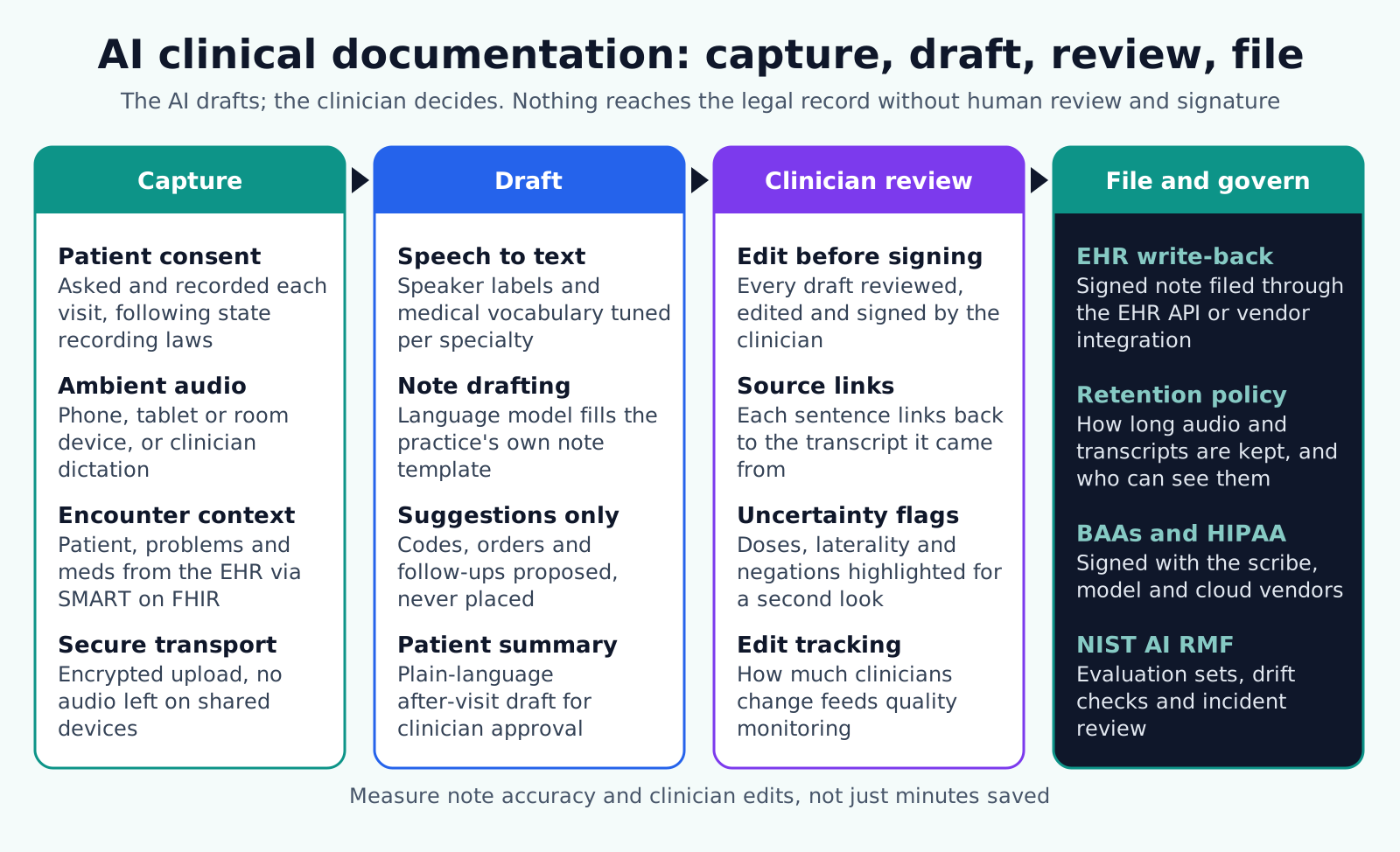
An ambient scribe runs in four stages: capture, draft, review and file. The safety work sits mostly in review, because that screen decides whether a clinician catches an invented dose, a wrong side of the body or a dropped negation before signing.
- Stage 1, Capture: Record consent at the start of each visit, capture ambient audio or dictation, pull the patient's problems, medications and allergies through a SMART on FHIR launch, and upload encrypted audio without leaving copies on shared devices.
- Stage 2, Draft: Convert speech to text with speaker labels and specialty vocabulary, fill the practice's note template, propose codes, orders and follow-ups without placing them, and draft the after-visit summary.
- Stage 3, Review: Show the draft in an editable screen where each sentence links to its place in the transcript, highlight the spans most likely to cause harm, and require the clinician to edit and sign.
- Stage 4, File and govern: Write the signed note through the EHR vendor's documented note API or integration program, apply the retention policy to audio and transcripts, and log every view, edit and signature.
Buy, integrate or build?
An established scribe product that already integrates with the EHR can be the fastest start. Custom work makes sense when specialty templates are not supported, when the scribe must live inside a digital health product, or when the organization needs control over where audio and transcripts are stored.
In each case the EHR integration, the review screen and governance are where the engineering effort goes. The speech and model calls are the smaller part of the project.
What belongs on the clinician review screen?
The review screen must let a clinician check the draft faster than writing it, without missing errors. This checklist is the minimum for a screen that supports a real sign-off rather than a click-through.
- Source links: Clicking any sentence plays or shows the matching transcript segment, so the clinician can confirm what was said.
- High-risk highlights: Medication names, doses, routes, frequencies, laterality, allergies and negations are marked for a second look.
- Unsupported content flags: Sentences with no matching transcript segment are marked, because they may be invented.
- Template gaps: Required sections with nothing captured are shown as empty, not filled with generic text.
- Suggestions kept separate: Proposed codes, orders and referrals sit in a separate panel and are never placed until a person accepts each one.
- Edit tracking: Every change is stored with the original draft, so quality reviewers can see what the model got wrong.
- Attestation: The clinician signs with a statement that they reviewed the note, and the system records the signer and time.
- Error reporting: One action sends a flagged sentence to the quality team with the transcript segment attached.
How should a scribe pilot be run and measured?
A pilot should prove that notes stay accurate while documentation time falls. Measuring time alone hides quality problems until a chart review finds them.
- 1. Choose visit types: Start with outpatient visits that follow a predictable structure, such as primary care follow-ups, before moving to complex or high-risk settings.
- 2. Settle contracts and consent first: Write the consent script, decide retention periods, and sign business associate agreements with the scribe, model and cloud vendors before any patient audio is captured.
- 3. Build an evaluation set: Collect consented or de-identified sample encounters with reference notes, and score drafts for omissions, invented content and errors in medications, doses and laterality.
- 4. Integrate with the EHR: Launch in patient context through SMART on FHIR or the vendor's integration program, and file signed notes through supported APIs.
- 5. Pilot with clinician champions: Track edit rates by note section, structured quality reviews of signed notes, after-hours documentation time from EHR audit data, and patient feedback.
- 6. Re-test every change: Re-run the evaluation set after any model, prompt or template change, because a small prompt edit can shift what the draft includes.
NIST AI 600-1, the generative AI profile of the NIST AI Risk Management Framework, names confabulation, where a model states false content with confidence, as a risk specific to generative systems. The evaluation set is how a scribe team measures that risk instead of assuming it away.
Audio, transcripts and retention decisions
Every scribe creates data that did not exist before: audio, transcripts and intermediate drafts. Each needs an owner, a purpose and a deletion date written down before the first recording.
- Audio: Decide whether audio is deleted once the note is signed or kept for a short quality window, and document the reason.
- Transcripts: Decide whether transcripts are stored with the note, kept by the vendor, or deleted, and confirm with counsel whether they form part of the designated record set.
- Drafts and edits: Keep draft-to-final differences for quality review, and decide how long they are retained.
- Legal holds: Make sure a hold can stop deletion for a specific encounter without keeping everything.
- Vendor copies: Put retention, deletion and any use for model training in the business associate agreement, and ask for deletion evidence.
- Access logs: Log who listened to audio or opened a transcript, since these files can reveal more than the signed note.
Where scribe rollouts go wrong
- Time-only metrics: Reporting minutes saved without accuracy and omission checks hides whether note quality has dropped.
- Suggested codes billed as is: AI-suggested E/M levels or diagnosis codes must be checked by the clinician or coder against the signed documentation.
- Audio kept by default: Retaining every recording without a defined purpose increases breach exposure and discovery scope.
- One consent script for every state: A script built for one-party consent fails where all-party consent applies.
- Silent model changes: A vendor update to the model or prompt can change note content, so contracts should require notice and the team should re-test.
- Click-through signing: A review screen that makes signing faster than reading turns the clinician into a rubber stamp.
How Agnotic can help
An AI scribe is only as safe as its review screen and its EHR path, and those are the parts Agnotic Technologies builds for health systems, provider groups and digital health teams. Agnotic engineers build consent capture, ambient and dictation flows, specialty note templates, review screens with source links and risk highlights, and SMART on FHIR launch and note write-back.
Agnotic also builds the evaluation sets, edit analytics and retention jobs that let a clinical owner show the scribe is safe to widen beyond the pilot group.
Build AI clinical documentation with Agnotic
Explore our AI clinical documentation work, or browse more articles in our AI Agents hub.
Related reading on Agnotic
Continue with our guides on AI in the EHR, ambient notes in telemedicine and clinician review design.
Sources
- 45 CFR 164.502(e): Disclosures to business associates
- 45 CFR 164.312: HIPAA Security Rule technical safeguards
- California Penal Code section 632: Confidential communications
- CMS: Medicare Program Integrity Manual, Chapter 3 (signature requirements)
- Federal Register: HTI-5 final rule (28 October 2026)
- NIST AI 600-1: Generative Artificial Intelligence Profile
- HL7: SMART App Launch implementation guide


