



Most EHR performance, reporting and compliance problems trace back to a few storage decisions made in the first month of the build. Where the clinical record lives, how a change is kept, and how other systems read the data are hard to undo once real patients are in the database.
This guide walks through the layers an EHR database needs, the storage models teams choose between, and how versioning, audit and APIs fit on top. It closes with a design sequence and the mistakes we see most often when we are asked to review a record that is already live.
What is EHR database architecture?
Designing the data layer of an EHR?
Agnotic designs and builds EHR data stores, APIs and reporting layers for clinical products.
EHR database architecture is the design of how an electronic health record stores, versions, secures and serves clinical data. It covers the data model for patients, encounters, orders and notes, the code systems behind them, the audit trail, and the separate stores that feed APIs, search and reporting without slowing the chart.
A good design treats the clinical record as the single source of truth and keeps everything else as a copy that can be rebuilt from it. Search indexes, reporting tables and API caches are all derived. When one of them drifts, you rebuild it, and the chart itself is never at risk.
Which layers does an EHR database need?
Most EHRs need five layers: the clinical store, a terminology layer, an audit store, an API layer and a reporting copy. Each one has a different job and a different load pattern, which is why they rarely share one database.
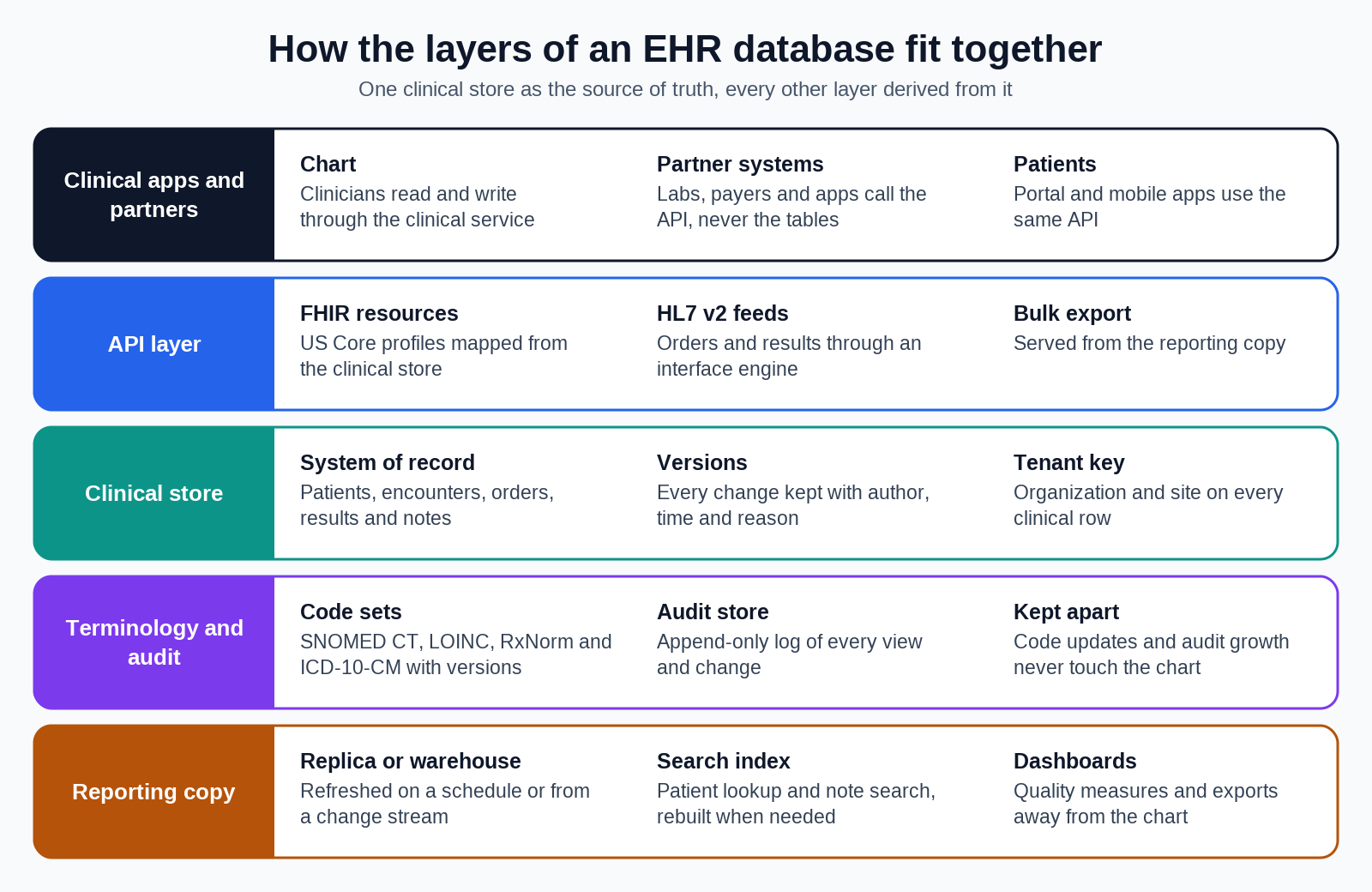
- Clinical store: Patients, encounters, problems, medications, orders, results and notes. This is the transactional system of record, tuned for many small reads and writes from the chart.
- Terminology layer: SNOMED CT, LOINC, RxNorm and ICD-10-CM code sets with their versions and mappings, kept apart so a code update never touches patient rows.
- Audit store: An append-only record of who viewed or changed what, and when. It grows faster than the clinical data and is read rarely, so it is stored differently.
- API layer: HL7 FHIR resources, HL7 v2 feeds and internal services that read the clinical store through one controlled path.
- Reporting copy: A replica or warehouse refreshed from the clinical store, where dashboards, quality measures and exports run without competing with clinicians.
Smaller products can start with fewer physical databases, but the boundaries should exist in the code from day one. Splitting a layer out later is simple when only one module ever wrote to it.
Relational, document or FHIR-native: which storage model fits?
The choice depends on whether your first release is driven by clinical workflows, by APIs or by analytics. Each model makes one of those easy and another harder.
- Relational core: Your own schema for patients, encounters and orders, with constraints the database enforces. Strong for workflows and reporting; FHIR is produced by a mapping layer, which is extra work to build and test.
- FHIR-native store: Data is kept as FHIR resources in a FHIR server or a JSON store. The API is close to free, but complex queries across resources, and reports that join many of them, are slower to write and to run.
- Hybrid: A relational core for the structured record, a document store for notes and forms that change shape often, and a FHIR layer on top. This is what most of the EHRs we build end up with.
Whichever you pick, keep identifiers stable. A patient, encounter or order should have one internal ID for its whole life, with identifiers from other systems held as separate, typed values. Most painful migrations we have seen started with a design that reused an outside system's ID as the primary key.
How should clinical data be versioned and audited?
Keep every change to clinical data as a new version, and log every read and write in a separate audit store. Clinicians amend notes, correct allergies and enter results late, and the record has to show what was known at each point in time.
The HIPAA Security Rule makes both a design requirement. Its audit controls standard, 45 CFR 164.312(b), requires hardware, software or procedural mechanisms that record and examine activity in information systems that contain or use electronic protected health information.
The integrity standard at 45 CFR 164.312(c)(1) requires policies and procedures to protect that information from improper alteration or destruction. In a database, that usually means no hard deletes of clinical rows, versioned updates, and checks that a stored record has not been changed outside the application.
- Versioning: Write each update as a new version with the author, time and reason, and mark one version as current. Amendments and corrections stay visible.
- Soft delete: Entered-in-error records are flagged and hidden from the chart, never removed, so a later review can see what happened.
- Audit events: Record user, patient, action, record type and time for every chart open, export and change. Keep them append-only, with retention set by your legal team.
- Break-the-glass: Emergency access outside a user's normal scope is allowed, logged with a reason, and reviewed after the fact.
How do APIs and reporting sit on top of the store?
APIs and reports should read through their own layers, never by querying the clinical tables directly from outside. That keeps the chart fast and lets the internal schema change without breaking partners.
If the product will be certified, the API layer has a fixed shape. ONC's standardized API criterion, 45 CFR 170.315(g)(10), is built on HL7 FHIR Release 4, the US Core implementation guide and the SMART App Launch guide, and it includes FHIR Bulk Data access for requests about groups of patients.
- FHIR mapping: Map each internal table to its US Core profile once, in one module, and test the mapping with real-shaped data on every release.
- Bulk export: Serve population exports from the reporting copy, not the clinical store, so a large export never slows a clinic.
- Search: Use a dedicated search index for patient lookup and note search, rebuilt from the clinical store when needed.
- Reporting: Refresh the reporting copy on a schedule or from a change stream, and document the lag so nobody mistakes it for live data.
How do teams design an EHR database step by step?
Start from the clinical workflows and the data they create, then decide storage, then design the copies. Working the other way round produces a technically neat database that the chart has to fight.
- 1. List workflows: Write out the first release's workflows, from intake to a signed note, and the data each step creates or reads.
- 2. Build a data dictionary: For each concept, record its code system, required fields, owner and who may change it.
- 3. Choose the storage model: Relational, FHIR-native or hybrid, based on whether workflows, APIs or analytics lead.
- 4. Design identity: Settle internal IDs, outside identifiers, and how duplicate patients are detected and merged.
- 5. Design versioning and audit: Decide the version model, the audit event list and where the audit store lives.
- 6. Design the derived layers: API mapping, search index and reporting copy, each with a rebuild path.
- 7. Load real-shaped data: Run a sample extract from each source system and a synthetic load at your expected volume before the first clinic goes live.
Step 7 is the one most often skipped. Loading a real extract into the planned model, even a small one, shows which fields have no home and which code systems are missing, while it is still cheap to change the design.
What are the common EHR database mistakes?
The common mistakes are all shortcuts that work for the first clinic and fail at the tenth. Each one below is something we have had to unwind in a live record.
- Free-text clinical data: Problems and allergies stored as text with no codes, so decision support, quality measures and exchange all need a coding project later.
- Outside IDs as primary keys: A lab or practice management ID used as the key, which breaks the day a second source system arrives.
- Reports on the live store: Dashboards querying the clinical tables during clinic hours, slowing the chart for every user.
- Audit in the same tables: Audit rows mixed with clinical rows, so the busiest tables grow fastest and backups balloon.
- One tenant assumed: No organization or site key on clinical rows, which makes a second customer a migration project.
- Hard deletes: Records removed instead of marked entered-in-error, so nobody can reconstruct what the chart showed at the time.
What are EHR database architecture best practices?
The practices that hold up are simple to state: one source of truth, everything else derived, and every change kept. The list below is what we check first in an architecture review.
- One writer per layer: Only the clinical service writes clinical data; only the audit service writes audit events.
- Codes at entry: Capture coded values where clinicians enter data, with free text alongside, not instead.
- Tenant key everywhere: Every clinical row carries its organization, even if there is only one today.
- Rebuildable copies: Search, reporting and API caches can be dropped and rebuilt from the clinical store.
- Tested restores: Backups are restored into a test environment on a schedule, and the time it takes is recorded.
- Schema changes as code: Migrations are versioned, reviewed and run the same way in every environment.
How Agnotic can help
Agnotic Technologies designs EHR data layers around your clinical workflows: the data dictionary, the storage model, versioning and audit, and the FHIR, search and reporting layers on top. We load sample extracts from your source systems before the design is final, so the model fits the data you actually have.
For records already in production, we run an architecture review that ranks the storage problems by how much they will cost to fix later, and then fix them in that order without taking the chart offline.
Get the data layer right first
Plan your EHR database with our engineers, or read more EHR integration articles in the hub.
Related reading on Agnotic
Read about the decisions that come before the database, how the record is secured and kept fast, how its data is analyzed, and how a FHIR facade opens an older store.


