



An AI feature is an API with a model in the middle. The risk is not only a strange answer. It is a prompt that changes what the API does, a key that can read too much, or a vendor that holds PHI with no agreement.
Agnotic Technologies draws that path before the feature is turned on for real charts.
How does an AI feature become an API security problem?
An AI feature becomes an API security problem when user text can change the call the model makes, or when the key behind the model can read more PHI than the user can. Agnotic Technologies limits both the text and the key before go-live.
The OWASP Top 10 for LLM Applications (2025) ranks prompt injection first: user prompts that alter a model's behavior or output in unintended ways.
OWASP defines excessive agency as the vulnerability that lets an LLM application take damaging actions in response to unexpected, ambiguous or manipulated model output, usually caused by excessive functionality, permissions or autonomy.
Reviewing an AI feature that calls your APIs?
A fractional technology lead can map the data, the key and the vendor agreement.
What should you check on that path?
Check the path from the user, through the prompt, to the API, and out to the vendor. A demo that only shows the answer skips the path.
- Prompt: user text is untrusted, including text pasted from a chart.
- Key: the model's credential can call only the APIs that feature needs.
- Log: the call is recorded without dumping PHI into a debug sink.
- Vendor: a business associate agreement if the vendor handles PHI.
A HIPAA covered entity may share protected health information with a business associate, such as a software vendor, only under a business associate agreement that commits the vendor to safeguard it.
How is this different from a general security post?
Healthcare data security covers the estate. This post is the slice where a model sits between a user and an API. The HIPAA AI app post covers the product safeguards. Why generic AI fails covers wrong answers. Here the failure is a call the user did not intend.
What should you turn off first?
Any tool that lets the model write, message or change a claim until a person confirms it. Read-only retrieval can stay. Write actions wait. Our chart-and-rules post is one way to keep the decision out of the model.
Turn each write action back on one at a time, with its own confirmation screen and its own log entry, once the read path has passed testing.
Where does PHI travel in an AI feature?
PHI travels further than most feature diagrams show. It leaves the chart, enters a prompt, reaches the model vendor, may be cached or logged there, and returns in a response your app stores again.
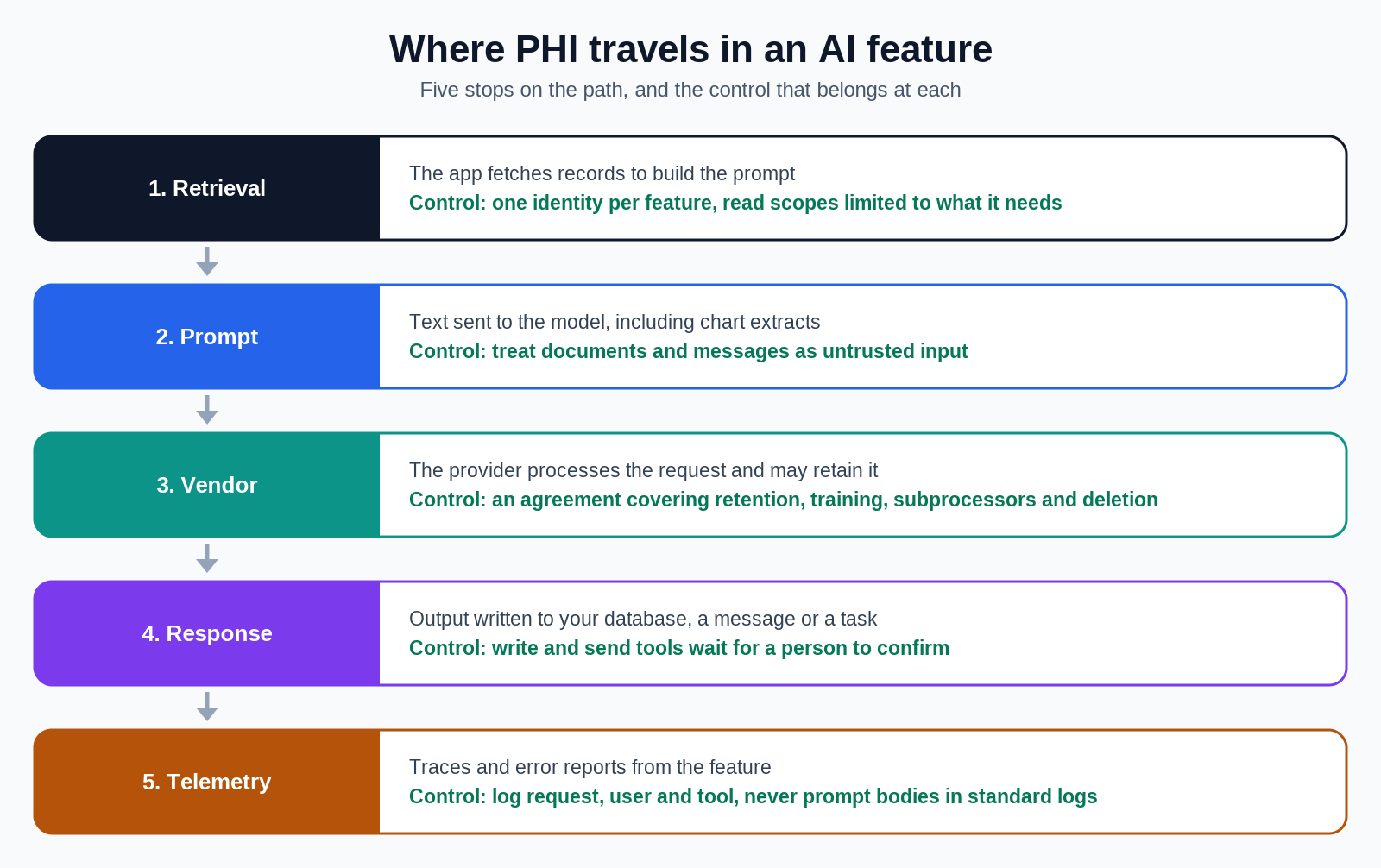
- Retrieval: the records your app fetches to build the prompt.
- Prompt: the text sent to the model, including chart extracts.
- Vendor: the provider's processing, retention and any subprocessors.
- Response: the output written to your database, a message or a task.
- Telemetry: traces and error reports that may copy prompt bodies by default.
Draw that path for each feature and mark every place PHI comes to rest. Each one needs an owner, an access rule and a retention period.
How should the model's credentials be scoped?
Give each AI feature its own service identity with the narrowest scopes it needs, and never reuse a clinician's or an administrator's token. A feature that summarizes notes should not hold a key that reads billing or writes orders.
- One identity per feature, not one shared key for every AI tool.
- Read scopes limited to the resource types the feature uses.
- Short-lived tokens issued per request where the API allows it.
- Keys kept in a vault and rotated, never in prompts, source code or client apps.
Where the backend is a FHIR API, SMART on FHIR scopes are a natural way to express these limits. Request the smallest set and test that a broader request is refused.
Should the model act as the user or as itself?
For reads on behalf of a clinician, pass the user's identity through so the API applies that user's permissions. A model reading with a system account can surface charts the user could never open directly.
Background jobs with no user need a separate system identity with a written purpose. Log every patient that identity touches, and review the list on a schedule.
How do agents change the risk?
An agent turns model output into actions through tools, so each tool is an API call the model can trigger. The exposure grows with every tool added, most of all with tools that write, send or pay.
- Read tools: allowed, limited to the user's own patients.
- Draft tools: allowed, with output held for a person to approve.
- Write or send tools: off until a person confirms each action.
- Outbound tools: web fetches or third-party calls allowed only to an approved list of destinations.
Hidden instructions in clinical documents
Text inside a referral letter, a patient message or a scanned form can carry instructions the model may follow. Treat every document the model reads as untrusted input, exactly like the user's own typing.
Keep system instructions apart from document content in the prompt, flag instruction-like text in uploads, and make sure no single document can trigger a tool call without a person seeing it first.
What should the vendor agreement cover?
The agreement should cover what the model provider may do with prompts and outputs, not only whether it will sign a business associate agreement. Read the data use, retention and subprocessor terms before any PHI is sent.
- Whether prompts and outputs are retained, and for how long.
- Whether they are used to train or improve the provider's models.
- Which subprocessors and regions handle the data.
- How an incident is reported to you.
- How data is deleted when the contract ends.
How should calls be logged without leaking PHI?
Log who called what, for which patient and with which outcome, but keep full prompts out of general application logs. When prompt text is needed for review, store it in a restricted place with its own access list and retention.
- Request ID, user, feature, patient reference and tool called.
- Token usage and errors, without prompt bodies.
- Full prompt and response only in the restricted review store.
- Alerts on unusual volume, such as one account pulling many charts through the model.
How do you test the path before go-live?
Test the path the way an attacker would use it, with test patients and a test vendor account. Each step below should fail safely before real charts are connected.
- Step 1, injection: hide an instruction in a test document and confirm no tool fires.
- Step 2, scope: ask the feature for data outside its scope and confirm the API refuses.
- Step 3, identity: run it as a user with limited access and confirm the output respects that limit.
- Step 4, logs: confirm no prompt body appears in standard logs or error reports.
- Step 5, vendor: confirm account settings match the agreement, such as retention switched off where agreed.
How do you limit damage if a key leaks?
Assume a key will leak one day and decide in advance what it could reach. Narrow scopes, short token lifetimes and per-feature identities keep that reach small.
Add rate limits per identity and per patient, and alert when a feature reads far more charts than its normal pattern. Keep a written revoke procedure that someone on call can run without waiting for the vendor.
Who owns AI feature security?
Security owns the keys, the logs and the vendor review, and the product team owns each feature's scope and tool list. Put both names on the feature before it reaches real charts, and require both to approve a new tool.
What are AI and API security best practices in healthcare?
- Map where PHI travels and rests for each AI feature.
- Give every feature its own narrowly scoped identity.
- Pass the user's identity through for reads on their behalf.
- Treat documents and messages as untrusted input.
- Keep write, send and payment tools behind a person's confirmation.
- Read the vendor's retention, training and subprocessor terms before go-live.
How Agnotic can help
Agnotic builds AI features and agents for healthcare teams with the API path designed first. We map where PHI goes, scope each identity and tool, set up logging that keeps prompts out of general logs, and test injection and scope before go-live.
Build secure AI agents with Agnotic
HIPAA-ready AI agent development with scoped keys, gated tools and a reviewed vendor path.
Related reading on Agnotic
Data security, HIPAA for an AI app, API safeguards and why a general model fails.


