



A scanner, a PACS, and an EHR can all be called integrated and still lose the study. The modality operator types a name, the archive files the pixels under a different patient ID, and the chart shows an order with no images. The bytes arrived. The visit did not.
This guide is the message path for a PACS integration: DICOM C-STORE into the archive, modality worklist onto the scanner, DICOMweb for systems that speak HTTP, and a FHIR ImagingStudy so the chart can point at the study without copying pixels. It is for imaging directors, PACS administrators, and the engineers building the interface. The decisions that are expensive to reverse are which system assigns the accession number, which system owns the patient ID in the image header, and whether the EHR stores pixels or a pointer.
What does PACS integration with DICOM actually move?
Connecting a scanner, a PACS, and the chart?
Agnotic Technologies builds DICOM and FHIR imaging interfaces: worklist, storage, DICOMweb, and ImagingStudy.
A PACS integration moves orders, demographics, and study status toward the scanner, then moves DICOM instances back to the archive and a pointer into the chart. The image bytes travel with DICOM C-STORE or DICOMweb STOW-RS. The chart usually stores a FHIR ImagingStudy or a link, not the pixels.
How do C-STORE, worklist, and performed steps fit together?
C-STORE writes instances to the archive, modality worklist tells the scanner who is due, and a performed-procedure message tells the order system what was actually done. Skipping the worklist is how patient names get typed by hand.
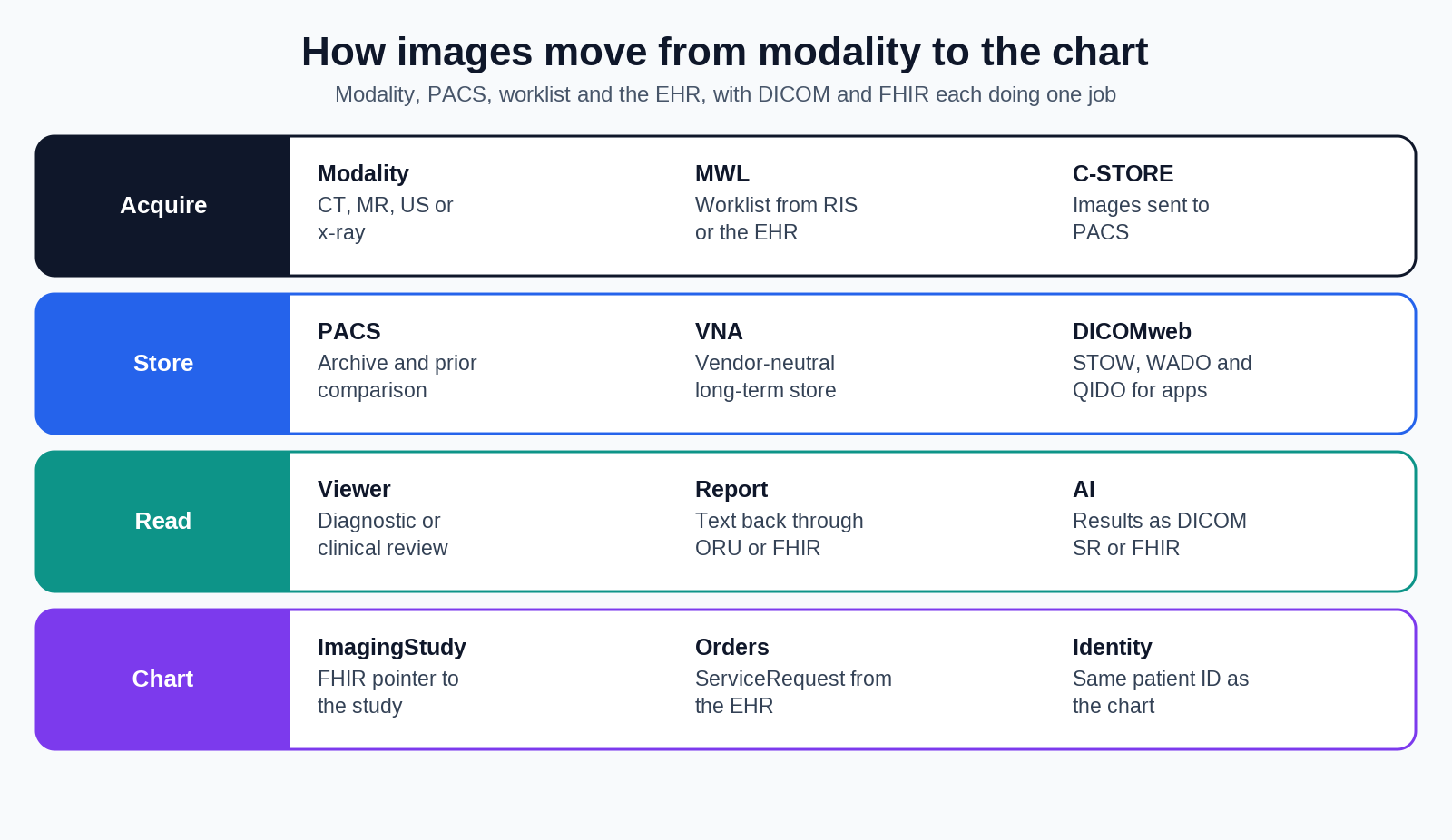
- Order out: The RIS or EHR creates an accession number and a requested procedure, then exposes them on a modality worklist.
- Worklist query: The modality issues a DICOM C-FIND against the Modality Worklist information model and shows Scheduled Procedure Steps to the operator.
- Header fill: The operator selects the step. Patient ID, accession number, and procedure description are written into the images from the worklist, not from the keyboard.
- Store: The modality sends instances with C-STORE (DIMSE) or STOW-RS (DICOMweb). The archive answers per instance, not with a vague success for the whole study.
- Status back: MPPS, or a later ORM or ORU style update the site already runs, tells the order system the step started or completed. Confirm which status path this site actually has.
- Chart pointer: A FHIR ImagingStudy, or a link on the order, tells the EHR the Study Instance UID and where to retrieve it.
DICOM Part 4 defines the Modality Worklist SOP Class as a way for the modality to verify the person to be examined, select a Scheduled Procedure Step, and copy mandatory attributes from the information system into the image object. The same part is explicit that worklist does not send information back from the modality to the information system. That return path is a different service. Teams that expect the worklist association to close the order will wait forever.
When should the interface use DICOMweb instead of DIMSE?
Use DICOMweb when the client is a web application, a cloud archive, or a FHIR server that already speaks HTTP. Keep DIMSE when the modality or the archive only implements classic associations. Many hospitals run both, with a proxy in between.
The DICOM Standard describes DICOMweb as RESTful services that can sit in front of DIMSE systems, so modalities do not all have to be replaced. On the DICOMweb page, query is QIDO-RS, retrieve is WADO-RS, and store is STOW-RS. Those three cover the calls a chart viewer or an outside-read service actually makes: find the study, pull the frames or the metadata, and, when the sender is also modern, store new instances.
- STOW-RS: HTTP POST of instances, the DICOMweb counterpart of C-STORE.
- QIDO-RS: Search studies, series, and instances. Match on Patient ID, Accession Number, and Study Instance UID.
- WADO-RS: Retrieve a study, series, instance, metadata, or frames. Rendered retrieve is optional and easy to forget in the contract.
- Proxy: A DIMSE archive can stay in place if a DICOMweb proxy is the only thing the new application talks to. Test the proxy with the same UIDs the archive uses.
- Bulk: Metadata-only WADO calls are how a FHIR facade learns series counts without pulling pixels across the network.
A CT scanner that only speaks DIMSE still needs a worklist and a C-STORE destination. Use DICOMweb at the edge the new application touches.
How does a FHIR ImagingStudy point at the archive?
A FHIR ImagingStudy is the index record: status, patient, identifiers, series, and an endpoint. It is not the image. The Study Instance UID on the ImagingStudy must be the same UID the archive uses, or every viewer opens the wrong study.
In FHIR R4, ImagingStudy.status and ImagingStudy.subject are required. Series and instance entries carry their own UIDs, SOP Class, and number. An Endpoint resource, referenced from the study or the series, is where you put the DICOMweb base URL. basedOn can point at the ServiceRequest that ordered the exam, which is how the open order finally closes.
- Identifier: Store the Study Instance UID as an identifier the viewer can round-trip. Do not mint a second study id and hope the archive understands it.
- Subject: Reference the same FHIR Patient the order used. A study linked to a duplicate Patient will not show on the chart the clinician has open.
- Series: Record modality, uid, and number of instances. A study header that says 400 instances while the archive has 40 is a failed store, not a display bug.
- Endpoint: Point at the DICOMweb server the viewer is allowed to call. A public URL in the resource and a private URL on the network is a common mismatch.
- Status: Map available, registered, and cancelled to real archive states. Leaving every study at registered hides completed exams.
Build the ImagingStudy from the archive's query response (QIDO-RS or C-FIND), not from the order alone. The order knows what was requested. The archive knows what was stored. The chart should believe the archive about UIDs and instance counts, and the order about the reason for exam.
Where do PACS integrations fail after go-live?
They fail on identifiers, partial stores, and viewers that cannot reach the endpoint. The association succeeds in the test room and breaks on the second scanner, the outside read, or the night list.
- Typed demographics: Worklist is down, so the tech types the name. The pixels store. The Patient ID does not match the order.
- Accession collisions: Two sites share a PACS and both start accession numbers at 1000. Studies attach to the wrong order.
- Partial C-STORE: The modality times out mid-series. The archive keeps the instances it got. The EHR marks the study complete because it saw one success.
- Character set: Patient names with accents arrive as the wrong encoding. The worklist looked fine on the scanner console and wrong in the report.
- Viewer network: ImagingStudy.endpoint is reachable from the integration server and blocked from the clinic VLAN.
- Time zones: Study date in the header and appointment time in the EHR disagree by a day, so the prefetch list misses the exam.
Reconcile orders without images, archive studies with no ImagingStudy, and instance counts that do not match QIDO-RS. Those three queries catch more defects than a single test study.
What has to be decided before the first association?
Decide the assigning authorities, the SOP classes, and who is allowed to create a study. A kickoff that skips this list spends the project arguing inside a packet capture.
- Patient ID: Issuer, format, and what happens when the MPI merges two records after images already exist.
- Accession number: Which system mints it, the character set, and whether leading zeros are significant.
- Study Instance UID: The modality root versus the archive root. Do not let two systems mint UIDs for the same exam.
- SOP classes: CT, MR, ultrasound, encapsulated PDF, and structured reports. A archive that refuses a SOP class will drop the report object and keep the images.
- Called and calling AE titles: One title per modality. Shared titles make the audit log useless.
- TLS and ports: Which associations are encrypted, and which VLANs may open them.
Record the decisions on one sheet the PACS administrator and the EHR analyst both sign. A new outpatient center that invents its own accession scheme will fork the integration.
How do you test storage and worklist without a live scanner?
Test with a DICOM toolkit and a fixed set of studies that cover the failures you care about, then repeat one test on the real modality before go-live. A toolkit proves the archive. The modality proves the header mapping.
- Worklist: Query by station AE title and scheduled date. Confirm the accession, patient ID, and procedure description the modality would copy.
- Store: Send a multi-series study, a single-frame study, and a study with an unsupported SOP class. Expect a per-instance response.
- Interrupt: Drop the association halfway. Confirm the archive does not mark the study complete and the retry does not duplicate instances.
- Query back: C-FIND or QIDO-RS by Study Instance UID and by accession. Both must return the same study.
- FHIR: Create the ImagingStudy from that query and open it in the viewer using only the endpoint and the UID.
- Merge: Change the patient ID the way the MPI will, and show whether old studies follow the new ID.
Keep the test studies de-identified and replay them after an archive upgrade. A change in transfer syntax support shows up as a failed store, not as a slow viewer.
What belongs in access control for images and headers?
Images and the headers on them are electronic PHI. Access control has to cover the association, the DICOMweb token, and the FHIR read of ImagingStudy, because any one of those paths can leak a study.
The HIPAA Security Rule, at 45 CFR 164.312, requires technical safeguards for electronic protected health information, including access control, audit controls, integrity, and transmission security. For imaging, that means unique users or service accounts on the viewer, an audit record of who retrieved a study, and TLS on DICOMweb and on any DIMSE association that leaves a locked network.
- Service accounts: One account per calling application, not a shared PACS password in every config file.
- Audit: Log AE title or client id, Study Instance UID, patient reference, and time. Pixel access and metadata access both count.
- Break-glass: If the viewer can open any study, record the reason. Do not rely on the network being private.
- Minimum retrieve: Prefer WADO-RS metadata and a viewer session over exporting a full study to a laptop.
How Agnotic can help
Agnotic Technologies builds the imaging interface for the hospital or the product team: modality worklist, C-STORE and STOW-RS into the archive, QIDO-RS and WADO-RS for viewers, and the FHIR ImagingStudy that points the chart at the study. Agnotic writes the identifier sheet with your PACS administrator, stands up a test archive, and leaves a reconciliation between orders, instance counts, and ImagingStudy rows.
If the archive must stay on DIMSE, we put DICOMweb at the edge the new application uses, and we test the proxy with the same UIDs the archive already stores.
Plan the imaging message path
Walk through worklist, storage, and ImagingStudy with an engineer, or read more imaging guides.
Related reading on Agnotic
Imaging informatics, AI on images, Epic radiology, and the cardiology overlap with Cupid.


