



Fax is not legally required in healthcare, yet referrals, records requests, prior authorization replies and lab results still arrive by fax every day. For many practices the fax line is the one channel that works with every partner, whatever software that partner runs.
This post explains why fax has lasted, why replacing it outright rarely works, and how to digitize the fax inbox instead: capturing every page as data, classifying documents, matching them to patients, filing or routing them, and sending the uncertain ones to people. It also covers moving partners to electronic exchange over time.
Why does fax remain so common in healthcare?
Planning how to handle documents that still arrive by fax?
Our fractional CTO service helps health organizations plan intake systems and integration roadmaps.
Fax remains common in healthcare because it is the one channel every practice, hospital, pharmacy and payer can send and receive, whatever systems they run. No law requires it, but rules permit it with safeguards and replacements need both sides ready. Agnotic Technologies builds intake systems that turn faxes into filed, searchable data.
HHS says a physician's office may fax patient medical information to another physician's office for treatment, with reasonable safeguards such as confirming the fax number is correct and placing the fax machine in a secure location.
Is fax legally required?
No. HIPAA does not require fax and does not prefer it over electronic exchange. It permits faxing for treatment with reasonable safeguards, the same as it permits other methods.
Some payers and partners require fax for their own processes, and some forms still ask for a signature on paper. That is a business requirement of the partner, which can change, not a legal rule.
Why have replacements not taken over?
Replacements have spread, but each one needs both parties to be connected to the same network or standard. Fax needs only a number, so it remains the fallback whenever a sender does not know what the receiver supports.
ONC's certification criterion for Direct uses the Applicability Statement for Secure Health Transport, under which health IT sends encrypted and signed health information to a third party and receivers return message delivery notifications.
Many organizations already have Direct addresses through their EHR but do not know their partners' addresses, or route Direct messages to a separate inbox nobody watches. The technology exists; the directory and the habits lag behind.
What does a fax inbox cost an organization?
A fax inbox costs staff time and creates risk: every page is read, named, matched to a patient and filed by hand, and a page filed to the wrong chart is a privacy incident. The work grows with volume and is invisible until it backs up.
Delays matter too. A referral that sits in a queue for days is a patient waiting, and a prior authorization reply that is filed late can push back a procedure.
How do you digitize the fax inbox?
Digitize it by treating each fax as a document moving through stages: capture it as an image with its sender details, classify what kind of document it is, find the patient, then file it to the chart, route it to a worklist or send it to a person to check.
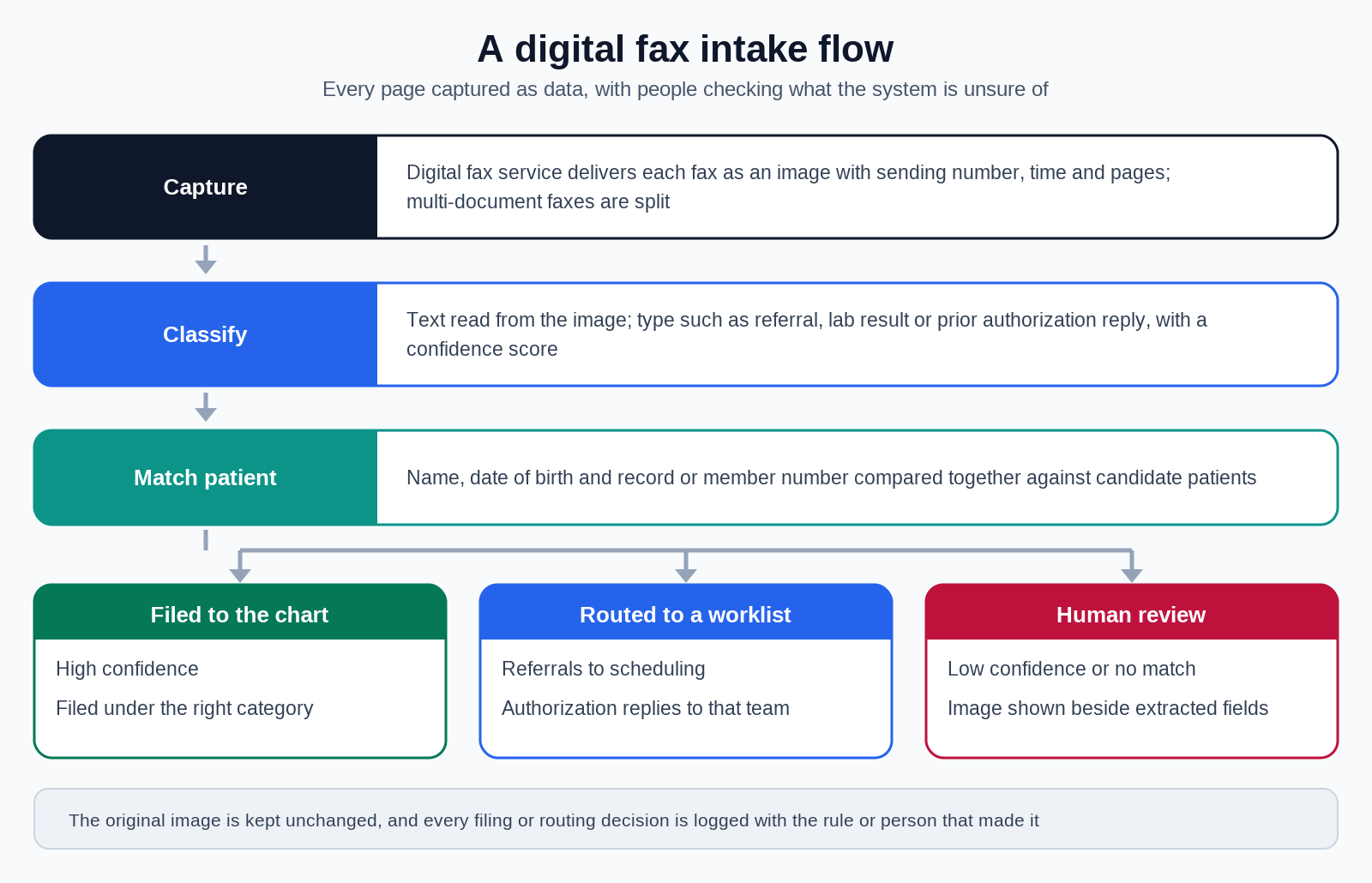
Each stage records its result and its confidence, so the system can decide which faxes need a person and which can move on alone.
How should faxes be captured?
Capture faxes through a digital fax service or a fax server that delivers each fax as an image file with the sending number, time and page count, never through a paper machine. Store the original image unchanged alongside anything extracted from it.
Split multi-document faxes at capture, since one transmission can hold a referral, a medication list and a cover sheet for different patients.
How should documents be classified?
Classify each document by type, such as referral, records request, lab result, prior authorization reply, refill request or consult note, because the type decides where it goes and how urgent it is.
- Text extraction: read the text from the image, including handwriting where possible.
- Type: a classifier trained on the organization's own faxes, with a confidence score.
- Key fields: patient name, date of birth, sending provider, dates and identifiers.
- Urgency: flags for words and document types that need same-day attention.
How do you match faxes to the right patient?
Match using several identifiers together, name, date of birth and any medical record or member number, and send anything uncertain to a person. A fax filed to the wrong patient is worse than one that waits an hour.
Show the reviewer the extracted fields beside the image and the candidate patients, so confirming a match takes seconds. Never file automatically on a name match alone.
Filing, routing and review
High-confidence documents can be filed to the chart under the right category, or routed to the worklist that acts on them, such as referrals to scheduling and prior authorization replies to the authorization team. Everything else goes to a review queue.
Set confidence thresholds per document type, start them conservatively, and raise automation only as review results show the system is right. Keep every decision logged with the user or rule that made it.
The HIPAA Security Rule's audit controls standard requires mechanisms that record and examine activity in information systems that contain or use electronic protected health information.
Sending faxes safely
Outbound faxes deserve the same care as inbound ones. Send from the EHR or the digital fax service rather than a standalone machine, so each fax is logged against the patient and the recipient.
Keep a directory of verified partner numbers instead of typing numbers by hand, include a cover sheet that names the intended recipient, and send only the pages the recipient needs. Track failed and unconfirmed transmissions on a worklist until each one is resolved.
Moving partners off fax
Digitizing the inbox does not stop the faxes, so work in parallel to move high-volume partners to electronic exchange. Rank senders by volume and start with those already on the same EHR network or able to use Direct.
Publish your Direct address on referral forms, ask frequent senders for theirs, and agree electronic routes for prior authorization with payers that offer them. Fax volume falls partner by partner, not all at once.
What goes wrong with fax digitization?
Projects stumble when they automate too much too early or treat fax as a scanning problem. These patterns recur.
- Name-only matching: documents filed to the wrong patient.
- No splitting: one fax with several documents filed as one.
- Thresholds set by hope: automation turned up before review data supports it.
- Lost originals: only extracted text kept, with no image to check.
- Fax forever: the inbox digitized but no plan to move partners to electronic exchange.
A worked example: a specialty practice's referral inbox
A specialty practice received most referrals by fax, and front desk staff spent much of each morning sorting pages. Referrals waited until someone had time to read them.
The practice moved to a digital fax service, added classification and patient matching with a review queue, and routed referrals straight to the scheduling worklist. Staff now confirmed matches instead of sorting paper.
At the same time, the practice gave its Direct address to its largest referring groups, and their referrals began arriving electronically.
Who owns what?
Fax intake touches several teams, and each needs a clear part.
- Health information management: filing rules, document categories and review quality.
- Front desk and scheduling: referral worklists and patient contact.
- IT and integration: fax service, EHR filing interface and Direct setup.
- Privacy officer: misfiling incidents and access to the review queue.
How do you measure fax intake?
Measure speed, accuracy and how much of the volume is moving to electronic exchange.
- Time from fax received to filed or routed, by document type.
- Share of documents handled without review, and review corrections.
- Misfiled documents found after filing.
- Fax volume from the largest senders, month by month.
What are fax digitization best practices?
Capture faxes digitally with the original image kept, split multi-document faxes, classify by type with confidence scores, match patients on several identifiers and route uncertain items to people.
Start automation thresholds conservatively, log every decision, and run a parallel plan to move high-volume partners to Direct or other electronic exchange.
How Agnotic can help
Agnotic builds fax intake systems: digital capture, document splitting and classification, patient matching with review queues, EHR filing and worklist routing, plus the Direct and API connections that replace fax partner by partner.
Automate your fax intake with Agnotic
Our fax intake automation page covers the capture, classification and filing we build.
Related reading on Agnotic
Intake, matching and electronic exchange.


