



Many products speak FHIR at the edge and keep their own tables inside. A FHIR native EHR goes further: the FHIR resources are the record, and every screen, rule and report reads them directly.
That choice removes a mapping layer, and it moves the hard problems somewhere else: versioning, validation, search performance, draft data and reporting. This post assumes you have chosen the native route and walks through what building on it looks like day to day. Whether to choose it is covered in our FHIR-ready architecture guide.
What is FHIR native EHR development?
Building an EHR on FHIR resources?
Our EHR integration services cover FHIR servers, profiles and the interfaces around them.
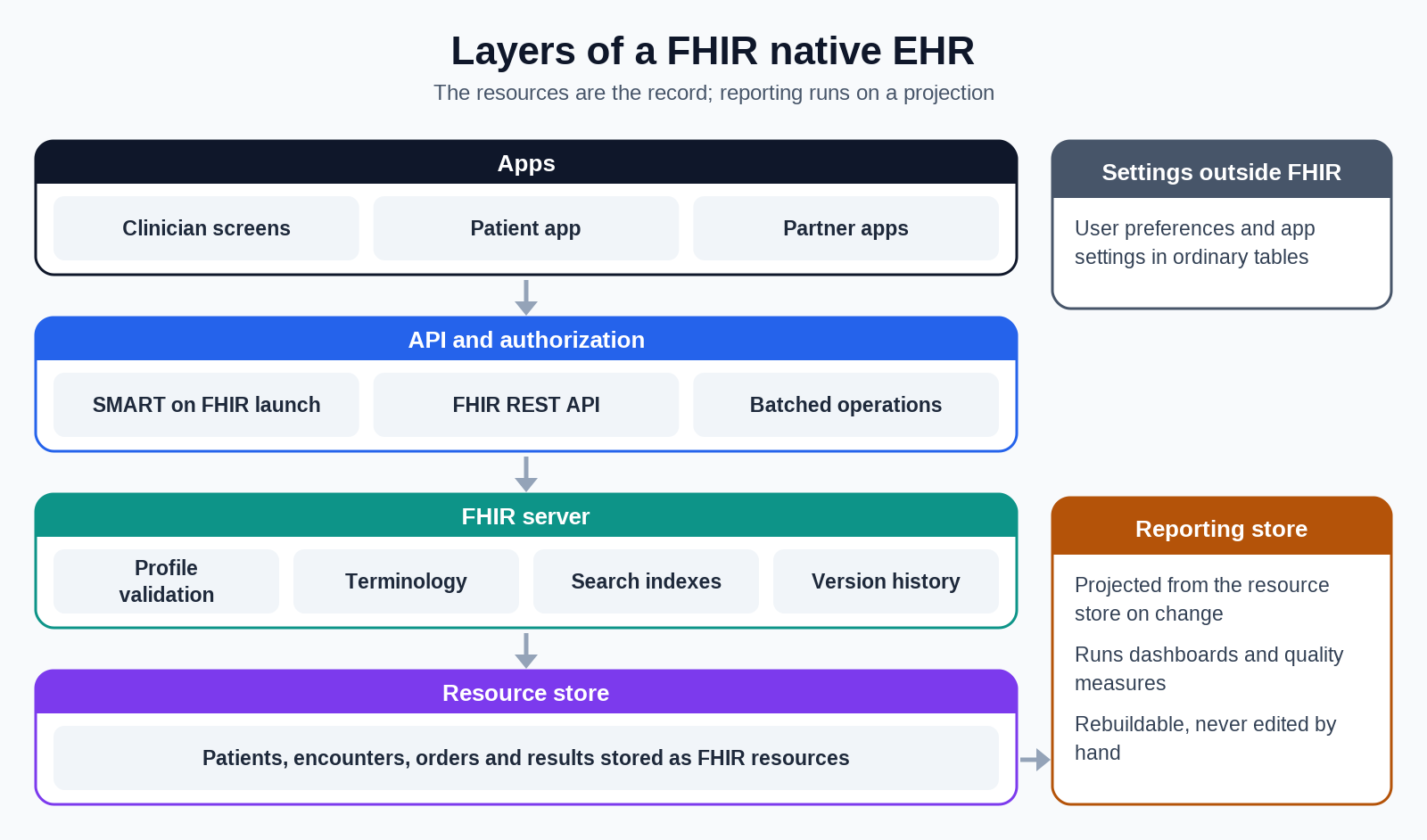
FHIR native EHR development means building an EHR whose system of record is a FHIR server: patients, encounters, observations, orders and notes are stored as FHIR resources and read through FHIR APIs by the product's own screens. Agnotic Technologies builds these products when exchange with other systems is central to the business.
HL7 FHIR is a standard published by HL7 International for exchanging health data through RESTful APIs built on defined resources such as Patient, Observation and MedicationRequest.
What changes when FHIR is the record?
The data model is no longer yours to design freely. It is the FHIR resource set, constrained by the profiles you choose.
- Schema: profiles define required fields, allowed codes and extensions, in place of your own table design.
- Identity: every resource has a server id, and links between resources are references.
- History: each update creates a new version, so the record keeps its past states.
- Access: your screens call the same API an outside app would, with the same authorization.
Which profiles should you start from?
Start from the national profiles your exchange partners already use, then add your own on top only where you must.
US Core is the HL7 FHIR implementation guide that profiles FHIR resources for the USCDI data classes used in the United States.
Keep your own extensions few and documented. Each one is data that other systems will ignore unless you tell them about it.
How do you handle data FHIR does not model well?
Some EHR data has no comfortable FHIR home: draft notes, scheduling rules, user preferences and internal work queues. Not everything has to be a resource.
- Clinical data: always FHIR resources, so it can be exchanged.
- Workflow state: Task and ServiceRequest where the work is clinical and shared.
- Drafts: resources with a draft or preliminary status, hidden from exchange until final.
- Application settings: your own tables, outside the FHIR store.
Why does search need planning?
Screens in an EHR run many searches on every page load. A FHIR server answers them from search indexes, and the default indexes rarely match your heaviest screens.
List the searches each main screen runs, test them with realistic data volumes, and add custom search parameters where needed. A chart summary that issues twenty separate searches should become one batched request or a server-side operation.
Where does reporting run?
Not on the transactional FHIR store. Quality measures, dashboards and population queries need joins and aggregates that FHIR search was not designed for.
Project resources into a reporting store, such as a relational or columnar database, on change. Keep the projection rebuildable from the FHIR store, so a reporting bug never touches the record.
Feed the projection from the server's change events or history, not from nightly full exports. Reports then stay close to the record, and a failed run can resume from the last version it processed instead of starting over.
How do versions and corrections work?
In a FHIR native record, a correction is a new version, not an overwrite. The server keeps every prior version, so you can show what a clinician saw at the time and what changed afterwards.
- Updates: each change creates a new version with its own id and timestamp.
- Errors: a resource recorded on the wrong patient is marked entered-in-error, not deleted.
- Authorship: a Provenance resource records who made the change, when and with which application.
- Concurrency: send the version you edited with each update, so two users cannot overwrite each other unnoticed.
Decide early how screens show history. Clinicians need the current value by default, with a clear way to see what changed and who changed it.
How do you migrate data into a FHIR native EHR?
By converting legacy data into resources that pass the same validation as new data. Loading invalid resources to save time creates a record your own screens cannot trust.
- Map first: write the mapping from each legacy table to resources and profiles, and review it with clinicians.
- Convert in batches: load with transaction bundles so each patient's data lands together or not at all.
- Validate on load: reject what fails the profile into a queue for correction.
- Keep the source: store the legacy identifier on each resource for tracing.
Data that cannot be mapped cleanly, such as old scanned notes, can be loaded as documents attached to the patient rather than forced into structured resources.
How do the product's own screens get authorized?
Through the same SMART on FHIR flow an outside app uses, with scopes matched to what each part of the product does. Giving your own front end a master key throws away the access model the native design gives you.
- Clinician screens: user-level scopes, so the server checks every read and write against that person's role.
- Patient app: patient-level scopes limited to the signed-in patient and anyone they are a proxy for.
- Background jobs: separate clients with narrow system scopes, one per job, so a reporting export cannot write clinical data.
- Administration: a distinct client for configuration, kept off the clinical screens entirely.
This also means the audit log on the FHIR server shows a real user for every clinical action, with no extra logging layer in the application.
How do you test a FHIR native build?
Test the data as much as the code. In a native build, an invalid resource is a defect in the record itself, so validation belongs in the pipeline next to unit tests.
- Profile tests: every resource your screens write is checked by the validator against its profile on each build.
- Search tests: each main screen's searches run against a test dataset, with response time recorded and compared with the last build.
- Round trips: write a resource through a screen, read it back through the API as an outside app would, and compare.
- History tests: update and correct a resource, then confirm the version trail and Provenance entries are complete.
- Load tests: realistic chart sizes, including long-term patients with years of observations, before each clinic goes live.
How do you upgrade profiles and FHIR releases?
Plan for it from day one, because the profiles you start on will be revised during the product's life. The record holds every resource ever written, so an upgrade touches stored data as well as code.
Run old and new profiles side by side during the change: validate new writes against the new profile, convert stored resources with a scripted, reversible job, and keep partners on the old shape until they confirm they can read the new one. Record which profile version each resource was written against.
What skills does the team need?
A FHIR native build needs people who know the specification and its profiles in depth, not only REST APIs. At least one engineer should be able to read an implementation guide, write and test a profile, and run a validator.
The team also needs someone who owns terminology: the code systems, value sets and mappings that profiles depend on. Without that owner, local codes creep back in through every new form.
Failure points in FHIR native builds
- Extension sprawl: local extensions added for every new field until the profile means little.
- Chatty screens: many small requests per page, slow under real load.
- No version strategy: updates that overwrite instead of creating traceable versions.
- Reports on the live store: heavy queries that slow clinical screens.
- Terminology in code: code lists hard-coded instead of served from a terminology service.
What are FHIR native EHR best practices?
Start from US Core, keep extensions rare, validate every write against its profile, design search for your real screens, keep drafts out of exchange, and run reporting on a projection. Load-test the main screens with realistic chart sizes before the first clinic goes live.
How Agnotic can help
Agnotic designs and builds FHIR native EHR products, from profile selection and server setup to screen performance and reporting projections. We often start with a short design phase that lists every screen's searches and every data item that will not be a FHIR resource.
Build a FHIR native EHR with Agnotic
We set up the profiles, server, search and reporting projection for your product.
Related reading on Agnotic
Native or mapped storage, the API-first core and FHIR servers.


