


Research teams want data in the OMOP Common Data Model, because it lets them run the same analysis across many institutions with the OHDSI tools. Source systems increasingly speak FHIR, because regulation and EHR vendors have made it the standard API. Databricks has become a common place to join the two, with cheap storage, Spark for transformation and Delta tables for history.
This guide walks through a FHIR to OMOP pipeline on Databricks: extracting with FHIR Bulk Data, landing data in bronze, silver and gold layers, using the HL7 FHIR to OMOP implementation guide for mappings, handling vocabularies and proving data quality before anyone runs a study.
What is a FHIR to OMOP pipeline on Databricks?
Building a FHIR to OMOP pipeline?
Agnotic builds FHIR data pipelines, from bulk export and Delta layers to OMOP tables ready for research.
A FHIR to OMOP pipeline on Databricks extracts clinical data from FHIR servers, stores it in Delta tables in layers of increasing quality, and transforms it into the OMOP Common Data Model with standard vocabularies. The result is a research-ready database that OHDSI tools can query, refreshed on a schedule from the source systems.
The two standards serve different purposes. FHIR is designed for exchanging data about individual patients between systems, while OMOP is designed for analysing populations. A pipeline between them is mostly a vocabulary and modelling exercise, with engineering wrapped around it.
How does data flow from FHIR to OMOP tables?
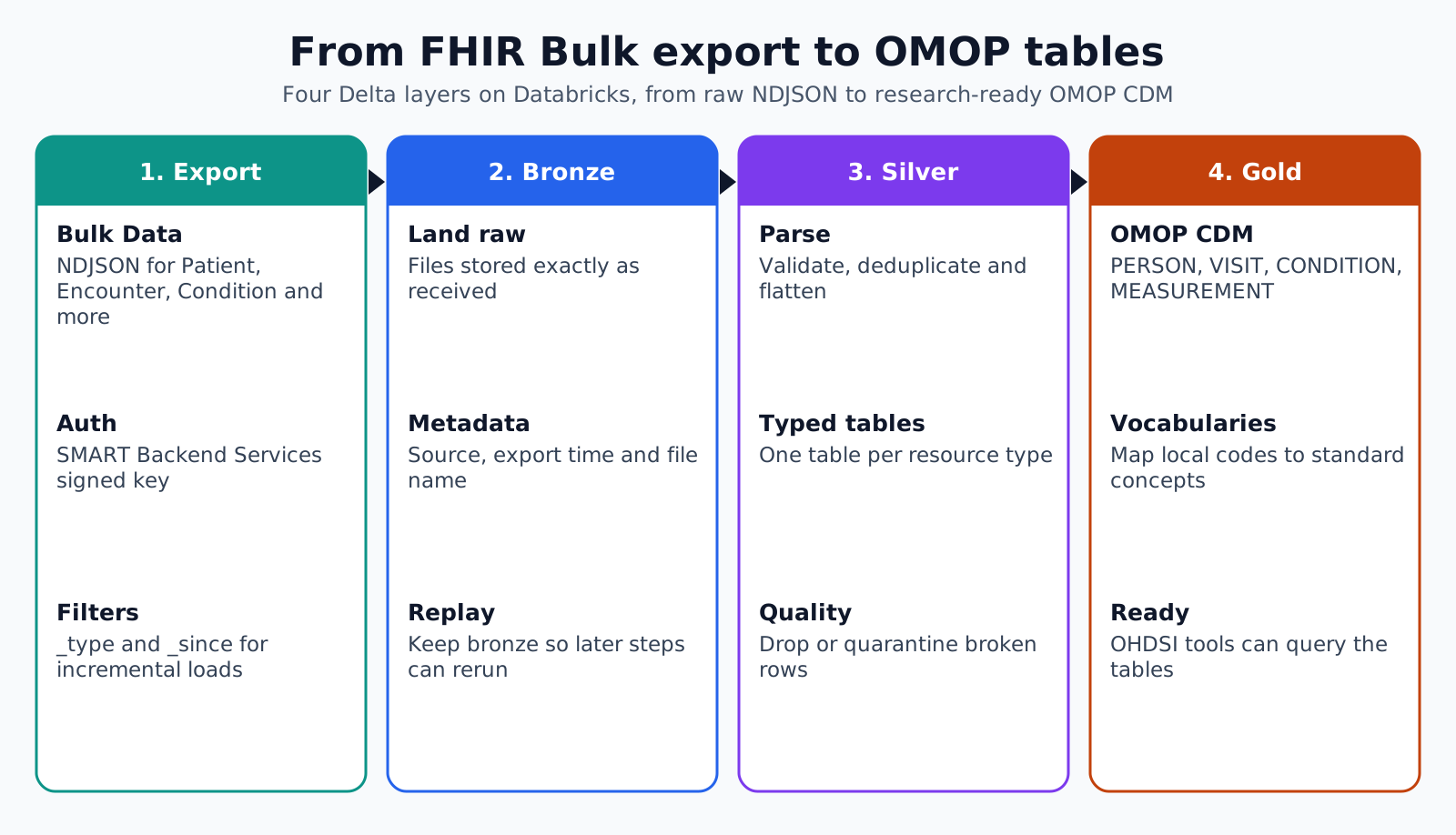
Data flows in four stages: bulk export from the FHIR server, a bronze layer that keeps the raw files, a silver layer of validated and flattened resources, and a gold layer in OMOP CDM form. Each stage is a set of Delta tables, so every step can be rerun and audited.
- 1. Export: A FHIR Bulk Data request produces NDJSON files of resources such as Patient, Encounter, Condition, Observation and MedicationRequest.
- 2. Bronze: Files land as they are, with load metadata such as source, export time and file name.
- 3. Silver: Resources are parsed, validated, deduplicated and flattened into typed tables.
- 4. Gold: Silver tables are mapped to OMOP tables such as PERSON, VISIT_OCCURRENCE, CONDITION_OCCURRENCE, MEASUREMENT and DRUG_EXPOSURE.
Databricks' own guidance on the medallion pattern describes bronze as raw data, silver as validated and cleaned data, and gold as enriched data ready for analytics. It also advises against writing silver tables directly from ingestion, so that source changes or failures do not break downstream tables.
How does FHIR Bulk Data export work?
FHIR Bulk Data export is an asynchronous operation that returns large sets of resources as NDJSON files, one resource per line. The client starts an export, polls a status URL until the job finishes, then downloads the files listed in the completion manifest.
- Export levels: All patients, a defined group of patients, or the whole system.
- Filters: Parameters such as _type limit the resource types, and _since requests only resources changed after a given time.
- Authentication: Bulk clients usually use SMART Backend Services, a server-to-server OAuth flow with a signed key.
- Output: NDJSON files per resource type, which load easily into Spark.
Use _since for incremental loads after the first full export. Keep the export time of each run in a control table, so the next run starts from the right point and a failed run can be repeated.
What belongs in the bronze layer?
The bronze layer should hold the exported resources exactly as received, plus metadata about where and when each one came from. Databricks recommends storing bronze fields as strings, VARIANT or binary rather than parsing them, which protects against schema surprises in the source.
For FHIR, that means one row per resource with the raw JSON, resource type, resource ID, source server, export run and load time. Keeping the raw JSON lets you reprocess everything when a mapping improves, without asking the source system for another export.
How should the silver layer handle FHIR resources?
The silver layer should parse each resource into typed columns, validate required elements, keep only the latest version of each resource and resolve references between resources. This is where FHIR's flexibility is turned into tables that analysts and mappings can rely on.
- Flatten carefully: Arrays such as codings, identifiers and components need their own child tables or exploded rows.
- Keep all codings: A Condition may carry SNOMED CT, ICD-10-CM and local codes together, and the OMOP mapping needs all of them.
- Deduplicate: Use resource ID and lastUpdated to keep the current version.
- Resolve references: Link Observations to Patients and Encounters through their reference fields.
- Quarantine bad records: Send resources that fail validation to an error table rather than dropping them.
How does the HL7 FHIR to OMOP guide help?
The HL7 FHIR to OMOP implementation guide, developed through the Vulcan accelerator and published by HL7's Biomedical Research and Regulation work group, documents how FHIR resources map to OMOP tables. Version 1.0.0 is published as an informative guide, and a 2.0.0 ballot version appears in the continuous build.
Use it as the starting point for your mapping specification rather than inventing your own. It records decisions that every team otherwise has to make, such as which FHIR resource feeds which OMOP domain. Your local data will still need additions, especially for local codes and extensions.
How are vocabularies mapped to OMOP standard concepts?
Vocabularies are mapped by translating every source code to an OMOP concept ID, then following the standard concept relationships to the standard concept used for analysis. The OHDSI Athena service distributes the vocabulary tables that make this possible.
- Load vocabularies: Download the vocabulary bundle from Athena and load it into Delta tables.
- Source concepts: Look up each source code, such as an ICD-10-CM diagnosis, to its source concept ID.
- Standard concepts: Follow the Maps to relationship to the standard concept, often SNOMED CT for conditions.
- Domain routing: The standard concept's domain decides the OMOP table, so a code may land in MEASUREMENT rather than OBSERVATION.
- Unmapped codes: Keep source values and set the concept ID to zero, then review the most frequent unmapped codes.
Local lab codes are usually the largest mapping job. Mapping them to LOINC once, with clinical review, pays off in every study that follows.
How do you prove the OMOP data is good enough?
You prove it with the OHDSI Data Quality Dashboard, which runs more than 3,500 checks against an OMOP database, and with targeted checks against the source. OHDSI expects the Data Quality Dashboard to be run before a site joins network studies.
- Conformance: Values follow the CDM's types, keys and allowed values.
- Completeness: Required fields are populated and expected data is present.
- Plausibility: Values make clinical sense, such as no births after deaths.
- Source reconciliation: Counts of patients, visits and key codes match the source within agreed tolerances.
Run the checks on every refresh, not only at launch. A change in an upstream system can quietly break a mapping months later, and the dashboard is the cheapest way to notice.
How should the pipeline be run and governed?
Run the pipeline as scheduled, versioned jobs with clear ownership, and govern the OMOP tables as identifiable health data unless they have been formally de-identified. A research database built from EHR data carries the same privacy duties as the EHR itself.
- Orchestration: Chain export, bronze, silver, gold and quality checks as one job, and stop publishing if checks fail.
- Versioned code: Keep transformations and mapping tables in source control, with each run recording the code version used.
- Access control: Restrict bronze and silver to the engineering team, and give researchers access only to the gold tables they need.
- De-identification: Where studies do not need identities, publish a de-identified copy with dates shifted and direct identifiers removed.
- Lineage: Record which export and which mapping version produced each OMOP row, so findings can be traced back.
- Retention: Agree how long raw exports are kept, balancing reprocessing needs against risk.
Delta tables help with both reruns and audits, because each write creates a new table version. If a mapping error is found, the team can see which loads were affected, fix the mapping and rebuild from bronze without another request to the source system.
How Agnotic can help
Agnotic Technologies builds FHIR data pipelines. We set up Bulk Data extraction with SMART Backend Services, design bronze, silver and gold layers on Databricks, write mappings based on the HL7 FHIR to OMOP guide, and run OHDSI quality checks on every load.
For research and analytics teams, we also help decide which data to bring in first and how to handle local codes, so the first studies can start sooner.
Plan your FHIR to OMOP pipeline
Explore our FHIR development services, or browse the data engineering hub.
Related reading on Agnotic
Read about clinical data integration, EHR data analytics, healthcare data management, Epic's Caboodle warehouse and FHIR integration.


