


Many digital health products check insurance through a clearinghouse API such as pVerify, then store the answer in whatever shape the API returned. That works until a second clearinghouse arrives, an EHR wants the result, or a payer API starts returning FHIR. At that point the product needs a standard model for coverage and benefits.
This guide shows how to put pVerify results into HL7 FHIR R4. It covers the pVerify call itself, which FHIR resources hold what, how to map benefits without losing meaning, what to store and for how long, and where these integrations usually break. It assumes you already know why eligibility checks matter and focuses on the data model.
What does integrating pVerify with FHIR mean?
Need eligibility data in FHIR?
Agnotic builds FHIR services and SMART apps that turn clearinghouse eligibility responses into standard Coverage and benefit resources.
Integrating pVerify with FHIR means calling pVerify's eligibility API and storing each result as standard HL7 FHIR R4 resources: a Coverage for the policy, a CoverageEligibilityRequest for the question asked and a CoverageEligibilityResponse for the payer's answer. Apps, EHRs and analytics can then read eligibility the same way whichever clearinghouse supplied it.
pVerify does the hard part of reaching payers. FHIR gives the product a vendor-neutral record of what was asked, what came back and when, which is what front desk staff, billing teams and auditors later need.
How does the pVerify API work?
The pVerify API is a REST service that takes a JSON eligibility request and returns a JSON response. Its public documentation says every request needs a bearer token obtained from the /Token endpoint with the client's credentials, and the same token can be reused for subsequent calls until it expires after an hour.
- Authentication: A client-credentials token from /Token, sent as a bearer token, plus a Client-API-Id header on each call.
- Main endpoint: pVerify's Postman collection describes EligibilitySummary as its second-generation endpoint that returns eligibility data as discrete objects, including copays for different service types.
- Request content: Payer code and name, the provider's NPI, the subscriber's name, date of birth and member ID, dates of service and a practice type code.
- Other routes: The collection also lists one-step endpoints without a token and a back-office workflow for payers without electronic eligibility, where results are retrieved later.
Behind the API, payers still answer in the HIPAA standard transaction. Under 45 CFR 162.1202, the adopted standard for eligibility inquiries and responses is the ASC X12 270/271 Technical Report Type 3, version 005010X279. pVerify translates that exchange into JSON, and the FHIR layer translates the JSON into a model the rest of the product understands.
Which FHIR resources hold eligibility data?
Three FHIR R4 resources hold eligibility data, with a few supporting ones. Keeping the question, the answer and the policy separate is the main design choice, because each changes on a different schedule.
- Coverage: The policy itself: payer, subscriber, member ID, relationship to the patient, group and plan identifiers, and the period it is valid.
- CoverageEligibilityRequest: The question: which patient, which coverage, which provider, which dates of service and which purpose.
- CoverageEligibilityResponse: The answer: whether the coverage is in force and the benefit details returned for each category of service.
- Supporting resources: Patient, Organization for the payer and Practitioner or Organization for the provider, identified by NPI.
The FHIR specification says CoverageEligibilityResponse combines a payer's answer on whether a coverage is in force with optional benefit details and whether services need preauthorization. Its purpose element takes the codes auth-requirements, benefits, discovery and validation, and its outcome element takes queued, complete, error or partial.
How does the pVerify to FHIR flow work?
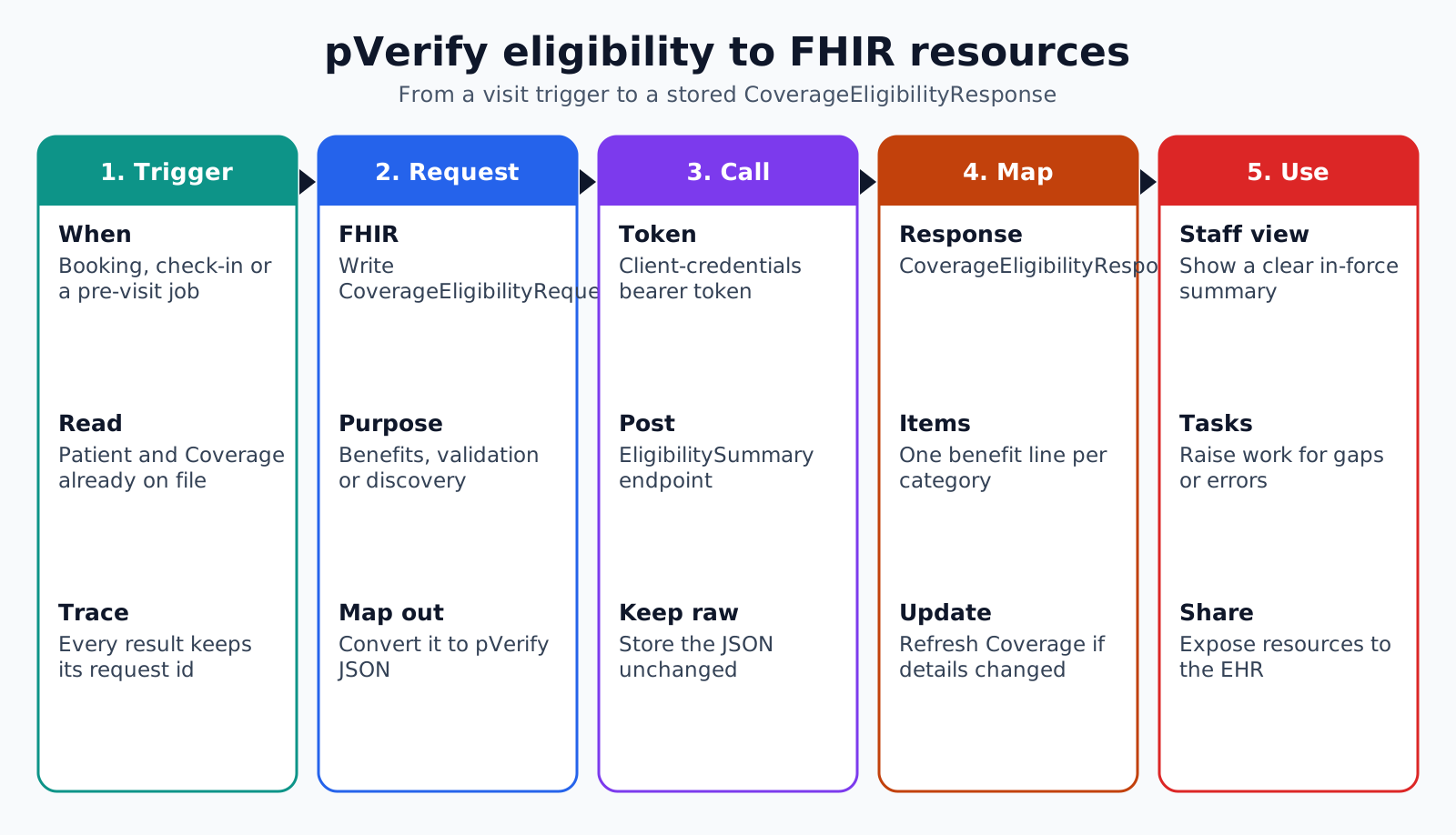
The flow runs from the app's trigger to a stored response in five steps. Each step leaves a record, so any result shown to staff can be traced back to the exact request and the raw response.
- 1. Trigger: An appointment is booked, a patient checks in, or a scheduled job runs before the visit date.
- 2. Build the request: The service reads the Patient and Coverage, writes a CoverageEligibilityRequest with purpose and service dates, and converts it to pVerify's JSON.
- 3. Call pVerify: The service obtains or reuses a token, posts to the eligibility endpoint and stores the raw JSON response unchanged.
- 4. Map the response: A mapper turns the JSON into a CoverageEligibilityResponse that references the request, and updates the Coverage if the payer returned new details.
- 5. Use the result: The app shows a summary to staff, raises a task for any problem, and makes the resources available to the EHR or a SMART app.
Keep the mapper as its own versioned component. pVerify can add fields, payers can change how they report benefits, and a mapping fix should be testable against stored raw responses without calling the API again.
How should benefits be mapped into CoverageEligibilityResponse?
Benefits should be mapped into insurance.item entries, one per service category, each with benefit lines for amounts. The R4 resource gives every item a category or a billing code, but not both, plus network, unit and term fields that carry the qualifiers payers attach to each amount.
- Category: The service type, such as office visit, specialist, lab or chiropractic, coded consistently across payers.
- Network: In network or out of network. A deductible without this qualifier is easy to misread.
- Unit: Individual or family, which changes what a remaining amount means.
- Term: Annual or lifetime, or a plan year that differs from the calendar year.
- Benefit lines: A benefit type, such as copay, coinsurance, deductible or out-of-pocket maximum, with allowed and used values where the payer gives them.
- Authorization flag: authorizationRequired when the payer says a service needs prior approval.
Set insurance.inforce from the plan status, and use outcome to say whether the answer is complete, partial or an error. A response with an active plan but no benefit details for the visit's service type is partial for the front desk's purposes, and the app should say so rather than showing a reassuring green tick.
Payer messages that do not fit a coded field, such as a note that a carve-out vendor manages behavioral health, belong in the item's description or in an extension the team documents. Dropping them loses exactly the detail that causes denials later.
What should be stored, and for how long?
Store the raw pVerify response, the FHIR resources derived from it and the mapping version used, for as long as the organization's billing and audit policies require. Eligibility is a point-in-time answer, so the date it was obtained matters as much as the content.
- Raw response: Kept unchanged and encrypted, for audit and for re-mapping when the mapper improves.
- Derived resources: Versioned, with the CoverageEligibilityResponse created date and a reference to its request.
- Current view: A query that returns the latest response per coverage for the next visit, without deleting the history.
- Access controls: Eligibility data is protected health information when a covered entity or business associate handles it, so apply the same safeguards as clinical data.
How should the mapping be tested?
The mapping should be tested against a library of stored responses from real payers, with the expected FHIR output reviewed by someone from billing. Synthetic examples alone miss the quirks that cause trouble.
- Golden files: For each common payer, keep de-identified sample responses and the FHIR resources they should produce, and run them on every mapper change.
- Validation: Check each output against the FHIR R4 specification and any profile the team adopts, so required elements and code systems are always present.
- Edge cases: Include inactive plans, multiple coverages, dependents, Medicare Advantage plans and responses with no benefit details.
- Human review: Ask a billing lead to read the summary screen for a handful of real responses and confirm it says what the payer meant.
Monitor in production as well. A sudden rise in partial outcomes or unmapped benefit categories for one payer usually means that payer changed its reporting, and the team should hear about it before the front desk does.
Where do pVerify to FHIR integrations break?
These integrations break where the clearinghouse response, the payer's habits and the FHIR model disagree about meaning. The failure points below come up repeatedly.
- Lost qualifiers: Deductibles are mapped without network or unit, and staff quote the wrong amount to patients.
- Token handling: Every call requests a new token, or an expired token fails silently, and checks stop running overnight.
- Silent partials: Back-office or delayed responses are treated as complete, so the app shows stale or empty benefits.
- Coverage overwrite: A response with a typo in the member ID overwrites a good Coverage record instead of raising a task.
- Payer name drift: Payer identifiers differ between pVerify, the practice management system and the EHR, so matches fail.
- No raw copy: Without the original JSON, nobody can prove what the payer said on the day of service.
Test with real response shapes from the payers the practice sees most. A mapping that is correct for one national payer can be wrong for a regional plan that reports copays under a different service category.
How do apps and EHRs use the FHIR result?
Apps and EHRs use the FHIR result by reading the latest CoverageEligibilityResponse for the patient's coverage and showing the parts each user needs. Because the resources are standard, the same data can drive a front desk screen, a patient estimate and a SMART app inside the EHR.
- Front desk: Plan active or not, copay for today's visit type, and any task raised by the check.
- Patient app: A plain explanation of what the visit may cost, with clear wording that the estimate depends on the payer's final decision.
- Billing: Coverage details and the response date attached to the encounter, ready for claim preparation.
- Reporting: Counts of inactive coverage found before visits and of partial responses by payer.
How Agnotic can help
Agnotic Technologies builds eligibility integrations for digital health companies and provider groups. We connect clearinghouse APIs such as pVerify, write and test the mapping into FHIR Coverage and CoverageEligibilityResponse resources, and keep raw responses and mapping versions so every result can be traced.
Agnotic also builds the screens and SMART on FHIR apps that put the results in front of staff and patients, and the reporting that shows where eligibility problems are being caught.
Put eligibility data on a standard model
Start with FHIR and SMART on FHIR development, or browse the revenue cycle hub.
Related reading on Agnotic
More on eligibility verification, the revenue cycle, FHIR integration and mapping HL7 v2 to FHIR.


