



Mirth Connect is a common choice for connecting a product or a smaller system to a hospital running Oracle Health (Cerner) Millennium. The engine handles the messages well. What makes these projects slow is everything around the channel: each hospital's own build and codes, network setup with the site's interface team, and deciding when to use HL7 v2 feeds and when to call the FHIR APIs.
This post covers the channels a typical Oracle Health integration needs, how the systems connect, what differs from site to site, when Mirth should call the FHIR APIs, how to test against a hospital's non-production domain and why these integrations fail.
What is Mirth Connect and Cerner integration?
Connecting your system to a hospital on Oracle Health?
Our Mirth Connect integration page covers the channels, hosting and support we provide.
Mirth Connect and Cerner integration means using Mirth Connect channels to exchange data with a hospital's Oracle Health (Cerner) Millennium system: receiving HL7 v2 feeds such as admissions and results, sending orders or documents back, and calling Millennium FHIR APIs where they fit. Agnotic Technologies builds and supports these channels.
Oracle completed its acquisition of Cerner in June 2022.
Hospitals and vendors still use both names, so documents and contracts often mention Cerner and Oracle Health side by side.
Which interfaces does an Oracle Health project need?
Most projects need a small set of HL7 v2 feeds chosen by workflow. Agree the list with the hospital early, because each feed is a separate build on the hospital's side.
- ADT: admissions, transfers, discharges and patient updates, usually the first feed.
- Orders: orders from Millennium to your system, or from your system into Millennium.
- Results: lab or device results sent back to the chart.
- Documents: notes or reports filed to the chart.
- Scheduling or charges: appointment updates or billing data where the workflow needs them.
How do Mirth and Oracle Health connect?
The hospital's own interface layer sends and receives HL7 v2 messages over a secure network link, and Mirth sits between that layer and your application, with one channel per feed and direction.
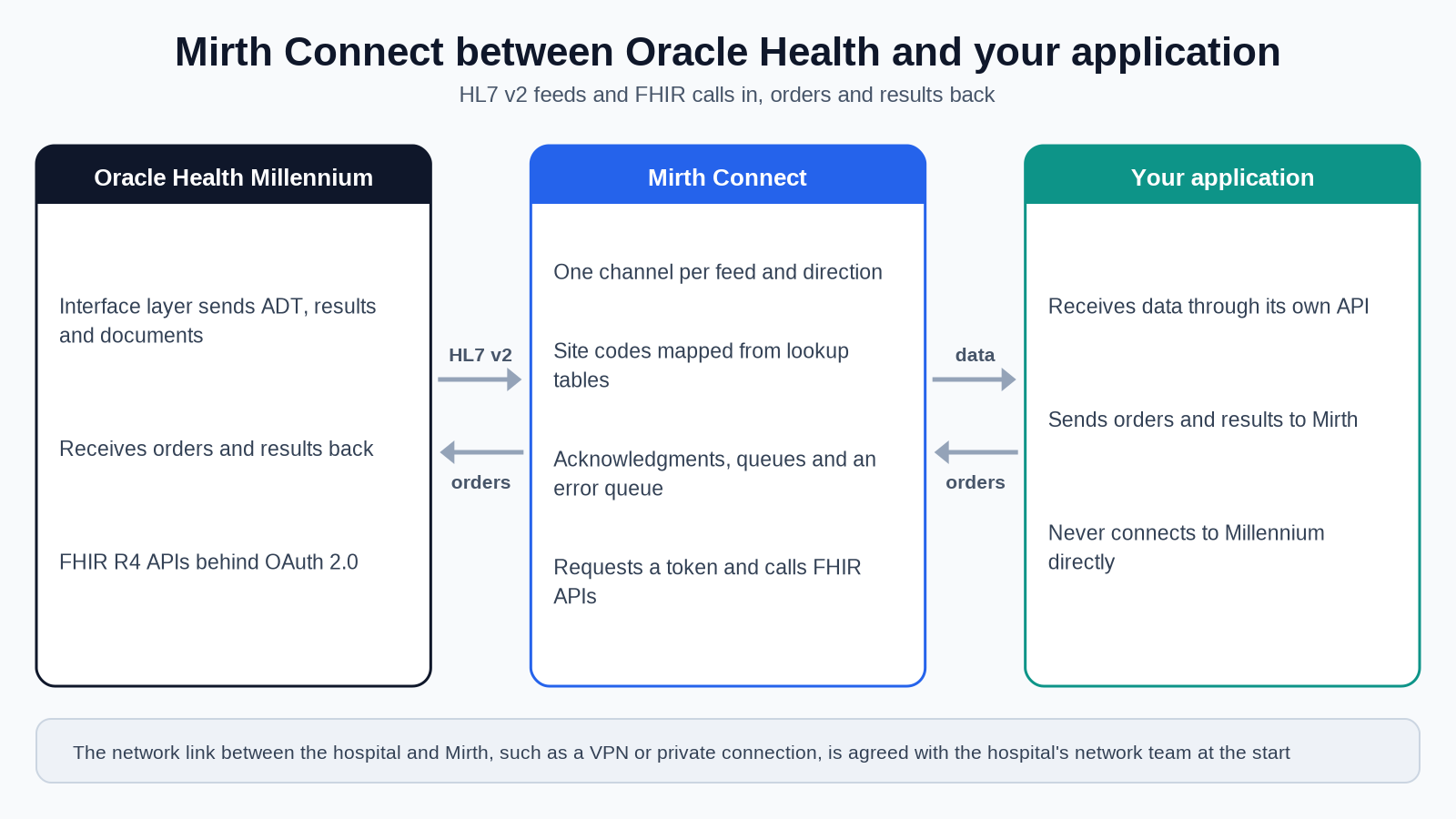
Plan the network link with the hospital's interface and network teams at the start: VPN or private connection, ports, certificates and who monitors the link. This is often the longest lead item.
What differs from one Oracle Health site to another?
Each hospital configures Millennium for itself, so the same message type can carry different codes, identifiers and optional fields at each site. A channel built for one hospital rarely works unchanged at the next.
- Codes: local codes for locations, order types and result types, which need mapping.
- Identifiers: which medical record, encounter and account numbers are sent, and in which fields.
- Events: which trigger events the site sends, and which it leaves out.
- Content: optional segments and notes some sites populate and others do not.
Ask each site for its interface specification and real sample messages, and keep site-specific mappings in configuration, not in channel code.
When should Mirth call the FHIR APIs?
Call the FHIR APIs when your workflow needs current data on demand, such as a patient's active medications when a screen opens, and keep HL7 v2 feeds for events the hospital pushes as they happen.
Oracle Health documents its Millennium Platform FHIR R4 (4.0.1) APIs with an OAuth 2.0 secured endpoint that supports SMART applications, and each resource interaction states whether patient, provider or system authentication is accepted.
A Mirth channel can request the token, call the API and pass results to your application, but token handling, scopes and rate limits need the same care as any other FHIR client. Confirm which resources and write operations the site has enabled.
Mapping codes between Millennium and your product
Map each site's local codes to your product's codes in lookup tables the channel reads, with an owner and a review when the hospital adds a code. An unmapped code should send the message to an error queue, never pass through blank.
Keep the original code and display text with the mapped value, so a disputed result can always be traced to what the hospital sent.
Acknowledgments and resends with the site
Agree with the hospital's interface team how acknowledgments work in each direction, what counts as an error, and how messages are resent after an outage. Mirth's message store and queues handle your side; the hospital controls resends from Millennium.
Write down the resend procedure before go-live, with contacts on both sides, so an outage at night does not wait for someone to find the right person.
How do you test channels against an Oracle Health site?
Test against the hospital's non-production Millennium domain with messages that reflect the site's real build, then run in parallel with live traffic before cutover.
- Sample messages: real, de-identified messages from the site for every feed and event.
- Code coverage: every local code the site sends, checked against the lookup tables.
- Errors: malformed messages, unknown codes and duplicates sent on purpose.
- Parallel run: live messages processed without action, then compared with expected results.
- Outage: the link dropped and restored, with queued messages delivered in order.
Go-live and cutover
Plan go-live with the hospital as a joint event: a date, a contact list, a cutover checklist and a rollback step. Turn feeds on one at a time, starting with ADT, and watch queues and errors closely for the first days.
Keep both teams on a shared channel for the first weeks, and review every error together until the error rate settles. Small mapping fixes found in this period are normal and should be released through the same change process as the original build.
Where should Mirth run?
Mirth can run in the vendor's cloud, connected to the hospital over the agreed link, or inside the hospital's own data center when the hospital prefers to keep the engine on its network. The choice changes who patches the server, who holds the logs and how the security review treats it.
Whichever is chosen, document upgrades, backups of channel configuration and the message store, and who is called when the engine stops.
Why do Mirth and Cerner integrations fail?
Most Mirth integration failures come from site differences and operations rather than the engine. These patterns recur.
- One-site channels: mappings hard-coded for the first hospital and broken at the second.
- Unmapped codes: new local codes passed through blank instead of stopped.
- Network delays: VPN and firewall work started late.
- No resend plan: messages lost during an outage with nobody to replay them.
- Unwatched queues: errors building up for days without an alert.
A worked example: a remote monitoring vendor's second hospital
A remote monitoring vendor had a Mirth channel receiving ADT from its first Oracle Health customer and sending device results back. At the second hospital, results were rejected because the site used different result codes and sent the encounter number in another field.
The team moved site settings into lookup tables and a per-site configuration file, added an error queue for unmapped codes, and built a test set from each site's sample messages. The third hospital needed configuration and testing, not new channel code.
Who owns what?
These integrations cross two organizations, so ownership must be written down for both sides.
- Hospital interface team: Millennium build, outbound feeds and resends from their side.
- Hospital network team: VPN or private connection and firewall rules.
- Vendor integration team: Mirth channels, mappings, queues and monitoring.
- Clinical owners on both sides: which data is exchanged and how it appears in each workflow.
How do you monitor the channels?
Monitor each channel for volume, errors and delay, with alerts that reach a person who can act.
- Messages received and sent per channel, compared with normal levels.
- Messages in error, by cause, such as unmapped codes or rejected acknowledgments.
- Time from message received to delivered.
- Link status and time since the last message on each feed.
What are Mirth Connect and Cerner integration best practices?
Agree the feed list and network setup with the hospital early, ask for each site's specification and real samples, keep site differences in configuration and stop any message with an unmapped code.
Use FHIR APIs for on-demand data and HL7 v2 feeds for pushed events, test on the site's non-production domain with a parallel run, write down resend procedures and monitor every channel for silence as well as errors.
How Agnotic can help
Agnotic builds Mirth Connect channels for Oracle Health sites: feed design with hospital interface teams, site configuration and code mapping, FHIR API calls with token handling, test sets from real samples, parallel runs and monitoring after go-live.
Connect to Oracle Health with Agnotic
Our Oracle Health (Cerner) integration page covers the HL7 v2 and FHIR connections we build.
Related reading on Agnotic
Mirth, HL7 v2 and Oracle Health.


